oval media
Members
-
Joined
-
Last visited
-
Hi T_matz, It is really strange. I have one of these Intel X540-AT2 (rev 01). It is working fine, I really like about this card is that it has two controller. But I'm not getting more than 235mbps, do anyone have a suggestion to get beet better performance out of this config? my expatiation around 900 to 1000mbps. This is my test server config Intel® Xeon® CPU E5-4650 0 @ 2.70GH, DDR 32GB ECC, Intel X540-AT2 (rev 01) 10G, Seagate ST12000NM002G 12 TB SAS x12, Parity 2x12TB, Cache 2x1TB SSD.

-
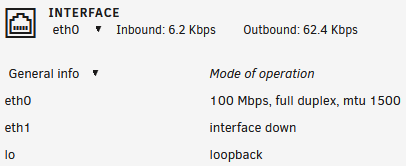
I'm facing similar problem, im gating 100Mbps. i hope to find solution for this issue? M/B: ASRockRack X399D8A-2T CPU: AMD Ryzen Threadripper 2920X 12-Core @ 3500 MHz Cache: 1152 KiB, 6 MB, 32 MB Memory: 64 GiB DDR4 Multi-bit ECC Network: eth0: 100 Mbps, full duplex, mtu 1500 (2x 10GbE Intel X550-AT2 NIC) Kernel: Linux 5.10.28-Unraid x86_64