PCRx
Members
-
Joined
-
Last visited
-
My server normally runs headless but I now have a need to access it via the servers GUI. Is there a command to startup the GUI from the server CLI or do I need to reboot (prefer not too)?
-
You were correct, I did misinterpret that. However I'm not sure doing that would even work. When the docker starts nothing appears in the log file. I'd expect to see some progress listed in the log file during startup despite not being able to access it remotely. Unfortunately, for numerous reasons, it's not a simple procedure for me to start the server in GUI mode to find out. I'll have to give up on it for now and maybe revisit it later. Thanks.
-
I'm having the same issue as joeshmoe1. Installed Olbat's container. It started but there is no WebUI. The log is blank as well. Entering the Console shows the files are indeed there but it seems to have not fully started the server. The appdata/cups folder is also empty. Tried with gfjardim settings and a fresh clean install using your settings. It just doesn't want to startup for some reason.
-
Changed my email server password recently. New password includes whitespaces. After changing the SMTP settings at Settings/Notifications to use the new password it reports that "authentication failed" when clicking the test button. Changing password back to one without whitespaces makes it work again.
-
I've not had any issues with it.
-
I just updated from within unRaid like any normal update. It's set to get the Lastest. Now mines at Version 1.7.2.3878 The PMS settings menu for me says 'DVR (Beta)'. Their video online just shows it as DVR. I did run the beta version last fall so figured it might be a leftover config setting causing that. I went ahead and setup HDHR Connect which went smoothly. After setup there was no outward sign of anything to do with Live TV with Plex Web. When using my iPhone it did play Live TV from the Program Guide menu.
-
Your Plex client app, once signed in, should connect to Plex.tv to find out where your Plex Media Server is located. It then connects to that IP address, which is typically your routers WAN IP. Make sure your router port forwarding is allowing the Plex connections through. On my router I've set forwarding on port 32400 to connect to the IP of my unRaid server which is running the Plex Media Server Docker.
-
He's got it set as Host in previous picture. I'd completely remove Plex as well as it's container. Then from a command line run: docker rmi $(docker images -q --filter "dangling=true") Then reinstall the container. Wait a bit for the container to load. You can watch using the log by clicking the piece of paper looking icon to the far right of the plex container.
-
It looks like your Host paths are not correct. SAB is putting the finished download in "/mnt/cache/downloads/complete/" but Sonarr is looking for it in "/mnt/cache/appdata/Download" Change the Sonarr path to the same you used in SAB so they both share the same mapped volume location. I don't use SAB myself, however, I don't think you'll need that "/mnt" volume mapped for any reason.
-
Just restarted PMS to update to latest version. Watching the log file as it started I saw this AccessDenied error. Is it safe to ignore? Starting Plex Media Server. Starting dbus-daemon Starting Avahi daemon 6 3000 /config/Library/Application Support unlimited Dec 24 08:53:16 unRAID syslog-ng[123]: syslog-ng starting up; version='3.5.3' Dec 24 08:53:16 unRAID dbus[125]: [system] org.freedesktop.DBus.Error.AccessDenied: Failed to set fd limit to 65536: Operation not permitted Starting Avahi daemon
-
+1 this would be great!
-
I grew tired of this and several other random issues so I nuked my entire install and rebuilt everything from scratch on a new flash drive. Just finished doing a download test and it works as expected now. Configuration was exactly the same so must have been an issue with the old setup I had. Thanks for your efforts.
-
cache is set to never spin down. All other drives spindown after 15 mins. Under Disk Settings > Enable spinup groups is set to No and was never enabled at any time. Using any post-processing scripts or anything in Sonarr or any other container? Nothing. NZBGet downloads the file, unpacks it to the cache drive, Sonarr or CP will find it there and rename it and copy to to it's final location. The final location is also on the cache drive just a different directory. I'm in the process of shutting down my entire array and rebooting. Hopefully that will clean out any ghosts in the machine. I'll let you know.
-
cache is set to never spin down. All other drives spindown after 15 mins. Under Disk Settings > Enable spinup groups is set to No and was never enabled at any time.
-
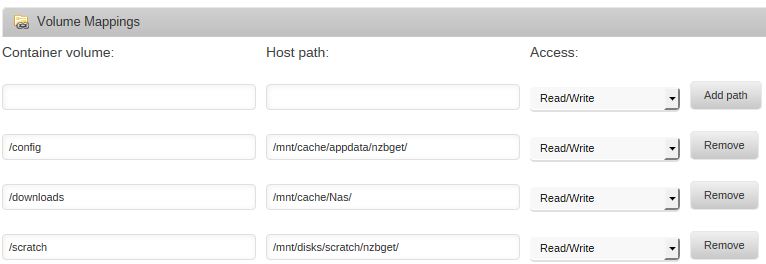
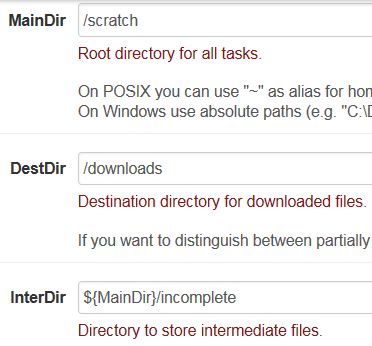
I've not noticed this behaviour. Post a screenshot of your NZBGet settings, sometimes a second pair of eyes can help... The way it's setup is that NZBGet will download to an externally mounted SSD (/scratch). The files will then be unpacked from the /scratch/incomplete folder to my cache drive where Sonarr or CP will process them. None of these dockers are mapped to the actual array in any way, only the /scratch and /cache drives. It's a mystery as to why my array spins up, and oddly, not the XFS drive.