juleztb
Members
-
Joined
-
Last visited
Everything posted by juleztb
-
Hi! I'm having the problem that after a recent update paperless doesn't load anymore. It worked perfectly fine just recently. I'm also able to login and use my Paperless Instance via an the iOS App "Swift Paperless" (Curently in Testflight). But the webUI just doesn't open anymore. It just says: I already tried restarting the container. No result. Couldn't find anything in the (linked) documentation, too. Can anyone help me? thanks in advance! EDIT: just tried and I can login with my admin account. It's just my personal account that is stuck on the loading page. I also tried clearing my browser cache and logging in in an incogito window. EDIT2: It works again, after granting my personal user all rights via the admin user. I didn't need to do this in the past. The rights I added were: AppConfig UISettings History MailAccount MailRule User That doesn't seem to make any sense, to me. Ay ideas?

-
Hi! Anyone else experiencing the problem that nextcloud stays in maintenance mode after an automatic update? I use it mine mainly as a central hub for backups from phone and PC. But sometimes I recognize after several days, that my backups didn't run and that my secondary backups to a cloud drive haven't seen any changes in days. It's only then I see, that nextcloud stayed in maintenance mode again. As this destroys my backup strategy it's quite annoying. Someone got an idea how to stop that from happening? Afaik since a few versions ago, updates are automatically run when unraid recognizes a new version and the container get's restarted. Before that it was a manual process and therefore no problem. But now... Thanks in advance!
-
Literally just 2 posts above people were talkin about that issue and their solution. Worked for me, too.
-
That's very much what I tried in the crontab on the host, I postet in the code block. Tried your statement (only difference being the -t parameter) and the result was the same: php not being found feels like my main problem. Any ideas on that? Thanks in advance!

-
Hi! Hat noch jemand das Problem, dass raspberrymatic immer reported, dass keine Internetverbindung besteht? An sich läuft mein Container und er findet auch den Telekom Stick. Allerdings ist die Internetverbindung alleine schon dafür wichtig, dass ich die ganzen Devices ordentlich von meiner Access Point Installation umziehen kann. Wenigstens scheint es zu funktionieren, denn irgendwie habe ich mal meinen einen Wassersensor reinbekommen. Allerdings findet mein Homeassistant leider auch widerum Raspberrymatic nicht, obwohl die IP stimmt. Ich vermute, dass das eben an der Aussenkommunikation liegt (die sich im Container dann durch das fehlende Internet zeigt). Hat da jemand eine Idee?

-
Hello there, I'm having problems with my docker container recently. It says that my crontabs aren't running. The background job settings are configured, as suggested (cron), yet my security overview states that the crontabs haven't run in over 5 hours. That's when I applied the latest update to my installation. Yet even before the update, it was said that the crontabs hadn't run in days. I already tried manually creating the cron for /config/www/nextcloud/cron.php from both within the container via */5 * * * * php -f /config/www/nextcloud/cron.php and on my main machine via */5 * * * * docker exec -i nextcloud sudo -u abc php -f /config/www/nextcloud/cron.php neither of that did work. I also couldn't run the cron.php completely manually via docker exec -it php -f /config/www/nextcloud/cron.php as the shell reported that "php" couldn't be found because there was no $PATH variable set. Can anyone help meh fixing that? I have another problem with my nextcloud docker: In the default Photos App, there are neither thumbnails nor can I open any photos from my iPhone, that are saved as *.heic. I fround some tips online that one should try to reinstall ImageMagic. But my tries here failed because of php not being available, too. Has anyone got HEIC Pictures going with linuxserver.io's nextcloud docker container? Thanks everyone in advance!
-
Thank you @JonathanM and @trurl. That totally fixed it!
-
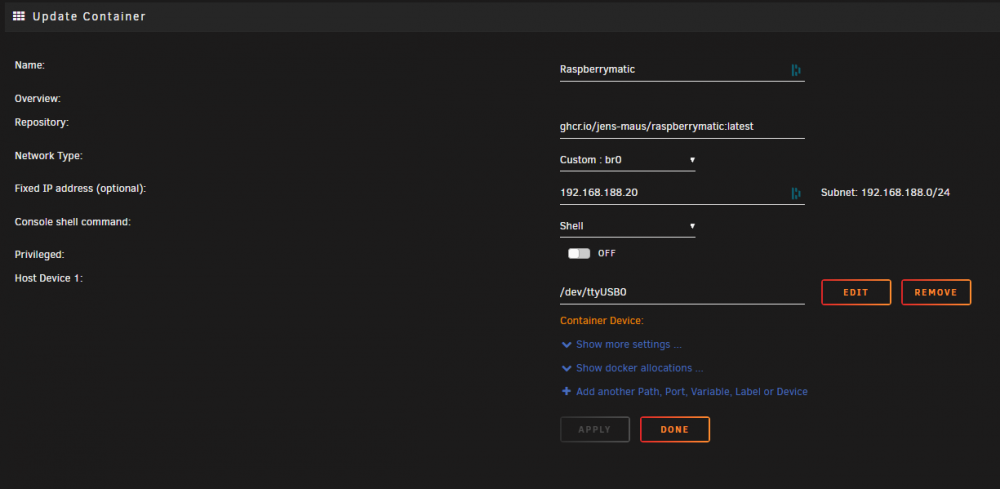
Hi! I installed the Docker as @fluppiduppi wrote. Everything worked fine and I added one of my water alarm sensors, which also worked fine. Even added it in Homeassistant, running in a VM on Unraid. Then just moments ago I ran an update of the raspberrymatic docker container and it seems like all my settings were wiped. When I tried to log into my raspberrymatic the complete setup process started from zero and everything was gone. At this point I'm quite happy I didn't add all the rest of my Homematic IP devices yet. That would have been a desaster. Yet I don't know how to fix this. I haven't had this problem with any of my other docker containers. All of them always kept their settings when restarting or updating them. Can anyone help me out? This was my configuration: Thanks a lot in advance! PS.: Answering in german is perfectly fine, too - didn't know if there's a convetion in place here. - Antwort auf Deutsch passt auch wunderbar - wusste nicht, ob es hier im Forum eine Konvention gibt.