





ELP1
Members
-
Joined
-
Last visited
-
Hello, I would have question related to performance in Steam Big picture mode. I installed Moonlight client on my Apple TV an also macOS and on both machine when I choose "Steam" button instead of "Desktop" button performance is so poor, that it is not usable at all. Is it normal behavior or there is way how to improve it? Is it related to container or it is some Steam bug thing? Thank you for any feedback!
-
Hello, please what is correct way how to define path in e.g. Read/Write Files from Disk node? I copied bunch of .pdf files into the appdata/n8n/folder and I put them into the node path in this way: /data/folder/*.pdf . But it does not work. Am I doing something wrong? Thank you!
-
Hello, thanks for a feedback. I can confirm that option "right / bottom" solved it.
-
Hello, I am trying to configure and visualize Array as 1 column and 6 rows. I need to assign it from the bottom. But if I choose in Tray assigment count direction option "left / bottom" and then I want to assign trays I see only 2 trays available. With option "left / top" I see all 6 trays. I guess it is some small bug ?
-
Hello, is your GPU working fine also under Unraid (Docker Containers) and also as VM Passthrough? Could you please write me which lines you had to add to VM .xml file? I am thinking also about buying 5070 or 5070 Ti but I read that users experience issues in comparison to previous GPU generations.
-
Hello, is 5090 already working under Unraid? I am thinking about buying one, but I need it working for Docker and also for VM (Passthrough). Thanks.
-
Ok, so I will rather keep it as it is. Thank you.
-
Hello, please do you know if there is a way, how to update Sunshine inside Steamheadless?
-
Hello, can somebody help me how to update frontend for ComfyUI Docker? I went through docs, but I am not wiser. I am getting this message. Thanks.
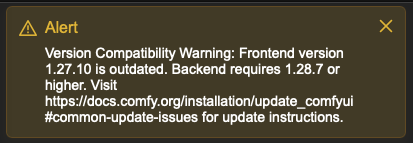
-
Hello, I have just noticed that in Unraid 7.2.0 RC1 in main dashboard name for pools is starting with "lowercase" but for array it starts with "uppercase". It is not so big issue but would be nice to have it unified. Please see attached screenshot.
-
Hello, I experience quite strange issues with container in a way that sometimes I am able to connect via Moonlight sometimes not. I guess it has something to do with Sunshine or GPU (Nvidia 4060Ti). In attached logs there are some items which probably indicate the error, however I do not know what does it mean. Also sometimes I am able to connect via VNC sometimes not. If yes, mostly it is frozen and I see only desktop. Also I guess the issue will be on container side, because I have also some other containers running which are using GPU and they are all working flawlessly. Have you experienced something like this? Do you know what could I test? Thanks! Kernel.txt Steam_Headless.txt
-
Hi, I did clean installation of Unraid and it started to work.
-
I have just checked it again and now it looks that it keeps P8 state. I think that I already found the reason why it was happening. Before I used HDMI dummy and I had no behavior like this. But yesterday I connected my GPU directly to TV via HDMI cable. When the TV is turned ON the GPU state is bouncing like I mentioned despite no activity (no VM running), once TV is off it keeps P8 state. And today I did NVIDIA plugin update so I thought that it is related to update, but apparently not.
-
Thank you, but I read your older comment here: , that it should not be used if it is used also with VM. Is it not true anymore? I do not want any crash of the server :-). And this script is not needed anymore in general because it is handled by Unraid itself?
-
Hello, I updated plugin, I restarted my server but I think that I see some strange behavior. In GPU statistics my GPU power states are jumping like crazy from P8 to P5 to P0. GPU is doing nothing... no VM, no Docker just idling. I am using also script from SpaceInvader to optimize power. Do you have an idea what it could be?

