baboolian
Members
-
Joined
-
Last visited
-
I'm back Got another crash just now. Grep'd the syslog for corruptions, but only saw the old ones from before my last post. Similar logs from docker as before. I've noticed these repetitive logs significantly increase in frequency when I am downloading data via a docker container, and I kicked off a large series of downloads shortly before this crash. The following are repeated many, many, many times: Oct 10 13:19:40 Unraid kernel: docker0: port 19(veth03f4177) entered disabled state Oct 10 13:19:40 Unraid kernel: veth4f08576: renamed from eth0 Oct 10 13:19:40 Unraid kernel: docker0: port 19(veth03f4177) entered disabled state Oct 10 13:19:40 Unraid kernel: device veth03f4177 left promiscuous mode Oct 10 13:19:40 Unraid kernel: docker0: port 19(veth03f4177) entered disabled state Oct 10 13:20:41 Unraid kernel: docker0: port 19(veth443690a) entered blocking state Oct 10 13:20:41 Unraid kernel: docker0: port 19(veth443690a) entered disabled state Oct 10 13:20:41 Unraid kernel: device veth443690a entered promiscuous mode Oct 10 13:20:44 Unraid kernel: eth0: renamed from veth9b5dc70 Oct 10 13:20:44 Unraid kernel: IPv6: ADDRCONF(NETDEV_CHANGE): veth443690a: link becomes ready Oct 10 13:20:44 Unraid kernel: docker0: port 19(veth443690a) entered blocking state Oct 10 13:20:44 Unraid kernel: docker0: port 19(veth443690a) entered forwarding state Oct 10 13:20:44 Unraid kernel: docker0: port 19(veth443690a) entered disabled state Oct 10 13:20:44 Unraid kernel: veth9b5dc70: renamed from eth0 Oct 10 13:20:44 Unraid kernel: docker0: port 19(veth443690a) entered disabled state Oct 10 13:20:44 Unraid kernel: device veth443690a left promiscuous mode Oct 10 13:20:44 Unraid kernel: docker0: port 19(veth443690a) entered disabled state Oct 10 13:21:44 Unraid kernel: docker0: port 19(veth9bb2bb4) entered blocking state Oct 10 13:21:44 Unraid kernel: docker0: port 19(veth9bb2bb4) entered disabled state Oct 10 13:21:44 Unraid kernel: device veth9bb2bb4 entered promiscuous mode Oct 10 13:21:44 Unraid kernel: eth0: renamed from veth934a655 Oct 10 13:21:44 Unraid kernel: IPv6: ADDRCONF(NETDEV_CHANGE): veth9bb2bb4: link becomes ready Oct 10 13:21:44 Unraid kernel: docker0: port 19(veth9bb2bb4) entered blocking state Oct 10 13:21:44 Unraid kernel: docker0: port 19(veth9bb2bb4) entered forwarding state Oct 10 13:21:44 Unraid kernel: docker0: port 19(veth9bb2bb4) entered disabled state Oct 10 13:21:44 Unraid kernel: veth934a655: renamed from eth0 Oct 10 13:21:44 Unraid kernel: docker0: port 19(veth9bb2bb4) entered disabled state Oct 10 13:21:44 Unraid kernel: device veth9bb2bb4 left promiscuous mode Oct 10 13:21:44 Unraid kernel: docker0: port 19(veth9bb2bb4) entered disabled state Oct 10 13:22:44 Unraid kernel: docker0: port 19(veth26ae910) entered blocking state Oct 10 13:22:44 Unraid kernel: docker0: port 19(veth26ae910) entered disabled state Oct 10 13:22:44 Unraid kernel: device veth26ae910 entered promiscuous mode Oct 10 13:22:45 Unraid kernel: eth0: renamed from veth5bb72fd Oct 10 13:22:45 Unraid kernel: IPv6: ADDRCONF(NETDEV_CHANGE): veth26ae910: link becomes ready Oct 10 13:22:45 Unraid kernel: docker0: port 19(veth26ae910) entered blocking state Oct 10 13:22:45 Unraid kernel: docker0: port 19(veth26ae910) entered forwarding state Oct 10 13:22:45 Unraid kernel: docker0: port 19(veth26ae910) entered disabled state Oct 10 13:22:45 Unraid kernel: veth5bb72fd: renamed from eth0 Oct 10 13:22:45 Unraid kernel: docker0: port 19(veth26ae910) entered disabled state Oct 10 13:22:45 Unraid kernel: device veth26ae910 left promiscuous mode Oct 10 13:22:45 Unraid kernel: docker0: port 19(veth26ae910) entered disabled state Oct 10 13:23:45 Unraid kernel: docker0: port 19(veth630b3c9) entered blocking state Oct 10 13:23:45 Unraid kernel: docker0: port 19(veth630b3c9) entered disabled state Oct 10 13:23:45 Unraid kernel: device veth630b3c9 entered promiscuous mode Oct 10 13:23:45 Unraid kernel: eth0: renamed from veth4f7d494 Oct 10 13:23:45 Unraid kernel: IPv6: ADDRCONF(NETDEV_CHANGE): veth630b3c9: link becomes ready Oct 10 13:23:45 Unraid kernel: docker0: port 19(veth630b3c9) entered blocking state Oct 10 13:23:45 Unraid kernel: docker0: port 19(veth630b3c9) entered forwarding state Oct 10 13:23:46 Unraid kernel: docker0: port 19(veth630b3c9) entered disabled state Oct 10 13:23:46 Unraid kernel: veth4f7d494: renamed from eth0 Oct 10 13:23:46 Unraid kernel: docker0: port 19(veth630b3c9) entered disabled state Oct 10 13:23:46 Unraid kernel: device veth630b3c9 left promiscuous mode Oct 10 13:23:46 Unraid kernel: docker0: port 19(veth630b3c9) entered disabled state Oct 10 13:24:46 Unraid kernel: docker0: port 19(veth87a97e4) entered blocking state Oct 10 13:24:46 Unraid kernel: docker0: port 19(veth87a97e4) entered disabled state Oct 10 13:24:46 Unraid kernel: device veth87a97e4 entered promiscuous mode Oct 10 13:24:46 Unraid kernel: eth0: renamed from veth2c87665 Oct 10 13:24:46 Unraid kernel: IPv6: ADDRCONF(NETDEV_CHANGE): veth87a97e4: link becomes ready Oct 10 13:24:46 Unraid kernel: docker0: port 19(veth87a97e4) entered blocking state Oct 10 13:24:46 Unraid kernel: docker0: port 19(veth87a97e4) entered forwarding state Oct 10 13:24:46 Unraid kernel: docker0: port 19(veth87a97e4) entered disabled state Oct 10 13:24:46 Unraid kernel: veth2c87665: renamed from eth0 Oct 10 13:24:46 Unraid kernel: docker0: port 19(veth87a97e4) entered disabled state Oct 10 13:24:46 Unraid kernel: device veth87a97e4 left promiscuous mode Oct 10 13:24:46 Unraid kernel: docker0: port 19(veth87a97e4) entered disabled state Oct 10 13:25:46 Unraid kernel: docker0: port 19(veth82b9037) entered blocking state Oct 10 13:25:46 Unraid kernel: docker0: port 19(veth82b9037) entered disabled state Oct 10 13:25:46 Unraid kernel: device veth82b9037 entered promiscuous mode Oct 10 13:25:46 Unraid kernel: eth0: renamed from veth4629c81 Oct 10 13:25:46 Unraid kernel: IPv6: ADDRCONF(NETDEV_CHANGE): veth82b9037: link becomes ready Oct 10 13:25:46 Unraid kernel: docker0: port 19(veth82b9037) entered blocking state Oct 10 13:25:46 Unraid kernel: docker0: port 19(veth82b9037) entered forwarding state Oct 10 13:25:46 Unraid kernel: docker0: port 19(veth82b9037) entered disabled state Oct 10 13:25:46 Unraid kernel: veth4629c81: renamed from eth0 Oct 10 13:25:46 Unraid kernel: docker0: port 19(veth82b9037) entered disabled state Oct 10 13:25:46 Unraid kernel: device veth82b9037 left promiscuous mode Oct 10 13:25:46 Unraid kernel: docker0: port 19(veth82b9037) entered disabled state Oct 10 13:26:46 Unraid kernel: docker0: port 19(veth2253b30) entered blocking state Oct 10 13:26:46 Unraid kernel: docker0: port 19(veth2253b30) entered disabled state Oct 10 13:26:46 Unraid kernel: device veth2253b30 entered promiscuous mode Oct 10 13:26:47 Unraid kernel: eth0: renamed from vethf99b22f Oct 10 13:26:47 Unraid kernel: IPv6: ADDRCONF(NETDEV_CHANGE): veth2253b30: link becomes ready Oct 10 13:26:47 Unraid kernel: docker0: port 19(veth2253b30) entered blocking state Oct 10 13:26:47 Unraid kernel: docker0: port 19(veth2253b30) entered forwarding state Oct 10 13:26:47 Unraid kernel: docker0: port 19(veth2253b30) entered disabled state Oct 10 13:26:47 Unraid kernel: vethf99b22f: renamed from eth0 Oct 10 13:26:47 Unraid kernel: docker0: port 19(veth2253b30) entered disabled state Oct 10 13:26:47 Unraid kernel: device veth2253b30 left promiscuous mode Oct 10 13:26:47 Unraid kernel: docker0: port 19(veth2253b30) entered disabled state Oct 10 13:27:47 Unraid kernel: docker0: port 19(veth1088522) entered blocking state Oct 10 13:27:47 Unraid kernel: docker0: port 19(veth1088522) entered disabled state Oct 10 13:27:47 Unraid kernel: device veth1088522 entered promiscuous mode Oct 10 13:27:47 Unraid kernel: eth0: renamed from veth1252bc2 Oct 10 13:27:47 Unraid kernel: IPv6: ADDRCONF(NETDEV_CHANGE): veth1088522: link becomes ready Oct 10 13:27:47 Unraid kernel: docker0: port 19(veth1088522) entered blocking state Oct 10 13:27:47 Unraid kernel: docker0: port 19(veth1088522) entered forwarding state Oct 10 13:27:47 Unraid kernel: docker0: port 19(veth1088522) entered disabled state Oct 10 13:27:47 Unraid kernel: veth1252bc2: renamed from eth0 Oct 10 13:27:47 Unraid kernel: docker0: port 19(veth1088522) entered disabled state Oct 10 13:27:47 Unraid kernel: device veth1088522 left promiscuous mode Oct 10 13:27:47 Unraid kernel: docker0: port 19(veth1088522) entered disabled state // *---- crash ---*
-
So far so good! Seems that the system drive cache corruption was the culprit (hopefully I'm not jynxing it). Thanks for the help!!
-
Thanks! I do have remote syslog enabled, it was short because that's how long it was up before crashing again. I ran xfs_repair and fixed the corruptions, which were on the system cache drive. Already on the latest Unraid version, and moved back to macvlan. Hopefully that was it! Is there a way to get notifications of corruptions like this in the future, without having to dig through syslogs following a hang? Thanks again!
-
It's been consistently crashing about once per month since my initial post. I finally switch to IPVLAN and to my surprise, it's been crashing more frequently. Anecdotally about once per week, and just now it crashed less than an hour after hard rebooting from a prior crash during a parity check. I've attached the complete remote syslog between the two crashes. The only notable thing I see is `dnsmasq-dhcp[24984]: DHCP, IP range 192.168.122.2 -- 192.168.122.254`, i've recently upgraded to ubiquiti gear and changed my network ip range to 10.0.*.* Any ideas? I know this isn't a lot of information to go off of, how can I provide more data? Thanks! unraid.logs.txt
-
Hello, unfortunately I'm back. Everything was running smoothly since my last post, until i got a system lockup last week. It happened around the same time that my download cache got full, and i figured it may have been related. Just a couple days later on an empty cache I got another system lockout. I enabled syslog server following your advice. My log file is extremely long, with 99% of it being composed of the following lines repeated multiple times per minute: Jun 7 18:48:11 Unraid kernel: docker0: port 20(veth8a464e8) entered blocking state Jun 7 18:48:11 Unraid kernel: docker0: port 20(veth8a464e8) entered forwarding state Jun 7 18:48:11 Unraid kernel: veth248cea2: renamed from eth0 Jun 7 18:48:11 Unraid kernel: docker0: port 20(veth8a464e8) entered disabled state Jun 7 18:48:11 Unraid kernel: docker0: port 20(veth8a464e8) entered disabled state Jun 7 18:48:11 Unraid kernel: device veth8a464e8 left promiscuous mode Jun 7 18:48:11 Unraid kernel: docker0: port 20(veth8a464e8) entered disabled state Jun 7 18:49:11 Unraid kernel: docker0: port 20(veth3e437da) entered blocking state Jun 7 18:49:11 Unraid kernel: docker0: port 20(veth3e437da) entered disabled state Jun 7 18:49:11 Unraid kernel: device veth3e437da entered promiscuous mode Jun 7 18:49:11 Unraid kernel: eth0: renamed from vethf9f02e6 Jun 7 18:49:11 Unraid kernel: IPv6: ADDRCONF(NETDEV_CHANGE): veth3e437da: link becomes ready The only content i see in my syslog file (/boot/logs/syslog-previous) aside from the above being repeated, is two errors which I've attached. I am running macvlan, which I'm aware is known to cause issues for many folks. I see it mentioned in my error logs, but it's not clear to me what they mean. If we can conclude with evidence that that is the culprit of my issues, I'll bite the bullet and switch to ipvlan and work my way through drawback of it. I've got over a dozen docker containers setup and running smoothly on this unraid server for well over a year, which I'd like to avoid messing with unless absolutely necessary. Happy to add a diagnostics dump if that would be helpful, but not a lot has changed since the last time I posted one. I'm currently on version 6.12.6, will update to 6.12.10 after my parity check finishes (usually takes ~30 hours). Thanks for all the help! syslog-errors.txt
-
I'll set that up now and provide more useful logs next time it happens. Thanks for the advice!
-
Hi, my system has been running smooth for a year until it complete froze up twice in the last two weeks. I have it hooked up to GUI mode as backup in case of networking issues, and GUI was locked out as well as ssh and http access. I've read other users having stability issues due to macvlan recently, I've been using this since the start and never had an issue until recently so i'm not sure if that's it. I've attached the two diagnostics logs, which i took immediately after hard rebooting. Any help would be greatly appreciated! unraid-diagnostics-20240127-1517.zip unraid-diagnostics-20240116-2140.zip
-
Hi, my Log usage is constantly high, currently at 44% in the Memory panel of dashboard. I narrowed it down to `/var/log/Xorg.0.log` via `du -sm /var/log/*` The log is full of the following, repeated many many times over: [3629980.717] (II) modeset(0): EDID vendor "SAM", prod id 29098 [3629980.717] (II) modeset(0): Using hsync ranges from config file [3629980.717] (II) modeset(0): Using vrefresh ranges from config file [3629980.717] (II) modeset(0): Printing DDC gathered Modelines: [3629980.717] (II) modeset(0): Modeline "3840x1080"x0.0 266.50 3840 3888 3920 4000 1080 1083 1093 1111 +hsync -vsync (66.6 kHz eP) [3629980.717] (II) modeset(0): Modeline "2560x1440"x0.0 241.50 2560 2608 2640 2720 1440 1443 1448 1481 +hsync -vsync (88.8 kHz e) [3629980.717] (II) modeset(0): Modeline "2560x1440"x0.0 497.75 2560 2608 2640 2720 1440 1443 1448 1525 +hsync -vsync (183.0 kHz e) [3629980.717] (II) modeset(0): Modeline "1920x1080"x0.0 148.50 1920 2008 2052 2200 1080 1084 1089 1125 +hsync +vsync (67.5 kHz e) [3629980.717] (II) modeset(0): Modeline "1920x1080"x0.0 148.50 1920 2448 2492 2640 1080 1084 1089 1125 +hsync +vsync (56.2 kHz e) [3629980.717] (II) modeset(0): Modeline "1280x720"x0.0 74.25 1280 1390 1430 1650 720 725 730 750 +hsync +vsync (45.0 kHz e) [3629980.717] (II) modeset(0): Modeline "1280x720"x0.0 74.25 1280 1720 1760 1980 720 725 730 750 +hsync +vsync (37.5 kHz e) [3629980.717] (II) modeset(0): Modeline "720x576"x0.0 27.00 720 732 796 864 576 581 586 625 -hsync -vsync (31.2 kHz e) [3629980.717] (II) modeset(0): Modeline "720x480"x0.0 27.00 720 736 798 858 480 489 495 525 -hsync -vsync (31.5 kHz e) [3629980.717] (II) modeset(0): Modeline "1920x1080"x0.0 297.00 1920 2008 2052 2200 1080 1084 1089 1125 +hsync +vsync (135.0 kHz e) [3629980.717] (II) modeset(0): Modeline "800x600"x0.0 40.00 800 840 968 1056 600 601 605 628 +hsync +vsync (37.9 kHz e) [3629980.717] (II) modeset(0): Modeline "800x600"x0.0 36.00 800 824 896 1024 600 601 603 625 +hsync +vsync (35.2 kHz e) [3629980.717] (II) modeset(0): Modeline "640x480"x0.0 31.50 640 656 720 840 480 481 484 500 -hsync -vsync (37.5 kHz e) [3629980.717] (II) modeset(0): Modeline "640x480"x0.0 31.50 640 664 704 832 480 489 492 520 -hsync -vsync (37.9 kHz e) [3629980.717] (II) modeset(0): Modeline "640x480"x0.0 30.24 640 704 768 864 480 483 486 525 -hsync -vsync (35.0 kHz e) [3629980.717] (II) modeset(0): Modeline "640x480"x0.0 25.18 640 656 752 800 480 490 492 525 -hsync -vsync (31.5 kHz e) [3629980.717] (II) modeset(0): Modeline "720x400"x0.0 28.32 720 738 846 900 400 412 414 449 -hsync +vsync (31.5 kHz e) [3629980.717] (II) modeset(0): Modeline "1280x1024"x0.0 135.00 1280 1296 1440 1688 1024 1025 1028 1066 +hsync +vsync (80.0 kHz e) [3629980.717] (II) modeset(0): Modeline "1024x768"x0.0 78.75 1024 1040 1136 1312 768 769 772 800 +hsync +vsync (60.0 kHz e) [3629980.717] (II) modeset(0): Modeline "1024x768"x0.0 75.00 1024 1048 1184 1328 768 771 777 806 -hsync -vsync (56.5 kHz e) [3629980.717] (II) modeset(0): Modeline "1024x768"x0.0 65.00 1024 1048 1184 1344 768 771 777 806 -hsync -vsync (48.4 kHz e) [3629980.717] (II) modeset(0): Modeline "832x624"x0.0 57.28 832 864 928 1152 624 625 628 667 -hsync -vsync (49.7 kHz e) [3629980.717] (II) modeset(0): Modeline "800x600"x0.0 49.50 800 816 896 1056 600 601 604 625 +hsync +vsync (46.9 kHz e) [3629980.717] (II) modeset(0): Modeline "800x600"x0.0 50.00 800 856 976 1040 600 637 643 666 +hsync +vsync (48.1 kHz e) [3629980.717] (II) modeset(0): Modeline "1152x864"x0.0 108.00 1152 1216 1344 1600 864 865 868 900 +hsync +vsync (67.5 kHz e) [3629980.717] (II) modeset(0): Modeline "1280x800"x0.0 71.00 1280 1328 1360 1440 800 803 809 823 +hsync -vsync (49.3 kHz e) [3629980.717] (II) modeset(0): Modeline "1280x1024"x0.0 108.00 1280 1328 1440 1688 1024 1025 1028 1066 +hsync +vsync (64.0 kHz e) [3629980.717] (II) modeset(0): Modeline "1600x900"x60.0 119.00 1600 1696 1864 2128 900 901 904 932 -hsync +vsync (55.9 kHz e) [3629980.717] (II) modeset(0): Modeline "1680x1050"x0.0 119.00 1680 1728 1760 1840 1050 1053 1059 1080 +hsync -vsync (64.7 kHz e) [3629980.717] (II) modeset(0): Modeline "1440x900"x0.0 88.75 1440 1488 1520 1600 900 903 909 926 +hsync -vsync (55.5 kHz e) [3629980.717] (WW) modeset(0): Output HDMI-2: Strange aspect ratio (1193/336), consider adding a quirk [3629980.717] (WW) modeset(0): Output HDMI-2: Strange aspect ratio (1193/336), consider adding a quirk [3629980.717] (WW) modeset(0): Output HDMI-2: Strange aspect ratio (1193/336), consider adding a quirk [3629980.717] (--) modeset(0): HDMI max TMDS frequency 300000KHz I'm running in GUI mode for easy debugging on occasion, as well as a windows VM with both connected to two different inputs of an ultra wide 49" curved Samsung G9 neo. I have a macbook hooked up to the third monitor input. Everything works great screen wise, how might I get rid of this repetitive logging that is eating up all my log memory? Thanks!
-
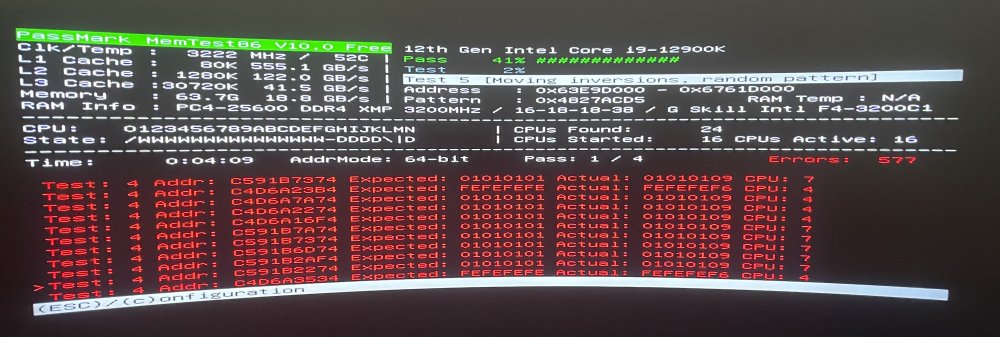
Well that didn't last long. After about 10 minutes downloads began failing again. Ran another memtest and got dozens of failures within 30 seconds. Switched from XMP to stock, same result. Trying the Corsair HX1000 PSU again. If this works, the brand new evga 1600w p2 is a couple weeks past the return window, so I'll prob take it out back and go office space on it.
-
Looks like the PSU was the culprit! I took your advice and upped the voltage, set it to 1.25 and got a memtest pass! I thought that was strange as it ran at stock 1.2v for weeks no problem, so I did some experiments. I also got a second set of matching ram. For the record, prior to all this I was running stock, no XMP. I initially only had the 8pin motherboard power connected. EVGA 1600w P2 PSU: 2x32 stock: FAIL 2x32 1.25v: PASS 2x32 XMP: FAIL Corsair HX1000 PSU: 2x32 stock: PASS 2x32 XMP: FAIL Connected the secondary 4pin motherboard power. EVGA 1600w P2 PSU: 2x32 stock: PASS 2x32 XMP: PASS Corsair HX1000 PSU: 2x32 stock: Didn't Test 2x32 XMP: PASS Added in second set of ram, now 4x32gb: EVGA 1600w P2 PSU: 4x32 stock: Didn't test 4x32 XMP: FAIL Corsair HX1000 PSU: 4x32 stock: Didn't Test 4x32 XMP: PASS I don't trust this EVGA PSU anymore, but I reeeally don't want to have to swap it out again (I managed to squeeze that monster 1600w psu into a Fractal Node 804 with 8 platters right above it and the max amount of case fans), so I gave it another shot because why not. The second time, it passed, with XMP on, after failing miserably the first time. I think I'll run it like this with XMP on for a week and see if it survives, and then hit it with another memtest to be sure. With 64gb it took ~8hrs and 128gb ~19hrs to run. I need a break. Thanks a ton for your help! Without your advice I likely would have lost a month unnecessarily RMA'ing my motherboard.
-
I upped the voltage from 1.2 -> 1.25 and got a full memtest pass /w both sticks! For fun, I ran memtest with XMP on, and it failed immediately (with 1.35v). Does this indicate dying RAM or PSU? 1.2v worked fine for months, and i ran XMP for a few days to test it early on with no problem either. I did switch PSU's about a month ago, though the new one is way overkill 1600w EVGA P2 and was brand new. This was around the same time I installed the RMA'd motherboard. Initially everything worked fine at 1.2v no xmpp for a couple of weeks, until about two weeks ago. I have another 2 sticks of identical RAM coming Friday I'll test, my hope is to run 4 sticks in the end.
-
Retested with both sticks in their original slots, as well as the previously empty two slots. Both failed, the former right away, and the later a bit later in the test with fewer errors. I'm rerunning a single stick test, which is almost done with the first pass and no errors so far. Does this indicate a mobo/psu issue? If so, how can I determine which is the culprit? Is it safe for me to run Unraid with 1 stick of RAM (assuming it passes the full test) in this situation?
-
I ran memtest on each stick, only let it go to 50% of the first pass (past where I initially saw errors) as I’m heading out of town for a few days in a couple of hours so short on time. Both sticks passed individually. What should I check next? Do I need to let memtest complete on both sticks?
-
Thanks for the tips! XMP is disabled, how do I check the CMOS memory timings? I’ll memtest one stick at a time now
-
Running memtest now and it’s already found some errors, will post final results when it finishes. Does this mean my RAM likely went bad? All parts are less than 6months old. Already had to RMA my motherboard, which also fried my USB boot drive. Things seemed stable for a while after I swapped those two parts out.