





couzin2000
Members
-
Joined
Everything posted by couzin2000
-
Is THIS how it works?
-
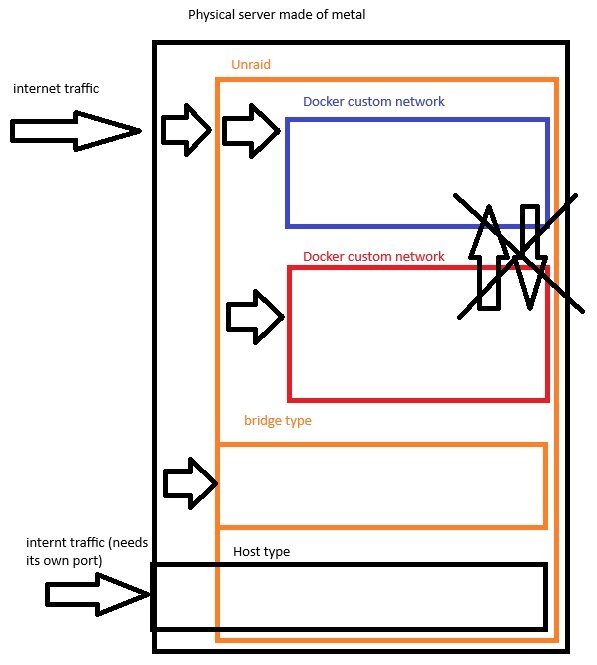
Sorry to revive this conversation, but... reading up on I was curious to see that this documentation does not explain "custom" networks. I suppose custom networks are something that belong to each OS. So here's my question -- docs.docker.com explains that networks have a type, either bridge, host, none, overlay, ipvlan, macvlan. So is there a custom Unraid type of network? As I understand it, my Unraid server's network card has an IP given from my router's DHCP server. Usually, you'd have 65000 ports, but creating a network inside Unraid basically forwards the traffic from the NIC's IP/port combination to a virtual software network created by Unraid, kinda like a VLAN. This means I'd have an extra 65025 IPs to draw from, each with 65000 ports? So I create a new container, I choose this custom network, and Unraid auto-assigns an IP within the range created, correct? And this Unraid network doesnt allow Docker containers to speak to each other outside of this network, correct? I'm just trying to validate my understanding of all this.
-
OK, reboot did it this time. Not sure why this happened. Reboot seems to release the folder where the pending update is at... not a very elegant solution, but worked.
-
And yet again. This time it's the Unraid Connect plugin. I'm trying a reboot, currently on 6.12.10, waiting for this to resolve itself so I can upgrade to 6.12.13. Would be great if someone had an answer for this.
-
Hi there, Sorry for the delays, I've been rather busy. I've installed the script in its final state on my Unraid 6.12.10 about 3-4 days ago. So far, the script works exactly as intended on multiple consecutive file transfers! Outstanding work my friend, thank you! You should definitely talk about this script and make it go wide - one of the better more useful features I'd been asking for on Unraid. Thanks again!
-
Ok, one bug; once you've brought the remaining percentage down to zero, the loop doesn't seem to reset. I do get a 0% notification and a Completed notification, but nothing in betwen. For that to happen, I can stop the script and run it again. Then the increments will be notified.
-
Completed without a hitch. Great work! If you can get this script constantly running, it'll be incredible. EDIT: Whoa snap! It DOES work on a loop! Congrats! I'm sold!
-
Great work amigo. For the moment, I'm getting response from DRY_RUN and from running the standard script while Mover is running. So far so good. I left INCREMENT at 25 to see how well that part works, and I did get a notification at 0% which is great. You could package and sell this with Unraid, it's just that excellent. Keep you posted on the whole move!
-
No dice. But you're right, we're getting more info now from the log. Here's what happened: Sending notification... jq: error: $TELEGRAM_CHAT_ID is not defined at , line 1: {chat_id: $TELEGRAM_CHAT_ID, text: $text, disable_notification: "false", parse_mode: "HTML"} jq: 1 compile error Notification sent to Telegram. I'm trying to read the corresponding lines, I can see the lines but not finding the error. My Chat ID was copied and pasted from the last script, so it's the right one. Any ideas?
-
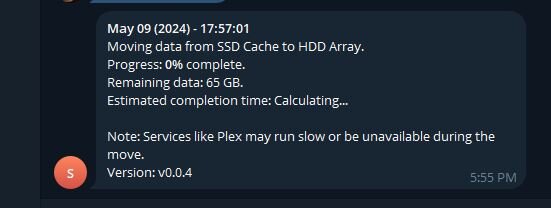
So far I've been able to insert the new script with my credentials. I left it at 25% increments. Would be a teensy tiny bit interesting to have a "Mover starting (0% completed)" message... just so we know it's actually started. I'll let you know once I get to 25% completed.
-
Well, I can also modify the script for myself, but if you're interested in making this available to a wider audience, yes I would think it'd be interesting to add the option. Even switching between "time" or "percentage" would be a great add. I understand. I'm in the process of transferring over 6TB but my cache drive is only 120GB... so that becomes many MANY Mover jobs 😂But I don't mind restarting it manually. It's just that if you make it a continuously running script, then frequency does need to be adjusted -- I'm getting notifications every 45 seconds or so and my arm is numb from the vibration of my Apple Watch 😂 Great Idea to be able to toggle between Telegram and Discord. If you ever want to make this a bit more interesting, perhaps there is a way to have the system generate its own notification, and that would send it through whichever Webhook is already configured for the user. I've chosen Telegram, but there's at least 10 different options to Unraid notifications... Maybe there's an easier way? If you need some testing or other feedback, I'm your man. I apologize as I'm not much of a programmer. I tinker, but not much else. Thank you for your very interesting work! I appreciate your effort!
-
Yes it does. However, I view this as a bit of an annoyance, because it's not on a parametered setting. Think there's a way to get updates every 25%? Also, and this may just be me not knowing how to setup user scripts to permanently run, after Mover stopped, the script stopped. The next usage of Mover did not send any notifications. Which I would totally prefer on a forever basis... as long as there's a way to set notifications every x %. Otherwise, this is actually draining my Apple Watch battery!
-
You did it! Works perfectly fine! Bravo!
-
I used the existing bot I use with Unraid. The token is all I needed to add in your script, the response gave me the channel ID. So in theory, I didnt need to "reinvite" my machine into the bot channel, as it's already there. I look into all this again, but you can take what I just gave you to the bank, I think.
-
ok - never mind. Here's the results when I inserted mytoken in the script: Response from Telegram API: {"ok":true,"result":{"id":6*********,"is_bot":true,"first_name":"s******","username":"s*******","can_join_groups":true,"can_read_all_group_messages":false,"supports_inline_queries":false,"can_connect_to_business":false}} DONE
-
Result: Response from Telegram API: {"ok":false,"error_code":404,"description":"Not Found"} Again, just to be sure, I AM getting Telegram notifications from Unraid. Just not getting these ones. No worries about the testing, glad to be of help. I know many who would want this. Wait, do I have to insert my bot token in the script? Or does the script get it for me?
-
Well, now at least it seems to be trying to send out the notification, but I get this: Warning: Failed to send notification to Telegram, HTTP status 404. I can see the script works though, because I AM getting 4 messages back to back like this. So it's just a matter of sending out the msg.
-
Perhaps has to do with the curl command being not properly formatted for Telegram? Here's what I find online: https://stackoverflow.com/questions/68213124/telegram-example-of-how-to-use-curl-for-windows-10-to-message-myself-with-a-bot curl -s -o /dev/null -X POST -H "Content-Type: application/json" -d "{\"chat_id\": \"-100XXXXXXXXXX\", \"text\": \"test_message\", \"disable_notification\": false}" https://api.telegram.org/bot{API_TOKEN}/sendMessage
-
OK. Because I was running Mover when I answered, I copied new files onto my cache and invoked Mover manually. So far, no notifications. I do have Telegram setup to give me notifications for everything. Perhaps I missed something in the script and I have some modifications to do? The logs don't really give me anything in terms of errors.
-
Oh wait, did I have to comment these out if I don't have exclusion paths to enter?
-
I saved this as "Mover Notifications", pasted the script, ran it once, and ran it in background. I check the log, here's what pops: Script Starting May 09, 2024 13:01.01 Full logs for this script are available at /tmp/user.scripts/tmpScripts/Mover Notifications/log.txt Error: Exclusion path /path/to/excluded/folder does not exist. Script Finished May 09, 2024 13:01.02 Full logs for this script are available at /tmp/user.scripts/tmpScripts/Mover Notifications/log.txt Any ideas? I don't believe I have "excluded" folders, but in theory Mover is still active as we speak.
-
Any way this can be adapted to work with Telegram? Would be a TOTAL treat for me!
-
I'm sure the drive is faulty, as this smart error is occuring for a third time now. The first two times self-tests revealed a functioning drive. This time the drive is "marked" and I'm unable to use it, self-tests fail everytime at 10%. The parity drive did show a smart error when the other drive failed. However repeated self-testing suggests it's not at fault. The SAS to SATA cable has been replaced with a brand new, better quality cable. Triple checked the cabling is connected to the proper connectors. I will recheck again to make sure no data is lost. As far as the flash drive problem, I doubt this is the case as my flash drive has been pretty reliable and the odds of it failing at the same time as a hard drive (let alone possibly 2 drives) are astronomical. There was no issue prior to this, no power outages no transfer problems, nothing.
-
I have 11 disks in the array, 1 parity and 10 data drives. Data disk 1 has had a smart error and because it's not the first, I am compelled to change the disk. Even though I have hotswap, I shut down the server, removed data disk 1, replaced it with a new identical disk. Array wasn't turned off when I did my shutdown. Server back on, my array is completely different-- my disks were all mixed up and not able to start because somehow the parity disk had been moved to the data disks...??? I powered down forcefully. Removed the disk I had justt replaced and put back the same drive I had prior - data disk 1, tthe one that had a smart error. Now, my array is in the same config, only the Parity drive is showing as a NEW DEVICE. It's exactly the same drive in the same spot! Am I going to lose everything here? the array doesn't want to start anymore because It's say "Too many wrong and/or missing disks!" Please help me fix this. This is 29 TB of personal stuff I stand to lose.
-
My ZFS Master Plugin is stuck in "pending" update. There isn't any way I can click the icon to open a contextual menu and stop the app, or anything. As well, CA doesn't allow me to "force" the update, nor can I completely remove the plugin using GUI. I wan to know what can be done to either force the update or remove it and reinstall it. I havent really used the plugin yet, so I don't have anything setup except for running SOME drives as ZFS. Removing or forcing an update will not make me lose anything, I think. Any command line controls I should be aware of?


