





pbrening
Members
-
Joined
-
Last visited
-
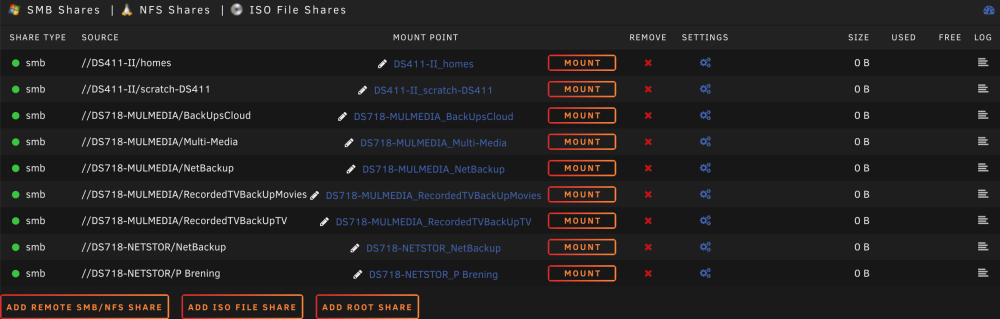
I changed my remote shares settings. I delete every share that was remote. I returned the smb multichannel to yes. I left alone the docker custom network as it was. I created new shares only using ip's and loading shares...making connections and setting as needed automount on two of them. With a reboot it works well. In summary the only change on my network was using ip vs name of mount share. I thank you for this recommendation and appreciate your diligent effort.
-
As requested I did the following: Stopped array Settings Network services Smb Enable SMB Multi Channel: - set to No from Yes Clean shutdown of array Power up Start array No changes in mounting auto or manually or even trying to create a new smb share externally as all do not work but spend time trying to mount and end up timing out.
-
I have seen my external smb shares no longer mount or even manually mount on unraid server. This problem began happening about a week ago as I have looked for solutions. The mounting of these shares has worked in the past for some months. The internal shares both default and created ones are fine. The external shares on network all of them synology nas do not longer mount or even reliabile create. Some times loading network shares works and some times mounts work as well but never create the intended share to use later. These external synology mounts are fine with macs on the network as I mount parts of the volumes by running a mount script on each mac. Please review and give me some ideas to pursue. Most topics seem related to internal shares within unraid and not external mounts unraid-nuc8beh-diagnostics-20221214-1642.zip
-
Works great. Thank you and really appreciate your help so much. The water here with Unraid is nice and warm. Thanks again!!
-
As requested pls find attached unraid-nuc8beh-diagnostics-20220909-1808.zip
-
Experienced a power hit even with a UPS connected to unraid server. The hardware was still running but access to it was not possible. I ended up power cycling the server and started raid. With this action I did see the following error as docker was not started. Warning: stream_socket_client(): unable to connect to unix:///var/run/docker.sock (No such file or directory) in /usr/local/emhttp/plugins/dynamix.docker.manager/include/DockerClient.php on line 710 Couldn't create socket: [2] No such file or directory Warning: Invalid argument supplied for foreach() in /usr/local/emhttp/plugins/dynamix.docker.manager/include/DockerClient.php on line 896 Sure would like some feedback on the best way to pursue this docker problem as I have at least 10 or so containers that have been running but not now or after a full sync due to power interruption and several reboots and shutdowns of unraid. Thanks for the feedback
