





isaacgrant85
Members
-
Joined
-
Last visited
-
Ah yes, I see the X now. Thank you. I look forward to the next update
-
I like it so far. A few points: Servers/Hardware would be helpful to have multiple network ports as well. My UnRAID has two NICs and IPMI for example Unclear on UnRAID/VM/Docker. I have created the server. I add UnRAID as an LXC for example so I can add apps to it. UnRAID also has the option to Host VMs so would make sense the nest under that, rather than the hardware Rack view - unclear on how to remove something, either as it is removed or added on error Patch panel in rack view - a little unclear about the linking of devices here. My router and switch connect into the patch panel for example. I'm just leaving hardware unlinked for now
-
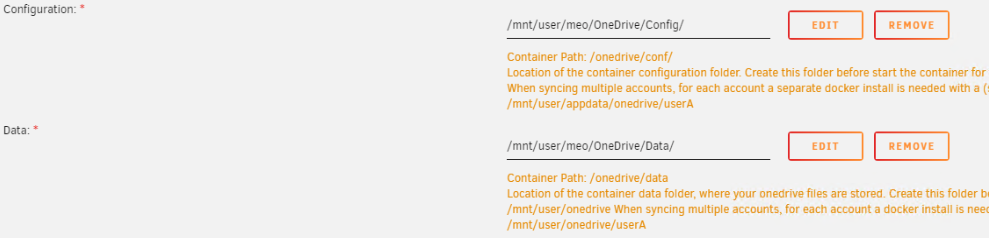
Looking into the docs for the app on github, there does appear to be a solution y creating a config file. I have created this file in the config directory as mapped in the docker config, but when opening the console and running "onedrive --display-config" it doesn't appear to show as seems it may have another path mapped? Is this an issue anoyone else has come across? This is actually of more benefit to me, not just for the permissions, but by also excluding some directories from sync Output: # onedrive --display-config onedrive version = v2.4.23 Config path = /root/.config/onedrive Config file found in config path = false Config option 'sync_dir' = /root/OneDrive Config option 'enable_logging' = false Config option 'log_dir' = /var/log/onedrive/ Config option 'disable_notifications' = false Config option 'min_notify_changes' = 5 Config option 'skip_dir' = Config option 'skip_dir_strict_match' = false Config option 'skip_file' = ~*|.~*|*.tmp Config option 'skip_dotfiles' = false Config option 'skip_symlinks' = false Config option 'monitor_interval' = 300 Config option 'monitor_log_frequency' = 6 Config option 'monitor_fullscan_frequency' = 12 Config option 'read_only_auth_scope' = false Config option 'dry_run' = false Config option 'upload_only' = false Config option 'download_only' = false Config option 'local_first' = false Config option 'check_nosync' = false Config option 'check_nomount' = false Config option 'resync' = false Config option 'resync_auth' = false Config option 'cleanup_local_files' = false Config option 'classify_as_big_delete' = 1000 Config option 'disable_upload_validation' = false Config option 'bypass_data_preservation' = false Config option 'no_remote_delete' = false Config option 'remove_source_files' = false Config option 'sync_dir_permissions' = 700 Config option 'sync_file_permissions' = 600 Config option 'space_reservation' = 52428800 Config option 'application_id' = Config option 'azure_ad_endpoint' = Config option 'azure_tenant_id' = common Config option 'user_agent' = Config option 'force_http_11' = false Config option 'debug_https' = false Config option 'rate_limit' = 0 Config option 'operation_timeout' = 3600 Config option 'sync_root_files' = false Selective sync 'sync_list' configured = false Config option 'sync_business_shared_folders' = false Business Shared Folders configured = false Config option 'webhook_enabled' = false
-
Currently having what I expect is the same issue. Look forward to hearing the answer!
