Credence
Members
-
Joined
-
Last visited
-
unraid-diagnostics-20220326-0847.zip
-
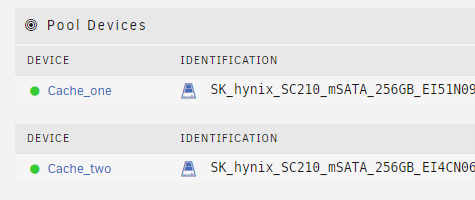
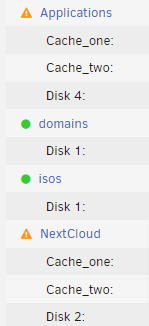
I honestly wish i had never starting trying to use cache drives but the money has been spent. So i have 2 pools set up with one drive each for cache. No matter what cache drive i set my shares to its using BOTH of them. The applications share is set for cache_one and the nextcloud is set for cache_two. Yet its copying data to both drive the same as if its in raid. Both cache drive have the exact same data in them even though its in 2 different pools. Also the move command is not doing anything for me. I have messed with every setting, downloaded plugins.... yet short of moving dragging the files myself i can get no data to move from the cache drives to the array whihc seems to make the parity function almost useless as everything is being stored in cache. Yes the shares cache settings are on "yes".