JPilla415
Members
-
Joined
-
Last visited
-
Yea, I think that the docker was created using AI tooling, and the developer seems to have moved on to other projects. I worry that it will be abandoned, which is why I am looking into other solutions. I will look into producing a script. Thanks.
-
Thanks, this Docker container has no appdata files to edit. My last post may not have been clear, but the process you outlined is the first step that I tried. I also tried the extra parameters route. Thanks very much for the suggestion though.
-
Thanks so much for the assistance and apologies for the lack of clarity in my original post. The method you outlined in your linked post was how I attempted to set the PUID, PGID and UMASK variables. I also tried to add: "--user 99:100 --env UMASK=000" as extra parameters, shown below:

-
Hello, I am working with a docker container, which does not support PUID, PGID, or UMASK environment variables. The container is available here: https://github.com/juaniwck/mister-retroarch-save-sync I am currently having an issue where the container is creating new files with the following permissions: -rw-r--r-- I have attempted to add the necessary environment variables via the Docker configuration UI, as well as adding "--user 99:100 --env UMASK=000" as additional parameters. In both cases, new files continue to be written with the following permissions: -rw-r--r-- Ultimately, I want the docker to write directories with the following permission: drwxrwxrwx and for files: -rw-rw-rw-. Are there any suggestions for how I might force the correct permissions to be applied?
-
Thank you both. I will mark this as resolved then.
-
Since writing my original post, reads have gone up to 58,703 and writes to 567. Again, just not sure what is considered normal. Appreciate any insights.
-
My server, running 7.0.1 has been up for 4.5 days and I am currently seeing 57,962 reads from the flash drive, and 548 writes. I see that there is a known issue with Unraid 7.0 around excessive USB usage. I am just not clear on whether or not this is considered excessive? Is there a known good baseline? Diagnostics attached, if they are needed. tower-diagnostics-20250702-0919.zip
-
This may be the wrong place to ask, but will we see an update to "Update Assistant" to check against 7.1 soon? It seems to still be checking against 7.0.1.
-
Thanks very much
-
Hello all - Thank you in advance for any recommendations on the best course of action. My goal is not speed, but safety of data. Current Server/Scenario: Running Unraid 6.12.14 1x 20TB Parity Drive 13x Data drives of varying sizes I have maxed out my available drive slots in my case. All drives are healthy Goals: Shrink array by 1x data drives Install new, larger parity drive Historically, I have used the "Unbalanced" plug-in to move all data off of a drive and then run the "clear an array drive" script to remove a drive from the array while maintaining parity. From what I understand, this is no longer a recommended approach. Is there another method that can be used that will maintain parity? Or is the recommended approach to: Move all data off data drive, which is going to be removed Stop the array Unassign the data drive and current parity drive assignments Start the array Stop the array Physically remove the data drive Physically remove parity drive Install the new larger parity drive Start the server in maintenance mode Rebuild parity Appreciate the guidance and thoughts.
-
Thanks so much for taking a look. I appreciate it.
-
I recently pre-cleared a new disk, using a USB external enclosure. The pre-clear process went fine, no errors detected. Log attached. However, in my system logs, there were several I/O errors, like so: May 25 14:07:25 Tower kernel: I/O error, dev sdq, sector 216176640 op 0x0:(READ) flags 0x80700 phys_seg 256 prio class 3 May 25 17:46:47 Tower kernel: I/O error, dev sdq, sector 7100000256 op 0x0:(READ) flags 0x80700 phys_seg 256 prio class 3 May 25 19:29:54 Tower kernel: I/O error, dev sdq, sector 10371895296 op 0x0:(READ) flags 0x80700 phys_seg 256 prio class 3 May 25 21:46:52 Tower kernel: I/O error, dev sdq, sector 14667474944 op 0x0:(READ) flags 0x80700 phys_seg 235 prio class 3 May 25 23:15:57 Tower kernel: I/O error, dev sdq, sector 17367803904 op 0x0:(READ) flags 0x80700 phys_seg 256 prio class 3 May 25 23:25:31 Tower kernel: I/O error, dev sdq, sector 17650579456 op 0x0:(READ) flags 0x80700 phys_seg 256 prio class 3 May 25 23:28:55 Tower kernel: I/O error, dev sdq, sector 17751074816 op 0x0:(READ) flags 0x80700 phys_seg 256 prio class 3 May 26 02:26:36 Tower kernel: I/O error, dev sdq, sector 22836414464 op 0x0:(READ) flags 0x80700 phys_seg 143 prio class 3 May 26 04:42:18 Tower kernel: I/O error, dev sdq, sector 26456676352 op 0x0:(READ) flags 0x80700 phys_seg 250 prio class 3 May 26 05:30:42 Tower kernel: I/O error, dev sdq, sector 27685124096 op 0x0:(READ) flags 0x80700 phys_seg 256 prio class 3 May 26 05:47:47 Tower kernel: I/O error, dev sdq, sector 28108584960 op 0x0:(READ) flags 0x80700 phys_seg 255 prio class 3 May 26 06:38:47 Tower kernel: I/O error, dev sdq, sector 29346476032 op 0x0:(READ) flags 0x80700 phys_seg 255 prio class 3 May 26 06:55:44 Tower kernel: I/O error, dev sdq, sector 29748836352 op 0x0:(READ) flags 0x80700 phys_seg 256 prio class 3 May 26 09:56:49 Tower kernel: I/O error, dev sdq, sector 33768067072 op 0x0:(READ) flags 0x80700 phys_seg 177 prio class 3 May 26 12:35:24 Tower kernel: I/O error, dev sdq, sector 36843491328 op 0x0:(READ) flags 0x80700 phys_seg 248 prio class 3 May 27 16:50:40 Tower kernel: I/O error, dev sdq, sector 829847552 op 0x0:(READ) flags 0x80700 phys_seg 256 prio class 3 May 27 17:23:38 Tower kernel: I/O error, dev sdq, sector 1869090816 op 0x0:(READ) flags 0x80700 phys_seg 256 prio class 3 May 27 18:14:28 Tower kernel: I/O error, dev sdq, sector 3488593920 op 0x0:(READ) flags 0x80700 phys_seg 255 prio class 3 May 27 18:17:12 Tower kernel: I/O error, dev sdq, sector 3575107584 op 0x0:(READ) flags 0x80700 phys_seg 256 prio class 3 May 27 18:30:54 Tower kernel: I/O error, dev sdq, sector 4006899712 op 0x0:(READ) flags 0x80700 phys_seg 256 prio class 3 May 27 22:18:08 Tower kernel: I/O error, dev sdq, sector 11223660544 op 0x0:(READ) flags 0x80700 phys_seg 254 prio class 3 May 27 22:38:32 Tower kernel: I/O error, dev sdq, sector 11866187776 op 0x0:(READ) flags 0x80700 phys_seg 218 prio class 3 May 27 22:47:46 Tower kernel: I/O error, dev sdq, sector 12155328512 op 0x0:(READ) flags 0x80700 phys_seg 255 prio class 3 May 28 02:27:18 Tower kernel: I/O error, dev sdq, sector 18810028032 op 0x0:(READ) flags 0x80700 phys_seg 99 prio class 3 May 28 02:53:56 Tower kernel: I/O error, dev sdq, sector 19580878848 op 0x0:(READ) flags 0x80700 phys_seg 256 prio class 3 May 28 03:22:13 Tower kernel: I/O error, dev sdq, sector 20390768640 op 0x0:(READ) flags 0x80700 phys_seg 256 prio class 3 May 28 04:57:37 Tower kernel: I/O error, dev sdq, sector 23055421440 op 0x0:(READ) flags 0x80700 phys_seg 36 prio class 3 May 28 06:07:08 Tower kernel: I/O error, dev sdq, sector 24922828800 op 0x0:(READ) flags 0x80700 phys_seg 211 prio class 3 May 28 07:18:30 Tower kernel: I/O error, dev sdq, sector 26779922432 op 0x0:(READ) flags 0x80700 phys_seg 167 prio class 3 May 28 09:10:28 Tower kernel: I/O error, dev sdq, sector 29533231104 op 0x0:(READ) flags 0x80700 phys_seg 248 prio class 3 May 28 10:02:02 Tower kernel: I/O error, dev sdq, sector 30733670400 op 0x0:(READ) flags 0x80700 phys_seg 256 prio class 3 May 28 13:04:12 Tower kernel: I/O error, dev sdq, sector 34633654272 op 0x0:(READ) flags 0x80700 phys_seg 256 prio class 3 I'm under the assumption is this due to a flaky USB enclosure disconnecting and reconnecting, but I wanted to ask the experts to be sure. Diagnostics attached. Appreciate any thoughts and feedback! preclear_disk_8LJBK2XN_8429.txt tower-diagnostics-20240529-0718-ANON.zip
-
Shoot! Didn't think about that. Thanks very much!
-
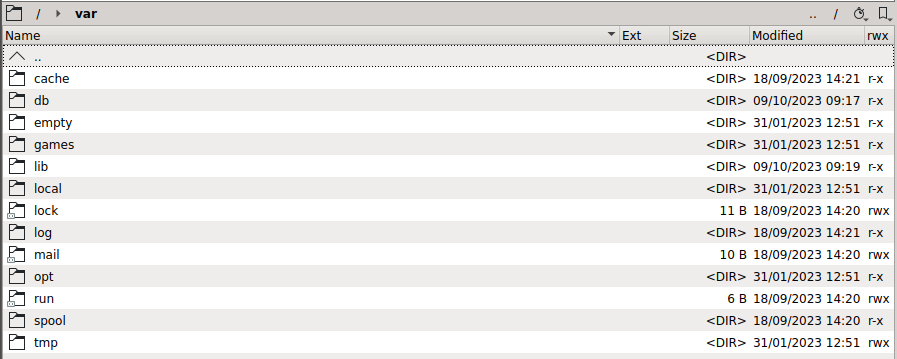
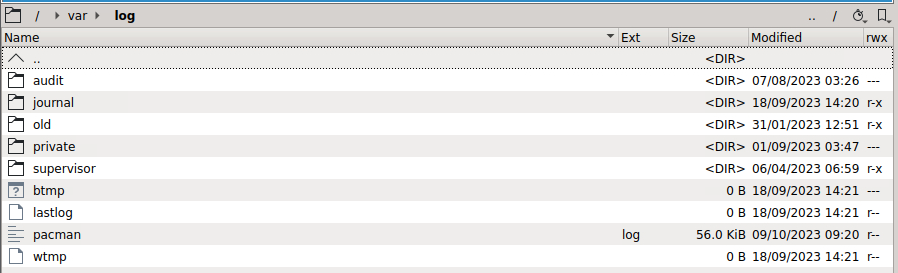
Forgive me if I am missing something painfully obvious, but the new Unbalanced UI is indicating the following: However, when looking through /var/log via Krusader, I am not seeing any log file. The last modified date for /var/log is back in 2023 for me. Appreciate the help!
-
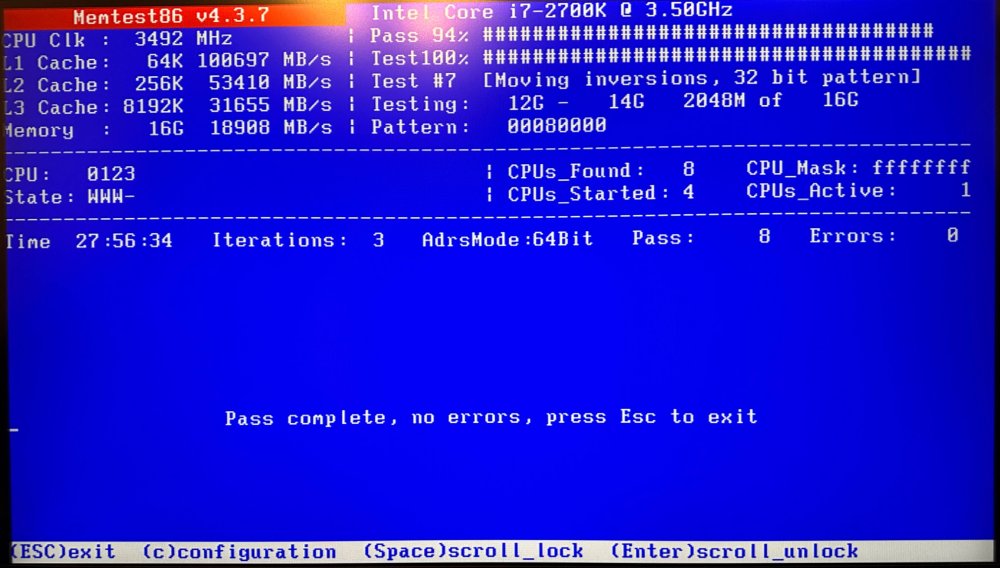
28 hour MemTest with clean results! Booting back up the server again after several days of downtime. Fingers crossed! Thanks again for all the help.