





TeamTiger
Members
-
Joined
-
Last visited
Everything posted by TeamTiger
-
Thanks @JorgeB, I managed to reinstall almost all apps, some i´m still working on to get working again. I changed from docker.img to directory, gives me a little more control and not having my server go completly offline because of docker.img issue. There is a weird thing though, but i think that might be more placed in a new toppic. (it´s about the custom networks , i recreated them, they are visible when adding new container to choose from, but on the DockerSettings tab Nothing about Network is shown, it´s very weird) for this one i will mark it solved
-
So is there a way to re-install a application without it has to be "re-downloaded"
-
But with reinstalling the docker application do the images have to be downloaded again? Because that would be a problem for a couple of my applications.
-
Yes It was. But there is no Lost+found folder anywhere (don´t know what that means) I´m also curious the problem occoured after the update to 6.12.10, I saw other have had also experienced problems after updating. I still have somehow in my logs saying BTRFS Dev/Pool3 error - "first key mismatch" But with file check it comes back as "no errors found". With further looking into it I found something that said; du: cannot access '/var/lib/docker/btrfs/subvolumes/432e326340b9e0cbd043ac293df5bf3e0d26ae03f2c44fd04ccfbafc14a0e5dc/usr/lib/python3.9/turtledemo/__pycache__/rosette.cpython-39.opt-2.pyc': No such file or directory du: cannot access '/var/lib/docker/btrfs/subvolumes/432e326340b9e0cbd043ac293df5bf3e0d26ae03f2c44fd04ccfbafc14a0e5dc/usr/lib/python3.9/turtledemo/__pycache__/rosette.cpython-39.pyc': Structure needs cleaning du: cannot access '/var/lib/docker/btrfs/subvolumes/432e326340b9e0cbd043ac293df5bf3e0d26ae03f2c44fd04ccfbafc14a0e5dc/usr/lib/python3.9/turtledemo/__pycache__/round_dance.cpython-39.opt-1.pyc': Structure needs cleaning du: cannot access '/var/lib/docker/btrfs/subvolumes/432e326340b9e0cbd043ac293df5bf3e0d26ae03f2c44fd04ccfbafc14a0e5dc/usr/lib/python3.9/turtledemo/__pycache__/round_dance.cpython-39.opt-2.pyc': Structure needs cleaning du: cannot access '/var/lib/docker/btrfs/subvolumes/432e326340b9e0cbd043ac293df5bf3e0d26ae03f2c44fd04ccfbafc14a0e5dc/usr/lib/python3.9/turtledemo/__pycache__/round_dance.cpython-39.pyc': Structure needs cleaning du: cannot access '/var/lib/docker/btrfs/subvolumes/432e326340b9e0cbd043ac293df5bf3e0d26ae03f2c44fd04ccfbafc14a0e5dc/usr/lib/python3.9/turtledemo/__pycache__/sorting_animate.cpython-39.opt-1.pyc': Structure needs cleaning du: cannot access '/var/lib/docker/btrfs/subvolumes/432e326340b9e0cbd043ac293df5bf3e0d26ae03f2c44fd04ccfbafc14a0e5dc/usr/lib/python3.9/turtledemo/__pycache__/sorting_animate.cpython-39.opt-2.pyc': Structure needs cleaning du: cannot access '/var/lib/docker/btrfs/subvolumes/432e326340b9e0cbd043ac293df5bf3e0d26ae03f2c44fd04ccfbafc14a0e5dc/usr/lib/python3.9/turtledemo/__pycache__/sorting_animate.cpython-39.pyc': Structure needs cleaning du: cannot access '/var/lib/docker/btrfs/subvolumes/432e326340b9e0cbd043ac293df5bf3e0d26ae03f2c44fd04ccfbafc14a0e5dc/usr/lib/python3.9/turtledemo/__pycache__/tree.cpython-39.opt-1.pyc': Structure needs cleaning du: cannot access '/var/lib/docker/btrfs/subvolumes/432e326340b9e0cbd043ac293df5bf3e0d26ae03f2c44fd04ccfbafc14a0e5dc/usr/lib/python3.9/turtledemo/__pycache__/tree.cpython-39.opt-2.pyc': Structure needs cleaning du: cannot access '/var/lib/docker/btrfs/subvolumes/432e326340b9e0cbd043ac293df5bf3e0d26ae03f2c44fd04ccfbafc14a0e5dc/usr/lib/python3.9/turtledemo/__pycache__/tree.cpython-39.pyc': Structure needs cleaning du: cannot access '/var/lib/docker/btrfs/subvolumes/432e326340b9e0cbd043ac293df5bf3e0d26ae03f2c44fd04ccfbafc14a0e5dc/usr/lib/python3.9/turtledemo/__pycache__/two_canvases.cpython-39.opt-1.pyc': Structure needs cleaning Aug 3 00:32:40 TeamTigers emhttpd: shcmd (62): /usr/local/sbin/mount_image '/mnt/cache/docker.img' /var/lib/docker 65 Aug 3 00:32:40 TeamTigers kernel: loop3: detected capacity change from 0 to 136314880 Aug 3 00:32:40 TeamTigers kernel: BTRFS: device fsid 797542a5-b8a1-4e66-a680-96a982d7bcea devid 1 transid 689356 /dev/loop3 scanned by mount (22574) Aug 3 00:32:40 TeamTigers kernel: BTRFS info (device loop3): first mount of filesystem 797542a5-b8a1-4e66-a680-96a982d7bcea Aug 3 00:32:40 TeamTigers kernel: BTRFS info (device loop3): using crc32c (crc32c-intel) checksum algorithm Aug 3 00:32:40 TeamTigers kernel: BTRFS info (device loop3): using free space tree Aug 3 00:32:40 TeamTigers kernel: BTRFS info (device loop3): bdev /dev/loop3 errs: wr 2557, rd 36, flush 0, corrupt 8952, gen 0 Aug 3 00:32:40 TeamTigers kernel: BTRFS info (device loop3): enabling ssd optimizations Aug 3 00:32:40 TeamTigers root: Resize device id 1 (/dev/loop3) from 65.00GiB to max Aug 3 00:32:40 TeamTigers emhttpd: shcmd (64): /etc/rc.d/rc.docker start Aug 3 00:33:01 TeamTigers kernel: BTRFS error (device loop3): tree first key mismatch detected, bytenr=11081891840 parent_transid=2594 key expected=(10567,144,72057080825216857) has=(10567,1,0) Could it be fixed with rolling back the Unraid update, since it was fine before then. When not and I would need to recreate the Docker Image, is there a way when reinstalling the docker containers without having to download the container Images.? I have a few Containers where the Image isn´t available to download anymore. And offcourse they are the most important for me. (My post yesterday did not go through somehow therefore the late respons)
-
teamtigers-diagnostics-20240802-1518anonyms.zip
-
Sorry totaly forgot Here are the diagnostics. I´m still in maintenance mode does that make a difference? In one of the log files there seems to be some error teamtigers-diagnostics-20240802-1333 anonyms.zip
-
In additional info to primary Post. I notice that the Disk gets with a minimum of 10°C hotter (leading it in the 43 to in the 50s°C ) then the Parity and other unnassigned disks. How could this be explained. (I recently have cleaned the server completely)
-
Hi just did that and getting this output Phase 1 - find and verify superblock... Phase 2 - using internal log - zero log... - scan filesystem freespace and inode maps... - found root inode chunk Phase 3 - for each AG... - scan and clear agi unlinked lists... - process known inodes and perform inode discovery... - agno = 0 - agno = 1 - agno = 2 - agno = 3 - agno = 4 - agno = 5 - agno = 6 - agno = 7 bad CRC for inode 15242863361 inode identifier 12164664221418192895 mismatch on inode 15242863361 bad CRC for inode 15242863361, will rewrite inode identifier 12164664221418192895 mismatch on inode 15242863361 cleared inode 15242863361 - process newly discovered inodes... Phase 4 - check for duplicate blocks... - setting up duplicate extent list... - check for inodes claiming duplicate blocks... - agno = 0 - agno = 4 - agno = 7 - agno = 2 - agno = 3 - agno = 5 - agno = 6 - agno = 1 entry "IMG-20190701-WA0008.jpg" at block 17 offset 104 in directory inode 15241802477 references free inode 15242863361 clearing inode number in entry at offset 104... clearing reflink flag on inodes when possible Phase 5 - rebuild AG headers and trees... - reset superblock... Phase 6 - check inode connectivity... - resetting contents of realtime bitmap and summary inodes - traversing filesystem ... rebuilding directory inode 15241802477 - traversal finished ... - moving disconnected inodes to lost+found ... Phase 7 - verify and correct link counts... done
-
Hi there, I have a Array disk that got disabled, I followed the instructions and rebuild it onto itself after smart showed everything was fine. Now after the rebuild I dit filesystem check trhough the Gui in maintenance Mode since it is in XFS format. I don´t know what to do now, it shows there are things not in order but , I´m not sure how to get it fixed. this is the output of the checkfilesystem command. Can someone please help me understand what it means, and what to do now to get it fixed? Apreciate the help Phase 1 - find and verify superblock... - block cache size set to 1473464 entries Phase 2 - using internal log - zero log... zero_log: head block 1617498 tail block 1617498 - scan filesystem freespace and inode maps... - found root inode chunk Phase 3 - for each AG... - scan (but don't clear) agi unlinked lists... - process known inodes and perform inode discovery... - agno = 0 - agno = 1 - agno = 2 - agno = 3 - agno = 4 - agno = 5 - agno = 6 - agno = 7 bad CRC for inode 15242863361 inode identifier 12164664221418192895 mismatch on inode 15242863361 bad CRC for inode 15242863361, would rewrite inode identifier 12164664221418192895 mismatch on inode 15242863361 would have cleared inode 15242863361 - process newly discovered inodes... Phase 4 - check for duplicate blocks... - setting up duplicate extent list... - check for inodes claiming duplicate blocks... - agno = 1 - agno = 2 - agno = 3 - agno = 0 - agno = 4 - agno = 6 - agno = 5 - agno = 7 entry "IMG-20190701-WA0008.jpg" at block 17 offset 104 in directory inode 15241802477 references free inode 15242863361 would clear inode number in entry at offset 104... bad CRC for inode 15242863361, would rewrite inode identifier 12164664221418192895 mismatch on inode 15242863361 would have cleared inode 15242863361 No modify flag set, skipping phase 5 Phase 6 - check inode connectivity... - traversing filesystem ... - agno = 0 - agno = 1 - agno = 2 - agno = 3 - agno = 4 - agno = 5 - agno = 6 - agno = 7 entry "IMG-20190701-WA0008.jpg" in directory inode 15241802477 points to free inode 15242863361, would junk entry would rebuild directory inode 15241802477 - traversal finished ... - moving disconnected inodes to lost+found ... Phase 7 - verify link counts... No modify flag set, skipping filesystem flush and exiting. XFS_REPAIR Summary Fri Aug 2 10:39:07 2024 Phase Start End Duration Phase 1: 08/02 10:36:22 08/02 10:36:33 11 seconds Phase 2: 08/02 10:36:33 08/02 10:36:36 3 seconds Phase 3: 08/02 10:36:36 08/02 10:37:55 1 minute, 19 seconds Phase 4: 08/02 10:37:55 08/02 10:37:56 1 second Phase 5: Skipped Phase 6: 08/02 10:37:56 08/02 10:39:07 1 minute, 11 seconds Phase 7: 08/02 10:39:07 08/02 10:39:07 Total run time: 2 minutes, 45 seconds
-
Hi There, I luved the Folder Plugin, with this new one, i´m missing a important feature, or it isn´t working. I could drag the Folders to the position i wanted them. But now with this new plugin it won´t work, and a new created folder is automatically placed on Top. So thats an issue, no the order is totally off. Is there a way to fix this?
-
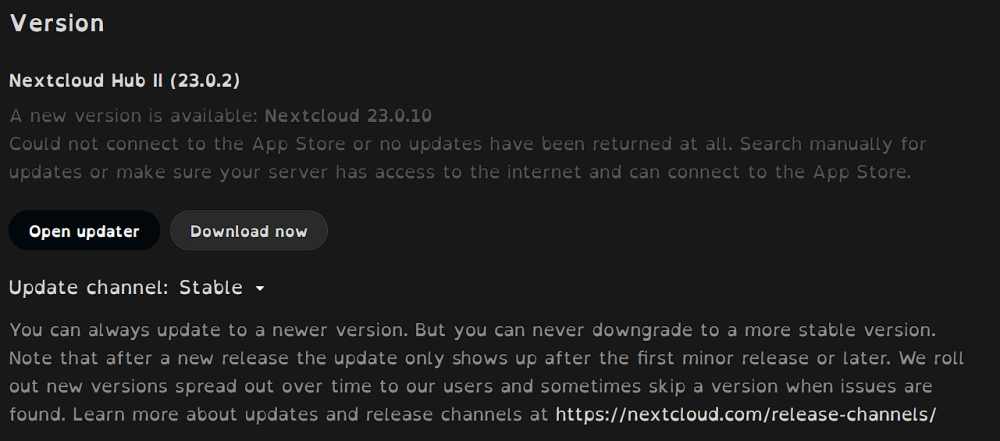
Hi there, I hope someone can help me with my issue. I´ve been trying to get it fixed, with several things i found online. It started with the "stuck on step 6 update" *Tried manually updating using occ command, and ended up completely without working NC (giving - Internal Server Error) . *So i did a restore of the docker. *After that i Updated the Mysql/Mariadb because of corrupt mysql.proc. and so on. But now still stuck with NC not working properly. Apps page keeps loading but nothing shows. A lot of apps give Internal Server Error since then. @ the admin/overview page by Version this error is shown Hope someone has a solution for me
-
Hi there, I have some issues accessing running Docker services when i activate when i am connected to my VPN. Issue 1. For example with my Adminer docker. When VPN is On then i can acces the webui only locally using IP:port! When using Hostname i get error 522 When VPN is OFF then i can acces the webui locally using IP:port and Hostname and remotely only with Hostname. This is the same for my Nextcloud Docker. Issue 2. Even following guides from SpaceInvaders or Ibrocorp to the letter I cannot get secure acces to NPM and also not through Hostname I can only acces the webui locally by IP:port This is also the same for some other dockers. The Setup. Asus Router (OpenVPN Client connected) using Cloudflare and NGINX for Hostname and reverse proxy have Cloudflare-DDNS docker to update the Dynamic ISP. Hope that someone can tell me what i have to change or did wrong.
