





Da-Man
Members
-
Joined
-
Last visited
-
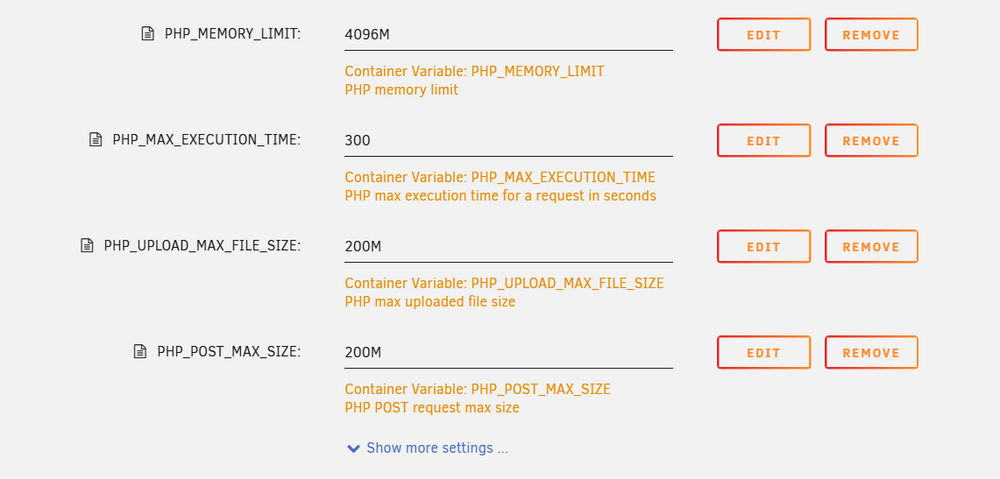
Thanks for the suggestion, I finally got it to work. I had tried mapping the apache2 folder before posting here, but it would not map for whatever reason. Based on your suggestion, I created a copy of the php.ini configuration file from inside the container and added it to the mounted apache2 folder. I then edited the file to reflect the changes I wanted to make. It works now! Thanks again @grtgbln
-
@grtgblnThanks for the response. On the docker level, is there a way to expose the PHP configuration used in the docker? I can see what the configuration is, but I do not yet know how to modify it. I will reach out to both parties as you suggested. Also, for LimeTech, the question was not related to any docker but I had asked that in general, does UNRaid support user defined PHP configurations as that may be necessary for self hosting other apps etc.
-
Hi; I am still awaiting an official response from @grtgbln on this issue. I have reached out to Lime Tech and the support response was that There is no support for configuring default PHP install on UNRaid and that to self host, I should look at docker containers and the configurations within the individual containers. I have gone down the rabbit hole and found that the Main WebTrees Project Page redirects to Docker Hub Profile of dtjs48jkt. The Build Link there then takes us to H2CK's WebTrees GitHub Page Here, in the latest code base, there is a PHP.ini file, which I believe where the Docker Image on UNRaid is picking up the configuration from. I have been unable to figure out how to modify this to suit my needs. Short of learning how to build this myself, I can only ask for help from @grtgbln on some way to make the PHP configuration user editable. Atleast the memory and execution time variables. The issue is that WebTrees provides options to locally save GeoLocation information which easily exceeds the PHP memory limit and also if your family tree gets large enough with pics etc, the memory falls short of what is required and the who app stops working. Let me know if you figure out a way to fix this?
-
Help with the WebTrees Container I am trying to add Geolocation data to the container and after uploading some CSV files from the application website for region USA, I run into the following error: Allowed memory size of 134217728 bytes exhausted (tried to allocate 20480 bytes) /var/www/html/vendor/illuminate/database/Connection.php: 414 I have tried adding PHP variables based on some information I have been able to dig up but those settings have not taken affect in the container. I believe the issue is because the MariaDB tables increase in size after adding all the location information and the PHP setting runs over the Max Limit. Is there a way to increase the PHP configuration variables like Memory Limit and Max Execution time etc? I believe they are built at compile time and there may be an option to make these configurable. @grtgbln, Can you please help?
-
Hi, I am not sure if you ever got an answer to this but I ran into the same issue and after a frustrating half hour of search, I found the official docket documentation which details the default admin username and password. At the time of initial setup, if no variable for Admin Username (WT_ADMIN) and Admin Password (WT_ADMINPW) is setup, then the default user is admin and password is admin123 Better still, at the time of installation, specify the variables with your preferred values and the information gets added the the DB. I hope this helps DA-Man
-
Hi, I am not sure if you ever got an answer to this but I ran into the same issue and after a frustrating half hour of search, I found the official docket documentation which details the default admin username and password. At the time of initial setup, if no variable for Admin Username (WT_ADMIN) and Admin Password (WT_ADMINPW) is setup, then the default user is admin and password is admin123 Better still, at the time of installation, specify the variables with your preferred values and the information gets added the the DB. I hope this helps DA-Man
-
Yes, I have been unable to figure out myself what is causing all these errors and that is why I was hoping someone could provide some guidance here. I have already re-started the server 4 times over the past couple of weeks to clear the logs which returns it to 0%
-
Hi All, Very new to unRaid and the forums. I started getting my error log getting into high double digits recently. Can someone help please? nas01-syslog-20230331-0320.zip
