





djtodd
Members
-
Joined
-
Last visited
Everything posted by djtodd
-
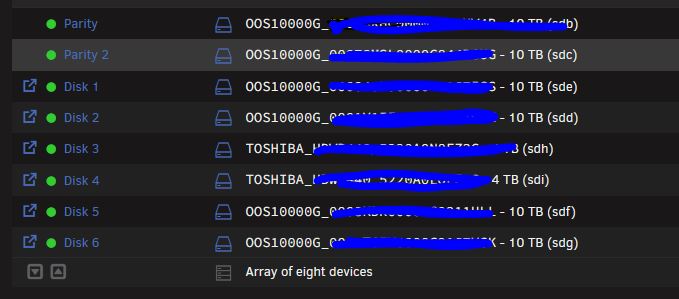
OK, I have a number of "Factory Refurbed" Seagate Exos WL 10TB SAS 12G 3.5 drives in my backup system. They won't spin down for the life of me. Is there any troubleshooting I can do? They show as the ever so "I trust this name" as "OOS1000G"
-
Can't say as I do. I'd say my setup was pretty bland as far as unusual configurations.
-
Over the past few days I've noticed that when the mover runs on my main installation, it just hangs. I've turned mover logging on, and I can see a few files transfer over, but then, nothing. I can stop the mover using "mover stop" and start it again, and things sometimes resume. But I'm at a bit of a loss. I haven't made any hardware or configuration/software changes in ages. tower-diagnostics-20230304-0949.zip
-
My memory isn't as good as I thought it seems. Thanks!
-
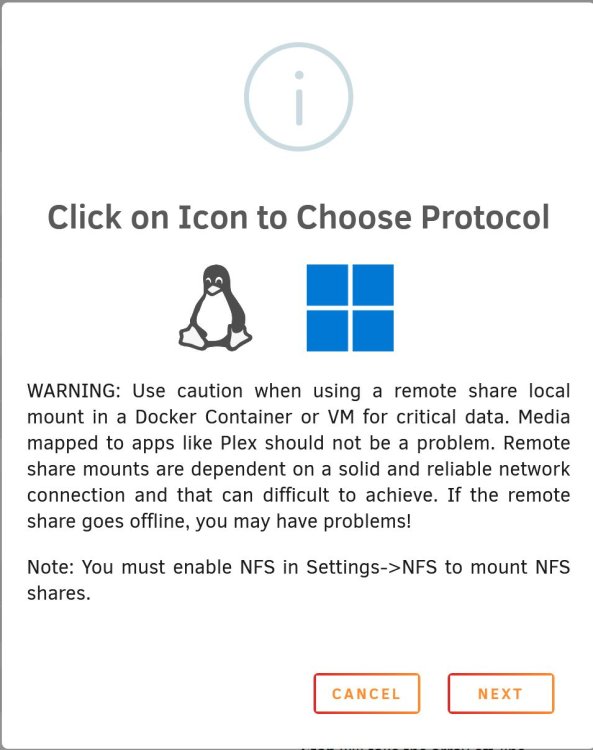
I added a new cache drive to create a pool, and after I rebooted my TOWER server, I saw that the SMB share I had connected with my other unraid box BACKUP was unmounted. It wouldn't mount. Fine, I'll just delete it and re-create. Now I can't even select the Penguin to choose the protocol. I don't think I've changed anything that should affect SMB shares. tower-diagnostics-20230212-1325.zip
-
Yeah thats exactly what I *thought* but I'm glad files weren't left behind, etc. Thanks!
-
Maybe I'm dense, but I've rebooted my server a couple of times for unrelated reasons in the past few weeks. I have the plugin installed, and it works like a charm. But should I see my server say "Installing 3rd party driver: NVIDIA xxxxx" every time I boot?
-
I noticed that random cores on my system were maxing out at 100%. Checked top and found it was the myservers unraid API. Did some googling and people basically said "restart it" Jan 7 10:10:26 Tower unraid-api[5798]: 👋 Farewell. UNRAID API shutting down! Jan 7 10:11:32 Tower unraid-api[6970]: ✔️ UNRAID API started successfully! So I did, but it doesn't seem to have had any effect. tower-diagnostics-20230107-1211.zip
-
I would bet on it. I'm another user with a Win 10 VM that starts fine in 6.10.3, but any 6.11.x version I've tried to upgrade to has left my VM behaving *very* oddly.
-
Anyone? I'm dying to know what I'm doing wrong and how to get onto 6.11.x
-
I'm having similar issues. You're not alone.
-
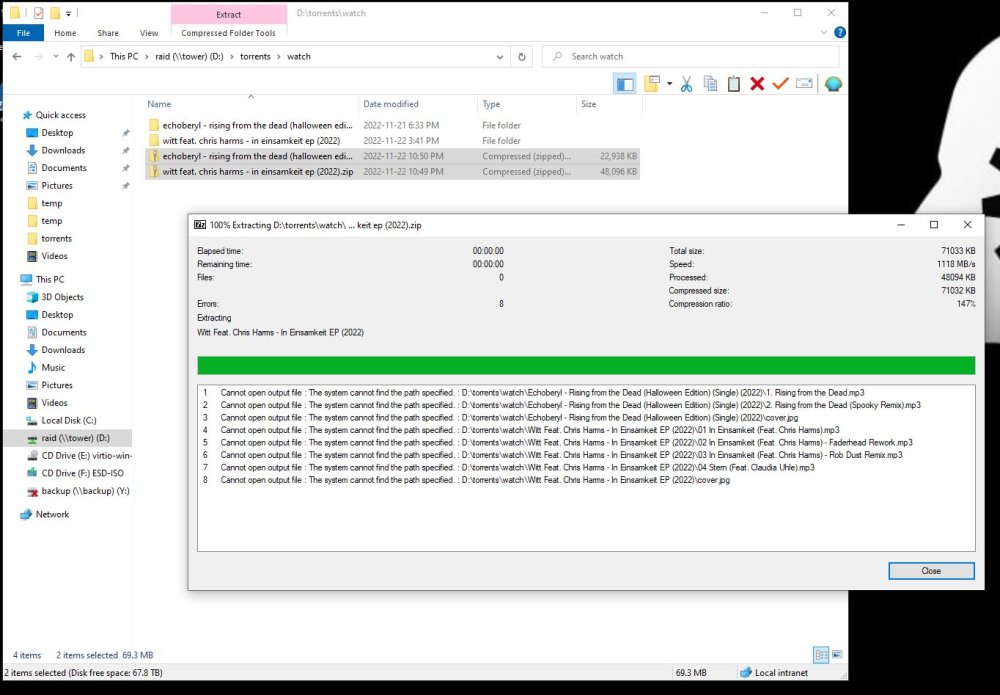
OK, I've just gone ahead and re-did the upgrade to 6.11.5 Attached are the results of the update assistant, a few shots of my Windows 10 VM being unable to read/write to the array, and the diagnostics. Hopefully someone can figure out what I'm missing/have done wrong. tower-diagnostics-20221123-1156.zip assistant.txt

-
OK, so I've tried updating a couple of times and I've run into issues with my one and only VM not starting. I'll sit there at the dashboard watching one thread sit at 100% for infinity. Tried updating the virtio drivers to virtio-win-0.1.225, in 6.10.3 and had that make the VM unresponsive prior to updating. Reverted back to virtio-win-0.1.190-1.iso and had to reboot the unraid server before I could get the VM running again. So, having run the update assistant, and it found nothing. If I were to shut down the VM, run the update process to 6.11.4, and I run into VM or IO issues, what sort of logs/diagnostics should I capture pre/post update if things aren't running well. The last time I tried I could get the VM running on (I believe 6.11.2) but weird random patched of my array were visible, but un-runnable (I can see the mp3, it won't play). Reverted back to 6.10.3 and everything was fine again. I just don't want to waste anyones time without the proper logs.
-
OK, so when upgrading to 6.11 my Windows 10 VM goes completely flaky. Won't start after stopping it, and if you log into it after a fresh unraid reboot, it acts crazy unable to access random directories on my main share. Realized I didn't have the time to diagnose anything, I rolled back to 6.10.3 everything works fine. HOWEVER I'm now seeing periodic reads across all disks, and none are able to spin down. iotop reports Total DISK READ : 62.36 K/s | Total DISK WRITE : 1578.55 K/s Actual DISK READ: 62.36 K/s | Actual DISK WRITE: 0.00 B/s TID PRIO USER DISK READ DISK WRITE SWAPIN IO> COMMAND 5705 be/4 root 31.18 K/s 997.80 K/s ?unavailable? shfs /mnt/user -disks 255 -o~w_other,noatime -o remember=0 32607 be/4 root 31.18 K/s 0.00 B/s ?unavailable? shfs /mnt/user -disks 255 -o~w_other,noatime -o remember=0 8035 be/4 root 0.00 B/s 565.16 K/s ?unavailable? shfs /mnt/user -disks 255 -o~w_other,noatime -o remember=0 1961 be/4 root 0.00 B/s 15.59 K/s ?unavailable? qemu-system-x86_64 -name gue~ny -msg timestamp=on [worker] 6144 be/4 root 0.00 B/s 0.00 B/s ?unavailable? [kvm-nx-lpage-re] 1 be/4 root 0.00 B/s 0.00 B/s ?unavailable? init 2 be/4 root 0.00 B/s 0.00 B/s ?unavailable? [kthreadd] I'm not sure how to interpret this to figure out whats accessing the array...
-
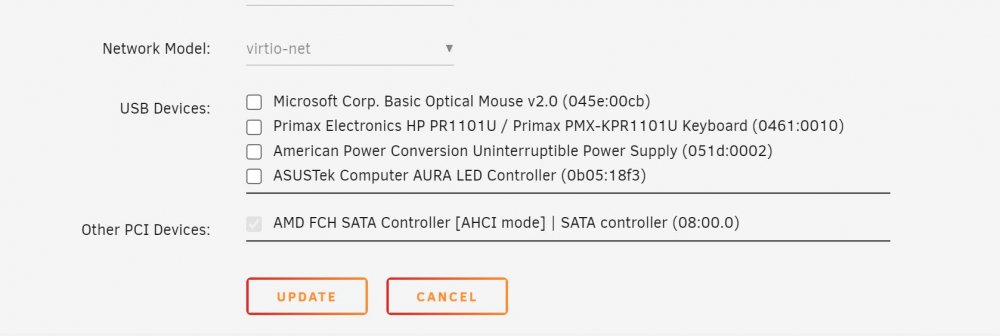
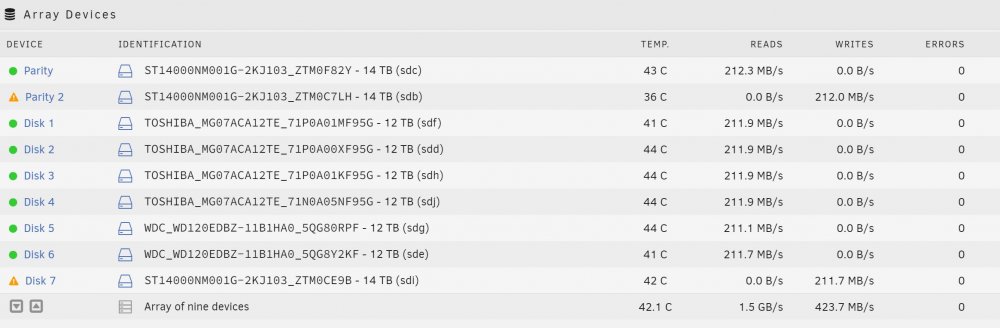
Interestingly, I started the array, with the VM set to autostart=off. Edited the config, and didn't see anything out of the ordinary in the config. Started the VM and... I then stopped the VM, and the SATA controller was present to be unchecked. Of course, then drive 7 did the disabled thing again, so I had to do the maintenance mode stop/start of the array to get it enabled again. Couldn't stop the array so I had to reboot in safe mode, do the changes, (enabling disk 7 and adding the "new" disk from the SATA controller, Parity 2) and rebooted back into normal mode. I had to reboot into safe mode because the array just wouldn't stop. Something seems very finicky. But its rebooted, the VM is up, and the array is rebuilding for the 4th time in almost as many days.
-
Where would this even be set? I haven't set up the VM to pass through anything other than the graphics card. Is it somehow grabbing it by default?
-
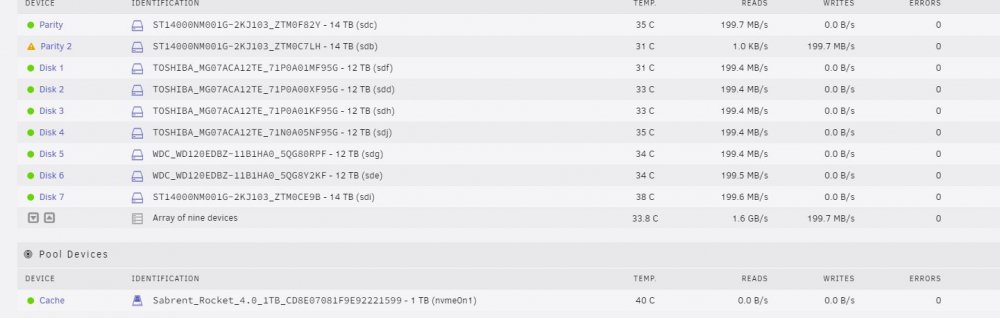
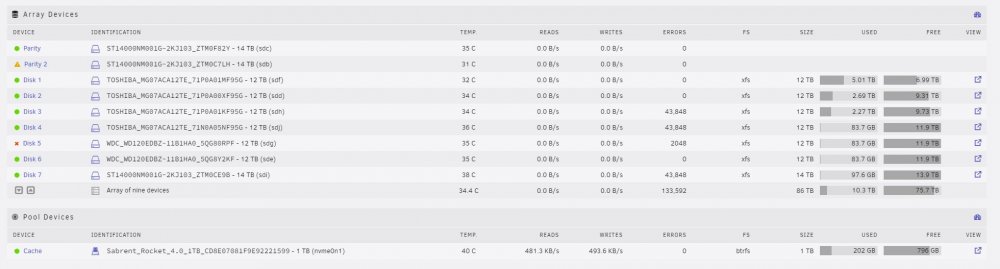
OK, so this time I started it up in safe mode, and I was able to add the device in as my 2nd parity drive. HOWEVER. When I cancelled the parity check and rebooted into normal mode, everything goes to hell. Diagnostics attached. tower-diagnostics-20220729-1739.zip
-
Will do!
-
BIOS can, yes. Once this latest round of parity check is complete in ~8 hours I'll re-attach the drive and post screen shots of the garbage that shows up in unRAID.
-
I should note that the Sata controller I'm using for this drive is an ASMedia 1064.
-
OK, did a bit of a hardware swap, put the contents of my unraid server in a Rosewill server case. My drives were controlled by an Adaptec 8805 in HBA mode, but when I booted it up there were tonnes of errors. Checked all of the cables, reseated everything, same deal. I had 9 drives, 2 parity and 7 data. So I just plugged 8 of them into the SATA ports on my x570 motherboard, let parity rebuild, and everything works. Now I have a "spare" exos 14TB drive, so I picked up a SATA controller and plugged it in. Drive 7 (also an exos 14tb) went disabled. So I yanked out the new drive, did the enable/disable on drive 7 and parity is again rebuilding. Is there a place where drive information is stored in unraid? Nothing shows on unassigned or historical drive lists. I'm going to attach the drive to another PC and delete any partitions, format, etc. But I'm left wondering if there's a config somewhere that has this drive SN stored, I just have this feeling that unraid is "remembering" this drive and causing chaos.





