NickT
Members
-
Joined
-
Last visited
-
The new power supply seems to have solved it.
-
Ok, I'll swap that out and try again.
-
The power supply in this system is quite old. Could that be the issue?
-
Started getting errors on the new drive that's preclearing. paragon-unraid-diagnostics-20220902-1318.zip
-
Just did that, with new cables. So far the preclear is going much faster with no errors. First time it slowed as far as 29 MB/s, now its going around 280. I've started a read check on the array, I'll update with the result of that. The HBA works fine with the other drives, though they are on a different cable.
-
I just had an issue with a seagate exos 14tb parity drive causing the following errors and system lockups: After swapping cables and ports, it didn't go away. So I removed the drive and all seemed well. Now another identical drive is showing read errors during a read check. Both drives are only a few months old. I ordered a replacement for the parity drive, of the same model, and now during pre-clear the syslog is showing errors on that too. It seems pretty unlikely that I'd have 3 bad drives in a row. My other drives, connected to the same HBA seem to be fine. Could this be a compatibiliy issue? paragon-unraid-diagnostics-20220901-1513.zip
-
Great, that did it. Thanks!
-
Phase 1 - find and verify superblock... Phase 2 - using internal log - zero log... Log inconsistent or not a log (last==0, first!=1) empty log check failed zero_log: cannot find log head/tail (xlog_find_tail=22) - scan filesystem freespace and inode maps... agf_freeblks 241067421, counted 240994714 in ag 0 finobt ir_freecount/free mismatch, inode chunk 0/128, freecount 20 nfree 18 agi_freecount 15, counted 16 in ag 0 agi_freecount 15, counted 20 in ag 0 finobt sb_ifree 409, counted 410 sb_fdblocks 1619703759, counted 1719929369 - found root inode chunk Phase 3 - for each AG... - scan (but don't clear) agi unlinked lists... - process known inodes and perform inode discovery... - agno = 0 Metadata corruption detected at 0x435c43, xfs_inode block 0x80/0x4000 bad CRC for inode 128 bad magic number 0xdab2 on inode 128 bad next_unlinked 0xff7fa63e on inode 128 Bad flags2 set in inode 128 bad CRC for inode 129 bad CRC for inode 133 bad CRC for inode 134 bad version number 0x43 on inode 134 inode identifier 1078070150 mismatch on inode 134 bad CRC for inode 128, would rewrite bad magic number 0xdab2 on inode 128, would reset magic number bad next_unlinked 0xff7fa63e on inode 128, would reset next_unlinked Bad flags2 set in inode 128 would fix bad flags2. root inode 128 has bad type 0xa000 would reset to directory Bad extent size 1191182336 on inode 128, would reset to zero bad attr fork offset 65 in inode 128, max=42 would clear root inode 128 bad CRC for inode 129, would rewrite would clear realtime bitmap inode 129 bad CRC for inode 133, would rewrite would have cleared inode 133 bad CRC for inode 134, would rewrite bad version number 0x43 on inode 134, would reset version number inode identifier 1078070150 mismatch on inode 134 would have cleared inode 134 - agno = 1 - agno = 2 - agno = 3 - agno = 4 - agno = 5 - agno = 6 - agno = 7 - process newly discovered inodes... Phase 4 - check for duplicate blocks... - setting up duplicate extent list... root inode would be lost - check for inodes claiming duplicate blocks... - agno = 0 - agno = 2 bad CRC for inode 128, would rewrite bad magic number 0xdab2 on inode 128, - agno = 4 - agno = 6 - agno = 7 - agno = 3 - agno = 1 would reset magic number bad next_unlinked 0xff7fa63e on inode 128, - agno = 5 entry "The Sandman" in shortform directory 8594108544 references free inode 176 would have junked entry "The Sandman" in directory inode 8594108544 would reset next_unlinked Bad flags2 set in inode 128 would fix bad flags2. Would clear next_unlinked in inode 128 root inode 128 has bad type 0xa000 would reset to directory Bad extent size 1191182336 on inode 128, would reset to zero bad attr fork offset 65 in inode 128, max=42 would clear root inode 128 bad CRC for inode 129, would rewrite would clear realtime bitmap inode 129 entry "Heroes.S02E03.1080p.Bluray.x264-hV.mkv" at block 0 offset 152 in directory inode 132 references free inode 134 would clear inode number in entry at offset 152... bad CRC for inode 133, would rewrite would have cleared inode 133 bad CRC for inode 134, would rewrite bad version number 0x43 on inode 134, would reset version number inode identifier 1078070150 mismatch on inode 134 would have cleared inode 134 No modify flag set, skipping phase 5 Inode allocation btrees are too corrupted, skipping phases 6 and 7 Maximum metadata LSN (1:260039) is ahead of log (0:0). Would format log to cycle 4. No modify flag set, skipping filesystem flush and exiting.
-
I can find no option to run a check on disk 4, either in normal mode or maintenance mode.
-
paragon-unraid-diagnostics-20220831-0910.zip
-
Planning to remove the parity drive, I reconnected the 8tb drive I had removed earlier. Unraid said it was unmountable and started a parity check/rebuild. However this was going at around 200kb/sec, so I canceled, reset the config and removed the parity drive. That seemed to fix all my performance issues. So I'm left with a tb or so of replaceable data missing from the 8tb drive. Is that data recoverable, or should I just format the drive and call it lost?
-
Tried switching the parity drive to a different cable and sata port. Same error, just on ata5 now instead of 6. I did have the parity drive connected to the HBA at first, but it showed read errors until I moved it back to the motherboard port. Is it likely to be a bad drive?
-
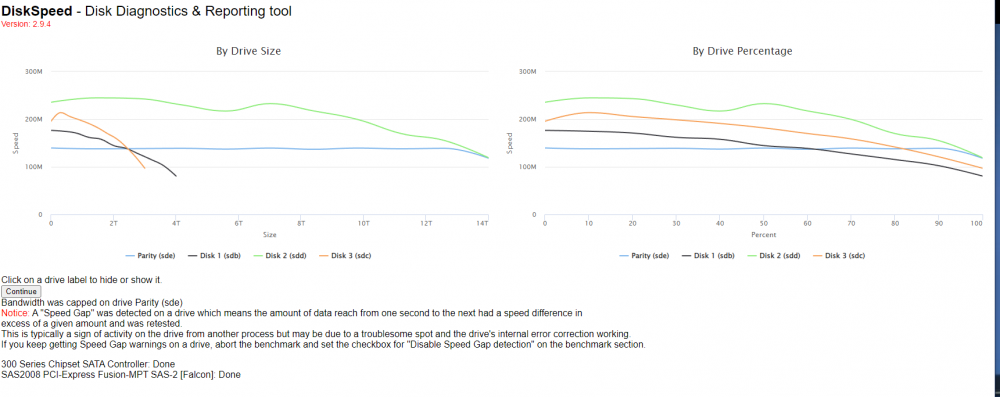
I've had unraid running for 6 months or so now, mainly as a plex server but with a few other dockers as well. I don't have a cache drive, but that hasn't been a problem until now. Recently I added an LSI 9211-8i HBA and an old 8tb SMR seagate drive I had laying around. After the upgrade I started getting performance issues, getting worse over time. Currently when I have any docker containers running, the dashboard shows high cpu usage but htop and iotop show nothing. I tried removing the hba and running all my drives on the motherboard sata ports. This didn't help. I tried removing the new drive, thinking a bad drive could be the problem. No change. I tried running a benchmark on my drives with the diskspeed app. My parity drive was limited to around 150mbps, but the others seemed to be normal. The system log is showing a lot of ata errors, but I don't understand what they mean. Any ideas? paragon-unraid-diagnostics-20220829-1604.zip