




Skip to content
View in the app

A better way to browse. Learn more.

Unraid

A full-screen app on your home screen with push notifications, badges and more.

To install this app on iOS and iPadOS
  1. Tap the Share icon in Safari
  2. Scroll the menu and tap Add to Home Screen.
  3. Tap Add in the top-right corner.
To install this app on Android
  1. Tap the 3-dot menu (⋮) in the top-right corner of the browser.
  2. Tap Add to Home screen or Install app.
  3. Confirm by tapping Install.

Redurion

Members
  • Joined

  • Last visited

Everything posted by Redurion

  1. Thanks, that does the job
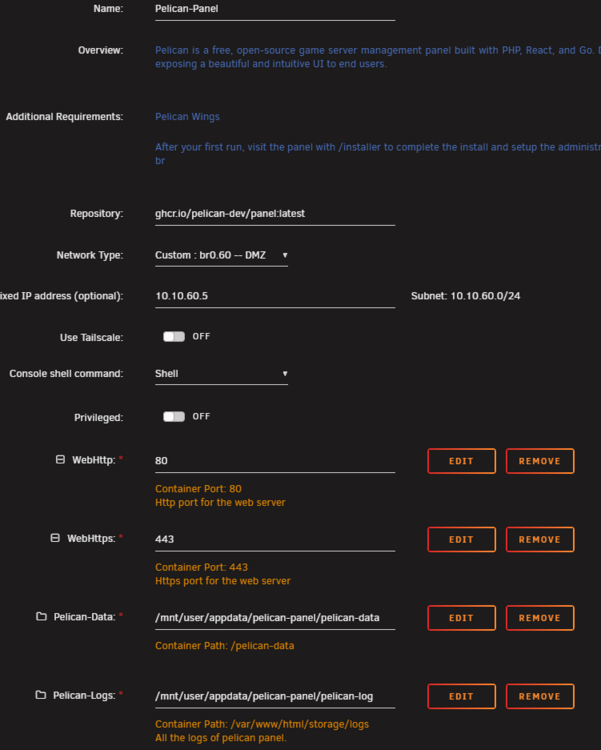
  2. Hi, I've some problems launching the Pelican Panel container. In my opinion everything is configured right, but everytime the container starts it crashed immediately and i've this in the log: In StreamHandler.php line 156: The stream or file "/var/www/html/storage/logs/laravel-2025-08-12.log" coul d not be opened in append mode: Failed to open stream: Permission denied The exception occurred while attempting to log: file_get_contents(/var/www/ html/.env): Failed to open stream: No such file or directory Context: {"exception":{}} I've no idea what I'm doing wrong. This is my container config: Best regards
Account

Navigation

Search

Search

Configure browser push notifications

Chrome (Android)
  1. Tap the lock icon next to the address bar.
  2. Tap Permissions → Notifications.
  3. Adjust your preference.
Chrome (Desktop)
  1. Click the padlock icon in the address bar.
  2. Select Site settings.
  3. Find Notifications and adjust your preference.