





Homer007
Members
-
Joined
-
Last visited
Everything posted by Homer007
-
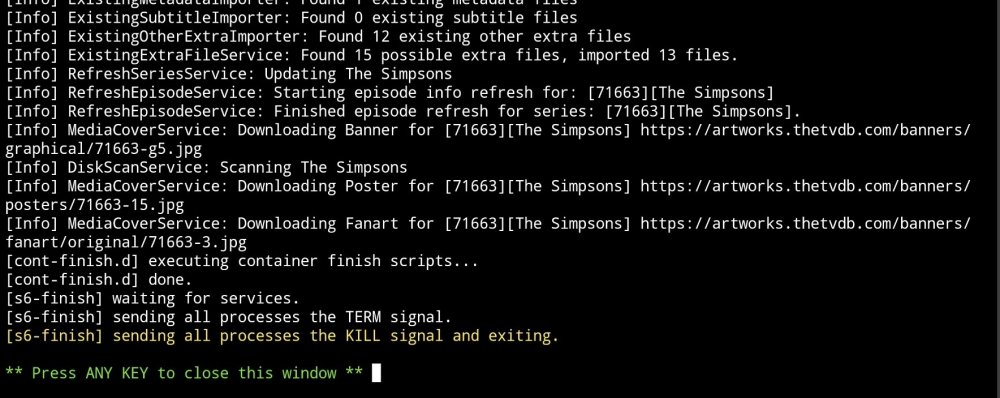
Hi everyone, new unRAID user here 😎 I started setting up my first unRAID server a few days ago, and generally I haven't had too many issues. The last thing I've been trying to do is to set up the media server etc part of the server, and for the last 2 days I have been trying to solve why my Sonarr docker keeps shutting down on its own. I'm at the point now where I don't know what else to try. I've rebooted many times. I've reinstalled the docker many times. I upgraded unRAID this morning. I've attached a screenshot of the last few entries to the docker's log. Please let me know if I can provide any other info which will help. Thanks in advance everyone.
-
I read somewhere that there is a folder on the flash drive that has a "-" after the name of it, and what some people have done is that they have removed the "-" and it's solved their issue of trying to get unRAID to boot up. Maybe this will solve your issue too. I'm only very new to unRAID myself so I may be totally off, but you have nothing to lose by trying it.
-
Thanks for replying! I can't remember if I unmounted the drive or not. I've done a few reboots which haven't helped. AND MY DRIVES ARE DROPPING LIKE FLIES!.... Now my SSD is showing as a historical drive despite being installed, plus I have a second drive doing the exact same thing. I haven't yet booted into Windows yet to check if they can be seen in the Windows environment; I won't get to do that now until tomorrow, but this is a little worrying... Here is the log that I just downloaded. tower-syslog-20220607-1223.zip
-
Hi everyone. My first post! I've just started my first unRAID. I have a couple drives, one is totally empty, but the rest have stuff on them. The plan is to not use parity immediately as I'll have a new drive coming soon which I'll add as the parity drive. So for now I'm just trying to get the machine running. While trying to work out how to transfer my stuff, I mounted one of the drives which are full. For some reason which I can't remember, I soon after shut it down, took that drive out and I connected another one of my drives. I then started it again, and then I did the same and put a completely different drive in. I repeated it again and this time I put the previous drive back in, not the one which has my stuff. I wasn't able to access the data on this drive and I noticed that both it and the drive that has my stuff on it, were both showing up as historical drives. I thought that seeing that I wasn't able to access this drive it may have been because I connected it to a different port, so I thought that if I cleared both drives as historical drives, then this drive might work, and when I go to install the drive that has stuff on it, I wouldn't then have any possible issues. So I go and remove the historical drives, I turn it off and I reinstalled my drive with my stuff on it. Now this drive won't work; it won't show up at all. I won't be surprised if the above lists things that I didn't need to do, so please don't go into the reasons too much, coz it's done now. I would just like to have access to the drive again. I still have a SSD with a working Windows 10 on it, and I can't see the drive in the Windows environment either. This probably means that somehow I may of killed the drive, but before I firmly come to this conclusion I thought I'd ask here. The drive is a WD Gold drive which I bought just over 4 years ago, so it's still under warranty, so in terms of storage space in covered, but this isn't obviously the case for it's contents. Anyways, I'm keen to hear why ideas! Cheers!
