ArchonX
Members
-
Joined
-
Last visited
Everything posted by ArchonX
-
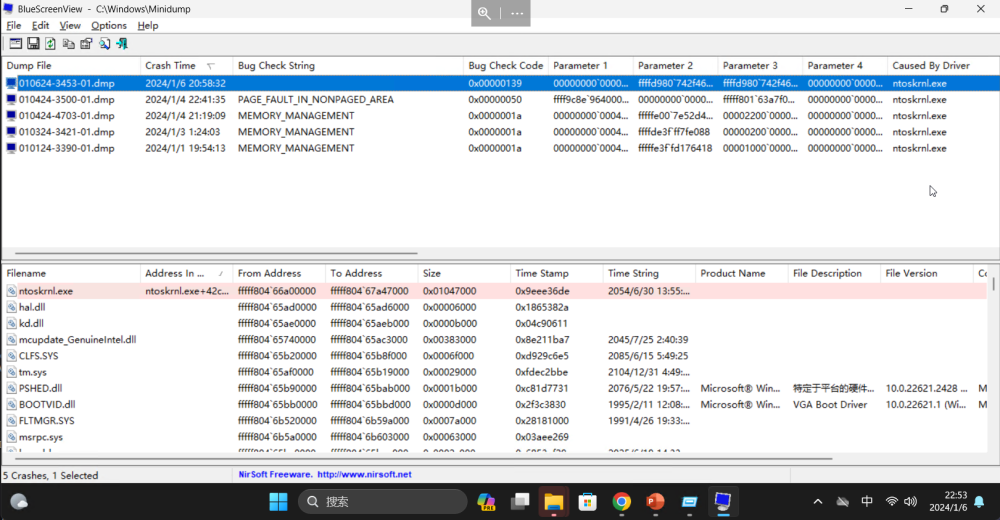
我在更换了一条内存后问题得到解决,我的蓝屏代码经常不一样,但多跟内存有关。
-
死机问题初步判断是一根内存有问题,拆下该内存后,Windows死机现象没在出现。等换了新内存插上再试试。
-
是否有解决方案能够让WSL2在Windows 11 VM 中运行?13900K遇到了同样的问题
-
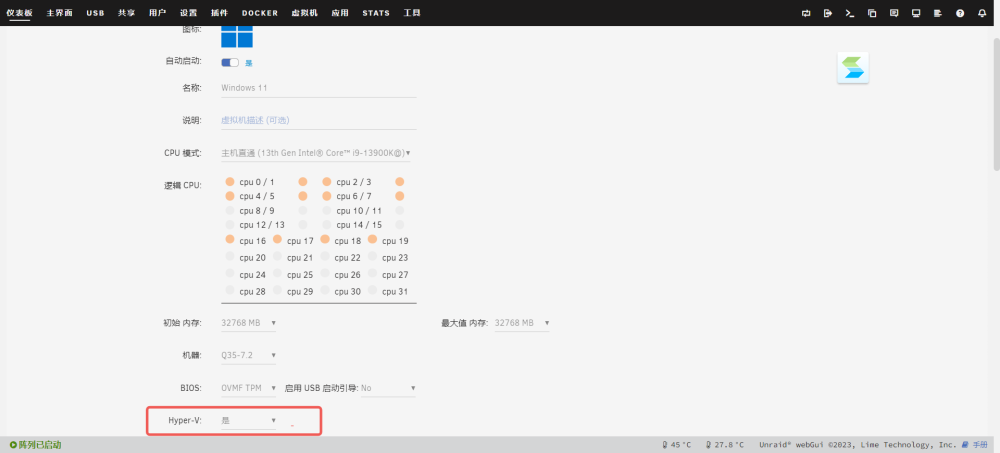
我指的不是xml中的Hyper-V,而是在Windows系统开启Hyper-V或者安装WSL2。xml中的Hyper-V不开会导致虚拟显卡用不了。
-
Hyper-V要设置成是,否则就报你刚才那个错误
-
Win11虚拟机需要安装Docker Dsektop 所以需要开启WSL2/Hyper-V,开启之后开机会进入系统修复,但修复无效,下次开机还会要求修复系统,不断重复。 CPU: Intel 13900k 主板:华硕 Pro Art Z790
-
没有共用核心,UNRAID只有四个小核能用,其余的都隔离了
-
已登录用户崩溃的情况解决了,虚拟机死机CPU满载的问题仍出现过一次
-
关闭了ASPM及处理器C状态后,似乎解决了问题,今天没有再崩溃亏过,还需要再观察观察
-
我这的问题应该和你是一样的,也提示了ntoskrnl.exe
-
关闭xhci hand-off无效
-
17:01发生Windows11虚拟机死机,分配给虚拟机的CPU全红。系统日志再给时间点没有任何异常记录,只有一条死机后我登陆UNRAID的记录。 unraid-syslog-20231224-0902.zip
-
主板的bios还是虚拟机的bios?
-
已登录的用户崩溃,表现为远程桌面断开,15-20s后又重新连接上,重新登陆用户,用户原来正在执行的任务中断。 虚拟机日志没有产生任何与崩溃有关的记录 系统日志在崩溃的时间点产生了如下日志: Dec 15 22:42:28 UNRAID kernel: usb 1-14: reset full-speed USB device number 5 using xhci_hcd Dec 15 22:42:28 UNRAID kernel: usb 1-11: reset full-speed USB device number 3 using xhci_hcd Dec 15 22:42:28 UNRAID kernel: usb 1-10.1: reset full-speed USB device number 4 using xhci_hcd Dec 15 22:42:44 UNRAID kernel: usb 1-14: reset full-speed USB device number 5 using xhci_hcd Dec 15 22:42:45 UNRAID kernel: usb 1-11: reset full-speed USB device number 3 using xhci_hcd Dec 15 22:42:45 UNRAID kernel: usb 1-10.1: reset full-speed USB device number 4 using xhci_hcd
-
pci=noaer in your syslinux configuration.
-
There are three virtual machines installed on Unraid - Synology, Ubuntu, and Windows 11. Only Windows 11 encounters this crash phenomenon. After the crash, the CPU is fully loaded for the Windows 11 virtual machine. This happens very frequently, about 1-2 times per day at random times. Additionally, when logging in via remote desktop, sometimes the logged in user will crash and get logged out, requiring re-login. Although the virtual machine does not crash, any tasks the logged in user was running get interrupted. This also happens frequently, about 2-3 times per day. This issue did not occur originally when using the B560+10100 CPU. It started happening after upgrading to the Z790+13900K. The problem still exists after updating to version 6.12.6. <?xml version='1.0' encoding='UTF-8'?> <domain type='kvm' id='4'> <name>Windows 11</name> <uuid>90338672-d29a-1fd7-e8bd-45756b16f49b</uuid> <metadata> <vmtemplate xmlns="unraid" name="Windows 11" icon="windows11.png" os="windowstpm"/> </metadata> <memory unit='KiB'>33554432</memory> <currentMemory unit='KiB'>33554432</currentMemory> <memoryBacking> <nosharepages/> </memoryBacking> <vcpu placement='static'>12</vcpu> <cputune> <vcpupin vcpu='0' cpuset='0'/> <vcpupin vcpu='1' cpuset='1'/> <vcpupin vcpu='2' cpuset='2'/> <vcpupin vcpu='3' cpuset='3'/> <vcpupin vcpu='4' cpuset='4'/> <vcpupin vcpu='5' cpuset='5'/> <vcpupin vcpu='6' cpuset='6'/> <vcpupin vcpu='7' cpuset='7'/> <vcpupin vcpu='8' cpuset='16'/> <vcpupin vcpu='9' cpuset='17'/> <vcpupin vcpu='10' cpuset='18'/> <vcpupin vcpu='11' cpuset='19'/> </cputune> <resource> <partition>/machine</partition> </resource> <os> <type arch='x86_64' machine='pc-i440fx-7.1'>hvm</type> <loader readonly='yes' type='pflash'>/usr/share/qemu/ovmf-x64/OVMF_CODE-pure-efi-tpm.fd</loader> <nvram>/etc/libvirt/qemu/nvram/90338672-d29a-1fd7-e8bd-45756b16f49b_VARS-pure-efi-tpm.fd</nvram> <boot dev='hd'/> </os> <features> <acpi/> <apic/> <hyperv mode='custom'> <relaxed state='on'/> <vapic state='on'/> <spinlocks state='on' retries='8191'/> <vendor_id state='on' value='none'/> </hyperv> </features> <cpu mode='host-passthrough' check='none' migratable='on'> <topology sockets='1' dies='1' cores='6' threads='2'/> <cache mode='passthrough'/> </cpu> <clock offset='localtime'> <timer name='hypervclock' present='yes'/> <timer name='hpet' present='no'/> </clock> <on_poweroff>destroy</on_poweroff> <on_reboot>restart</on_reboot> <on_crash>restart</on_crash> <devices> <emulator>/usr/local/sbin/qemu</emulator> <controller type='usb' index='0' model='qemu-xhci' ports='15'> <alias name='usb'/> <address type='pci' domain='0x0000' bus='0x00' slot='0x07' function='0x0'/> </controller> <controller type='virtio-serial' index='0'> <alias name='virtio-serial0'/> <address type='pci' domain='0x0000' bus='0x00' slot='0x03' function='0x0'/> </controller> <controller type='pci' index='0' model='pci-root'> <alias name='pci.0'/> </controller> <serial type='pty'> <source path='/dev/pts/2'/> <target type='isa-serial' port='0'> <model name='isa-serial'/> </target> <alias name='serial0'/> </serial> <console type='pty' tty='/dev/pts/2'> <source path='/dev/pts/2'/> <target type='serial' port='0'/> <alias name='serial0'/> </console> <channel type='unix'> <source mode='bind' path='/var/lib/libvirt/qemu/channel/target/domain-4-Windows 11/org.qemu.guest_agent.0'/> <target type='virtio' name='org.qemu.guest_agent.0' state='disconnected'/> <alias name='channel0'/> <address type='virtio-serial' controller='0' bus='0' port='1'/> </channel> <input type='tablet' bus='usb'> <alias name='input0'/> <address type='usb' bus='0' port='4'/> </input> <input type='mouse' bus='ps2'> <alias name='input1'/> </input> <input type='keyboard' bus='ps2'> <alias name='input2'/> </input> <tpm model='tpm-tis'> <backend type='emulator' version='2.0' persistent_state='yes'/> <alias name='tpm0'/> </tpm> <graphics type='vnc' port='5902' autoport='yes' websocket='5702' listen='0.0.0.0' keymap='en-us'> <listen type='address' address='0.0.0.0'/> </graphics> <audio id='1' type='none'/> <video> <model type='qxl' ram='65536' vram='65536' vgamem='16384' heads='1' primary='yes'/> <alias name='video0'/> <address type='pci' domain='0x0000' bus='0x00' slot='0x02' function='0x0'/> </video> <hostdev mode='subsystem' type='pci' managed='yes'> <driver name='vfio'/> <source> <address domain='0x0000' bus='0x00' slot='0x14' function='0x3'/> </source> <alias name='hostdev0'/> <address type='pci' domain='0x0000' bus='0x00' slot='0x04' function='0x0'/> </hostdev> <hostdev mode='subsystem' type='pci' managed='yes'> <driver name='vfio'/> <source> <address domain='0x0000' bus='0x00' slot='0x16' function='0x0'/> </source> <alias name='hostdev1'/> <address type='pci' domain='0x0000' bus='0x00' slot='0x05' function='0x0'/> </hostdev> <hostdev mode='subsystem' type='pci' managed='yes'> <driver name='vfio'/> <source> <address domain='0x0000' bus='0x02' slot='0x00' function='0x0'/> </source> <alias name='hostdev2'/> <address type='pci' domain='0x0000' bus='0x00' slot='0x06' function='0x0'/> </hostdev> <hostdev mode='subsystem' type='usb' managed='no'> <source startupPolicy='optional' missing='yes'> <vendor id='0x1e71'/> <product id='0x3008'/> </source> <alias name='hostdev4'/> <address type='usb' bus='0' port='2'/> </hostdev> <hostdev mode='subsystem' type='usb' managed='no'> <source> <address bus='1' device='12'/> </source> <alias name='hostdev5'/> <address type='usb' bus='0' port='1'/> </hostdev> <memballoon model='none'/> </devices> <seclabel type='dynamic' model='dac' relabel='yes'> <label>+0:+100</label> <imagelabel>+0:+100</imagelabel> </seclabel> </domain>
-
Unraid安装有三台虚拟机分别为Synology、Unbuntu、Windows11,只有Win11会出现这种死机现象,死机后分配给Win11虚拟机CPU满载。发生频率很高约一天1-2次,随机出现。 另外通过远程桌面登录,有时会产生已登录的用户崩溃并被注销,需要重新登录,虚拟机虽然不会死机,但已登录用户中正在执行的任务会被中断,发生频率也很高约一天2-3次。 CPU原来使用B560+10100时未出现该现象,更换为Z790+13900K后出现,重装系统无效,两类问题均会出现,Windows版本为最新的23H2。 更新至6.12.6后该问题仍然存在。 <?xml version='1.0' encoding='UTF-8'?> <domain type='kvm' id='4'> <name>Windows 11</name> <uuid>90338672-d29a-1fd7-e8bd-45756b16f49b</uuid> <metadata> <vmtemplate xmlns="unraid" name="Windows 11" icon="windows11.png" os="windowstpm"/> </metadata> <memory unit='KiB'>33554432</memory> <currentMemory unit='KiB'>33554432</currentMemory> <memoryBacking> <nosharepages/> </memoryBacking> <vcpu placement='static'>12</vcpu> <cputune> <vcpupin vcpu='0' cpuset='0'/> <vcpupin vcpu='1' cpuset='1'/> <vcpupin vcpu='2' cpuset='2'/> <vcpupin vcpu='3' cpuset='3'/> <vcpupin vcpu='4' cpuset='4'/> <vcpupin vcpu='5' cpuset='5'/> <vcpupin vcpu='6' cpuset='6'/> <vcpupin vcpu='7' cpuset='7'/> <vcpupin vcpu='8' cpuset='16'/> <vcpupin vcpu='9' cpuset='17'/> <vcpupin vcpu='10' cpuset='18'/> <vcpupin vcpu='11' cpuset='19'/> </cputune> <resource> <partition>/machine</partition> </resource> <os> <type arch='x86_64' machine='pc-i440fx-7.1'>hvm</type> <loader readonly='yes' type='pflash'>/usr/share/qemu/ovmf-x64/OVMF_CODE-pure-efi-tpm.fd</loader> <nvram>/etc/libvirt/qemu/nvram/90338672-d29a-1fd7-e8bd-45756b16f49b_VARS-pure-efi-tpm.fd</nvram> <boot dev='hd'/> </os> <features> <acpi/> <apic/> <hyperv mode='custom'> <relaxed state='on'/> <vapic state='on'/> <spinlocks state='on' retries='8191'/> <vendor_id state='on' value='none'/> </hyperv> </features> <cpu mode='host-passthrough' check='none' migratable='on'> <topology sockets='1' dies='1' cores='6' threads='2'/> <cache mode='passthrough'/> </cpu> <clock offset='localtime'> <timer name='hypervclock' present='yes'/> <timer name='hpet' present='no'/> </clock> <on_poweroff>destroy</on_poweroff> <on_reboot>restart</on_reboot> <on_crash>restart</on_crash> <devices> <emulator>/usr/local/sbin/qemu</emulator> <controller type='usb' index='0' model='qemu-xhci' ports='15'> <alias name='usb'/> <address type='pci' domain='0x0000' bus='0x00' slot='0x07' function='0x0'/> </controller> <controller type='virtio-serial' index='0'> <alias name='virtio-serial0'/> <address type='pci' domain='0x0000' bus='0x00' slot='0x03' function='0x0'/> </controller> <controller type='pci' index='0' model='pci-root'> <alias name='pci.0'/> </controller> <serial type='pty'> <source path='/dev/pts/2'/> <target type='isa-serial' port='0'> <model name='isa-serial'/> </target> <alias name='serial0'/> </serial> <console type='pty' tty='/dev/pts/2'> <source path='/dev/pts/2'/> <target type='serial' port='0'/> <alias name='serial0'/> </console> <channel type='unix'> <source mode='bind' path='/var/lib/libvirt/qemu/channel/target/domain-4-Windows 11/org.qemu.guest_agent.0'/> <target type='virtio' name='org.qemu.guest_agent.0' state='disconnected'/> <alias name='channel0'/> <address type='virtio-serial' controller='0' bus='0' port='1'/> </channel> <input type='tablet' bus='usb'> <alias name='input0'/> <address type='usb' bus='0' port='4'/> </input> <input type='mouse' bus='ps2'> <alias name='input1'/> </input> <input type='keyboard' bus='ps2'> <alias name='input2'/> </input> <tpm model='tpm-tis'> <backend type='emulator' version='2.0' persistent_state='yes'/> <alias name='tpm0'/> </tpm> <graphics type='vnc' port='5902' autoport='yes' websocket='5702' listen='0.0.0.0' keymap='en-us'> <listen type='address' address='0.0.0.0'/> </graphics> <audio id='1' type='none'/> <video> <model type='qxl' ram='65536' vram='65536' vgamem='16384' heads='1' primary='yes'/> <alias name='video0'/> <address type='pci' domain='0x0000' bus='0x00' slot='0x02' function='0x0'/> </video> <hostdev mode='subsystem' type='pci' managed='yes'> <driver name='vfio'/> <source> <address domain='0x0000' bus='0x00' slot='0x14' function='0x3'/> </source> <alias name='hostdev0'/> <address type='pci' domain='0x0000' bus='0x00' slot='0x04' function='0x0'/> </hostdev> <hostdev mode='subsystem' type='pci' managed='yes'> <driver name='vfio'/> <source> <address domain='0x0000' bus='0x00' slot='0x16' function='0x0'/> </source> <alias name='hostdev1'/> <address type='pci' domain='0x0000' bus='0x00' slot='0x05' function='0x0'/> </hostdev> <hostdev mode='subsystem' type='pci' managed='yes'> <driver name='vfio'/> <source> <address domain='0x0000' bus='0x02' slot='0x00' function='0x0'/> </source> <alias name='hostdev2'/> <address type='pci' domain='0x0000' bus='0x00' slot='0x06' function='0x0'/> </hostdev> <hostdev mode='subsystem' type='usb' managed='no'> <source startupPolicy='optional' missing='yes'> <vendor id='0x1e71'/> <product id='0x3008'/> </source> <alias name='hostdev4'/> <address type='usb' bus='0' port='2'/> </hostdev> <hostdev mode='subsystem' type='usb' managed='no'> <source> <address bus='1' device='12'/> </source> <alias name='hostdev5'/> <address type='usb' bus='0' port='1'/> </hostdev> <memballoon model='none'/> </devices> <seclabel type='dynamic' model='dac' relabel='yes'> <label>+0:+100</label> <imagelabel>+0:+100</imagelabel> </seclabel> </domain>
-
I try to pass through RTL8125b to synologyNAS OR windows11 have same question,the VM fails to boot,syslog show PCIe Bus Error,Have you solved this problem? Jun 16 22:10:04 UNRAID kernel: pcieport 0000:00:1c.7: AER: Uncorrected (Non-Fatal) error received: 0000:00:1c.7 Jun 16 22:10:04 UNRAID kernel: pcieport 0000:00:1c.7: PCIe Bus Error: severity=Uncorrected (Non-Fatal), type=Transaction Layer, (Requester ID) Jun 16 22:10:04 UNRAID kernel: pcieport 0000:00:1c.7: device [8086:43bf] error status/mask=00100000/00000000
-
UNRAID webui的命令行里,我的主板是MSI B560 爆破弹,检测芯片是 6683 亲测有效
-
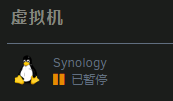
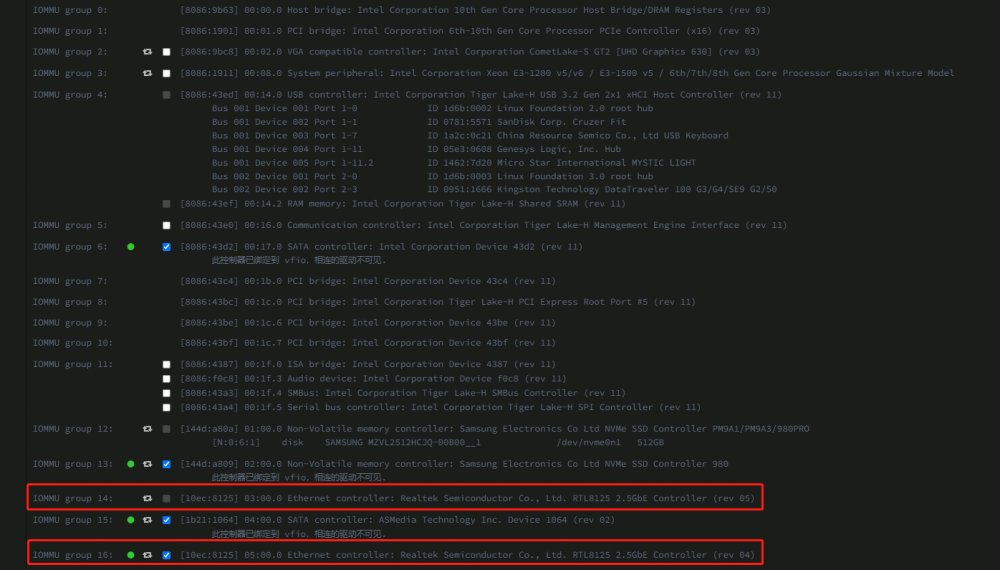
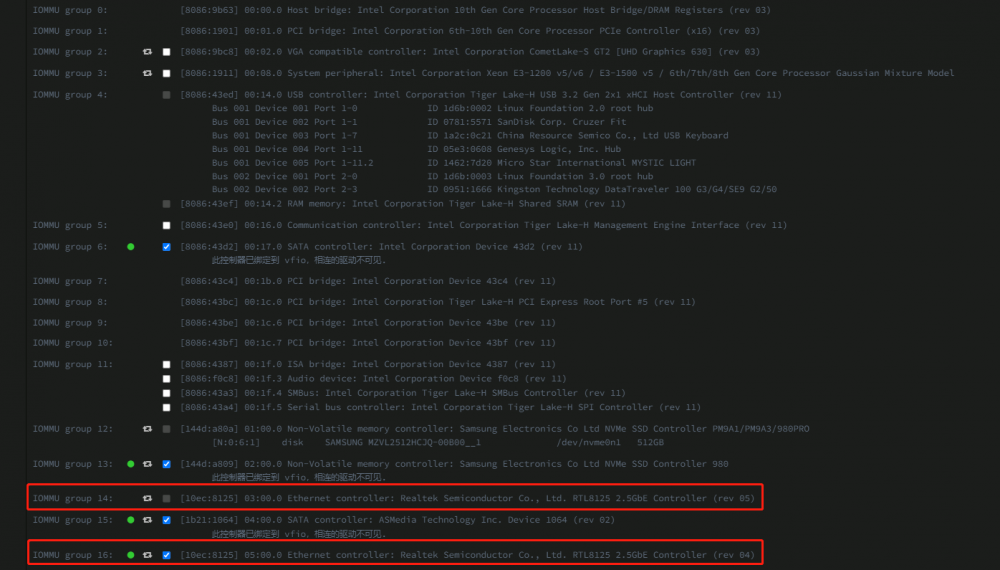
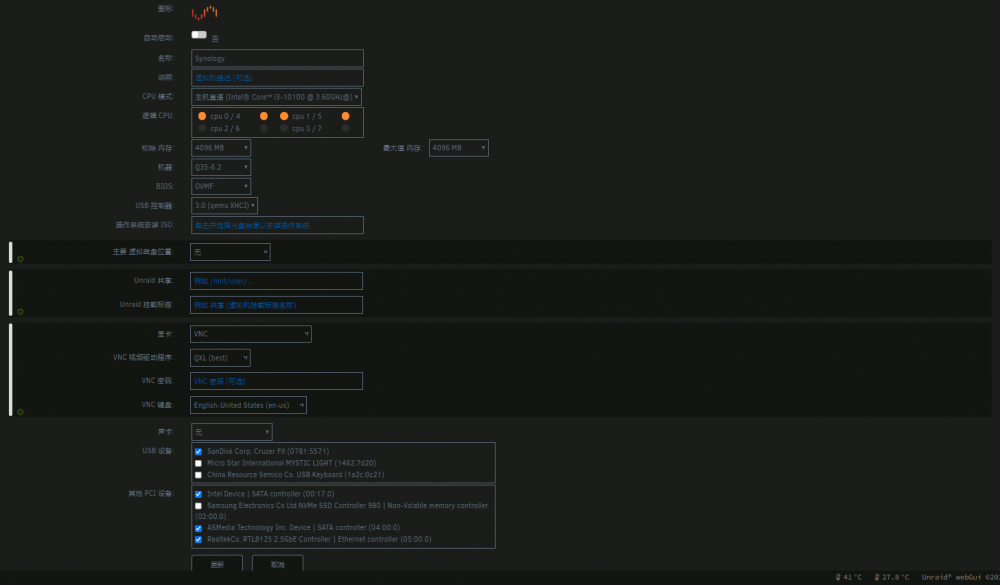
主板:MSI B560M 爆破弹 CPU:i3-10100 内存:威刚 16g ddr4 2666mhz 板载网卡:RTL8125B 2.5GB PCI网卡:RTL8125B 2.5GB UNRAID:6.10.3 问题描述:板载/PCIe网卡RTL8125B,直通黑群晖/Windows 11,启动时可以启动,启动几十秒后,日志后台报错,虚拟机被暂停 PCIe ACS 覆盖 设置为:下游/多功能/both 均不能解决 VFIO 允许不安全的中断 设置为:是/否 均不能解决 两张RTL8125B无论直通哪一张均报错,不直通网卡,直通SATA控制器、NVME硬盘、核心显卡不报错 报错后虚拟机自动被暂停: PCI 设备和 IOMMU 组: 虚拟机配置: 虚拟机XML: <?xml version='1.0' encoding='UTF-8'?> <domain type='kvm'> <name>Synology</name> <uuid>f8a0ae01-c5de-0cc9-45cc-5004203b07e7</uuid> <metadata> <vmtemplate xmlns="unraid" name="Linux" icon="linux.png" os="linux"/> </metadata> <memory unit='KiB'>4194304</memory> <currentMemory unit='KiB'>4194304</currentMemory> <memoryBacking> <nosharepages/> </memoryBacking> <vcpu placement='static'>4</vcpu> <cputune> <vcpupin vcpu='0' cpuset='0'/> <vcpupin vcpu='1' cpuset='4'/> <vcpupin vcpu='2' cpuset='1'/> <vcpupin vcpu='3' cpuset='5'/> </cputune> <os> <type arch='x86_64' machine='pc-q35-6.2'>hvm</type> <loader readonly='yes' type='pflash'>/usr/share/qemu/ovmf-x64/OVMF_CODE-pure-efi.fd</loader> <nvram>/etc/libvirt/qemu/nvram/f8a0ae01-c5de-0cc9-45cc-5004203b07e7_VARS-pure-efi.fd</nvram> <boot dev='hd'/> </os> <features> <acpi/> <apic/> </features> <cpu mode='host-passthrough' check='none' migratable='on'> <topology sockets='1' dies='1' cores='2' threads='2'/> <cache mode='passthrough'/> </cpu> <clock offset='utc'> <timer name='rtc' tickpolicy='catchup'/> <timer name='pit' tickpolicy='delay'/> <timer name='hpet' present='no'/> </clock> <on_poweroff>destroy</on_poweroff> <on_reboot>restart</on_reboot> <on_crash>restart</on_crash> <devices> <emulator>/usr/local/sbin/qemu</emulator> <controller type='usb' index='0' model='qemu-xhci' ports='15'> <address type='pci' domain='0x0000' bus='0x00' slot='0x07' function='0x0'/> </controller> <controller type='sata' index='0'> <address type='pci' domain='0x0000' bus='0x00' slot='0x1f' function='0x2'/> </controller> <controller type='pci' index='0' model='pcie-root'/> <controller type='pci' index='1' model='pcie-root-port'> <model name='pcie-root-port'/> <target chassis='1' port='0x10'/> <address type='pci' domain='0x0000' bus='0x00' slot='0x02' function='0x0' multifunction='on'/> </controller> <controller type='pci' index='2' model='pcie-root-port'> <model name='pcie-root-port'/> <target chassis='2' port='0x11'/> <address type='pci' domain='0x0000' bus='0x00' slot='0x02' function='0x1'/> </controller> <controller type='pci' index='3' model='pcie-root-port'> <model name='pcie-root-port'/> <target chassis='3' port='0x12'/> <address type='pci' domain='0x0000' bus='0x00' slot='0x02' function='0x2'/> </controller> <controller type='pci' index='4' model='pcie-to-pci-bridge'> <model name='pcie-pci-bridge'/> <address type='pci' domain='0x0000' bus='0x01' slot='0x00' function='0x0'/> </controller> <controller type='pci' index='5' model='pcie-root-port'> <model name='pcie-root-port'/> <target chassis='5' port='0x13'/> <address type='pci' domain='0x0000' bus='0x00' slot='0x02' function='0x3'/> </controller> <controller type='pci' index='6' model='pcie-root-port'> <model name='pcie-root-port'/> <target chassis='6' port='0x14'/> <address type='pci' domain='0x0000' bus='0x00' slot='0x02' function='0x4'/> </controller> <controller type='pci' index='7' model='pcie-root-port'> <model name='pcie-root-port'/> <target chassis='7' port='0x15'/> <address type='pci' domain='0x0000' bus='0x00' slot='0x02' function='0x5'/> </controller> <controller type='virtio-serial' index='0'> <address type='pci' domain='0x0000' bus='0x03' slot='0x00' function='0x0'/> </controller> <serial type='pty'> <target type='isa-serial' port='0'> <model name='isa-serial'/> </target> </serial> <console type='pty'> <target type='serial' port='0'/> </console> <channel type='unix'> <target type='virtio' name='org.qemu.guest_agent.0'/> <address type='virtio-serial' controller='0' bus='0' port='1'/> </channel> <input type='tablet' bus='usb'> <address type='usb' bus='0' port='2'/> </input> <input type='mouse' bus='ps2'/> <input type='keyboard' bus='ps2'/> <graphics type='vnc' port='-1' autoport='yes' websocket='-1' listen='0.0.0.0' keymap='en-us'> <listen type='address' address='0.0.0.0'/> </graphics> <audio id='1' type='none'/> <video> <model type='qxl' ram='65536' vram='65536' vgamem='16384' heads='1' primary='yes'/> <address type='pci' domain='0x0000' bus='0x00' slot='0x01' function='0x0'/> </video> <hostdev mode='subsystem' type='pci' managed='yes'> <driver name='vfio'/> <source> <address domain='0x0000' bus='0x00' slot='0x17' function='0x0'/> </source> <address type='pci' domain='0x0000' bus='0x04' slot='0x01' function='0x0'/> </hostdev> <hostdev mode='subsystem' type='pci' managed='yes'> <driver name='vfio'/> <source> <address domain='0x0000' bus='0x04' slot='0x00' function='0x0'/> </source> <address type='pci' domain='0x0000' bus='0x05' slot='0x00' function='0x0'/> </hostdev> <hostdev mode='subsystem' type='pci' managed='yes'> <driver name='vfio'/> <source> <address domain='0x0000' bus='0x05' slot='0x00' function='0x0'/> </source> <address type='pci' domain='0x0000' bus='0x06' slot='0x00' function='0x0'/> </hostdev> <hostdev mode='subsystem' type='usb' managed='no'> <source> <vendor id='0x0781'/> <product id='0x5571'/> </source> <address type='usb' bus='0' port='1'/> </hostdev> <memballoon model='none'/> </devices> </domain> 虚拟机日志报错截图: qemu-system-x86_64: vfio_err_notifier_handler(0000:05:00.0) Unrecoverable error detected. Please collect any data possible and then kill the guest 系统日志报错截图: Jun 16 07:02:27 UNRAID kernel: pcieport 0000:00:1c.7: AER: Uncorrected (Non-Fatal) error received: 0000:00:1c.7 Jun 16 07:02:27 UNRAID kernel: pcieport 0000:00:1c.7: PCIe Bus Error: severity=Uncorrected (Non-Fatal), type=Transaction Layer, (Requester ID) Jun 16 07:02:27 UNRAID kernel: pcieport 0000:00:1c.7: device [8086:43bf] error status/mask=00100000/00000000