





Remy4409
Members
-
Joined
-
Last visited
-
Solved, I tried the solution from that post: Deleted the 4 files from the flash drive using the WebGUI and rebooted. Just had to choose a new root password and add users back. Access was restored.
-
Just did, it works fine with a new usb.
-
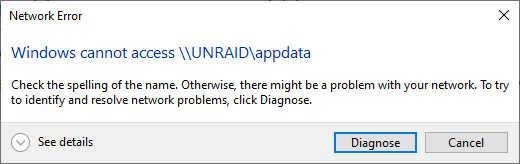
I tried turning SMB off and on, didn't work. I won't see the flash drive because I just cannot establish a connection to the server I always get an error from Windows, Android or Linux like the picture. From the moment I try to connect to my server, ex: 192.168.100.105, it just won't find it. It doesn't show up anywhere on the local network as well.
-
total 24 drwxrwxrwx 1 nobody users 125 Mar 31 05:04 ./ drwxr-xr-x 16 root root 320 Mar 31 04:26 ../ drwxrwxrwx 1 nobody users 43 Jul 23 2024 .Trash-99/ drwxrwxrwx 1 nobody users 28 Aug 24 2024 BackupPhotos/ drwxrwxrwx 1 nobody users 121 Apr 24 2025 Hoarding/ drwxrwxrwx 1 nobody users 174 Dec 25 17:38 PLEX/ drwxrwxrwx 1 nobody users 4096 Mar 12 08:15 appdata/ drwxrwxrwx 1 nobody users 30 Jun 20 2024 domains/ drwxrwxrwx 1 nobody users 66 Jun 20 2024 isos/ drwxrwxrwx 1 nobody users 54 Feb 6 2022 system/ drwxrwxrwx 1 nobody users 16384 Mar 7 19:18 tmp/ drwxrwxrwx 1 nobody users 26 Mar 31 04:00 user_backup/ I can't access any share. Not only the share, but I just cannot connect to the server network location at all.
-
tower-diagnostics-20260331-0847.zip
-
Hi! I had to shutdown my server to do some electrical work and when I turned it back on, it had renamed itself Tower. I can't access any shares from SMB. I can access them from the server itself and see the content, just not connect from another device. All of docker is working fine. Not using VMs. I checked all settings, nothing changed. I was also not able to shutdown twice, clicking the shutdown button just did nothing, as well as cli command. I don't have a USB backup from before the incident. Can I fix the issues without re-installing unraid? If not, how can I re-install it and lose the least settings possible? Thank you!
-
Hi, I've been running an asrock B550m motherboard that has a 2.5Gb R8125 chipset. I posted here before for server instability, where I would suddently be unable to connect to the server. After it happened many times, I came to the conclusion that the network chipset is the issue. In my latest logs, I can see the interface crashing and coming back online multiple times before the server stopped responding. I tried to install the r8125 driver from the apps to test, and it still crashed today. I know realtek chipset are terrible on Unraid, but I was wondering if anyone had an idea before I buy a new NIC? Thanks!
-
Just checked the most recent log, seems like the network driver installed is the r8169, but the Realtek chip on my motherboard is an RTL8125BG, should I install the r8125 driver from the community apps?
-
It's the only one I have on the motherboard. Maybe I'll try updating the BIOS. Maybe locking it to 1Gbps instead of 2.5?
-
Hi! So 3 weeks later it happened again, and the log seems to be more explicit. Is there anything in there that could narrow down the issue? Big thank you in advance! LOG.txt
-
Thank you for the reply. Do you have any idea of what it can be, or any way to start troubleshooting? Could it be because I'm on an AMD system? I know those had trouble with C-state, but I made the necessary changes. Maybe I should turn it off completely.
-
Hi! It happened last night, last time was 2 months ago. Unraid becomes unresponsive: Dashboard, Dockers, everything. Didn't seem to find anything in the diagnostics. I enabled the syslog last time. I attached the diagnostics and latest syslog info between the moment it happened and the moment I restarted it. Any help? That's becoming much of an issue, especially when I'm not home to restart it. Thanks! unraid-diagnostics-20250314-0727.zip syslog-20240314.log
-
Hi! Just updated Unraid to 6.12.10, and everything works fine except for plex. I get this error in the logs: PMS: failure detected. Read/write access is required for path: /config/Library/Application Support/Plex Media Server When I check with krusader, most of the folders indeed do not have write access anymore in the folder. I do have a backup of my appdata from this morning, but I cannot restore because of the update, will copying the files manually restore the permissions? What should I do? Thanks!
-
Hi! Currently have an old intel with an iGPU. I want to upgrade to an Asrock B550M PG Riptide with a Ryzen 3600. I cannot find find any info as to if this motherboard will boot without a gpu. I do have a Tesla P4 though, and was wondering if that would be recognized as a gpu and boot even if it doesn't have a video output? Thanks!
-
Hi! So basically, one of my drives is dying. Ordered a new one but in the meanwhile, I started moving stuff on other drives using Unbalanced. I basically Moved a total of 2.2TB, but in the Main tab on Unraid, the used space on my drive only went down by about 1.5TB. I didn't think AT ALL about hardlinks created by radarr or sonarr, so now I have my Qbittorrent folder on the failing drive, and my Plex folder containing the same shows and movies on another drive. Did i fucked up everything? From what I understand it copied the whole file since it's another drive, hardlinks cannot work between 2 drives, I should have moved both at the same time. How can I came back from this? Can I put data back in any way to restore those links? EDIT: Worse case scenario, I can just delete my stuff from the qBittorrent folder and it would solve it, but I'd like to avoid it if possible. Thank you!
