Skip to content
View in the app

A better way to browse. Learn more.

Unraid

A full-screen app on your home screen with push notifications, badges and more.

To install this app on iOS and iPadOS
  1. Tap the Share icon in Safari
  2. Scroll the menu and tap Add to Home Screen.
  3. Tap Add in the top-right corner.
To install this app on Android
  1. Tap the 3-dot menu (⋮) in the top-right corner of the browser.
  2. Tap Add to Home screen or Install app.
  3. Confirm by tapping Install.

myd2898129

Members
  • Joined

  • Last visited

  1. 更新下今天的新版本就好了
  2. 遇到了同样的问题,不知道怎么解决
  3. 是的,虽然可以用国内源,但基本都很久不更新
  4. 这个一时半会是解决不了的,毕竟很多插件源在github上,要么自己科学,要么装的时候多试几次
  5. 解决了,用npm和swag反向代理时都不行,更换traefix来反向代理,问题解决了
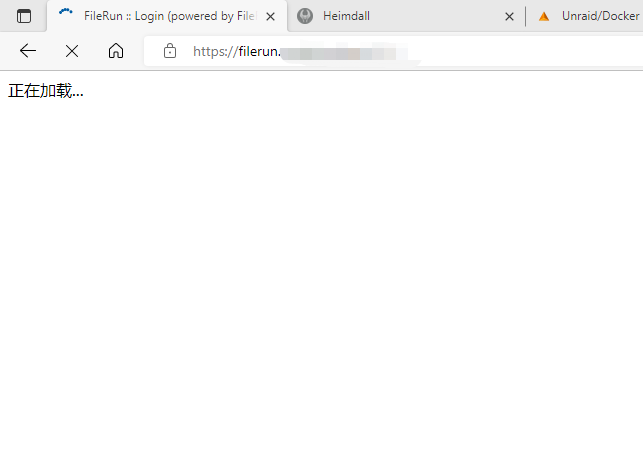
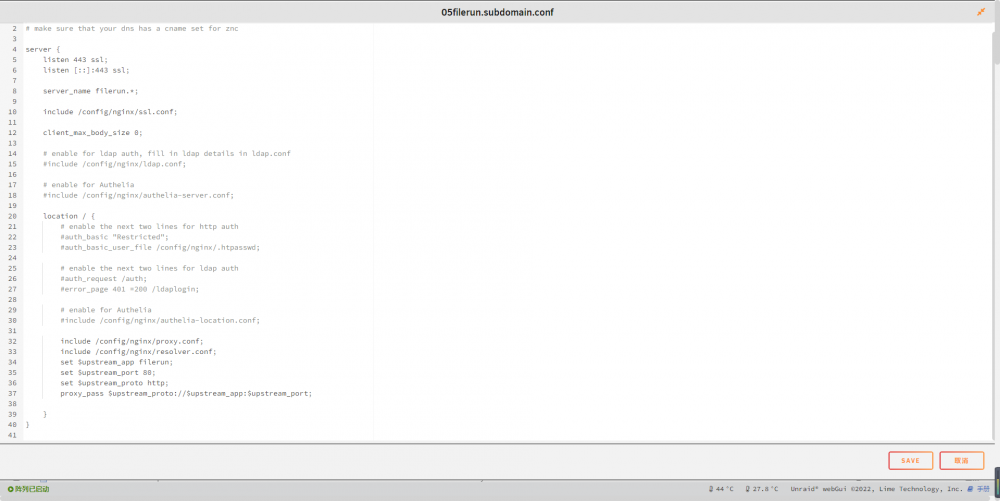
  6. 如题,使用swag反向代理filerun时,不能正常访问,一直显示在加载中,其他反向代理正常工作。 swag参数设置如下图 问题现象如图: 麻烦知道的大佬给看看咋回事?
  7. 解决了,因为没有将共享文件夹映射至容器/user-files/导致的,将需要的共享文件夹映射至/user-files/就好了,大乌龙了
  8. 如题,搭建好了Filerun,文件类可以删除至Trash,但是文件夹不行,只能选择永久删除,不经过回收站,有遇到同意问题的朋友吗? 错误日志如下:

  9. myd2898129 changed their profile photo
  10. 确实,要是有个手机客户端就好了

Account

Navigation

Search

Search

Configure browser push notifications

Chrome (Android)
  1. Tap the lock icon next to the address bar.
  2. Tap Permissions → Notifications.
  3. Adjust your preference.
Chrome (Desktop)
  1. Click the padlock icon in the address bar.
  2. Select Site settings.
  3. Find Notifications and adjust your preference.