





hollowimage
Members
-
Joined
-
Last visited
-
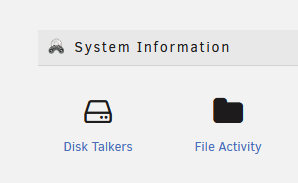
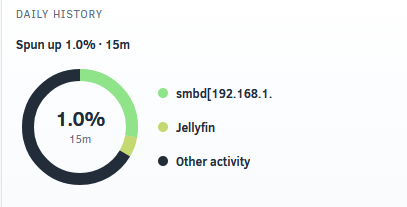
couple of suggestions (im on 7.3.1): 1. can light theme be optimized, please? its incredibly hard, if not impossible in some cases, to read. see example: the name for an accessor is cut off even in detail mode, but really everywhere: kind of defeats the purpose if i cant see the last octet of the address. if there are no plugin installed that enable system information section in Tools menu, disk talkers does nto show up. I had to install File Activity V2 in order to get it to show:


-
yeah i tried all of those combinations. i am specifically looking in my array storage shares. would be great to have the dev chime in here though @EDACerton -- or at least let us know this is abandonware so i can look at alternatives.
-
like what?
-
@EDACerton anything i can help provide here? this is turning into quite a headache and i really would like this thing working. the only thing i see here: cat fileactivity-watcher.log {"level":"info","tag":"2026.05.03.0212","revision":"5736642995d85081b85daba55fa7c6d4970e483d","git_dirty":"no","time":1783439295,"message":"Build information"} {"level":"info","time":1783439295,"message":"Starting file activity watcher..."} {"level":"info","Exclusions":["(?i)appdata","(?i)docker","(?i)system","(?i)syslogs"],"Enable":true,"UnassignedDevices":true,"Cache":false,"SSD":false,"DisplayEvents":1000,"MaxRecords":20000,"time":1783439295,"message":"File Activity Watcher Configuration"} {"level":"info","array_disks":4,"pool_disks":0,"time":1783439295,"message":"Disk count"} {"level":"warn","error":"open /var/state/unassigned.devices/unassigned.devices.json: no such file or directory","time":1783439295,"message":"Error reading unassigned devices file"} {"level":"info","disk":"disk1","mountpoint":"/mnt/disk1","type":"data","filesystem":"zfs","rotational":true,"time":1783439295,"message":"Watching disk"} {"level":"info","disk":"disk2","mountpoint":"/mnt/disk2","type":"data","filesystem":"zfs","rotational":true,"time":1783439295,"message":"Watching disk"} {"level":"info","disk":"disk3","mountpoint":"/mnt/disk3","type":"data","filesystem":"zfs","rotational":true,"time":1783439295,"message":"Watching disk"} {"level":"info","disk":"disk4","mountpoint":"/mnt/disk4","type":"data","filesystem":"zfs","rotational":true,"time":1783439295,"message":"Watching disk"} {"level":"info","count":4,"time":1783439295,"message":"Watch folders"} {"level":"info","time":1783439295,"message":"Watcher ready"} {"level":"info","time":1783439295,"message":"Starting event listener..."} {"level":"info","filter":"(?i)appdata","time":1783439295,"message":"Adding exclusion filter"} {"level":"info","filter":"(?i)docker","time":1783439295,"message":"Adding exclusion filter"} {"level":"info","filter":"(?i)system","time":1783439295,"message":"Adding exclusion filter"} {"level":"info","filter":"(?i)syslogs","time":1783439295,"message":"Adding exclusion filter"} {"level":"info","current_lines":0,"time":1783439295,"message":"Current activity records"} {"level":"info","path":"/mnt/disk1","fsid":"807321a982b18d00","time":1783439295,"message":"Cached mount fsid"} {"level":"info","path":"/mnt/disk2","fsid":"f7805000dffb8a00","time":1783439295,"message":"Cached mount fsid"} {"level":"info","path":"/mnt/disk3","fsid":"39bd7812c225f700","time":1783439295,"message":"Cached mount fsid"} {"level":"info","path":"/mnt/disk4","fsid":"953b1740bde4ac00","time":1783439295,"message":"Cached mount fsid"} is the {"level":"warn","error":"open /var/state/unassigned.devices/unassigned.devices.json: no such file or directory","time":1783439295,"message":"Error reading unassigned devices file"} but this file exists at the different path (ini UD vs json that its lookign for): root@voyager:/var/log# file /var/state/unassigned.devices/unassigned.devices.ini /var/state/unassigned.devices/unassigned.devices.ini: ASCII text i saw your comment about the ini to json but i dont think that applied to UD probably. root@voyager:/var/log# ls -lsa /var/state/unassigned.devices total 24 0 drwxr-xr-x 2 root root 160 Jul 7 10:43 ./ 0 drwxr-xr-x 6 root root 120 Jul 2 13:49 ../ 4 -rw-r--r-- 1 root root 60 Jul 2 13:50 device_hosts.json 4 -rw-r--r-- 1 root root 414 Jul 7 10:43 df_status.json 4 -rw-r--r-- 1 root root 126 Jul 7 10:43 disk_names.json 4 -rw-r--r-- 1 root root 328 Jul 7 08:55 ping_status.json 4 -rw-r--r-- 1 root root 329 Jul 7 10:43 share_names.json 4 -rw-r--r-- 1 root root 3419 Jul 2 13:50 unassigned.devices.ini it looks like root has rights to read this file, as does everyone, really. Otherwise the logs of the watcher itself look good. and yeah, this is running latest 7.3.1 i rebooted a few weeks ago, plugin is updated and has been re-installed a few times.
-
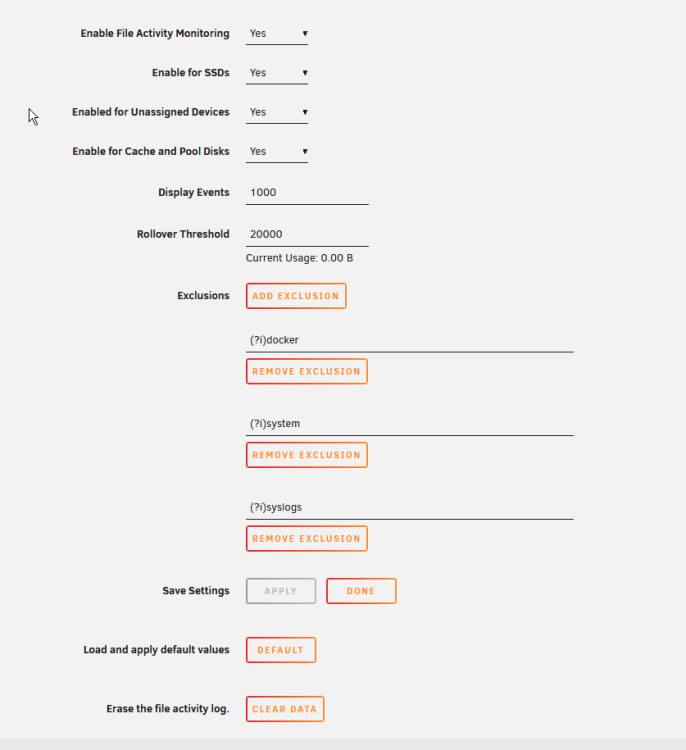
yeah im still at a loss here, ive got no activity whatsoever. i rebooted, upgraded to 7.3.1. plugin on latest, but nothing is logged. everything turned on, even like show me appdata -- i get nada.
-
is reboot necessary?
-
^same -- how can i help? i dont think i've seen this plugin work at all since ive upgraded to 7+
-
ok, i tried all sort of options. 1. there's an error in unmarshalling unassigned devices, but i dont think its a problem really. maybe improper handling of 0 device list. {"level":"warn","error":"json: cannot unmarshal array into Go value of type map[string]disks.UDInfo","time":1775227519,"message":"Error parsing unassigned devices JSON"} i was finaly able to get it to log something, anything, by disabling all filters and enabling all sources, and the only logs i could see were coming from my docker overlay volume fs. thats it.
-
yeah i think after upgrade to 7.x i stopped seeing any activity logged. i re-installed it, but no cigar.
-
im seeing the something very similar with pihole, actually. its appdata config folder is owned by a user on my server that has never logged in (made an account for my wife to access some shares, she never bothered). to test this i deleted the account and restarted pihole, and appdata config folder went from her user to UNKNOWN. i tried setting --user 99:100 on the extra params for the container but then the container had start issues; i tried recursively setting the config folder to be owned by 99:100 (not the whole shared just theconfig, before people flip out), and uponc ontainer start, like clockwork, its reverted back to UNKNOWN owner. im a bit at a loss here.When i add a wireguard config into the unraid wireguard manager (settings >> VPN Manager) and use the button on the main page to toggle the tunnel state, the entire ui immediatelly refuses all web traffic. same config is valid and works if enabled from inside vpn manager when toggling inactive -> active. wg0 comes up no issues. Good button: Bad button: the only way to recover access at that point, is to reboot the server. I wish i could tell you anything else but i lose all access to the box over the root interface/ip. containers remain accessible. i verified this on 2 machines, attached the diagnostics for one of them (smaller one with less hardware). edit: i just took a look at the diag dump, and honestly, idk how much useful itll be since i attached it after the server reboot once i was able to get back into it. i can setup a syslog server and duplicate everything ifyou really need me, but i was able to repro this on 2 machines now, you shoudl be able to get this reproduced fairly quickly as well. enterprise-diagnostics-20251129-2352.zip


