




Skip to content
View in the app

A better way to browse. Learn more.

Unraid

A full-screen app on your home screen with push notifications, badges and more.

To install this app on iOS and iPadOS
  1. Tap the Share icon in Safari
  2. Scroll the menu and tap Add to Home Screen.
  3. Tap Add in the top-right corner.
To install this app on Android
  1. Tap the 3-dot menu (⋮) in the top-right corner of the browser.
  2. Tap Add to Home screen or Install app.
  3. Confirm by tapping Install.

TrippyFix

Members
  • Joined

  • Last visited

  1. Adding to issues after the update. All new torrents from TL are stalled and I am not getting any error messages. 🤔 EDIT: Well, apparently it just resolved itself! Working again.
  2. I'm using the binhex container, as I'm also using a bunch of other binhex containers (related to Plex). I did try both the "--device=/dev/dvb" and device path, but none of them works. Is there anything else I can try? Switching to the official Plex container feels like a lot of work.
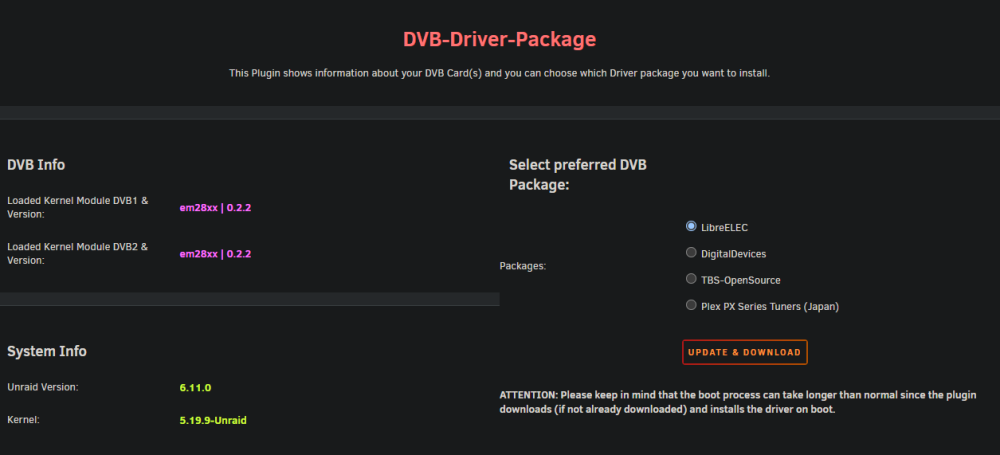
  3. I have a WinTV-dualHD, which I can't get to show up in Plex. I've installed DVB-Driver-Package, downloaded LibreELEC package and rebooted. And also added extra parameter "--device=/dev/dvb" in the Plex container. Am I missing something? Plex is still not picking up my tuner.
Account

Navigation

Search

Search

Configure browser push notifications

Chrome (Android)
  1. Tap the lock icon next to the address bar.
  2. Tap Permissions → Notifications.
  3. Adjust your preference.
Chrome (Desktop)
  1. Click the padlock icon in the address bar.
  2. Select Site settings.
  3. Find Notifications and adjust your preference.