





drtechnolust
Members
-
Joined
-
Last visited
-
This ended up being a combination of a hardware issue and a licensing/TPM change. The server had been throwing repeated AMD MCE/Hardware Errors, Data Fabric errors, RCU stalls, freezes, and failed boots. I was able to reproduce hardware errors outside of Unraid in Fedora as well, so I replaced the Ryzen 7 5800X with a Ryzen 9 5900XT. After the CPU replacement, the ASUS BIOS detected a new fTPM/TPM identity. Unraid then showed a GUID mismatch and the TPM license move failed with: KeyFile is not valid I opened a ticket with Unraid Support and their quick response I was able to get my licensing issue sorted out and I'm back online. Thanks!
-
My Unraid server started having a bunch of hardware issues MCE errors, Data Fabric errors, RCU stalls, random freezes, and failed boots. I was also able to reproduce hardware errors in Fedora, so I started treating it as a hardware problem instead of Unraid. During all of this my old Unraid USB also failed and became permanently write protected, so I replaced the flash drive and restored my config. I then replaced my Ryzen 7 5800X with a Ryzen 9 5900XT. On the first boot after installing the new CPU, the ASUS BIOS gave me the message about a new CPU / fTPM and creating a new TPM identity. Unraid is booting now, but my Pro license is messed up. The old TPM GUID ended in ABCD and the new one ends in EFGH. The Unraid account page tells me to Move to TPM, but when I go through the process and click Replace Key, I get: KeyFile is not valid My account still shows my Pro license and lets me download the key file, but it looks like that key is still tied to the old GUID. I already opened a support ticket, but while I wait I wanted to see if anyone else has run into this after replacing an AMD CPU/fTPM. Do I just need Unraid support to reset/reissue the existing Pro key to the new TPM GUID, or is there something else I can do? I can post screenshots/diagnostics if needed.
-
I recently upgraded to a 28TB parity drive, and I’m trying to dial in the best practice parity check schedule. Current behavior: Full parity check takes ~2.5–3 days to complete System remains usable, but I obviously want to minimize wear and performance impact Questions: With modern large drives (28TB+), what is the recommended parity check frequency? Monthly? Quarterly? Bi-annually? Do most of you still run non-correcting parity checks routinely and only run correcting checks when errors are detected? Any downside to spacing checks further apart given how long they now take? Are there any Unraid-specific tunables settings or other plugins you recommend to optimize long parity checks on large arrays? Currently, using Parity Check tuning plugin. I’m mainly looking for a balance between data integrity and drive longevity, especially with parity checks taking multiple days now. Appreciate any insight from others running 20TB+ / 28TB parity setups.
-
Ah yes… the Minimum Free Space setting in on the 'Cache' pool which is set to 0. The thing I absolutely should have set years ago, it was literally there in plain sight… and absolutely didn’t set it. Consider this mystery solved and my pride slightly wounded. 🤣 Thanks!
-
Yes, it’s running now. I wasn’t sure when someone would be available to look at the logs, so I restarted the server. This issue has been happening for a while, and I was hoping to understand whether it’s normal or if there’s a technical reason behind it. Whenever the cache fills and I move items out of it via mover, Docker still won’t re-enable via the GUI or terminal until I completely reboot the server. I’m trying to understand why Docker doesn’t start again once space is freed, and why a full reboot is required to restore functionality.
-
diagnostics-20251209-1247.zip
-
diagnostics-20251209-1048.zip
-
My Docker service stopped because my downloads share filled up the cache pool completely. I’ve already started the Mover and now have ~100GB free on the cache (and it’s still increasing), but Docker still won’t start. Is there a way to get Docker to start again without rebooting the server? Do I need to restart a specific service or clear a lock file? Any guidance would be appreciated.
-
I tried a several different ports on the MOBO and case and still it would not boot past the prompt. The issue was the vfio-pci and vsftpd.user_list prevented the flash drive to go through all tasks. I removed those files from the flash drive and the server booted and array started. I also, have several FSCK files on the root of the flash drive which my understanding is a possible failing drive. I made a backup of the flash drive and saved it to cloud storage and now I'm in the process of creating a new flash drive from the backup to use.
-
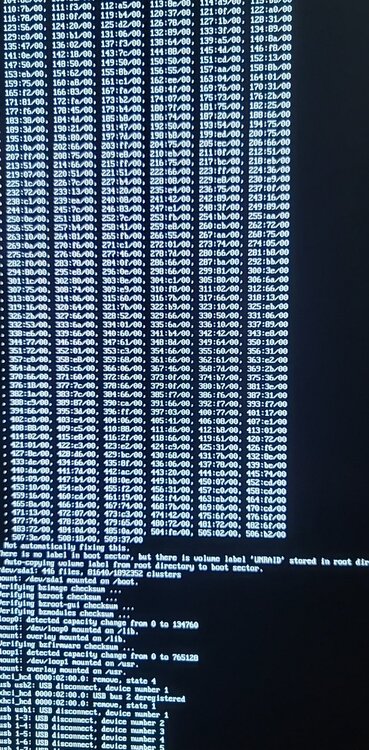
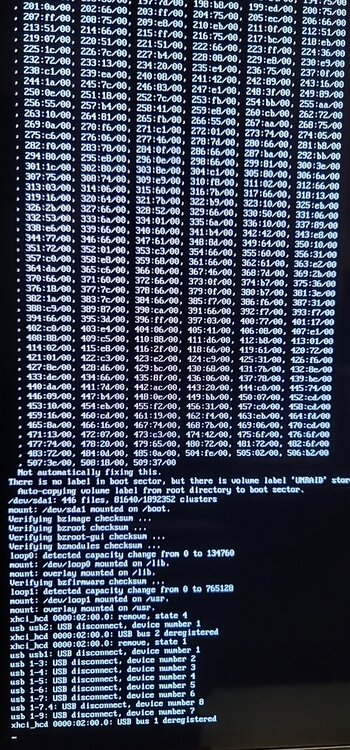
I've rebooted my server, but now it's stuck at the command prompt and won't proceed any further. After looking into it, I believe the issue is with my flash drive. I removed the drive, connected it to another computer, ran a scan, and it showed no problems. However, when I tried booting from it again, it still gets stuck at the same prompt.I then prepared a new USB 2.0 flash drive using the Unraid boot tool and copied over the config folder from the problematic drive, but the server still won't move past the prompt.I've attached a screenshot of the boot process where it gets stuck. The server seems to hang during verification steps (e.g., bzroot_checksum and bzmodules_checksum). Additionally, there are several messages about USB disconnection and deregistration. This happens even after switching to a new USB flash drive and copying over the config folder.
-
I created a windows 10 23h2 vm with virtuous share using Spaceinvaders guide successfully but I ran into an issue trying to run Hyperspin from the share. So I shutdown the vm and removed the virtiofs share from the vms gui. Now my VM starts up with automatic repair because it blue screens with Critical Process Has Died. Anyone have any idea how to go about fixing this to get the vm to boot back to Windows?
-
I've searched all over the inter-webs looking for a fix for this issue and I can't seem to pinpoint the cause. Can someone chime in and let me know if you have expereienced the same issue or know where to search in the logs for a fix. When I play audio via Youtube (Firefox, Chrome, or Brave) or another app like Spotify the audio would stutter like pop. This happens on all Windows VMS and Ubuntu as well. I have uninstalled and replaced the Windows 11 and Windows 10 AMD drivers Changed the bit rate of the Sound, increased the memory and changed the CPU cores steampunk-diagnostics-20240416-2259.zip
-
I was able to install Monterey using spaceinvaders video - but for some reason Ventura or Sonoma will not install. I show it downloading, preparing, the goes to the apple logo with progress but then it boots to boot menu with choice of Macintosh HD, Monterey, Recovery to choose from... I choose Monterey and check version and it's still Monterey
-
Btrfs
-
Is there any way to recover the data off of the drive?


