Ken.N
Members
-
Joined
-
Last visited
-
Thank you @trurl. I will try a different file explorer to see if things are improved.
-
Oh yeah for sure I understand this point. Everything has two sides and your clarification even still strengthens my decision of choosing Unraid rather than other OS. Knowing how Unraid works will help me and everyone have further implementation to avoid unpredictable lost down the road. Thanks, cap. @JorgeB
-
Thanks, @JorgeB. for your reply. I would love to understand more about how parity works. As I read some old threads in Unraid and as you clarified already, Parity can not help anything in bit-rot, bad sector situations and parity just simply helps recover data of one malfunction data disk (suppose only 1 parity disk) while other disks in an array MUST be healthy to participate in recovery. So does this feature also create a consequence that when the data disk encounters data corrupted, the parity will also sync the wrong corrupted bit string and replace the good bit string of the previous parity-sync ? Is there any solution within Unraid array to protect array against bit-rot, bad-sector except off-side backup ? oh wait, even if I run off-side backup on Unraid OS, there still exists corruption potential as well. If this is the case, Unraid eventually exists a drawback against Raid due to the fact that Unraid has no redundancy and can not protect data from corruption, while Raid does by discovering corruption by BTRFS scrub job and repair corruption by comparing bit strings among raid disks. Please help me to clarify this. Much appreciated.
-
Hi. Im newbie here and I'm curious about this DYNAMIX FILE INTEGRITY PLUGIN vs Btrfs scrub. I'm currently running BTRFS on 2 x 5TB data array with 1 Parity. I read some discussion that the Btrfs scrub will compare the previous data checksum with the new checksum from new scheduled scrub job, then notify the error/Repair corrupted blocks. This function seems to be the same with the Dynamix File Integrity. So my question is what's the different between those two methods ? There are some suggestions that Repair corrupted Blocks function is not working/effective since there is no Raid in the array, therefore, if problem occurs with a disk, Repair Corrupted Blocks is useless and Btrfs scrub is no more than just a corruption alarm. So does parity disk help anything to repair the corrupted blocks ? Thanks, everyone.

-
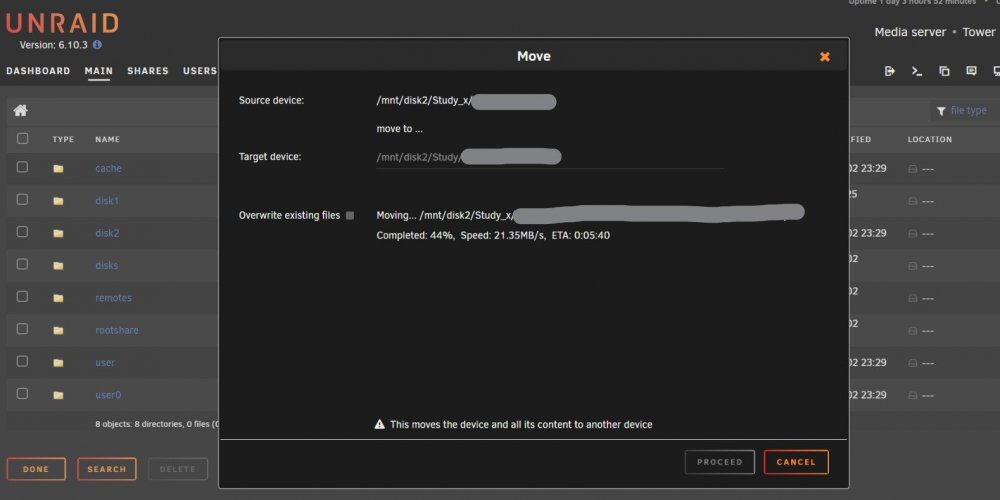
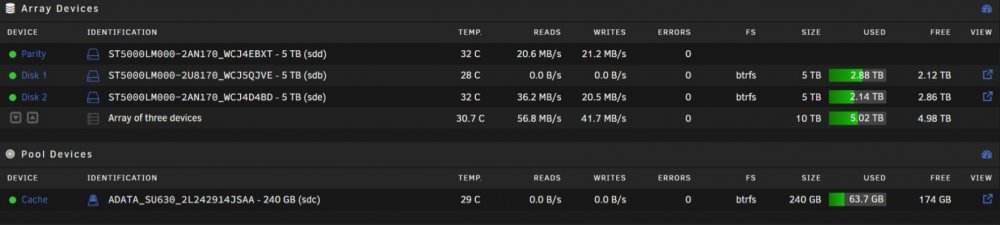
Hi everyone. I change the directories of my data to have better organization. All data moved is in the SAME disk and I use Dynamix File Manager to move files from disk-to-disk (not disk-to-user or user-related to prevent cache detour). The moving speed is really slow, I check the array devices and it syncs parity during the move. I'm a bit confused because I thought the data will be in the same bit location in the disk's plate anyway, it just changes the main directory and parity should not sync anything to slow down the move, and this move-in-the-same-disk should be very fast. Please correct me if I'm wrong and If this parity-sync and moving speed are by desire, how can I manage to improve ? Thank you.