





bluiwulf
Members
-
Joined
-
Last visited
-
This was the issue and I really appreciate the fast response, you're awesome
-
@ich777 I really appreciate all the work you do on these containers I'm having issues w/ configuring my V Rising gameserver. I updated the server name and world name and I've gone into my router and forwarded the port range to my Unraid server's internal IP address. But I cannot see the server when I open the game client. I know it said it can take a long time on first launch and I did select to validate it as well. Is there like an expected time frame for how long it will take to fully setup? Or am I simply missing some obvious steps? This is my first time ever hosting a server for anything so I'm sure I'm missing something.
-
Thank you for that response, I hadn't even think to try a different browser and it was one of my extensions causing it to not work. I appreciate this so much.
-
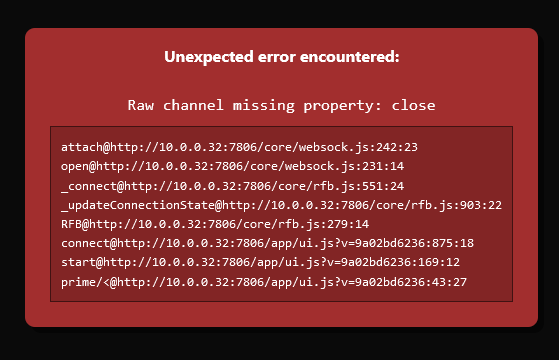
I'm sorry if this is something simple, but I'm still getting the hang of working w/ docker containers and my MakeMKV (as well as Handbrake) container won't load the web GUI and gives me this error below I tried reinstalling multiple times and checked the log and there is no more details reported so far it's only these two containers w/ this issue
-
Well I was able to use that link to provide a work around. I changed the /boot/config/go file w/ the following lines to software disable the power switch: # Change power button handling and restart elogind to reload the edited config /usr/bin/sed -i -e 's/#HandlePowerKey=poweroff/HandlePowerKey=ignore/g' /etc/elogind/logind.conf /etc/rc.d/rc.elogind restart chmod -x /etc/acpi/acpi_handler.sh
-
I attempted this and it just forces a suspend state that locks up the entire server.
-
Actually no, I keep a secondary monitor on connected to monitor for it and this is when it starts the graceful shutdown: Jul 8 18:45:35 Biest webGUI: Successful login user root from 10.0.0.3 Jul 8 18:50:52 Biest elogind-daemon[1977]: Power key pressed. Jul 8 18:50:52 Biest elogind-daemon[1977]: Powering Off...
-
Here is the syslog and the diagnostics. I'm going to test each of the memory sticks next just to make sure they are each good. biest-diagnostics-20220708-1850.zip syslog.log biest-diagnostics-20220708-1846.zip
-
I did attempt safe mode a few times and disabling the front panel buttons and USB. It didn't make any difference.
-
I've been searching all over for a potential fix to a sudden problem I am having w/ UNRAID 6.10.3. It keeps reporting a sudden power button press and graceful shutdown. The power button isn't getting pressed and I've done extensive diagnostic testing and on the server and cannot find a problem. The only reported hardware issues are w/ the Smart Array Battery, which I am getting a replacement for. I also ran Memtest and even went as far as to install TrueNAS and verified that the server does not initiate a shutdown in any other situation except being booted into UNRAID. I reinstalled the OS on the flash drive and attempted to use two additional flash drives, but the issue persists. I would appreciate any other suggestions for troubleshooting this issue. It's a HPE Proliant DL380 Gen9 w/ 2x Xeon processors and 64GB RAM.

