





Brian Bjarke Jensen
Members
-
Joined
-
Last visited
-
Thank you, ghost82! After reducing the allocated working memory to about 60GB I got the VM to start with a single (the second) GPU. However, passing in both GPUs, the VM would not finish booting while no errors in the logs... I tried to specifically set the rom of the GPUs and this solved the final issue. Thanks a ton, I really appreciate the help! 🙂
-
hey ghost82, I tried to copy your answer directly in and start the VM, unfortunately the same error popup showed. I have attached the logs: visionserver-diagnostics-20230104-1537.zip I really appreciate your help, as I am at a loss with this one. I have succeeded with a similar setup earlier, so I really don't get why it won't work now.
-
Hello ghost82, thank you for taking the time to look into this. I have attempted to start the VM again and right after getting the error message popup i went and downloaded the diagnostics: visionserver-diagnostics-20230104-1229.zip
-
I should add that I also have both GPUs bound to VFIO-PCI: And that this has happened succesfully, as shown by the log:
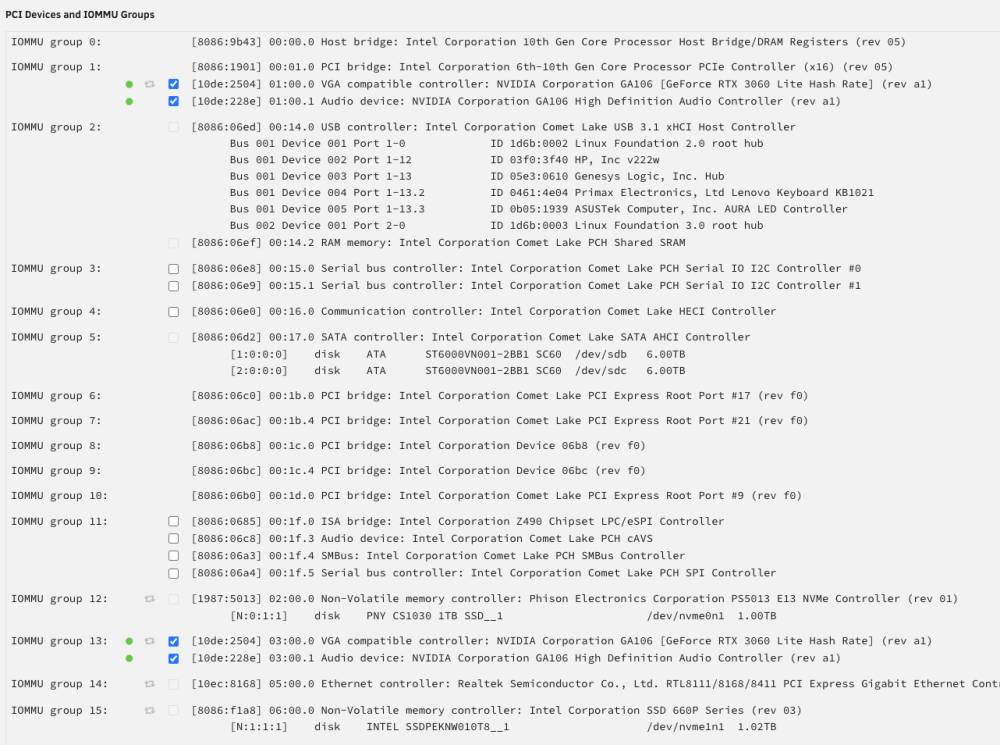
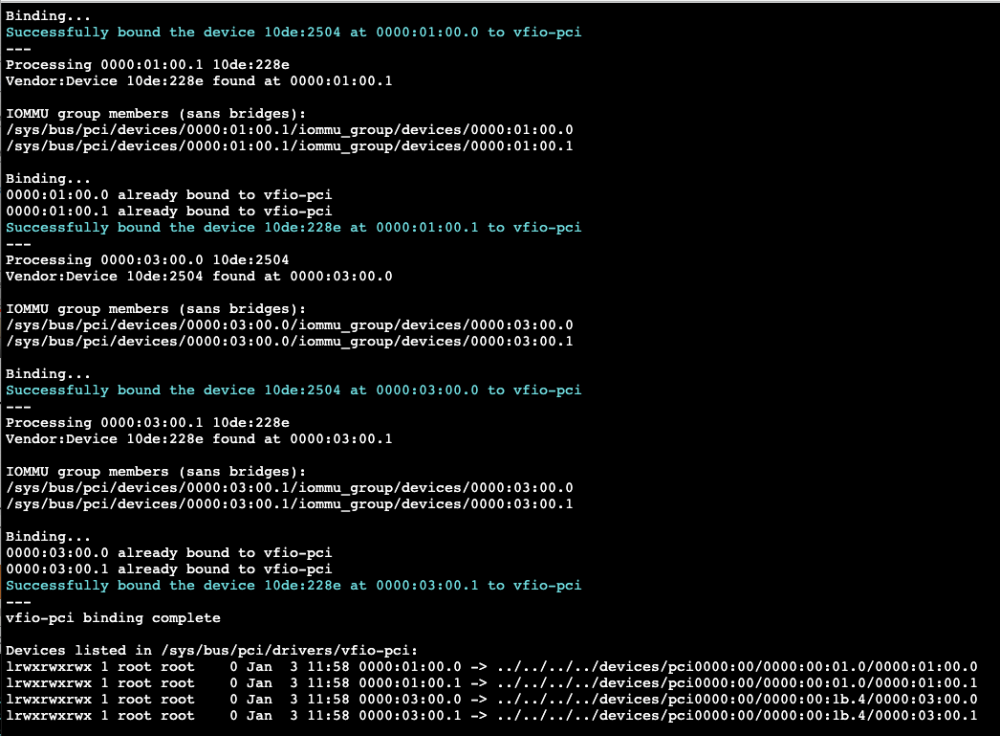
-
Hello SimonF, I changed the XML based on the instructions by SpaceInvader One, where a succesful GPU passthrough must have its XML edited for the whole GPU to be passed through as one device to the VM. I have just tried starting without changing the XML now, this unfortunately didn't work. I have also tried to get the ROM files from techpowerup and remove the header of the file (as described by SpaceInvader One) to maybe fix the issue. Below is a screenshot of the gui when I do the virtual graphics where the VM boots up: And below shows the GPU passthrough attempt where the VM doesn't boot:
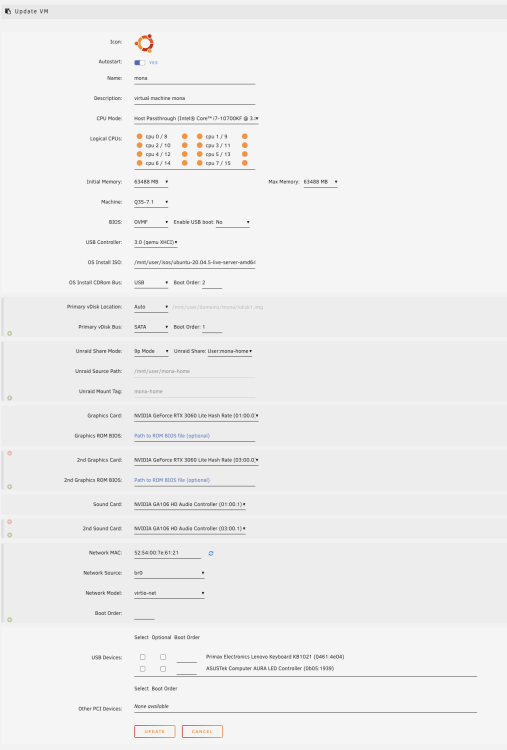
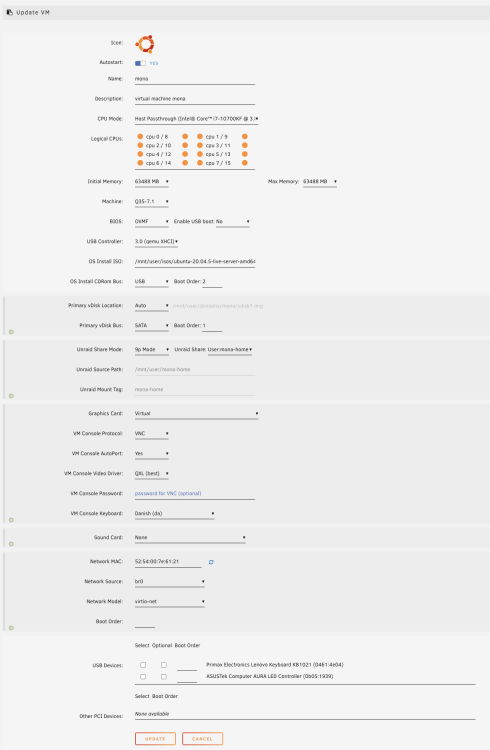
-
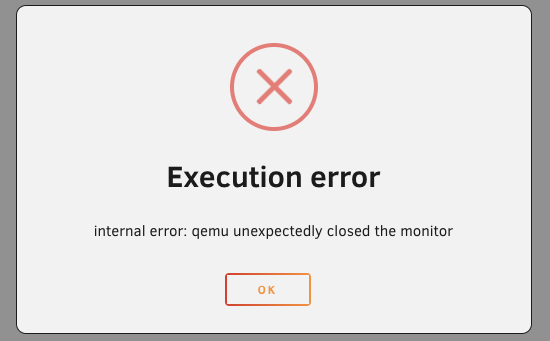
Hello, as the title says, I am able to start and run an Ubuntu 20.04 VM when the graphics card is set to "Virtual". The settings are as follow: <?xml version='1.0' encoding='UTF-8'?> <domain type='kvm' id='6'> <name>mona</name> <uuid>3f25e14d-e01b-b04c-05e4-8ea31610d531</uuid> <description>virtual machine mona</description> <metadata> <vmtemplate xmlns="unraid" name="Ubuntu" icon="ubuntu.png" os="ubuntu"/> </metadata> <memory unit='KiB'>65011712</memory> <currentMemory unit='KiB'>65011712</currentMemory> <memoryBacking> <nosharepages/> </memoryBacking> <vcpu placement='static'>16</vcpu> <cputune> <vcpupin vcpu='0' cpuset='0'/> <vcpupin vcpu='1' cpuset='8'/> <vcpupin vcpu='2' cpuset='1'/> <vcpupin vcpu='3' cpuset='9'/> <vcpupin vcpu='4' cpuset='2'/> <vcpupin vcpu='5' cpuset='10'/> <vcpupin vcpu='6' cpuset='3'/> <vcpupin vcpu='7' cpuset='11'/> <vcpupin vcpu='8' cpuset='4'/> <vcpupin vcpu='9' cpuset='12'/> <vcpupin vcpu='10' cpuset='5'/> <vcpupin vcpu='11' cpuset='13'/> <vcpupin vcpu='12' cpuset='6'/> <vcpupin vcpu='13' cpuset='14'/> <vcpupin vcpu='14' cpuset='7'/> <vcpupin vcpu='15' cpuset='15'/> </cputune> <resource> <partition>/machine</partition> </resource> <os> <type arch='x86_64' machine='pc-q35-7.1'>hvm</type> <loader readonly='yes' type='pflash'>/usr/share/qemu/ovmf-x64/OVMF_CODE-pure-efi.fd</loader> <nvram>/etc/libvirt/qemu/nvram/3f25e14d-e01b-b04c-05e4-8ea31610d531_VARS-pure-efi.fd</nvram> </os> <features> <acpi/> <apic/> </features> <cpu mode='host-passthrough' check='none' migratable='on'> <topology sockets='1' dies='1' cores='8' threads='2'/> <cache mode='passthrough'/> </cpu> <clock offset='utc'> <timer name='rtc' tickpolicy='catchup'/> <timer name='pit' tickpolicy='delay'/> <timer name='hpet' present='no'/> </clock> <on_poweroff>destroy</on_poweroff> <on_reboot>restart</on_reboot> <on_crash>restart</on_crash> <devices> <emulator>/usr/local/sbin/qemu</emulator> <disk type='file' device='disk'> <driver name='qemu' type='raw' cache='writeback'/> <source file='/mnt/user/domains/mona/vdisk1.img' index='2'/> <backingStore/> <target dev='hdc' bus='sata'/> <boot order='1'/> <alias name='sata0-0-2'/> <address type='drive' controller='0' bus='0' target='0' unit='2'/> </disk> <disk type='file' device='cdrom'> <driver name='qemu' type='raw'/> <source file='/mnt/user/isos/ubuntu-20.04.5-live-server-amd64.iso' index='1'/> <backingStore/> <target dev='hda' bus='usb'/> <readonly/> <boot order='2'/> <alias name='usb-disk0'/> <address type='usb' bus='0' port='1'/> </disk> <controller type='usb' index='0' model='qemu-xhci' ports='15'> <alias name='usb'/> <address type='pci' domain='0x0000' bus='0x00' slot='0x07' function='0x0'/> </controller> <controller type='pci' index='1' model='pcie-root-port'> <model name='pcie-root-port'/> <target chassis='1' port='0x10'/> <alias name='pci.1'/> <address type='pci' domain='0x0000' bus='0x00' slot='0x02' function='0x0' multifunction='on'/> </controller> <controller type='pci' index='2' model='pcie-root-port'> <model name='pcie-root-port'/> <target chassis='2' port='0x11'/> <alias name='pci.2'/> <address type='pci' domain='0x0000' bus='0x00' slot='0x02' function='0x1'/> </controller> <controller type='pci' index='3' model='pcie-root-port'> <model name='pcie-root-port'/> <target chassis='3' port='0x12'/> <alias name='pci.3'/> <address type='pci' domain='0x0000' bus='0x00' slot='0x02' function='0x2'/> </controller> <controller type='pci' index='4' model='pcie-root-port'> <model name='pcie-root-port'/> <target chassis='4' port='0x13'/> <alias name='pci.4'/> <address type='pci' domain='0x0000' bus='0x00' slot='0x02' function='0x3'/> </controller> <controller type='pci' index='5' model='pcie-root-port'> <model name='pcie-root-port'/> <target chassis='5' port='0x14'/> <alias name='pci.5'/> <address type='pci' domain='0x0000' bus='0x00' slot='0x02' function='0x4'/> </controller> <controller type='pci' index='6' model='pcie-root-port'> <model name='pcie-root-port'/> <target chassis='6' port='0x8'/> <alias name='pci.6'/> <address type='pci' domain='0x0000' bus='0x00' slot='0x01' function='0x0' multifunction='on'/> </controller> <controller type='pci' index='7' model='pcie-root-port'> <model name='pcie-root-port'/> <target chassis='7' port='0x9'/> <alias name='pci.7'/> <address type='pci' domain='0x0000' bus='0x00' slot='0x01' function='0x1'/> </controller> <controller type='pci' index='8' model='pcie-root-port'> <model name='pcie-root-port'/> <target chassis='8' port='0xa'/> <alias name='pci.8'/> <address type='pci' domain='0x0000' bus='0x00' slot='0x01' function='0x2'/> </controller> <controller type='pci' index='9' model='pcie-to-pci-bridge'> <model name='pcie-pci-bridge'/> <alias name='pci.9'/> <address type='pci' domain='0x0000' bus='0x01' slot='0x00' function='0x0'/> </controller> <controller type='virtio-serial' index='0'> <alias name='virtio-serial0'/> <address type='pci' domain='0x0000' bus='0x03' slot='0x00' function='0x0'/> </controller> <controller type='sata' index='0'> <alias name='ide'/> <address type='pci' domain='0x0000' bus='0x00' slot='0x1f' function='0x2'/> </controller> <controller type='pci' index='0' model='pcie-root'> <alias name='pcie.0'/> </controller> <filesystem type='mount' accessmode='passthrough'> <source dir='/mnt/user/mona-home'/> <target dir='mona-home'/> <alias name='fs0'/> <address type='pci' domain='0x0000' bus='0x02' slot='0x00' function='0x0'/> </filesystem> <interface type='bridge'> <mac address='52:54:00:7e:61:21'/> <source bridge='br0'/> <target dev='vnet5'/> <model type='virtio-net'/> <alias name='net0'/> <address type='pci' domain='0x0000' bus='0x04' slot='0x00' function='0x0'/> </interface> <serial type='pty'> <source path='/dev/pts/10'/> <target type='isa-serial' port='0'> <model name='isa-serial'/> </target> <alias name='serial0'/> </serial> <console type='pty' tty='/dev/pts/10'> <source path='/dev/pts/10'/> <target type='serial' port='0'/> <alias name='serial0'/> </console> <channel type='unix'> <source mode='bind' path='/var/lib/libvirt/qemu/channel/target/domain-6-mona/org.qemu.guest_agent.0'/> <target type='virtio' name='org.qemu.guest_agent.0' state='disconnected'/> <alias name='channel0'/> <address type='virtio-serial' controller='0' bus='0' port='1'/> </channel> <input type='tablet' bus='usb'> <alias name='input0'/> <address type='usb' bus='0' port='2'/> </input> <input type='mouse' bus='ps2'> <alias name='input1'/> </input> <input type='keyboard' bus='ps2'> <alias name='input2'/> </input> <graphics type='vnc' port='5900' autoport='yes' websocket='5700' listen='0.0.0.0' keymap='da'> <listen type='address' address='0.0.0.0'/> </graphics> <audio id='1' type='none'/> <video> <model type='qxl' ram='65536' vram='65536' vgamem='16384' heads='1' primary='yes'/> <alias name='video0'/> <address type='pci' domain='0x0000' bus='0x09' slot='0x01' function='0x0'/> </video> <memballoon model='virtio'> <alias name='balloon0'/> <address type='pci' domain='0x0000' bus='0x05' slot='0x00' function='0x0'/> </memballoon> </devices> <seclabel type='dynamic' model='dac' relabel='yes'> <label>+0:+100</label> <imagelabel>+0:+100</imagelabel> </seclabel> </domain> And the logs are as follow: 2023-01-03 16:23:35.594+0000: starting up libvirt version: 8.7.0, qemu version: 7.1.0, kernel: 5.19.17-Unraid, hostname: visionserver LC_ALL=C \ PATH=/bin:/sbin:/usr/bin:/usr/sbin \ HOME=/var/lib/libvirt/qemu/domain-6-mona \ XDG_DATA_HOME=/var/lib/libvirt/qemu/domain-6-mona/.local/share \ XDG_CACHE_HOME=/var/lib/libvirt/qemu/domain-6-mona/.cache \ XDG_CONFIG_HOME=/var/lib/libvirt/qemu/domain-6-mona/.config \ /usr/local/sbin/qemu \ -name guest=mona,debug-threads=on \ -S \ -object '{"qom-type":"secret","id":"masterKey0","format":"raw","file":"/var/lib/libvirt/qemu/domain-6-mona/master-key.aes"}' \ -blockdev '{"driver":"file","filename":"/usr/share/qemu/ovmf-x64/OVMF_CODE-pure-efi.fd","node-name":"libvirt-pflash0-storage","auto-read-only":true,"discard":"unmap"}' \ -blockdev '{"node-name":"libvirt-pflash0-format","read-only":true,"driver":"raw","file":"libvirt-pflash0-storage"}' \ -blockdev '{"driver":"file","filename":"/etc/libvirt/qemu/nvram/3f25e14d-e01b-b04c-05e4-8ea31610d531_VARS-pure-efi.fd","node-name":"libvirt-pflash1-storage","auto-read-only":true,"discard":"unmap"}' \ -blockdev '{"node-name":"libvirt-pflash1-format","read-only":false,"driver":"raw","file":"libvirt-pflash1-storage"}' \ -machine pc-q35-7.1,usb=off,dump-guest-core=off,mem-merge=off,memory-backend=pc.ram,pflash0=libvirt-pflash0-format,pflash1=libvirt-pflash1-format \ -accel kvm \ -cpu host,migratable=on,host-cache-info=on,l3-cache=off \ -m 63488 \ -object '{"qom-type":"memory-backend-ram","id":"pc.ram","size":66571993088}' \ -overcommit mem-lock=off \ -smp 16,sockets=1,dies=1,cores=8,threads=2 \ -uuid 3f25e14d-e01b-b04c-05e4-8ea31610d531 \ -no-user-config \ -nodefaults \ -chardev socket,id=charmonitor,fd=35,server=on,wait=off \ -mon chardev=charmonitor,id=monitor,mode=control \ -rtc base=utc,driftfix=slew \ -global kvm-pit.lost_tick_policy=delay \ -no-hpet \ -no-shutdown \ -boot strict=on \ -device '{"driver":"pcie-root-port","port":16,"chassis":1,"id":"pci.1","bus":"pcie.0","multifunction":true,"addr":"0x2"}' \ -device '{"driver":"pcie-root-port","port":17,"chassis":2,"id":"pci.2","bus":"pcie.0","addr":"0x2.0x1"}' \ -device '{"driver":"pcie-root-port","port":18,"chassis":3,"id":"pci.3","bus":"pcie.0","addr":"0x2.0x2"}' \ -device '{"driver":"pcie-root-port","port":19,"chassis":4,"id":"pci.4","bus":"pcie.0","addr":"0x2.0x3"}' \ -device '{"driver":"pcie-root-port","port":20,"chassis":5,"id":"pci.5","bus":"pcie.0","addr":"0x2.0x4"}' \ -device '{"driver":"pcie-root-port","port":8,"chassis":6,"id":"pci.6","bus":"pcie.0","multifunction":true,"addr":"0x1"}' \ -device '{"driver":"pcie-root-port","port":9,"chassis":7,"id":"pci.7","bus":"pcie.0","addr":"0x1.0x1"}' \ -device '{"driver":"pcie-root-port","port":10,"chassis":8,"id":"pci.8","bus":"pcie.0","addr":"0x1.0x2"}' \ -device '{"driver":"pcie-pci-bridge","id":"pci.9","bus":"pci.1","addr":"0x0"}' \ -device '{"driver":"qemu-xhci","p2":15,"p3":15,"id":"usb","bus":"pcie.0","addr":"0x7"}' \ -device '{"driver":"virtio-serial-pci","id":"virtio-serial0","bus":"pci.3","addr":"0x0"}' \ -blockdev '{"driver":"file","filename":"/mnt/user/domains/mona/vdisk1.img","node-name":"libvirt-2-storage","cache":{"direct":false,"no-flush":false},"auto-read-only":true,"discard":"unmap"}' \ -blockdev '{"node-name":"libvirt-2-format","read-only":false,"cache":{"direct":false,"no-flush":false},"driver":"raw","file":"libvirt-2-storage"}' \ -device '{"driver":"ide-hd","bus":"ide.2","drive":"libvirt-2-format","id":"sata0-0-2","bootindex":1,"write-cache":"on"}' \ -blockdev '{"driver":"file","filename":"/mnt/user/isos/ubuntu-20.04.5-live-server-amd64.iso","node-name":"libvirt-1-storage","auto-read-only":true,"discard":"unmap"}' \ -blockdev '{"node-name":"libvirt-1-format","read-only":true,"driver":"raw","file":"libvirt-1-storage"}' \ -device '{"driver":"usb-storage","bus":"usb.0","port":"1","drive":"libvirt-1-format","id":"usb-disk0","bootindex":2,"removable":false}' \ -fsdev local,security_model=passthrough,id=fsdev-fs0,path=/mnt/user/mona-home \ -device '{"driver":"virtio-9p-pci","id":"fs0","fsdev":"fsdev-fs0","mount_tag":"mona-home","bus":"pci.2","addr":"0x0"}' \ -netdev tap,fd=36,id=hostnet0 \ -device '{"driver":"virtio-net","netdev":"hostnet0","id":"net0","mac":"52:54:00:7e:61:21","bus":"pci.4","addr":"0x0"}' \ -chardev pty,id=charserial0 \ -device '{"driver":"isa-serial","chardev":"charserial0","id":"serial0","index":0}' \ -chardev socket,id=charchannel0,fd=34,server=on,wait=off \ -device '{"driver":"virtserialport","bus":"virtio-serial0.0","nr":1,"chardev":"charchannel0","id":"channel0","name":"org.qemu.guest_agent.0"}' \ -device '{"driver":"usb-tablet","id":"input0","bus":"usb.0","port":"2"}' \ -audiodev '{"id":"audio1","driver":"none"}' \ -vnc 0.0.0.0:0,websocket=5700,audiodev=audio1 \ -k da \ -device '{"driver":"qxl-vga","id":"video0","max_outputs":1,"ram_size":67108864,"vram_size":67108864,"vram64_size_mb":0,"vgamem_mb":16,"bus":"pci.9","addr":"0x1"}' \ -device '{"driver":"virtio-balloon-pci","id":"balloon0","bus":"pci.5","addr":"0x0"}' \ -sandbox on,obsolete=deny,elevateprivileges=deny,spawn=deny,resourcecontrol=deny \ -msg timestamp=on char device redirected to /dev/pts/10 (label charserial0) qxl_send_events: spice-server bug: guest stopped, ignoring However, when I try to do a GPU-passthrough, while remembering to update the xml-settings to use multifunction and remap the bus, as shown below: <?xml version='1.0' encoding='UTF-8'?> <domain type='kvm'> <name>mona</name> <uuid>3f25e14d-e01b-b04c-05e4-8ea31610d531</uuid> <description>virtual machine mona</description> <metadata> <vmtemplate xmlns="unraid" name="Ubuntu" icon="ubuntu.png" os="ubuntu"/> </metadata> <memory unit='KiB'>65011712</memory> <currentMemory unit='KiB'>65011712</currentMemory> <memoryBacking> <nosharepages/> </memoryBacking> <vcpu placement='static'>16</vcpu> <cputune> <vcpupin vcpu='0' cpuset='0'/> <vcpupin vcpu='1' cpuset='8'/> <vcpupin vcpu='2' cpuset='1'/> <vcpupin vcpu='3' cpuset='9'/> <vcpupin vcpu='4' cpuset='2'/> <vcpupin vcpu='5' cpuset='10'/> <vcpupin vcpu='6' cpuset='3'/> <vcpupin vcpu='7' cpuset='11'/> <vcpupin vcpu='8' cpuset='4'/> <vcpupin vcpu='9' cpuset='12'/> <vcpupin vcpu='10' cpuset='5'/> <vcpupin vcpu='11' cpuset='13'/> <vcpupin vcpu='12' cpuset='6'/> <vcpupin vcpu='13' cpuset='14'/> <vcpupin vcpu='14' cpuset='7'/> <vcpupin vcpu='15' cpuset='15'/> </cputune> <os> <type arch='x86_64' machine='pc-q35-7.1'>hvm</type> <loader readonly='yes' type='pflash'>/usr/share/qemu/ovmf-x64/OVMF_CODE-pure-efi.fd</loader> <nvram>/etc/libvirt/qemu/nvram/3f25e14d-e01b-b04c-05e4-8ea31610d531_VARS-pure-efi.fd</nvram> </os> <features> <acpi/> <apic/> </features> <cpu mode='host-passthrough' check='none' migratable='on'> <topology sockets='1' dies='1' cores='8' threads='2'/> <cache mode='passthrough'/> </cpu> <clock offset='utc'> <timer name='rtc' tickpolicy='catchup'/> <timer name='pit' tickpolicy='delay'/> <timer name='hpet' present='no'/> </clock> <on_poweroff>destroy</on_poweroff> <on_reboot>restart</on_reboot> <on_crash>restart</on_crash> <devices> <emulator>/usr/local/sbin/qemu</emulator> <disk type='file' device='disk'> <driver name='qemu' type='raw' cache='writeback'/> <source file='/mnt/user/domains/mona/vdisk1.img'/> <target dev='hdc' bus='sata'/> <boot order='1'/> <address type='drive' controller='0' bus='0' target='0' unit='2'/> </disk> <disk type='file' device='cdrom'> <driver name='qemu' type='raw'/> <source file='/mnt/user/isos/ubuntu-20.04.5-live-server-amd64.iso'/> <target dev='hda' bus='usb'/> <readonly/> <boot order='2'/> <address type='usb' bus='0' port='1'/> </disk> <controller type='usb' index='0' model='qemu-xhci' ports='15'> <address type='pci' domain='0x0000' bus='0x00' slot='0x07' function='0x0'/> </controller> <controller type='pci' index='0' model='pcie-root'/> <controller type='pci' index='1' model='pcie-root-port'> <model name='pcie-root-port'/> <target chassis='1' port='0x10'/> <address type='pci' domain='0x0000' bus='0x00' slot='0x02' function='0x0' multifunction='on'/> </controller> <controller type='pci' index='2' model='pcie-root-port'> <model name='pcie-root-port'/> <target chassis='2' port='0x11'/> <address type='pci' domain='0x0000' bus='0x00' slot='0x02' function='0x1'/> </controller> <controller type='pci' index='3' model='pcie-root-port'> <model name='pcie-root-port'/> <target chassis='3' port='0x12'/> <address type='pci' domain='0x0000' bus='0x00' slot='0x02' function='0x2'/> </controller> <controller type='pci' index='4' model='pcie-root-port'> <model name='pcie-root-port'/> <target chassis='4' port='0x13'/> <address type='pci' domain='0x0000' bus='0x00' slot='0x02' function='0x3'/> </controller> <controller type='pci' index='5' model='pcie-root-port'> <model name='pcie-root-port'/> <target chassis='5' port='0x14'/> <address type='pci' domain='0x0000' bus='0x00' slot='0x02' function='0x4'/> </controller> <controller type='pci' index='6' model='pcie-root-port'> <model name='pcie-root-port'/> <target chassis='6' port='0x8'/> <address type='pci' domain='0x0000' bus='0x00' slot='0x01' function='0x0' multifunction='on'/> </controller> <controller type='pci' index='7' model='pcie-root-port'> <model name='pcie-root-port'/> <target chassis='7' port='0x9'/> <address type='pci' domain='0x0000' bus='0x00' slot='0x01' function='0x1'/> </controller> <controller type='pci' index='8' model='pcie-root-port'> <model name='pcie-root-port'/> <target chassis='8' port='0xa'/> <address type='pci' domain='0x0000' bus='0x00' slot='0x01' function='0x2'/> </controller> <controller type='pci' index='9' model='pcie-to-pci-bridge'> <model name='pcie-pci-bridge'/> <address type='pci' domain='0x0000' bus='0x01' slot='0x00' function='0x0'/> </controller> <controller type='virtio-serial' index='0'> <address type='pci' domain='0x0000' bus='0x03' slot='0x00' function='0x0'/> </controller> <controller type='sata' index='0'> <address type='pci' domain='0x0000' bus='0x00' slot='0x1f' function='0x2'/> </controller> <filesystem type='mount' accessmode='passthrough'> <source dir='/mnt/user/mona-home'/> <target dir='mona-home'/> <address type='pci' domain='0x0000' bus='0x02' slot='0x00' function='0x0'/> </filesystem> <interface type='bridge'> <mac address='52:54:00:7e:61:21'/> <source bridge='br0'/> <model type='virtio-net'/> <address type='pci' domain='0x0000' bus='0x04' slot='0x00' function='0x0'/> </interface> <serial type='pty'> <target type='isa-serial' port='0'> <model name='isa-serial'/> </target> </serial> <console type='pty'> <target type='serial' port='0'/> </console> <channel type='unix'> <target type='virtio' name='org.qemu.guest_agent.0'/> <address type='virtio-serial' controller='0' bus='0' port='1'/> </channel> <input type='tablet' bus='usb'> <address type='usb' bus='0' port='2'/> </input> <input type='mouse' bus='ps2'/> <input type='keyboard' bus='ps2'/> <audio id='1' type='none'/> <hostdev mode='subsystem' type='pci' managed='yes'> <driver name='vfio'/> <source> <address domain='0x0000' bus='0x01' slot='0x00' function='0x0'/> </source> <address type='pci' domain='0x0000' bus='0x05' slot='0x00' function='0x0' multifunction='on'/> </hostdev> <hostdev mode='subsystem' type='pci' managed='yes'> <driver name='vfio'/> <source> <address domain='0x0000' bus='0x03' slot='0x00' function='0x0'/> </source> <address type='pci' domain='0x0000' bus='0x06' slot='0x00' function='0x0' multifunction='on'/> </hostdev> <hostdev mode='subsystem' type='pci' managed='yes'> <driver name='vfio'/> <source> <address domain='0x0000' bus='0x01' slot='0x00' function='0x1'/> </source> <address type='pci' domain='0x0000' bus='0x05' slot='0x00' function='0x1'/> </hostdev> <hostdev mode='subsystem' type='pci' managed='yes'> <driver name='vfio'/> <source> <address domain='0x0000' bus='0x03' slot='0x00' function='0x1'/> </source> <address type='pci' domain='0x0000' bus='0x06' slot='0x00' function='0x1'/> </hostdev> <memballoon model='none'/> </devices> </domain> Upon running the VM I get this popup in unRAID: And this output in the logs: 2023-01-03 16:28:17.148+0000: starting up libvirt version: 8.7.0, qemu version: 7.1.0, kernel: 5.19.17-Unraid, hostname: visionserver LC_ALL=C \ PATH=/bin:/sbin:/usr/bin:/usr/sbin \ HOME=/var/lib/libvirt/qemu/domain-7-mona \ XDG_DATA_HOME=/var/lib/libvirt/qemu/domain-7-mona/.local/share \ XDG_CACHE_HOME=/var/lib/libvirt/qemu/domain-7-mona/.cache \ XDG_CONFIG_HOME=/var/lib/libvirt/qemu/domain-7-mona/.config \ /usr/local/sbin/qemu \ -name guest=mona,debug-threads=on \ -S \ -object '{"qom-type":"secret","id":"masterKey0","format":"raw","file":"/var/lib/libvirt/qemu/domain-7-mona/master-key.aes"}' \ -blockdev '{"driver":"file","filename":"/usr/share/qemu/ovmf-x64/OVMF_CODE-pure-efi.fd","node-name":"libvirt-pflash0-storage","auto-read-only":true,"discard":"unmap"}' \ -blockdev '{"node-name":"libvirt-pflash0-format","read-only":true,"driver":"raw","file":"libvirt-pflash0-storage"}' \ -blockdev '{"driver":"file","filename":"/etc/libvirt/qemu/nvram/3f25e14d-e01b-b04c-05e4-8ea31610d531_VARS-pure-efi.fd","node-name":"libvirt-pflash1-storage","auto-read-only":true,"discard":"unmap"}' \ -blockdev '{"node-name":"libvirt-pflash1-format","read-only":false,"driver":"raw","file":"libvirt-pflash1-storage"}' \ -machine pc-q35-7.1,usb=off,dump-guest-core=off,mem-merge=off,memory-backend=pc.ram,pflash0=libvirt-pflash0-format,pflash1=libvirt-pflash1-format \ -accel kvm \ -cpu host,migratable=on,host-cache-info=on,l3-cache=off \ -m 63488 \ -object '{"qom-type":"memory-backend-ram","id":"pc.ram","size":66571993088}' \ -overcommit mem-lock=off \ -smp 16,sockets=1,dies=1,cores=8,threads=2 \ -uuid 3f25e14d-e01b-b04c-05e4-8ea31610d531 \ -display none \ -no-user-config \ -nodefaults \ -chardev socket,id=charmonitor,fd=35,server=on,wait=off \ -mon chardev=charmonitor,id=monitor,mode=control \ -rtc base=utc,driftfix=slew \ -global kvm-pit.lost_tick_policy=delay \ -no-hpet \ -no-shutdown \ -boot strict=on \ -device '{"driver":"pcie-root-port","port":16,"chassis":1,"id":"pci.1","bus":"pcie.0","multifunction":true,"addr":"0x2"}' \ -device '{"driver":"pcie-root-port","port":17,"chassis":2,"id":"pci.2","bus":"pcie.0","addr":"0x2.0x1"}' \ -device '{"driver":"pcie-root-port","port":18,"chassis":3,"id":"pci.3","bus":"pcie.0","addr":"0x2.0x2"}' \ -device '{"driver":"pcie-root-port","port":19,"chassis":4,"id":"pci.4","bus":"pcie.0","addr":"0x2.0x3"}' \ -device '{"driver":"pcie-root-port","port":20,"chassis":5,"id":"pci.5","bus":"pcie.0","addr":"0x2.0x4"}' \ -device '{"driver":"pcie-root-port","port":8,"chassis":6,"id":"pci.6","bus":"pcie.0","multifunction":true,"addr":"0x1"}' \ -device '{"driver":"pcie-root-port","port":9,"chassis":7,"id":"pci.7","bus":"pcie.0","addr":"0x1.0x1"}' \ -device '{"driver":"pcie-root-port","port":10,"chassis":8,"id":"pci.8","bus":"pcie.0","addr":"0x1.0x2"}' \ -device '{"driver":"pcie-pci-bridge","id":"pci.9","bus":"pci.1","addr":"0x0"}' \ -device '{"driver":"qemu-xhci","p2":15,"p3":15,"id":"usb","bus":"pcie.0","addr":"0x7"}' \ -device '{"driver":"virtio-serial-pci","id":"virtio-serial0","bus":"pci.3","addr":"0x0"}' \ -blockdev '{"driver":"file","filename":"/mnt/user/domains/mona/vdisk1.img","node-name":"libvirt-2-storage","cache":{"direct":false,"no-flush":false},"auto-read-only":true,"discard":"unmap"}' \ -blockdev '{"node-name":"libvirt-2-format","read-only":false,"cache":{"direct":false,"no-flush":false},"driver":"raw","file":"libvirt-2-storage"}' \ -device '{"driver":"ide-hd","bus":"ide.2","drive":"libvirt-2-format","id":"sata0-0-2","bootindex":1,"write-cache":"on"}' \ -blockdev '{"driver":"file","filename":"/mnt/user/isos/ubuntu-20.04.5-live-server-amd64.iso","node-name":"libvirt-1-storage","auto-read-only":true,"discard":"unmap"}' \ -blockdev '{"node-name":"libvirt-1-format","read-only":true,"driver":"raw","file":"libvirt-1-storage"}' \ -device '{"driver":"usb-storage","bus":"usb.0","port":"1","drive":"libvirt-1-format","id":"usb-disk0","bootindex":2,"removable":false}' \ -fsdev local,security_model=passthrough,id=fsdev-fs0,path=/mnt/user/mona-home \ -device '{"driver":"virtio-9p-pci","id":"fs0","fsdev":"fsdev-fs0","mount_tag":"mona-home","bus":"pci.2","addr":"0x0"}' \ -netdev tap,fd=36,id=hostnet0 \ -device '{"driver":"virtio-net","netdev":"hostnet0","id":"net0","mac":"52:54:00:7e:61:21","bus":"pci.4","addr":"0x0"}' \ -chardev pty,id=charserial0 \ -device '{"driver":"isa-serial","chardev":"charserial0","id":"serial0","index":0}' \ -chardev socket,id=charchannel0,fd=34,server=on,wait=off \ -device '{"driver":"virtserialport","bus":"virtio-serial0.0","nr":1,"chardev":"charchannel0","id":"channel0","name":"org.qemu.guest_agent.0"}' \ -device '{"driver":"usb-tablet","id":"input0","bus":"usb.0","port":"2"}' \ -audiodev '{"id":"audio1","driver":"none"}' \ -device '{"driver":"vfio-pci","host":"0000:01:00.0","id":"hostdev0","bus":"pci.5","multifunction":true,"addr":"0x0"}' \ -device '{"driver":"vfio-pci","host":"0000:03:00.0","id":"hostdev1","bus":"pci.6","multifunction":true,"addr":"0x0"}' \ -device '{"driver":"vfio-pci","host":"0000:01:00.1","id":"hostdev2","bus":"pci.5","addr":"0x0.0x1"}' \ -device '{"driver":"vfio-pci","host":"0000:03:00.1","id":"hostdev3","bus":"pci.6","addr":"0x0.0x1"}' \ -sandbox on,obsolete=deny,elevateprivileges=deny,spawn=deny,resourcecontrol=deny \ -msg timestamp=on char device redirected to /dev/pts/10 (label charserial0) 2023-01-03 16:28:24.394+0000: shutting down, reason=failed I am unsure about how to proceed with this and would appreciate any and all help. Thank you in advance!
-
Okay as a final update - I actually got this working! Thank you for your good points primeval_god! 🙂 The solution was to docker save (https://docs.docker.com/engine/reference/commandline/save/) to export my image into a file, that I then copied into a shared folder on my server. From the unraid interface, I opened a terminal to navigate to the newly copied container image and loaded this into docker on my server by running docker load (https://docs.docker.com/engine/reference/commandline/load/). Afterwards, I used the terminal to access the folder that contains the xml-files that define the docker templates that Unraid shows in its interface. I copied an already existing xml-file that is used for another container and edited the copied xml-file to reference my local docker image name and show appropriate information. The container is now running and I am able to manage it using the Unraid interface. If anyone are interested in a more detailed description of what I have done, feel free to contact me, I'll be happy to share what I have learned 🙂
-
Thanks again for your time, I'll try to clarify what I mean. Is it really just that straightforward - that if I load a docker image that I created myself, it will show up and be manageable via the gui? I wouldn't have guessed, but I will try right away! I'll update you on how it goes 🙂
-
Thank you for your suggestion! :-) I am aware of these commands, but would loading a container image this way, make the imported container show up and be manageable in Unraid as if it was a community container? I expect that I could make a shared folder that i export the container images to, and then run the docker load command from the console of the server.
-
Hello, I am fairly new to Unraid, though very familiar with Linux and Docker. I have developed a home automation container that I would like to run on my Unraid (Version 6.10.3) server. I have already looked online, at tutorials on youtube and at the UnRaid manual about docker, and I am easily able to run other community containers (e.g. PostgreSQL 12) on my server, though I am not able to figure out how to transfer my privately developed container to run in UnRaid along with the community containers. I am aware that I may just spin up a Linux VM and run the container inside the VM, but I find this to defeat the purpose of running a container. I understand that it is possible to download containers using a link to a container repo, but I do not wish to make my container image publicly available. I am also aware that Docker Hub allows for one free private container repo, but given time I will have multiple containers that I want to update regularly and not make available online. So to sum up my question - is it possible to transfer a docker image to Unraid via e.g. rsync or shared folder and then spin it up and manage it using the dashboard, as can be done with the community containers? Thank you in advance! Kind regards, Brian


