





NathanR
Members
-
Joined
-
Last visited
-
128 GiB DDR5 Single-bit ECC
-
TL;DR Share must be cache primary [secondary doesn't matter] when doing top level manual splitting via rootshare I don't know where to put this. But just spent all day trying to figure this out with LLMs and finally fixed it myself because they kept thinking this was a minimum space or mounting issue (it isn't). Moved my music from array to cache drive with unbalanced. Found out I couldn't write to music (disk space full). Spent entire day circling trying random commands. Finally just set my Media share to cache first (as my other share was working). Worked first try. Dang.
-
So you cleared a 16TB disk for ~20hrs without the CLI terminal closing? I would think a disclaimer stating that the dd command doesn't run in background would be useful. I would wonder why mine didn't clear at full speed. You can't imagine any improvements to the documentation at all?
-
Ahh yes, I misunderstood/dumb moment. Duh, it has to write parity during writing zeros to drive; It's just after that I can remove it and force a "parity is valid checkbox". Anyways, I'm content with my setup. But that documentation and/or feature should be looked at. I can do it on my second server if it helps troubleshoot this issue (does anyone want to look at this further?). Thanks!
-
Welp. Array finally stopped. ...and I decided to rip the band aid off. Tools > New Config > [I should have preserved the cache assignment] apply. After re-arranging my drives to make my OCD happy. Started array in maintenance mode, it found the encrypted xfs/zfs drives. Then stop & start in normal mode. It is now doing a parity-sync on both parity drives.
-
Welp, tried stopping the array. It's stuck doing whatever it is doing. Should I remove the temp drive1? umount /mnt/disk1 rm /tmp/xmini.img
-
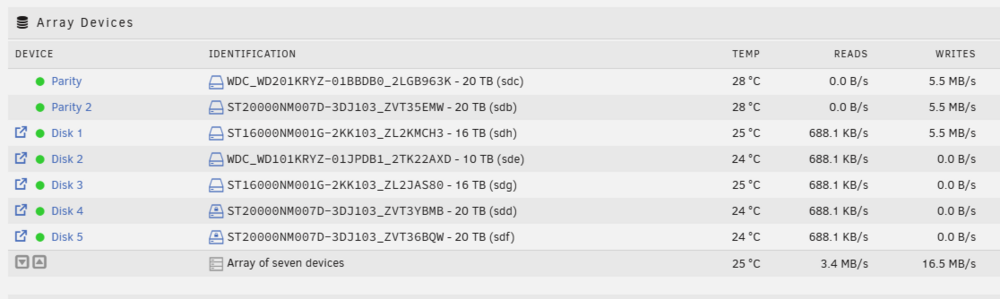
I shutdown any dockers using the array. Not sure what else would be writing to any array disks. When I turn off the zero write (tried yesterday) the write speed doesn't change and array goes to idle. Whole point was to not write parity. It looks like it's re-writing parity anyways (just super slowly). Maybe I just cancel and remove the disk and move on, hah.
-
storinator-diagnostics-20250915-1228.zip Thanks for taking a looksee
-
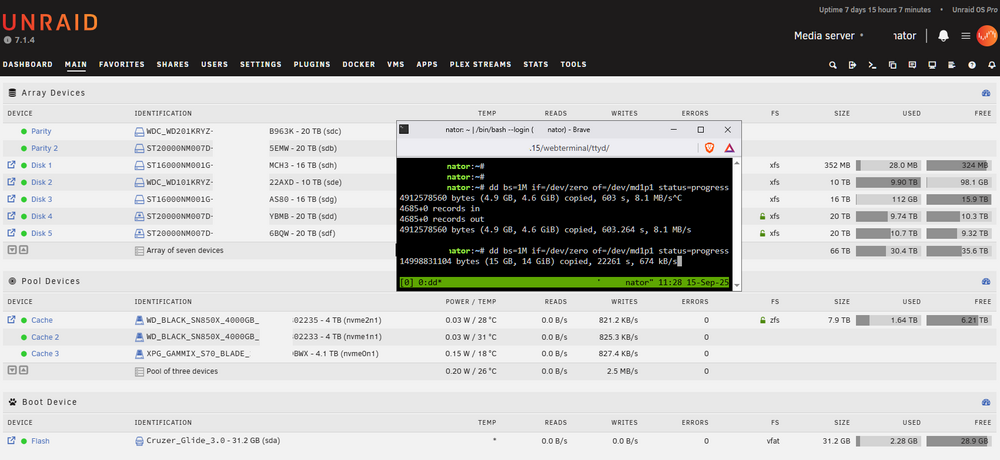
Thanks, seems like Tmux was already installed. Any idea why progress is so slow? I did this to not risk loosing parity. Though I suppose with two parity drives I can pull remove one disk at a time and keep parity regardless.
-
You can expand the zfs pool I have not tried it or know anything about it other than it was released and possible.
-
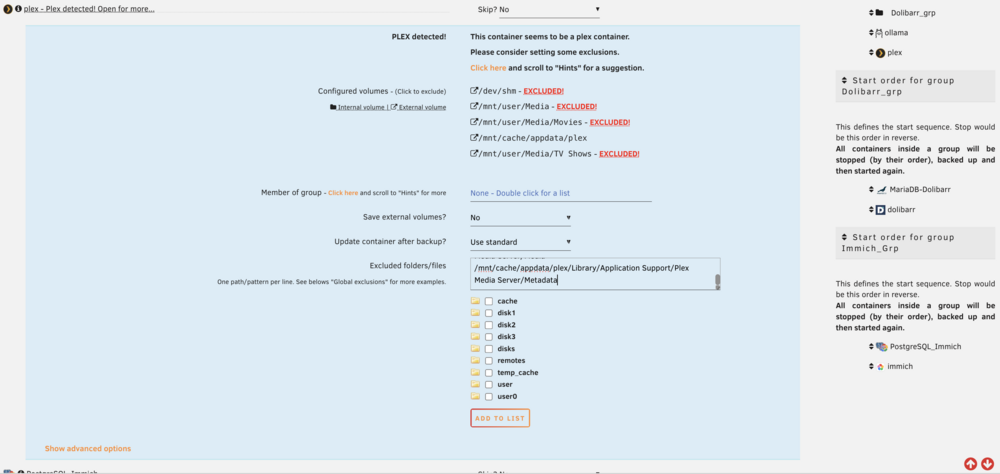
Agreed. However that is not the case as all my other dockers backup properly. (I did not show that screenshot, but I have tried multiple source types in the settings box. Even going so far to list every plex sub-directory. All yield the same result.) It’s a weird bug. No worries here. I’ll probably move to zfs snapshots at some point and won’t worry about this. @KluthR no worries, I’m not asking you to change anything. I figured it out by reading other messages in this thread. Thank you :)
-
I followed the steps in the docs https://docs.unraid.net/unraid-os/using-unraid-to/manage-storage/array-configuration/#removing-disks However, I want to clear my dual 16TB drives regardless of CLI closing. Should I use: nohup dd bs=1M if=/dev/zero of=/dev/mdXp1 status=progress
-
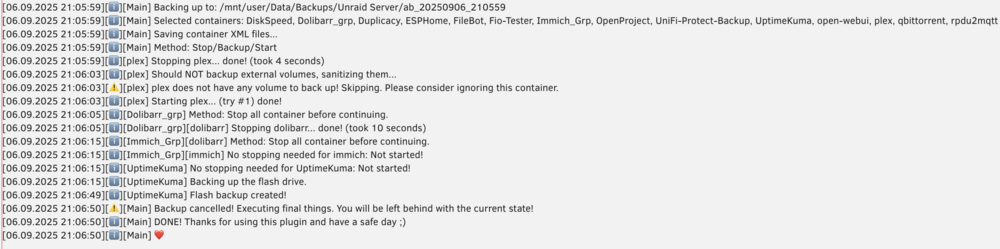
I understand this plugin to be frozen and only bugfixes moving forward. I am not requesting a bugfix or anything. Just a note to others. Thank you for the time and effort you have given the community. Plex backup isn't working for me. "plex does not have any volume to back up! Skipping. Please consider ignoring this container." I think the issue is this: "/mnt/cache/appdata/plex" is showing as external somehow. Weird. I will look at debug logs next. Also groups, you simply make one by typing text in the group field and hitting save. Current help text doesn't make a ton of sense. Hope that helps others.
-
Okay so zfs encrypted with a short passphrase (as a test) worked. Not sure what I did differently today vs last night? I restarted unraid this morning. Edit: Using a full-long passphrase worked. I guess a restart fixed it? Dunno. Was loosing hair last night. Now for some speed tests :)

-
Well... zfs unencrypted just worked. I simply formatted it a second time. (I have done this before with encrypted deployment). I will delete and try again.



