





Staz
Members
-
Joined
-
Last visited
-
Thank you for the work on this update. 7.0.1 to 7.1.2 with no issues. 13600k on ASRock Z790 Pro RS, 64GB DDR5, 4 NVMEs, 1 SSD, 6 HDDs I am still running Macvlan because of Ubiquiti. This kernel appears to have reduced power watts, as my idle (6 disks spun up) wattage is now 81w (before was 90w). Idle (spun down) wattage is still at 45w.
-
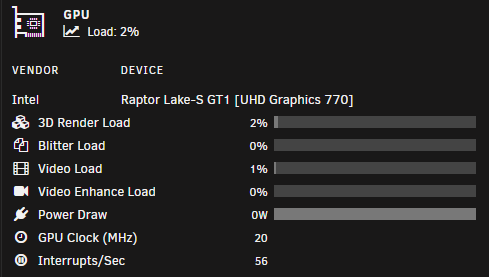
Regarding the GPU Power Draw on the dashboard, using an Intel UHD GPU, is there supposed to be any power draw? I swear this used to some something other than 0w.
-
Thanks for pointing me in that direction. I just found the Parity Check Tuning forum and this is a known issue, being worked on.
-
I just upgraded and also got the Unclean shutdown message. Details: I always stop my docker containers first. Then I stop the array. The array did stop cleanly. After the reboot, I got the Unclean shutdown message, however, the parity check did not start, and the parity says "valid".
-
+1 Please make it so.
