





Vincent77
Members
-
Joined
-
Last visited
-
Today I did some testing. I removed all the disks from the array except for one and did a read check. No problems it ran at 120MB/s. I then added each disk one at a time, doing a read test after adding each one. What I found was I have three disks that when added to the array individually, will cause the read check to crawl. Disks 4, 8 and 24 are causing the problem. I am able to read and write to these disks at full speed, yet they slow the read check down to under 2MB/s. I don't really want to remove these 3 disks from the array as it's 32TB or storage that otherwise performs as they should. Tomorrow I will clear and format one to see if that does anything.
-
They're both disabled now.
-
I'll grab a new PSU and required connectors tomorrow. I think the current PSU in the disk shelf is a Corsair 550w. The nvme was the cache drive originally but I disabled it at some point a while back fiddling, trying anything to fix this issue. I'll set it back now.
-
Interesting. I did notice reads and writes are much higher on that disk, and climbing slowly.
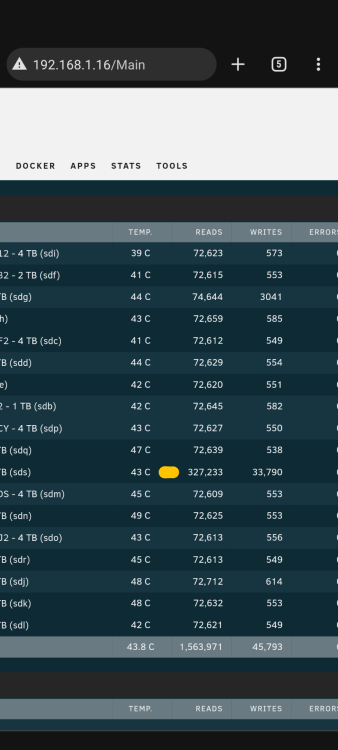
-
Hi. New diagnostics attached, taken during read check. tower-diagnostics-20240122-2127.zip
-
My parity check and read check speed is abysmal. Max 2MB/s but I am able to read from and write to the array at GB speed over the network. I've read through the logs and found a couple of errors but no idea how to interpret them or how to proceed. At one time the parity check speed was fine so somewhere along the line I've added or changed something that broke it. Help from the experts would be appreciated. Specs of my setup: - Norco ds 24 bay disk shelf with 18 disk's in the array. Connected via 6 sff8088 cables to two LSI9201-16e sas cards on an Asus PRIME B450M Ryzen 3 3200g 16GB DDR4 tower-diagnostics-20240122-1549.zip
-
I had the same issue as David, fixed using the instructions provided by JorgeB. Thanks guys!
