





mozes
Members
-
Joined
-
Last visited
-
Currently running a Threadfin container to provide IPTV services from my provider to a Plex container. It works alright but definitely has its issues. Is anyone running alternatives to Threadfin? Pros/Cons or what do you like about the alternative you are leveraging?
-
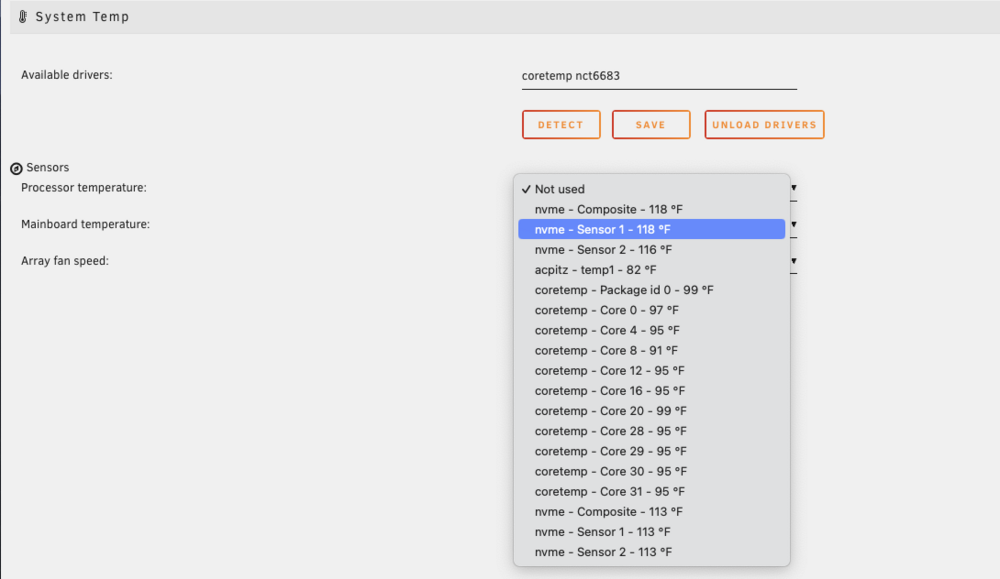
New build running 6.12.10 community, with Dyamix System temp 2023.02.04b. Build has i5-12600K CPU & MSI MPG B760I Edge MB. Current driver detection for system temp is showing coretemp nct6683. In the drop down for the CPU temp and MB temp its not clear which item is the temp for the CPU vs MB and what some of the other items are. Any guidance?
-
When following dja's manual restore method from the VM backup it specefies a path in step 3 /etc/libvirt/qemu/nvram/ for the FD file. I dont seem to have a libvirt folder in my /etc directory. Did something change with the versions or could I possibly be looking in the wrong location? The only location I have found the libvirt directory in is part of the mnt/usr/system/ path.
-
Thanks Squid!
-
After going through the Spaceinvader One video and Unraid guide on initial Docker setup, seems the options you can select within Docker data root are a newer feature. Are there things to keep in mind why you would want to change the default data root form btrfs vDisk to one of the other two options (xfs vDisk / directory)?
-
Great thank you for the guidance!
-
Looking for some guidance on which path to take for storage setup hosting my VMDKs. I currently have an NVME SSD which I wanted dedicated for my VMDKs domain share in Unraid. Originally I had planned on pointing the share to the specific cache setup for this purpose which is using that NVME and setting the cache pool to ONLY. I currently will backup the VMDKs off box separately. In order to prevent other shares form leveraging the NVME I would need to go through each share and ensure each one didn't default to this specific cache pool. Recently I found that NVMEs can be added to the array. Would a better direction for my goal be to add the NVME to the array and under global share settings exclude that drive from the array and only include it for the domains share? If this approach was taken does the parity drive backup the NVME still? Would rather keep the option for btrfs raid 1 and a second NVME in the future instead of using the parity drive. Any guidance would be appreciated to ensure I started down the best path from the start.
