





TuxWolfgang
Members
-
Joined
-
Last visited
Everything posted by TuxWolfgang
-
Unfortunately, I deleted it again and replaced it with NextCloud.
-
Sorry für die Verwirrung. Nextcloud war hier nur als Beispiel zu sehen. Meinte jetzt nicht konkret Nextcloud (hatte ich laufen, aber jetzt nicht mehr). Apps die aktuell zB laufen: syncthing: http://192.168.0.100:8384/ phpmyadmin: http://192.168.0.100:8008/ homeassistant: http://192.168.0.100:8123/ Photoview: http://192.168.0.100:8694/ flame: http://192.168.0.100:5030/ usw... UnRaid ist mit http://192.168.0.100 erreichbar
-
Die Idee war folgende: - Im Haus gibt es eine Firewall über die alles läuft. Dort kann ich manuell DNS Einstellungen vornehmen. Also das zB die Domain nextcloud.intern mit 192.168.0.x auflöst. - Es ist dort aber nur eine Eingabe der IP Adresse möglich. Deshalb war eben der Gedanke, der Web Oberfläche vom Docker einer fixe IP Adresse zuzuordnen - Das klappt soweit auch. Nur, dass eben der 8080 Port verwendet wird und nicht 80. Das ganze ist jetzt auch nicht das große Thema. Ich kann auch mit IP:PORT leben. Aber ich dachte, es geht relativ einfach ohne große Einstellungen oder Anpassungen...
-
Exakt dieses Problem habe ich auch soeben. Hast du dafür eine Lösung gefunden?
-
"Auto scan all folders" According to this documentation, it should work like this. (https://docs.librephotos.com/docs/user-guide/auto-scan) I still adjusted the path, but unfortunately that doesn't work for me yet too. It comes an error:
-
Thank you very much! Specifying subfolders seems to work. Container Path: /var/lib/librephotos/photos/USER1 Container Path: /var/lib/librephotos/photos/USER2 Container Path: /var/lib/librephotos/photos/....
-
How can I set it up for multiple users? In UnRaid I have separate shares for different users. Now I would like to have it also for Librephotos set so that each user sees just his share. But I can only select one share in Docker "Container Path: /var/lib/librephotos/photos/" Or is there another trick?
-
Reinstalling (two times) helped. It seems that Node.js binary was not downloaded completely or could not be decompressed. Thank you very much!
-
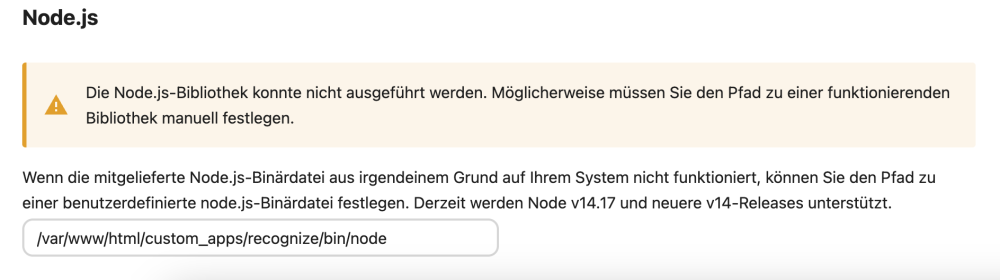
I don't understand. The file seems to exist, but cannot be executed: root@ae995bd20a60:/# /var/www/html/custom_apps/recognize/bin/node -v bash: /var/www/html/custom_apps/recognize/bin/node: No such file or directory root@ae995bd20a60:/# cd /var/www/html/custom_apps/recognize/bin/ root@ae995bd20a60:/var/www/html/custom_apps/recognize/bin# dir node x64.tar.gz root@ae995bd20a60:/var/www/html/custom_apps/recognize/bin# ./node -v bash: ./node: No such file or directory root@ae995bd20a60:/var/www/html/custom_apps/recognize/bin# /node -v bash: /node: No such file or directory root@ae995bd20a60:/var/www/html/custom_apps/recognize/bin# node -v bash: node: command not found
-
That's strange. It can not be found on me? root@ae995bd20a60:/# node -v bash: node: command not found In the Nextcloud settings you can also set a path to the Node.JS. I just don't know where that should be?
-
The new version supports object recognition, but requires Node.js. Is there a way to make this work? https://apps.nextcloud.com/apps/recognize https://nextcloud.com/blog/press_releases/nextcloud-hub-3-release-ai-photos/
-
Have you already found a solution? Have a similar problem.


