





dgaglioni
Members
-
Joined
-
Last visited
Everything posted by dgaglioni
-
Hi everyone, Last few days I've noticed that as soon as ZFS ARC filled my RAM my Unraid becomes very unresponsive (UI, SMB, SSHd etc...) and dockers started to showing "unhealthy", I restarted the server and the issue was gone until it filled the RAM again (64GB). The workaround I found was to set the "options zfs zfs_arc_max" on /boot/config/modprobe.d/zfs.conf , since adjusting that to 8GB the issue was gone (24 hours and no issue). Not sure if it is related specifically to my system, but here are the diag files: nas-diagnostics-20241030-1111 - Today diag running with ARC 8GB max for 24 hours nas-diagnostics-20241029-0943 - Final config with 8GB for ARC nas-diagnostics-20241028-0925 - First attempt with 12GB for ARC ...diags in between all having issues and crazy logs about php and winbindd... nas-diagnostics-20241025-1545 - before upgrade nas-diagnostics-20241029-0943.zip nas-diagnostics-20241028-0925.zip nas-diagnostics-20241028-0712.zip nas-diagnostics-20241027-1440.zip nas-diagnostics-20241026-1445.zip nas-diagnostics-20241026-1432.zip nas-diagnostics-20241026-1125.zip nas-diagnostics-20241026-0347.zip nas-diagnostics-20241026-0316.zip nas-diagnostics-20241025-2137.zip nas-diagnostics-20241025-1545.zip nas-diagnostics-20241030-1111.zip
-
Anyone having issues on 7.0.0 beta 4? Installation logs: +============================================================================== | Testing SNMP by listing mounts, /boot should be present +============================================================================== snmpwalk -v 2c localhost -c zabbix@snmp1 hrFSMountPoint snmpwalk failureCouldn't find /boot mount point. SNMP output: snmpwalk: error while loading shared libraries: libssl.so.1.1: cannot open shared object file: No such file or directory plugin: run failed: '/bin/bash' returned 1 Executing hook script: post_plugin_checks
-
Hi everyone, Since upgrade from 6.12.13, I have seeing some errors on Unraid /dev/sda disk, checking the logs I found one that shows my onboard i225 interfaces going down and right after issues on my sda disk, as I'm using an offboard 4x10Gb card I disabled the i225 on BIOS and since then I'm not seeing issues anymore. I might not be related but all issues with the usb drive are gone. Obs: I tried different USB ports, 2.0, 3.2 and Thunderbolt (USB-C). MB: Asus B550 Creator nas-diagnostics-20241025-1545 - before upgrade nas-diagnostics-20241026-1445 - after disabling i225 nas-diagnostics-20241026-1432 - issue nas-diagnostics-20241026-1125 - issue nas-diagnostics-20241028-0712.zip nas-diagnostics-20241027-1440.zip nas-diagnostics-20241026-1445.zip nas-diagnostics-20241026-1432.zip nas-diagnostics-20241026-1125.zip nas-diagnostics-20241026-0347.zip nas-diagnostics-20241026-0316.zip nas-diagnostics-20241025-2137.zip nas-diagnostics-20241025-1545.zip
-
Hi everyone, I just upgraded from 6.12.13 with a zfs pool configured with a cache disk (L2ARC), after the upgrade to 7.0.0 beta 4 I noticed that the zfs pool was missing the cache disk, without upgrading the zfs pool I created two partition (one for L2ARC and the other for ZIL) on the disk I was using as cache and added back to my zfs pool (only array started). After adding the L2ARC (nvme0n1p2) and ZIL (nvme0n1p1) to the zfs pool, the disks started to show "Unmountable: wrong or no file system" on main webui, I stopped the array and rebooted but no success. After the reboot I performed a zpool import -a and the pool was "back" however still showing "Unmountable: wrong or no file system" on the zfs pool disk. As a workaround I added it to the "zpool import -a" to "/boot/config/go", tried a reboot and the zfs pools were imported. edit: Commands used: zpool add zfs log /dev/nvme0n1p1 zpool add zfs cache /dev/nvme0n1p2 In attach the diagnostics before and after the upgrade. nas-diagnostics-20241026-0347.zip nas-diagnostics-20241025-1545.zip
-
@JorgeB @limetech Why not include on 6.12.13 ? root@NAS:~# lspci | grep FastLinQ 01:00.0 Ethernet controller: QLogic Corp. FastLinQ QL41000 Series 10/25/40/50GbE Controller (rev 02) 01:00.1 Ethernet controller: QLogic Corp. FastLinQ QL41000 Series 10/25/40/50GbE Controller (rev 02) 01:00.2 Ethernet controller: QLogic Corp. FastLinQ QL41000 Series 10/25/40/50GbE Controller (rev 02) 01:00.3 Ethernet controller: QLogic Corp. FastLinQ QL41000 Series 10/25/40/50GbE Controller (rev 02)
-
Same here, I selected "Enable Docker: No" apply and "Enable Docker: Yes" apply, and it worked....
-
Hi, I have my Unraid with 2 interfaces however I just use eth0 for Unraid mgmt and VM traffic and eth1 for dockers, in my scenario I just have an IP on eth0, I don't see why add another IP to Unraid on another interface, unless your goal is Unraid mgmt redundancy. Quick question, if I understood eth0 is 1Gb interface and eth1 is a 10Gb interface correct? If both are 1Gb, create a bond and add the VLANs you need, you can let the Unraid mgmt on a native VLAN and create VLANs for the VMs and Dockers.
-
Hi everyone, I'm seeing an increase of errors (below) on my usb flash drive I have Unraid installed, is time for replacement? I'm considering installing on a 64GB SSD, is it a better idea than 32GB usb flash drive? Sep 17 03:40:01 NAS kernel: sd 0:0:0:0: [sda] tag#0 UNKNOWN(0x2003) Result: hostbyte=0x00 driverbyte=DRIVER_OK cmd_age=0s Sep 17 03:40:01 NAS kernel: sd 0:0:0:0: [sda] tag#0 Sense Key : 0x3 [current] Sep 17 03:40:01 NAS kernel: sd 0:0:0:0: [sda] tag#0 ASC=0x11 ASCQ=0x0 Sep 17 03:40:01 NAS kernel: sd 0:0:0:0: [sda] tag#0 CDB: opcode=0x28 28 00 00 09 c7 40 00 00 20 00 Sep 17 03:40:01 NAS kernel: critical medium error, dev sda, sector 640832 op 0x0:(READ) flags 0x80700 phys_seg 32 prio class 2 Oct 2 03:40:01 NAS kernel: sd 0:0:0:0: [sda] tag#0 UNKNOWN(0x2003) Result: hostbyte=0x00 driverbyte=DRIVER_OK cmd_age=0s Oct 2 03:40:01 NAS kernel: sd 0:0:0:0: [sda] tag#0 Sense Key : 0x3 [current] Oct 2 03:40:01 NAS kernel: sd 0:0:0:0: [sda] tag#0 ASC=0x11 ASCQ=0x0 Oct 2 03:40:01 NAS kernel: sd 0:0:0:0: [sda] tag#0 CDB: opcode=0x28 28 00 00 09 c7 40 00 00 20 00 Oct 2 03:40:01 NAS kernel: critical medium error, dev sda, sector 640832 op 0x0:(READ) flags 0x80700 phys_seg 32 prio class 2 Oct 3 03:40:01 NAS kernel: sd 0:0:0:0: [sda] tag#0 UNKNOWN(0x2003) Result: hostbyte=0x00 driverbyte=DRIVER_OK cmd_age=0s Oct 3 03:40:01 NAS kernel: sd 0:0:0:0: [sda] tag#0 Sense Key : 0x3 [current] Oct 3 03:40:01 NAS kernel: sd 0:0:0:0: [sda] tag#0 ASC=0x11 ASCQ=0x0 Oct 3 03:40:01 NAS kernel: sd 0:0:0:0: [sda] tag#0 CDB: opcode=0x28 28 00 00 09 c7 40 00 00 20 00 Oct 3 03:40:01 NAS kernel: critical medium error, dev sda, sector 640832 op 0x0:(READ) flags 0x80700 phys_seg 32 prio class 2 Oct 24 03:40:01 NAS kernel: sd 0:0:0:0: [sda] tag#0 UNKNOWN(0x2003) Result: hostbyte=0x00 driverbyte=DRIVER_OK cmd_age=0s Oct 24 03:40:01 NAS kernel: sd 0:0:0:0: [sda] tag#0 Sense Key : 0x3 [current] Oct 24 03:40:01 NAS kernel: sd 0:0:0:0: [sda] tag#0 ASC=0x11 ASCQ=0x0 Oct 24 03:40:01 NAS kernel: sd 0:0:0:0: [sda] tag#0 CDB: opcode=0x28 28 00 00 09 c7 41 00 00 1f 00 Oct 24 03:40:01 NAS kernel: critical medium error, dev sda, sector 640833 op 0x0:(READ) flags 0x80700 phys_seg 31 prio class 2 Oct 28 03:40:01 NAS kernel: sd 0:0:0:0: [sda] tag#0 UNKNOWN(0x2003) Result: hostbyte=0x00 driverbyte=DRIVER_OK cmd_age=0s Oct 28 03:40:01 NAS kernel: sd 0:0:0:0: [sda] tag#0 Sense Key : 0x3 [current] Oct 28 03:40:01 NAS kernel: sd 0:0:0:0: [sda] tag#0 ASC=0x11 ASCQ=0x0 Oct 28 03:40:01 NAS kernel: sd 0:0:0:0: [sda] tag#0 CDB: opcode=0x28 28 00 00 09 c7 41 00 00 1f 00 Oct 28 03:40:01 NAS kernel: critical medium error, dev sda, sector 640833 op 0x0:(READ) flags 0x80700 phys_seg 31 prio class 2 Nov 2 03:40:01 NAS kernel: sd 0:0:0:0: [sda] tag#0 UNKNOWN(0x2003) Result: hostbyte=0x00 driverbyte=DRIVER_OK cmd_age=0s Nov 2 03:40:01 NAS kernel: sd 0:0:0:0: [sda] tag#0 Sense Key : 0x3 [current] Nov 2 03:40:01 NAS kernel: sd 0:0:0:0: [sda] tag#0 ASC=0x11 ASCQ=0x0 Nov 2 03:40:01 NAS kernel: sd 0:0:0:0: [sda] tag#0 CDB: opcode=0x28 28 00 00 09 c7 41 00 00 1f 00 Nov 2 03:40:01 NAS kernel: critical medium error, dev sda, sector 640833 op 0x0:(READ) flags 0x80700 phys_seg 31 prio class 2 Dec 6 03:40:01 NAS kernel: sd 0:0:0:0: [sda] tag#0 UNKNOWN(0x2003) Result: hostbyte=0x00 driverbyte=DRIVER_OK cmd_age=0s Dec 6 03:40:01 NAS kernel: sd 0:0:0:0: [sda] tag#0 Sense Key : 0x3 [current] Dec 6 03:40:01 NAS kernel: sd 0:0:0:0: [sda] tag#0 ASC=0x11 ASCQ=0x0 Dec 6 03:40:01 NAS kernel: sd 0:0:0:0: [sda] tag#0 CDB: opcode=0x28 28 00 00 09 c7 40 00 00 20 00 Dec 6 03:40:01 NAS kernel: critical medium error, dev sda, sector 640832 op 0x0:(READ) flags 0x80700 phys_seg 32 prio class 2 Dec 10 03:40:01 NAS kernel: sd 0:0:0:0: [sda] tag#0 UNKNOWN(0x2003) Result: hostbyte=0x00 driverbyte=DRIVER_OK cmd_age=0s Dec 10 03:40:01 NAS kernel: sd 0:0:0:0: [sda] tag#0 Sense Key : 0x3 [current] Dec 10 03:40:01 NAS kernel: sd 0:0:0:0: [sda] tag#0 ASC=0x11 ASCQ=0x0 Dec 10 03:40:01 NAS kernel: sd 0:0:0:0: [sda] tag#0 CDB: opcode=0x28 28 00 00 09 c7 40 00 00 20 00 Dec 10 03:40:01 NAS kernel: critical medium error, dev sda, sector 640832 op 0x0:(READ) flags 0x80700 phys_seg 32 prio class 2 Dec 11 03:40:01 NAS kernel: sd 0:0:0:0: [sda] tag#0 UNKNOWN(0x2003) Result: hostbyte=0x00 driverbyte=DRIVER_OK cmd_age=0s Dec 11 03:40:01 NAS kernel: sd 0:0:0:0: [sda] tag#0 Sense Key : 0x3 [current] Dec 11 03:40:01 NAS kernel: sd 0:0:0:0: [sda] tag#0 ASC=0x11 ASCQ=0x0 Dec 11 03:40:01 NAS kernel: sd 0:0:0:0: [sda] tag#0 CDB: opcode=0x28 28 00 00 09 c7 41 00 00 1f 00 Dec 11 03:40:01 NAS kernel: critical medium error, dev sda, sector 640833 op 0x0:(READ) flags 0x80700 phys_seg 31 prio class 2 Dec 13 03:40:01 NAS kernel: sd 0:0:0:0: [sda] tag#0 UNKNOWN(0x2003) Result: hostbyte=0x00 driverbyte=DRIVER_OK cmd_age=0s Dec 13 03:40:01 NAS kernel: sd 0:0:0:0: [sda] tag#0 Sense Key : 0x3 [current] Dec 13 03:40:01 NAS kernel: sd 0:0:0:0: [sda] tag#0 ASC=0x11 ASCQ=0x0 Dec 13 03:40:01 NAS kernel: sd 0:0:0:0: [sda] tag#0 CDB: opcode=0x28 28 00 00 09 c7 41 00 00 1f 00 Dec 13 03:40:01 NAS kernel: critical medium error, dev sda, sector 640833 op 0x0:(READ) flags 0x80700 phys_seg 31 prio class 2 Dec 15 03:40:01 NAS kernel: sd 0:0:0:0: [sda] tag#0 UNKNOWN(0x2003) Result: hostbyte=0x00 driverbyte=DRIVER_OK cmd_age=0s Dec 15 03:40:01 NAS kernel: sd 0:0:0:0: [sda] tag#0 Sense Key : 0x3 [current] Dec 15 03:40:01 NAS kernel: sd 0:0:0:0: [sda] tag#0 ASC=0x11 ASCQ=0x0 Dec 15 03:40:01 NAS kernel: sd 0:0:0:0: [sda] tag#0 CDB: opcode=0x28 28 00 00 09 c7 41 00 00 1f 00 Dec 15 03:40:01 NAS kernel: critical medium error, dev sda, sector 640833 op 0x0:(READ) flags 0x80700 phys_seg 31 prio class 2 Dec 16 03:40:01 NAS kernel: sd 0:0:0:0: [sda] tag#0 UNKNOWN(0x2003) Result: hostbyte=0x00 driverbyte=DRIVER_OK cmd_age=0s Dec 16 03:40:01 NAS kernel: sd 0:0:0:0: [sda] tag#0 Sense Key : 0x3 [current] Dec 16 03:40:01 NAS kernel: sd 0:0:0:0: [sda] tag#0 ASC=0x11 ASCQ=0x0 Dec 16 03:40:01 NAS kernel: sd 0:0:0:0: [sda] tag#0 CDB: opcode=0x28 28 00 00 09 c7 41 00 00 1f 00 Dec 16 03:40:01 NAS kernel: critical medium error, dev sda, sector 640833 op 0x0:(READ) flags 0x80700 phys_seg 31 prio class 2 Dec 18 03:40:01 NAS kernel: sd 0:0:0:0: [sda] tag#0 UNKNOWN(0x2003) Result: hostbyte=0x00 driverbyte=DRIVER_OK cmd_age=0s Dec 18 03:40:01 NAS kernel: sd 0:0:0:0: [sda] tag#0 Sense Key : 0x3 [current] Dec 18 03:40:01 NAS kernel: sd 0:0:0:0: [sda] tag#0 ASC=0x11 ASCQ=0x0 Dec 18 03:40:01 NAS kernel: sd 0:0:0:0: [sda] tag#0 CDB: opcode=0x28 28 00 00 09 c7 40 00 00 20 00 Dec 18 03:40:01 NAS kernel: critical medium error, dev sda, sector 640832 op 0x0:(READ) flags 0x80700 phys_seg 32 prio class 2 Dec 19 03:40:01 NAS kernel: sd 0:0:0:0: [sda] tag#0 UNKNOWN(0x2003) Result: hostbyte=0x00 driverbyte=DRIVER_OK cmd_age=0s Dec 19 03:40:01 NAS kernel: sd 0:0:0:0: [sda] tag#0 Sense Key : 0x3 [current] Dec 19 03:40:01 NAS kernel: sd 0:0:0:0: [sda] tag#0 ASC=0x11 ASCQ=0x0 Dec 19 03:40:01 NAS kernel: sd 0:0:0:0: [sda] tag#0 CDB: opcode=0x28 28 00 00 09 c7 41 00 00 1f 00 Dec 19 03:40:01 NAS kernel: critical medium error, dev sda, sector 640833 op 0x0:(READ) flags 0x80700 phys_seg 31 prio class 2 Dec 20 03:40:01 NAS kernel: sd 0:0:0:0: [sda] tag#0 UNKNOWN(0x2003) Result: hostbyte=0x00 driverbyte=DRIVER_OK cmd_age=0s Dec 20 03:40:01 NAS kernel: sd 0:0:0:0: [sda] tag#0 Sense Key : 0x3 [current] Dec 20 03:40:01 NAS kernel: sd 0:0:0:0: [sda] tag#0 ASC=0x11 ASCQ=0x0 Dec 20 03:40:01 NAS kernel: sd 0:0:0:0: [sda] tag#0 CDB: opcode=0x28 28 00 00 09 c7 41 00 00 1f 00 Dec 20 03:40:01 NAS kernel: critical medium error, dev sda, sector 640833 op 0x0:(READ) flags 0x80700 phys_seg 31 prio class 2 Dec 21 03:40:01 NAS kernel: sd 0:0:0:0: [sda] tag#0 UNKNOWN(0x2003) Result: hostbyte=0x00 driverbyte=DRIVER_OK cmd_age=0s Dec 21 03:40:01 NAS kernel: sd 0:0:0:0: [sda] tag#0 Sense Key : 0x3 [current] Dec 21 03:40:01 NAS kernel: sd 0:0:0:0: [sda] tag#0 ASC=0x11 ASCQ=0x0 Dec 21 03:40:01 NAS kernel: sd 0:0:0:0: [sda] tag#0 CDB: opcode=0x28 28 00 00 09 c7 41 00 00 1f 00 Dec 21 03:40:01 NAS kernel: critical medium error, dev sda, sector 640833 op 0x0:(READ) flags 0x80700 phys_seg 31 prio class 2 Dec 23 03:40:01 NAS kernel: sd 0:0:0:0: [sda] tag#0 UNKNOWN(0x2003) Result: hostbyte=0x00 driverbyte=DRIVER_OK cmd_age=0s Dec 23 03:40:01 NAS kernel: sd 0:0:0:0: [sda] tag#0 Sense Key : 0x3 [current] Dec 23 03:40:01 NAS kernel: sd 0:0:0:0: [sda] tag#0 ASC=0x11 ASCQ=0x0 Dec 23 03:40:01 NAS kernel: sd 0:0:0:0: [sda] tag#0 CDB: opcode=0x28 28 00 00 09 c7 41 00 00 1f 00 Dec 23 03:40:01 NAS kernel: critical medium error, dev sda, sector 640833 op 0x0:(READ) flags 0x80700 phys_seg 31 prio class 2 Dec 23 03:40:01 NAS kernel: sd 0:0:0:0: [sda] tag#0 UNKNOWN(0x2003) Result: hostbyte=0x00 driverbyte=DRIVER_OK cmd_age=0s Dec 23 03:40:01 NAS kernel: sd 0:0:0:0: [sda] tag#0 Sense Key : 0x3 [current] Dec 23 03:40:01 NAS kernel: sd 0:0:0:0: [sda] tag#0 ASC=0x11 ASCQ=0x0 Dec 23 03:40:01 NAS kernel: sd 0:0:0:0: [sda] tag#0 CDB: opcode=0x28 28 00 00 09 c7 48 00 00 01 00 Dec 23 03:40:01 NAS kernel: critical medium error, dev sda, sector 640840 op 0x0:(READ) flags 0x0 phys_seg 1 prio class 2 Dec 23 03:40:01 NAS kernel: FAT-fs (sda1): Directory bread(block 640808) failed Dec 23 03:40:01 NAS kernel: sd 0:0:0:0: [sda] tag#0 UNKNOWN(0x2003) Result: hostbyte=0x00 driverbyte=DRIVER_OK cmd_age=0s Dec 23 03:40:01 NAS kernel: sd 0:0:0:0: [sda] tag#0 Sense Key : 0x3 [current] Dec 23 03:40:01 NAS kernel: sd 0:0:0:0: [sda] tag#0 ASC=0x11 ASCQ=0x0 Dec 23 03:40:01 NAS kernel: sd 0:0:0:0: [sda] tag#0 CDB: opcode=0x28 28 00 00 09 c7 49 00 00 01 00 Dec 23 03:40:01 NAS kernel: critical medium error, dev sda, sector 640841 op 0x0:(READ) flags 0x0 phys_seg 1 prio class 2 Dec 23 03:40:01 NAS kernel: FAT-fs (sda1): Directory bread(block 640809) failed Dec 24 03:40:01 NAS kernel: sd 0:0:0:0: [sda] tag#0 UNKNOWN(0x2003) Result: hostbyte=0x00 driverbyte=DRIVER_OK cmd_age=0s Dec 24 03:40:01 NAS kernel: sd 0:0:0:0: [sda] tag#0 Sense Key : 0x3 [current] Dec 24 03:40:01 NAS kernel: sd 0:0:0:0: [sda] tag#0 ASC=0x11 ASCQ=0x0 Dec 24 03:40:01 NAS kernel: sd 0:0:0:0: [sda] tag#0 CDB: opcode=0x28 28 00 00 09 c7 41 00 00 1f 00 Dec 24 03:40:01 NAS kernel: critical medium error, dev sda, sector 640833 op 0x0:(READ) flags 0x80700 phys_seg 31 prio class 2 Dec 25 03:40:01 NAS kernel: sd 0:0:0:0: [sda] tag#0 UNKNOWN(0x2003) Result: hostbyte=0x00 driverbyte=DRIVER_OK cmd_age=0s Dec 25 03:40:01 NAS kernel: sd 0:0:0:0: [sda] tag#0 Sense Key : 0x3 [current] Dec 25 03:40:01 NAS kernel: sd 0:0:0:0: [sda] tag#0 ASC=0x11 ASCQ=0x0 Dec 25 03:40:01 NAS kernel: sd 0:0:0:0: [sda] tag#0 CDB: opcode=0x28 28 00 00 09 c7 40 00 00 20 00 Dec 25 03:40:01 NAS kernel: critical medium error, dev sda, sector 640832 op 0x0:(READ) flags 0x80700 phys_seg 32 prio class 2 Dec 27 03:40:01 NAS kernel: sd 0:0:0:0: [sda] tag#0 UNKNOWN(0x2003) Result: hostbyte=0x00 driverbyte=DRIVER_OK cmd_age=0s Dec 27 03:40:01 NAS kernel: sd 0:0:0:0: [sda] tag#0 Sense Key : 0x3 [current] Dec 27 03:40:01 NAS kernel: sd 0:0:0:0: [sda] tag#0 ASC=0x11 ASCQ=0x0 Dec 27 03:40:01 NAS kernel: sd 0:0:0:0: [sda] tag#0 CDB: opcode=0x28 28 00 00 09 c7 41 00 00 1f 00 Dec 27 03:40:01 NAS kernel: critical medium error, dev sda, sector 640833 op 0x0:(READ) flags 0x80700 phys_seg 31 prio class 2 Dec 27 20:15:15 NAS emhttpd: read SMART /dev/sda Dec 30 15:25:09 NAS emhttpd: read SMART /dev/sda Dec 31 03:24:57 NAS kernel: sd 0:0:0:0: [sda] tag#0 UNKNOWN(0x2003) Result: hostbyte=0x00 driverbyte=DRIVER_OK cmd_age=0s Dec 31 03:24:57 NAS kernel: sd 0:0:0:0: [sda] tag#0 Sense Key : 0x3 [current] Dec 31 03:24:57 NAS kernel: sd 0:0:0:0: [sda] tag#0 ASC=0x11 ASCQ=0x0 Dec 31 03:24:57 NAS kernel: sd 0:0:0:0: [sda] tag#0 CDB: opcode=0x28 28 00 00 0c 81 80 00 00 f0 00 Dec 31 03:24:57 NAS kernel: critical medium error, dev sda, sector 819584 op 0x0:(READ) flags 0x84700 phys_seg 30 prio class 2 Dec 31 03:24:57 NAS kernel: sd 0:0:0:0: [sda] tag#0 UNKNOWN(0x2003) Result: hostbyte=0x00 driverbyte=DRIVER_OK cmd_age=0s Dec 31 03:24:57 NAS kernel: sd 0:0:0:0: [sda] tag#0 Sense Key : 0x3 [current] Dec 31 03:24:57 NAS kernel: sd 0:0:0:0: [sda] tag#0 ASC=0x11 ASCQ=0x0 Dec 31 03:24:57 NAS kernel: sd 0:0:0:0: [sda] tag#0 CDB: opcode=0x28 28 00 00 0c 82 80 00 00 f0 00 Dec 31 03:24:57 NAS kernel: critical medium error, dev sda, sector 819840 op 0x0:(READ) flags 0x84700 phys_seg 30 prio class 2 Dec 31 03:24:57 NAS kernel: sd 0:0:0:0: [sda] tag#0 UNKNOWN(0x2003) Result: hostbyte=0x00 driverbyte=DRIVER_OK cmd_age=0s Dec 31 03:24:57 NAS kernel: sd 0:0:0:0: [sda] tag#0 Sense Key : 0x3 [current] Dec 31 03:24:57 NAS kernel: sd 0:0:0:0: [sda] tag#0 ASC=0x11 ASCQ=0x0 Dec 31 03:24:57 NAS kernel: sd 0:0:0:0: [sda] tag#0 CDB: opcode=0x28 28 00 00 0c 81 b0 00 00 08 00 Dec 31 03:24:57 NAS kernel: critical medium error, dev sda, sector 819632 op 0x0:(READ) flags 0x0 phys_seg 1 prio class 2 Dec 31 03:24:57 NAS kernel: sd 0:0:0:0: [sda] tag#0 UNKNOWN(0x2003) Result: hostbyte=0x00 driverbyte=DRIVER_OK cmd_age=0s Dec 31 03:24:57 NAS kernel: sd 0:0:0:0: [sda] tag#0 Sense Key : 0x3 [current] Dec 31 03:24:57 NAS kernel: sd 0:0:0:0: [sda] tag#0 ASC=0x11 ASCQ=0x0 Dec 31 03:24:57 NAS kernel: sd 0:0:0:0: [sda] tag#0 CDB: opcode=0x28 28 00 00 0c 81 b0 00 00 08 00 Dec 31 03:24:57 NAS kernel: critical medium error, dev sda, sector 819632 op 0x0:(READ) flags 0x0 phys_seg 1 prio class 2 Dec 31 03:24:57 NAS kernel: sd 0:0:0:0: [sda] tag#0 UNKNOWN(0x2003) Result: hostbyte=0x00 driverbyte=DRIVER_OK cmd_age=0s Dec 31 03:24:57 NAS kernel: sd 0:0:0:0: [sda] tag#0 Sense Key : 0x3 [current] Dec 31 03:24:57 NAS kernel: sd 0:0:0:0: [sda] tag#0 ASC=0x11 ASCQ=0x0 Dec 31 03:24:57 NAS kernel: sd 0:0:0:0: [sda] tag#0 CDB: opcode=0x28 28 00 00 0c 81 c0 00 00 08 00 Dec 31 03:24:57 NAS kernel: critical medium error, dev sda, sector 819648 op 0x0:(READ) flags 0x0 phys_seg 1 prio class 2 Dec 31 03:24:57 NAS kernel: sd 0:0:0:0: [sda] tag#0 UNKNOWN(0x2003) Result: hostbyte=0x00 driverbyte=DRIVER_OK cmd_age=0s Dec 31 03:24:57 NAS kernel: sd 0:0:0:0: [sda] tag#0 Sense Key : 0x3 [current] Dec 31 03:24:57 NAS kernel: sd 0:0:0:0: [sda] tag#0 ASC=0x11 ASCQ=0x0 Dec 31 03:24:57 NAS kernel: sd 0:0:0:0: [sda] tag#0 CDB: opcode=0x28 28 00 00 0c 82 78 00 00 08 00 Dec 31 03:24:57 NAS kernel: critical medium error, dev sda, sector 819832 op 0x0:(READ) flags 0x0 phys_seg 1 prio class 2 Dec 31 03:24:57 NAS kernel: sd 0:0:0:0: [sda] tag#0 UNKNOWN(0x2003) Result: hostbyte=0x00 driverbyte=DRIVER_OK cmd_age=0s Dec 31 03:24:57 NAS kernel: sd 0:0:0:0: [sda] tag#0 Sense Key : 0x3 [current] Dec 31 03:24:57 NAS kernel: sd 0:0:0:0: [sda] tag#0 ASC=0x11 ASCQ=0x0 Dec 31 03:24:57 NAS kernel: sd 0:0:0:0: [sda] tag#0 CDB: opcode=0x28 28 00 00 0c 82 78 00 00 08 00 Dec 31 03:24:57 NAS kernel: critical medium error, dev sda, sector 819832 op 0x0:(READ) flags 0x0 phys_seg 1 prio class 2 Dec 31 03:24:57 NAS kernel: sd 0:0:0:0: [sda] tag#0 UNKNOWN(0x2003) Result: hostbyte=0x00 driverbyte=DRIVER_OK cmd_age=0s Dec 31 03:24:57 NAS kernel: sd 0:0:0:0: [sda] tag#0 Sense Key : 0x3 [current] Dec 31 03:24:57 NAS kernel: sd 0:0:0:0: [sda] tag#0 ASC=0x11 ASCQ=0x0 Dec 31 03:24:57 NAS kernel: sd 0:0:0:0: [sda] tag#0 CDB: opcode=0x28 28 00 00 0c 83 30 00 00 08 00 Dec 31 03:24:57 NAS kernel: critical medium error, dev sda, sector 820016 op 0x0:(READ) flags 0x0 phys_seg 1 prio class 2 Dec 31 03:24:57 NAS kernel: sd 0:0:0:0: [sda] tag#0 UNKNOWN(0x2003) Result: hostbyte=0x00 driverbyte=DRIVER_OK cmd_age=0s Dec 31 03:24:57 NAS kernel: sd 0:0:0:0: [sda] tag#0 Sense Key : 0x3 [current] Dec 31 03:24:57 NAS kernel: sd 0:0:0:0: [sda] tag#0 ASC=0x11 ASCQ=0x0 Dec 31 03:24:57 NAS kernel: sd 0:0:0:0: [sda] tag#0 CDB: opcode=0x28 28 00 00 0c 83 30 00 00 08 00 Dec 31 03:24:57 NAS kernel: critical medium error, dev sda, sector 820016 op 0x0:(READ) flags 0x0 phys_seg 1 prio class 2 Dec 31 03:24:57 NAS kernel: sd 0:0:0:0: [sda] tag#0 UNKNOWN(0x2003) Result: hostbyte=0x00 driverbyte=DRIVER_OK cmd_age=0s Dec 31 03:24:57 NAS kernel: sd 0:0:0:0: [sda] tag#0 Sense Key : 0x3 [current] Dec 31 03:24:57 NAS kernel: sd 0:0:0:0: [sda] tag#0 ASC=0x11 ASCQ=0x0 Dec 31 03:24:57 NAS kernel: sd 0:0:0:0: [sda] tag#0 CDB: opcode=0x28 28 00 00 0c 83 38 00 00 08 00 Dec 31 03:24:57 NAS kernel: critical medium error, dev sda, sector 820024 op 0x0:(READ) flags 0x0 phys_seg 1 prio class 2 Dec 31 03:46:06 NAS emhttpd: read SMART /dev/sda Jan 1 03:40:02 NAS kernel: sd 0:0:0:0: [sda] tag#0 UNKNOWN(0x2003) Result: hostbyte=0x00 driverbyte=DRIVER_OK cmd_age=0s Jan 1 03:40:02 NAS kernel: sd 0:0:0:0: [sda] tag#0 Sense Key : 0x3 [current] Jan 1 03:40:02 NAS kernel: sd 0:0:0:0: [sda] tag#0 ASC=0x11 ASCQ=0x0 Jan 1 03:40:02 NAS kernel: sd 0:0:0:0: [sda] tag#0 CDB: opcode=0x28 28 00 00 09 c7 41 00 00 1f 00 Jan 1 03:40:02 NAS kernel: critical medium error, dev sda, sector 640833 op 0x0:(READ) flags 0x80700 phys_seg 31 prio class 2 Jan 4 03:40:01 NAS kernel: sd 0:0:0:0: [sda] tag#0 UNKNOWN(0x2003) Result: hostbyte=0x00 driverbyte=DRIVER_OK cmd_age=0s Jan 4 03:40:01 NAS kernel: sd 0:0:0:0: [sda] tag#0 Sense Key : 0x3 [current] Jan 4 03:40:01 NAS kernel: sd 0:0:0:0: [sda] tag#0 ASC=0x11 ASCQ=0x0 Jan 4 03:40:01 NAS kernel: sd 0:0:0:0: [sda] tag#0 CDB: opcode=0x28 28 00 00 09 c7 41 00 00 1f 00 Jan 4 03:40:01 NAS kernel: critical medium error, dev sda, sector 640833 op 0x0:(READ) flags 0x80700 phys_seg 31 prio class 2 Jan 4 18:46:16 NAS emhttpd: read SMART /dev/sda Jan 4 18:59:20 NAS emhttpd: read SMART /dev/sda Jan 5 03:40:01 NAS kernel: sd 0:0:0:0: [sda] tag#0 UNKNOWN(0x2003) Result: hostbyte=0x00 driverbyte=DRIVER_OK cmd_age=0s Jan 5 03:40:01 NAS kernel: sd 0:0:0:0: [sda] tag#0 Sense Key : 0x3 [current] Jan 5 03:40:01 NAS kernel: sd 0:0:0:0: [sda] tag#0 ASC=0x11 ASCQ=0x0 Jan 5 03:40:01 NAS kernel: sd 0:0:0:0: [sda] tag#0 CDB: opcode=0x28 28 00 00 09 c7 41 00 00 1f 00 Jan 5 03:40:01 NAS kernel: critical medium error, dev sda, sector 640833 op 0x0:(READ) flags 0x80700 phys_seg 31 prio class 2 Jan 5 03:40:01 NAS kernel: sd 0:0:0:0: [sda] tag#0 UNKNOWN(0x2003) Result: hostbyte=0x00 driverbyte=DRIVER_OK cmd_age=0s Jan 5 03:40:01 NAS kernel: sd 0:0:0:0: [sda] tag#0 Sense Key : 0x3 [current] Jan 5 03:40:01 NAS kernel: sd 0:0:0:0: [sda] tag#0 ASC=0x11 ASCQ=0x0 Jan 5 03:40:01 NAS kernel: sd 0:0:0:0: [sda] tag#0 CDB: opcode=0x28 28 00 00 09 c7 49 00 00 01 00 Jan 5 03:40:01 NAS kernel: critical medium error, dev sda, sector 640841 op 0x0:(READ) flags 0x0 phys_seg 1 prio class 2 Jan 5 03:40:01 NAS kernel: FAT-fs (sda1): Directory bread(block 640809) failed Jan 5 09:09:55 NAS kernel: sd 0:0:0:0: [sda] tag#0 UNKNOWN(0x2003) Result: hostbyte=0x00 driverbyte=DRIVER_OK cmd_age=0s Jan 5 09:09:55 NAS kernel: sd 0:0:0:0: [sda] tag#0 Sense Key : 0x3 [current] Jan 5 09:09:55 NAS kernel: sd 0:0:0:0: [sda] tag#0 ASC=0x11 ASCQ=0x0 Jan 5 09:09:55 NAS kernel: sd 0:0:0:0: [sda] tag#0 CDB: opcode=0x28 28 00 00 0c 4e 80 00 00 f0 00 Jan 5 09:09:55 NAS kernel: critical medium error, dev sda, sector 806528 op 0x0:(READ) flags 0x84700 phys_seg 16 prio class 2 Jan 5 09:09:55 NAS kernel: sd 0:0:0:0: [sda] tag#0 UNKNOWN(0x2003) Result: hostbyte=0x00 driverbyte=DRIVER_OK cmd_age=0s Jan 5 09:09:55 NAS kernel: sd 0:0:0:0: [sda] tag#0 Sense Key : 0x3 [current] Jan 5 09:09:55 NAS kernel: sd 0:0:0:0: [sda] tag#0 ASC=0x11 ASCQ=0x0 Jan 5 09:09:55 NAS kernel: sd 0:0:0:0: [sda] tag#0 CDB: opcode=0x28 28 00 00 0c 50 80 00 00 f0 00 Jan 5 09:09:55 NAS kernel: critical medium error, dev sda, sector 807040 op 0x0:(READ) flags 0x84700 phys_seg 22 prio class 2 Jan 5 09:09:55 NAS kernel: sd 0:0:0:0: [sda] tag#0 UNKNOWN(0x2003) Result: hostbyte=0x00 driverbyte=DRIVER_OK cmd_age=0s Jan 5 09:09:55 NAS kernel: sd 0:0:0:0: [sda] tag#0 Sense Key : 0x3 [current] Jan 5 09:09:55 NAS kernel: sd 0:0:0:0: [sda] tag#0 ASC=0x11 ASCQ=0x0 Jan 5 09:09:55 NAS kernel: sd 0:0:0:0: [sda] tag#0 CDB: opcode=0x28 28 00 00 0c 82 70 00 00 10 00 Jan 5 09:09:55 NAS kernel: critical medium error, dev sda, sector 819824 op 0x0:(READ) flags 0x80700 phys_seg 2 prio class 2 Jan 5 09:09:56 NAS kernel: sd 0:0:0:0: [sda] tag#0 UNKNOWN(0x2003) Result: hostbyte=0x00 driverbyte=DRIVER_OK cmd_age=0s Jan 5 09:09:56 NAS kernel: sd 0:0:0:0: [sda] tag#0 Sense Key : 0x3 [current] Jan 5 09:09:56 NAS kernel: sd 0:0:0:0: [sda] tag#0 ASC=0x11 ASCQ=0x0 Jan 5 09:09:56 NAS kernel: sd 0:0:0:0: [sda] tag#0 CDB: opcode=0x28 28 00 00 0c 82 80 00 00 f0 00 Jan 5 09:09:56 NAS kernel: critical medium error, dev sda, sector 819840 op 0x0:(READ) flags 0x84700 phys_seg 12 prio class 2 Jan 5 09:09:56 NAS kernel: sd 0:0:0:0: [sda] tag#0 UNKNOWN(0x2003) Result: hostbyte=0x00 driverbyte=DRIVER_OK cmd_age=0s Jan 5 09:09:56 NAS kernel: sd 0:0:0:0: [sda] tag#0 Sense Key : 0x3 [current] Jan 5 09:09:56 NAS kernel: sd 0:0:0:0: [sda] tag#0 ASC=0x11 ASCQ=0x0 Jan 5 09:09:56 NAS kernel: sd 0:0:0:0: [sda] tag#0 CDB: opcode=0x28 28 00 00 0c 81 a8 00 00 08 00 Jan 5 09:09:56 NAS kernel: critical medium error, dev sda, sector 819624 op 0x0:(READ) flags 0x0 phys_seg 1 prio class 2 Jan 5 09:09:56 NAS kernel: sd 0:0:0:0: [sda] tag#0 UNKNOWN(0x2003) Result: hostbyte=0x00 driverbyte=DRIVER_OK cmd_age=0s Jan 5 09:09:56 NAS kernel: sd 0:0:0:0: [sda] tag#0 Sense Key : 0x3 [current] Jan 5 09:09:56 NAS kernel: sd 0:0:0:0: [sda] tag#0 ASC=0x11 ASCQ=0x0 Jan 5 09:09:56 NAS kernel: sd 0:0:0:0: [sda] tag#0 CDB: opcode=0x28 28 00 00 0c 81 b0 00 00 08 00 Jan 5 09:09:56 NAS kernel: critical medium error, dev sda, sector 819632 op 0x0:(READ) flags 0x0 phys_seg 1 prio class 2 Jan 5 09:09:56 NAS kernel: sd 0:0:0:0: [sda] tag#0 UNKNOWN(0x2003) Result: hostbyte=0x00 driverbyte=DRIVER_OK cmd_age=0s Jan 5 09:09:56 NAS kernel: sd 0:0:0:0: [sda] tag#0 Sense Key : 0x3 [current] Jan 5 09:09:56 NAS kernel: sd 0:0:0:0: [sda] tag#0 ASC=0x11 ASCQ=0x0 Jan 5 09:09:56 NAS kernel: sd 0:0:0:0: [sda] tag#0 CDB: opcode=0x28 28 00 00 0c 81 c0 00 00 08 00 Jan 5 09:09:56 NAS kernel: critical medium error, dev sda, sector 819648 op 0x0:(READ) flags 0x0 phys_seg 1 prio class 2 Jan 6 03:40:01 NAS kernel: sd 0:0:0:0: [sda] tag#0 UNKNOWN(0x2003) Result: hostbyte=0x00 driverbyte=DRIVER_OK cmd_age=0s Jan 6 03:40:01 NAS kernel: sd 0:0:0:0: [sda] tag#0 Sense Key : 0x3 [current] Jan 6 03:40:01 NAS kernel: sd 0:0:0:0: [sda] tag#0 ASC=0x11 ASCQ=0x0 Jan 6 03:40:01 NAS kernel: sd 0:0:0:0: [sda] tag#0 CDB: opcode=0x28 28 00 00 09 c7 40 00 00 20 00 Jan 6 03:40:01 NAS kernel: critical medium error, dev sda, sector 640832 op 0x0:(READ) flags 0x80700 phys_seg 32 prio class 2 Jan 7 03:40:01 NAS kernel: sd 0:0:0:0: [sda] tag#0 UNKNOWN(0x2003) Result: hostbyte=0x00 driverbyte=DRIVER_OK cmd_age=0s Jan 7 03:40:01 NAS kernel: sd 0:0:0:0: [sda] tag#0 Sense Key : 0x3 [current] Jan 7 03:40:01 NAS kernel: sd 0:0:0:0: [sda] tag#0 ASC=0x11 ASCQ=0x0 Jan 7 03:40:01 NAS kernel: sd 0:0:0:0: [sda] tag#0 CDB: opcode=0x28 28 00 00 09 c7 40 00 00 20 00 Jan 7 03:40:01 NAS kernel: critical medium error, dev sda, sector 640832 op 0x0:(READ) flags 0x80700 phys_seg 32 prio class 2 Jan 7 03:40:01 NAS kernel: sd 0:0:0:0: [sda] tag#0 UNKNOWN(0x2003) Result: hostbyte=0x00 driverbyte=DRIVER_OK cmd_age=0s Jan 7 03:40:01 NAS kernel: sd 0:0:0:0: [sda] tag#0 Sense Key : 0x3 [current] Jan 7 03:40:01 NAS kernel: sd 0:0:0:0: [sda] tag#0 ASC=0x11 ASCQ=0x0 Jan 7 03:40:01 NAS kernel: sd 0:0:0:0: [sda] tag#0 CDB: opcode=0x28 28 00 00 09 c7 48 00 00 01 00 Jan 7 03:40:01 NAS kernel: critical medium error, dev sda, sector 640840 op 0x0:(READ) flags 0x0 phys_seg 1 prio class 2 Jan 7 03:40:01 NAS kernel: FAT-fs (sda1): Directory bread(block 640808) failed Jan 7 03:40:01 NAS kernel: sd 0:0:0:0: [sda] tag#0 UNKNOWN(0x2003) Result: hostbyte=0x00 driverbyte=DRIVER_OK cmd_age=0s Jan 7 03:40:01 NAS kernel: sd 0:0:0:0: [sda] tag#0 Sense Key : 0x3 [current] Jan 7 03:40:01 NAS kernel: sd 0:0:0:0: [sda] tag#0 ASC=0x11 ASCQ=0x0 Jan 7 03:40:01 NAS kernel: sd 0:0:0:0: [sda] tag#0 CDB: opcode=0x28 28 00 00 09 c7 49 00 00 01 00 Jan 7 03:40:01 NAS kernel: critical medium error, dev sda, sector 640841 op 0x0:(READ) flags 0x0 phys_seg 1 prio class 2 Jan 7 03:40:01 NAS kernel: FAT-fs (sda1): Directory bread(block 640809) failed Jan 7 03:40:01 NAS kernel: sd 0:0:0:0: [sda] tag#0 UNKNOWN(0x2003) Result: hostbyte=0x00 driverbyte=DRIVER_OK cmd_age=0s Jan 7 03:40:01 NAS kernel: sd 0:0:0:0: [sda] tag#0 Sense Key : 0x3 [current] Jan 7 03:40:01 NAS kernel: sd 0:0:0:0: [sda] tag#0 ASC=0x11 ASCQ=0x0 Jan 7 03:40:01 NAS kernel: sd 0:0:0:0: [sda] tag#0 CDB: opcode=0x28 28 00 00 09 c7 4b 00 00 01 00 Jan 7 03:40:01 NAS kernel: critical medium error, dev sda, sector 640843 op 0x0:(READ) flags 0x0 phys_seg 1 prio class 2 Jan 7 03:40:01 NAS kernel: FAT-fs (sda1): Directory bread(block 640811) failed Jan 8 03:40:01 NAS kernel: sd 0:0:0:0: [sda] tag#0 UNKNOWN(0x2003) Result: hostbyte=0x00 driverbyte=DRIVER_OK cmd_age=0s Jan 8 03:40:01 NAS kernel: sd 0:0:0:0: [sda] tag#0 Sense Key : 0x3 [current] Jan 8 03:40:01 NAS kernel: sd 0:0:0:0: [sda] tag#0 ASC=0x11 ASCQ=0x0 Jan 8 03:40:01 NAS kernel: sd 0:0:0:0: [sda] tag#0 CDB: opcode=0x28 28 00 00 09 c7 41 00 00 1f 00 Jan 8 03:40:01 NAS kernel: critical medium error, dev sda, sector 640833 op 0x0:(READ) flags 0x80700 phys_seg 31 prio class 2 Jan 8 03:40:01 NAS kernel: sd 0:0:0:0: [sda] tag#0 UNKNOWN(0x2003) Result: hostbyte=0x00 driverbyte=DRIVER_OK cmd_age=0s Jan 8 03:40:01 NAS kernel: sd 0:0:0:0: [sda] tag#0 Sense Key : 0x3 [current] Jan 8 03:40:01 NAS kernel: sd 0:0:0:0: [sda] tag#0 ASC=0x11 ASCQ=0x0 Jan 8 03:40:01 NAS kernel: sd 0:0:0:0: [sda] tag#0 CDB: opcode=0x28 28 00 00 09 c7 48 00 00 01 00 Jan 8 03:40:01 NAS kernel: critical medium error, dev sda, sector 640840 op 0x0:(READ) flags 0x0 phys_seg 1 prio class 2 Jan 8 03:40:01 NAS kernel: FAT-fs (sda1): Directory bread(block 640808) failed Jan 8 03:40:01 NAS kernel: sd 0:0:0:0: [sda] tag#0 UNKNOWN(0x2003) Result: hostbyte=0x00 driverbyte=DRIVER_OK cmd_age=0s Jan 8 03:40:01 NAS kernel: sd 0:0:0:0: [sda] tag#0 Sense Key : 0x3 [current] Jan 8 03:40:01 NAS kernel: sd 0:0:0:0: [sda] tag#0 ASC=0x11 ASCQ=0x0 Jan 8 03:40:01 NAS kernel: sd 0:0:0:0: [sda] tag#0 CDB: opcode=0x28 28 00 00 09 c7 49 00 00 01 00 Jan 8 03:40:01 NAS kernel: critical medium error, dev sda, sector 640841 op 0x0:(READ) flags 0x0 phys_seg 1 prio class 2 Jan 8 03:40:01 NAS kernel: FAT-fs (sda1): Directory bread(block 640809) failed Jan 8 03:40:01 NAS kernel: sd 0:0:0:0: [sda] tag#0 UNKNOWN(0x2003) Result: hostbyte=0x00 driverbyte=DRIVER_OK cmd_age=0s Jan 8 03:40:01 NAS kernel: sd 0:0:0:0: [sda] tag#0 Sense Key : 0x3 [current] Jan 8 03:40:01 NAS kernel: sd 0:0:0:0: [sda] tag#0 ASC=0x11 ASCQ=0x0 Jan 8 03:40:01 NAS kernel: sd 0:0:0:0: [sda] tag#0 CDB: opcode=0x28 28 00 00 09 c7 4a 00 00 01 00 Jan 8 03:40:01 NAS kernel: critical medium error, dev sda, sector 640842 op 0x0:(READ) flags 0x0 phys_seg 1 prio class 2 Jan 8 03:40:01 NAS kernel: FAT-fs (sda1): Directory bread(block 640810) failed Jan 9 03:40:01 NAS kernel: sd 0:0:0:0: [sda] tag#0 UNKNOWN(0x2003) Result: hostbyte=0x00 driverbyte=DRIVER_OK cmd_age=0s Jan 9 03:40:01 NAS kernel: sd 0:0:0:0: [sda] tag#0 Sense Key : 0x3 [current] Jan 9 03:40:01 NAS kernel: sd 0:0:0:0: [sda] tag#0 ASC=0x11 ASCQ=0x0 Jan 9 03:40:01 NAS kernel: sd 0:0:0:0: [sda] tag#0 CDB: opcode=0x28 28 00 00 09 c7 41 00 00 1f 00 Jan 9 03:40:01 NAS kernel: critical medium error, dev sda, sector 640833 op 0x0:(READ) flags 0x80700 phys_seg 31 prio class 2 Jan 10 03:40:01 NAS kernel: sd 0:0:0:0: [sda] tag#0 UNKNOWN(0x2003) Result: hostbyte=0x00 driverbyte=DRIVER_OK cmd_age=0s Jan 10 03:40:01 NAS kernel: sd 0:0:0:0: [sda] tag#0 Sense Key : 0x3 [current] Jan 10 03:40:01 NAS kernel: sd 0:0:0:0: [sda] tag#0 ASC=0x11 ASCQ=0x0 Jan 10 03:40:01 NAS kernel: sd 0:0:0:0: [sda] tag#0 CDB: opcode=0x28 28 00 00 09 c7 41 00 00 1f 00 Jan 10 03:40:01 NAS kernel: critical medium error, dev sda, sector 640833 op 0x0:(READ) flags 0x80700 phys_seg 31 prio class 2
-
After some attempts got mine working, here are the steps I did to make it work: Install Redis from jj9987 maintainer. Install PostgreSQL15 from jj9987 maintainer Install netbox from linuxserver maintainer, carefully fill out the redis and postgresql required information If you see on netbox logs error below, stop netbox container. ERR AUTH <password> called without any password configured for the default user. Are you sure your configuration is correct? 5. Edit the /appdata/logs/netbox/configuration.py and add a sharp to #'PASSWORD': 'none' on redis configs. 6. Remove the REDIS PASSWORD variable from the netbox container Obs: If any configuration is needed on netbox container, stop the container, edit on the configuration.py first and then edit the config on container. As mentioned here, the container configuration is not being updated correctly to configuratin.py.
-
You are under a CGNAT network, ask your ISP to remove your connection from this pool and add to the pool of users that receive a public IP. https://en.wikipedia.org/wiki/Carrier-grade_NAT
-
What about the WAN interface on your router? Does it shows the public IP as well? Are you sure your new ISP modem is in router mode? Isn't the TPLINK your WAN router, why google wifi would influence on your port forwards?
-
You will have to run in a VM, Vyos minimum requirements are 1vcpu/512MB RAM/4GB disk the recommended are 1vcpu/1GB RAM/10GB disk Or You can run a Vyos VM behind your Sophos and configure Wireguard on your Vyos then you can stablish a connection from your Unraid to Vyos where you have your Sophos.
-
That's odd, I had to reboot a few times and it did not happen again. are you using docker ipvlan?
-
Run a Vyos VM on your Unraid server and then stablish an IPSEC with your Sophos. I have a similar scenario, works perfectly.
-
Thanks @JorgeB !! That was the solution, I also tried static IP/MASK/GW/DNS for Eth0 on my Unraid, however APPs and Unraid Connect stopped working, it only worked using DHCP, but that's fine. Later I'll try to add back the Eth1 to create a bond0 with Eth0 and try DHCP for IP/MASK/GW/DNS assignment.
-
I'm having the same problem, for 2 days it stoped at 19:00 PM (GMT -3), and right now it happed at 01:10 AM (GMT -3), I have to manually reboot the server. Jun 23 00:37:01 NAS kernel: ata2: EH complete Jun 23 01:10:02 NAS kernel: Linux version 6.1.34-Unraid (root@Develop) (gcc (GCC) 12.2.0, GNU ld version 2.40-slack151) #1 SMP PREEMPT_DYNAMIC Fri Jun 16 11:48:38 PDT 2023 Jun 23 01:10:02 NAS kernel: Command line: BOOT_IMAGE=/bzimage acpi_enforce_resources=lax isolcpus=4-11,16-23 pci-stub.ids=14e4:1657 pcie_acs_override=multifunction video=efifb:off initrd=/bzroot Jun 23 01:10:02 NAS kernel: x86/fpu: Supporting XSAVE feature 0x001: 'x87 floating point registers' nas-diagnostics-20230623-0236.zip syslog.7z
-
I'm having the same problem, the problem with wireguard/docker after server boot, the only solution I found is disabling the docker on settings and re-enabling it, after that it works.
-
Thank you so much!
-
Thank you Jorge, I did a cat on fstab and that's all information I got: root@NAS:~# cat /etc/fstab /dev/sda1 /boot vfat rw,flush,noatime,nodiratime,dmask=77,fmask=177,shortname=mixed /boot/bzmodules /lib/modules squashfs ro,defaults /boot/bzfirmware /lib/firmware squashfs ro,defaults tmpfs /dev/shm tmpfs defaults hugetlbfs /hugetlbfs hugetlbfs defaults I was hoping to see the mount options for the pools I have, do you know where I can find it so I can add the autodefrag option?
-
How can I mount my pool with autodefrag enabled using btrfs?
-
Hi guys, I'm running version 6.11.2 and the installation is stuck, below the outputs: plugin: installing: snmp.plg Executing hook script: pre_plugin_checks plugin: downloading: snmp.plg ... 100% plugin: downloading: snmp.plg ... done Executing hook script: pre_plugin_checks +============================================================================== | Skipping package perl-5.32.0-x86_64-1 (newer vesion already installed) +============================================================================== +============================================================================== | Skipping package libnl-1.1.4-x86_64-3 (already installed) +============================================================================== +============================================================================== | Skipping package net-snmp-5.9-x86_64-1 (already installed) +============================================================================== +============================================================================== | Skipping package unraid-snmp-2021.05.21-x86_64-1 (already installed) +============================================================================== +============================================================================== | Testing SNMP by listing mounts, /boot should be present +============================================================================== snmpwalk -v 2c localhost -c public hrFSMountPoint snmpwalk failureCouldn't find /boot mount point. SNMP output: Timeout: No Response from localhost plugin: run failed: /bin/bash Executing hook script: post_plugin_checks
-
Installed an old NVIDIA driver and everything is working fine for a few days, I'm using version 472.12.
-
Hi everyone, I suspect that the latest NVIDIA driver (526.47) is not working properly with passthrough on Unraid 6.11.1, after I launch a game and start playing for about 5 minutes my Win10 VM pause and I get the error "error: kvm run failed Bad address" as you can see in the logs below. I've tried configure ACS (print below) and the /config/go (outputs below) file to try fixing the issue but it does not work. For troubleshooting purpose I have run FurMark for 15 minutes and no issues with the VM. I tried the following games, and all crashed the VM: Quake 1 RTX Flight Simulator The Witcher 3 The only way I found to have the GPU back after VM crash is rebooting the server. My server spec: Ryzen 5900X (8 cores for Win10 VM) Asus X570 TUF PLUS (BIOS 4403) 32GB RAM 3200Mhz (16GB for Win10 VM) RTX 3080 10GB Gainward Corsair HX850i I really appreciate any help on this issue. Logs output: -device '{"driver":"isa-serial","chardev":"charserial0","id":"serial0","index":0}' \ -chardev socket,id=charchannel0,fd=35,server=on,wait=off \ -device '{"driver":"virtserialport","bus":"virtio-serial0.0","nr":1,"chardev":"charchannel0","id":"channel0","name":"org.qemu.guest_agent.0"}' \ -audiodev '{"id":"audio1","driver":"none"}' \ -device '{"driver":"vfio-pci","host":"0000:0b:00.0","id":"hostdev0","bus":"pci.4","addr":"0x0"}' \ -device '{"driver":"vfio-pci","host":"0000:0b:00.1","id":"hostdev1","bus":"pci.5","addr":"0x0"}' \ -sandbox on,obsolete=deny,elevateprivileges=deny,spawn=deny,resourcecontrol=deny \ -msg timestamp=on char device redirected to /dev/pts/1 (label charserial0) 2022-10-31T06:59:32.271373Z qemu-system-x86_64: terminating on signal 15 from pid 6224 (/usr/sbin/libvirtd) 2022-10-31 06:59:33.569+0000: shutting down, reason=shutdown 2022-10-31 06:59:56.964+0000: starting up libvirt version: 8.7.0, qemu version: 7.1.0, kernel: 5.19.14-Unraid, hostname: NAS LC_ALL=C \ PATH=/bin:/sbin:/usr/bin:/usr/sbin \ HOME='/var/lib/libvirt/qemu/domain-4-Windows 10' \ XDG_DATA_HOME='/var/lib/libvirt/qemu/domain-4-Windows 10/.local/share' \ XDG_CACHE_HOME='/var/lib/libvirt/qemu/domain-4-Windows 10/.cache' \ XDG_CONFIG_HOME='/var/lib/libvirt/qemu/domain-4-Windows 10/.config' \ /usr/local/sbin/qemu \ -name 'guest=Windows 10,debug-threads=on' \ -S \ -object '{"qom-type":"secret","id":"masterKey0","format":"raw","file":"/var/lib/libvirt/qemu/domain-4-Windows 10/master-key.aes"}' \ -blockdev '{"driver":"file","filename":"/usr/share/qemu/ovmf-x64/OVMF_CODE-pure-efi.fd","node-name":"libvirt-pflash0-storage","auto-read-only":true,"discard":"unmap"}' \ -blockdev '{"node-name":"libvirt-pflash0-format","read-only":true,"driver":"raw","file":"libvirt-pflash0-storage"}' \ -blockdev '{"driver":"file","filename":"/etc/libvirt/qemu/nvram/5a2e6419-57dc-a0fa-00b8-62324f670400_VARS-pure-efi.fd","node-name":"libvirt-pflash1-storage","auto-read-only":true,"discard":"unmap"}' \ -blockdev '{"node-name":"libvirt-pflash1-format","read-only":false,"driver":"raw","file":"libvirt-pflash1-storage"}' \ -machine pc-q35-7.1,usb=off,dump-guest-core=off,mem-merge=off,memory-backend=pc.ram,pflash0=libvirt-pflash0-format,pflash1=libvirt-pflash1-format \ -accel kvm \ -cpu host,migratable=on,topoext=on,host-cache-info=on,l3-cache=off \ -m 16384 \ -object '{"qom-type":"memory-backend-ram","id":"pc.ram","size":17179869184}' \ -overcommit mem-lock=off \ -smp 16,sockets=1,dies=1,cores=8,threads=2 \ -uuid 5a2e6419-57dc-a0fa-00b8-62324f670400 \ -display none \ -no-user-config \ -nodefaults \ -chardev socket,id=charmonitor,fd=41,server=on,wait=off \ -mon chardev=charmonitor,id=monitor,mode=control \ -rtc base=localtime,driftfix=slew \ -global kvm-pit.lost_tick_policy=delay \ -no-hpet \ -no-shutdown \ -boot strict=on \ -device '{"driver":"pcie-root-port","port":8,"chassis":1,"id":"pci.1","bus":"pcie.0","multifunction":true,"addr":"0x1"}' \ -device '{"driver":"pcie-pci-bridge","id":"pci.2","bus":"pci.1","addr":"0x0"}' \ -device '{"driver":"pcie-root-port","port":9,"chassis":3,"id":"pci.3","bus":"pcie.0","addr":"0x1.0x1"}' \ -device '{"driver":"pcie-root-port","port":10,"chassis":4,"id":"pci.4","bus":"pcie.0","addr":"0x1.0x2"}' \ -device '{"driver":"pcie-root-port","port":11,"chassis":5,"id":"pci.5","bus":"pcie.0","addr":"0x1.0x3"}' \ -device '{"driver":"pcie-root-port","port":12,"chassis":6,"id":"pci.6","bus":"pcie.0","addr":"0x1.0x4"}' \ -device '{"driver":"nec-usb-xhci","p2":15,"p3":15,"id":"usb","bus":"pcie.0","addr":"0x7"}' \ -device '{"driver":"virtio-serial-pci","id":"virtio-serial0","bus":"pci.3","addr":"0x0"}' \ -blockdev '{"driver":"host_device","filename":"/dev/disk/by-id/nvme-SAMSUNG_MZVLB512HBJQ-00000_S4GENX0R144120","node-name":"libvirt-1-storage","cache":{"direct":false,"no-flush":false},"auto-read-only":true,"discard":"unmap"}' \ -blockdev '{"node-name":"libvirt-1-format","read-only":false,"cache":{"direct":false,"no-flush":false},"driver":"raw","file":"libvirt-1-storage"}' \ -device '{"driver":"ide-hd","bus":"ide.2","drive":"libvirt-1-format","id":"sata0-0-2","bootindex":1,"write-cache":"on"}' \ -netdev tap,fd=42,id=hostnet0 \ -device '{"driver":"vmxnet3","netdev":"hostnet0","id":"net0","mac":"52:54:00:08:6e:b2","bus":"pci.2","addr":"0x1"}' \ -chardev pty,id=charserial0 \ -device '{"driver":"isa-serial","chardev":"charserial0","id":"serial0","index":0}' \ -chardev socket,id=charchannel0,fd=40,server=on,wait=off \ -device '{"driver":"virtserialport","bus":"virtio-serial0.0","nr":1,"chardev":"charchannel0","id":"channel0","name":"org.qemu.guest_agent.0"}' \ -audiodev '{"id":"audio1","driver":"none"}' \ -device '{"driver":"vfio-pci","host":"0000:0b:00.0","id":"hostdev0","bus":"pci.4","addr":"0x0"}' \ -device '{"driver":"vfio-pci","host":"0000:0b:00.1","id":"hostdev1","bus":"pci.5","addr":"0x0"}' \ -sandbox on,obsolete=deny,elevateprivileges=deny,spawn=deny,resourcecontrol=deny \ -msg timestamp=on char device redirected to /dev/pts/1 (label charserial0) error: kvm run failed Bad address RAX=0000000000000000 RBX=ffffb67cce2d8000 RCX=0000000000800001 RDX=0000000000000000 RSI=0000000000000000 RDI=ffffba0548a82000 RBP=fffff40dc6a495d0 RSP=fffff40dc6a494d0 R8 =0000000000000000 R9 =0000000000000000 R10=fffff8046881be20 R11=fffff40dc6a494b0 R12=00000000000002f7 R13=0000000000000000 R14=0000000000000387 R15=0000000000000000 RIP=fffff804821b1765 RFL=00040246 [---Z-P-] CPL=0 II=0 A20=1 SMM=0 HLT=0 ES =002b 0000000000000000 ffffffff 00c0f300 DPL=3 DS [-WA] CS =0010 0000000000000000 ffffffff 00a09b00 DPL=0 CS64 [-RA] SS =0018 0000000000000000 00000000 00409300 DPL=0 DS [-WA] DS =002b 0000000000000000 ffffffff 00c0f300 DPL=3 DS [-WA] FS =0053 0000000000000000 00033c00 0040f300 DPL=3 DS [-WA] GS =002b ffffa68015ec0000 ffffffff 00c0f300 DPL=3 DS [-WA] LDT=0000 0000000000000000 00000000 00000000 TR =0040 ffffa68015ece000 00000067 00008b00 DPL=0 TSS64-busy GDT= ffffa68015ecffb0 00000057 IDT= ffffa68015ecd000 00000fff CR0=80050033 CR2=0000027f2af50e30 CR3=0000000183220000 CR4=00350ef8 DR0=00007ff604d108f0 DR1=0000000000000000 DR2=0000000000000000 DR3=0000000000000000 DR6=00000000ffff0ff0 DR7=0000000000000400 EFER=0000000000004d01 Code=00 48 8b 01 48 8b 40 58 ff 15 e9 32 c4 ff 8b f0 85 c0 75 47 <8b> 43 08 83 f8 04 72 c3 41 8b d4 c1 e2 10 42 80 bc 3f a8 04 00 00 01 75 7a 41 8b c6 42 2b 2022-10-31T07:13:25.739382Z qemu-system-x86_64: terminating on signal 15 from pid 6224 (/usr/sbin/libvirtd) 2022-10-31 07:14:13.772+0000: shutting down, reason=destroyed ------------------------------------------------------------------------------------------------------------------------------------ VM XML: <?xml version='1.0' encoding='UTF-8'?> <domain type='kvm'> <name>Windows 10</name> <uuid>5a2e6419-57dc-a0fa-00b8-62324f670400</uuid> <metadata> <vmtemplate xmlns="unraid" name="Windows 10" icon="windows.png" os="windows10"/> </metadata> <memory unit='KiB'>16777216</memory> <currentMemory unit='KiB'>16777216</currentMemory> <memoryBacking> <nosharepages/> </memoryBacking> <vcpu placement='static'>16</vcpu> <cputune> <vcpupin vcpu='0' cpuset='0'/> <vcpupin vcpu='1' cpuset='12'/> <vcpupin vcpu='2' cpuset='1'/> <vcpupin vcpu='3' cpuset='13'/> <vcpupin vcpu='4' cpuset='2'/> <vcpupin vcpu='5' cpuset='14'/> <vcpupin vcpu='6' cpuset='3'/> <vcpupin vcpu='7' cpuset='15'/> <vcpupin vcpu='8' cpuset='4'/> <vcpupin vcpu='9' cpuset='16'/> <vcpupin vcpu='10' cpuset='5'/> <vcpupin vcpu='11' cpuset='17'/> <vcpupin vcpu='12' cpuset='6'/> <vcpupin vcpu='13' cpuset='18'/> <vcpupin vcpu='14' cpuset='7'/> <vcpupin vcpu='15' cpuset='19'/> </cputune> <os> <type arch='x86_64' machine='pc-q35-7.1'>hvm</type> <loader readonly='yes' type='pflash'>/usr/share/qemu/ovmf-x64/OVMF_CODE-pure-efi.fd</loader> <nvram>/etc/libvirt/qemu/nvram/5a2e6419-57dc-a0fa-00b8-62324f670400_VARS-pure-efi.fd</nvram> </os> <features> <acpi/> <apic/> </features> <cpu mode='host-passthrough' check='none' migratable='on'> <topology sockets='1' dies='1' cores='8' threads='2'/> <cache mode='passthrough'/> <feature policy='require' name='topoext'/> </cpu> <clock offset='localtime'> <timer name='rtc' tickpolicy='catchup'/> <timer name='pit' tickpolicy='delay'/> <timer name='hpet' present='no'/> </clock> <on_poweroff>destroy</on_poweroff> <on_reboot>restart</on_reboot> <on_crash>restart</on_crash> <devices> <emulator>/usr/local/sbin/qemu</emulator> <disk type='block' device='disk'> <driver name='qemu' type='raw' cache='writeback'/> <source dev='/dev/disk/by-id/nvme-SAMSUNG_MZVLB512HBJQ-00000_S4GENX0R144120'/> <target dev='hdc' bus='sata'/> <boot order='1'/> <address type='drive' controller='0' bus='0' target='0' unit='2'/> </disk> <controller type='sata' index='0'> <address type='pci' domain='0x0000' bus='0x00' slot='0x1f' function='0x2'/> </controller> <controller type='pci' index='0' model='pcie-root'/> <controller type='pci' index='1' model='pcie-root-port'> <model name='pcie-root-port'/> <target chassis='1' port='0x8'/> <address type='pci' domain='0x0000' bus='0x00' slot='0x01' function='0x0' multifunction='on'/> </controller> <controller type='pci' index='2' model='pcie-to-pci-bridge'> <model name='pcie-pci-bridge'/> <address type='pci' domain='0x0000' bus='0x01' slot='0x00' function='0x0'/> </controller> <controller type='pci' index='3' model='pcie-root-port'> <model name='pcie-root-port'/> <target chassis='3' port='0x9'/> <address type='pci' domain='0x0000' bus='0x00' slot='0x01' function='0x1'/> </controller> <controller type='pci' index='4' model='pcie-root-port'> <model name='pcie-root-port'/> <target chassis='4' port='0xa'/> <address type='pci' domain='0x0000' bus='0x00' slot='0x01' function='0x2'/> </controller> <controller type='pci' index='5' model='pcie-root-port'> <model name='pcie-root-port'/> <target chassis='5' port='0xb'/> <address type='pci' domain='0x0000' bus='0x00' slot='0x01' function='0x3'/> </controller> <controller type='pci' index='6' model='pcie-root-port'> <model name='pcie-root-port'/> <target chassis='6' port='0xc'/> <address type='pci' domain='0x0000' bus='0x00' slot='0x01' function='0x4'/> </controller> <controller type='virtio-serial' index='0'> <address type='pci' domain='0x0000' bus='0x03' slot='0x00' function='0x0'/> </controller> <controller type='usb' index='0' model='nec-xhci' ports='15'> <address type='pci' domain='0x0000' bus='0x00' slot='0x07' function='0x0'/> </controller> <interface type='bridge'> <mac address='52:54:00:08:6e:b2'/> <source bridge='br0'/> <model type='vmxnet3'/> <address type='pci' domain='0x0000' bus='0x02' slot='0x01' function='0x0'/> </interface> <serial type='pty'> <target type='isa-serial' port='0'> <model name='isa-serial'/> </target> </serial> <console type='pty'> <target type='serial' port='0'/> </console> <channel type='unix'> <target type='virtio' name='org.qemu.guest_agent.0'/> <address type='virtio-serial' controller='0' bus='0' port='1'/> </channel> <input type='mouse' bus='ps2'/> <input type='keyboard' bus='ps2'/> <audio id='1' type='none'/> <hostdev mode='subsystem' type='pci' managed='yes'> <driver name='vfio'/> <source> <address domain='0x0000' bus='0x0b' slot='0x00' function='0x0'/> </source> <address type='pci' domain='0x0000' bus='0x04' slot='0x00' function='0x0'/> </hostdev> <hostdev mode='subsystem' type='pci' managed='yes'> <driver name='vfio'/> <source> <address domain='0x0000' bus='0x0b' slot='0x00' function='0x1'/> </source> <address type='pci' domain='0x0000' bus='0x05' slot='0x00' function='0x0'/> </hostdev> <memballoon model='none'/> </devices> </domain> ------------------------------------------------------------------------------------------------------------------------------------ Go file config: root@NAS:/boot/config# cat go #!/bin/bash # Start the Management Utility /usr/local/sbin/emhttp & #fix video for VM echo 0 > /sys/class/vtconsole/vtcon0/bind echo 0 > /sys/class/vtconsole/vtcon1/bind echo efi-framebuffer.0 > /sys/bus/platform/drivers/efi-framebuffer/unbind ------------------------------------------------------------------------------------------------------------------------------------ ACS config print: Thank you!
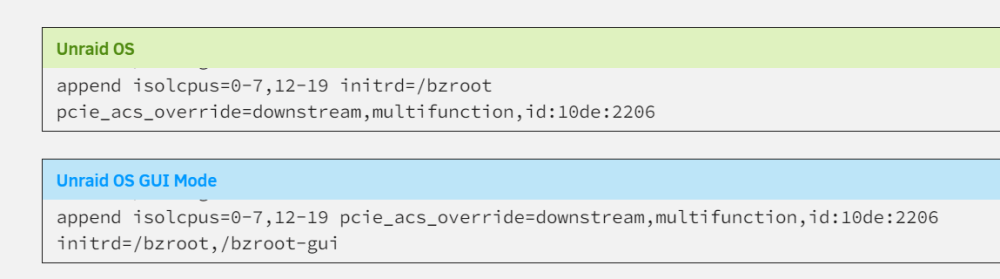
-
Please add it to Unraid, a simple toggle button would be enough.
-
Thank you for the help @JonathanM ! I just watched Spaceinvader One video about cache pools and what you suggest works perfectly! I'll deploy in the following manner: Array Devices 1 x 12TB Parity (I'll purchase another 12TB HDD) 1 x 12TB Disk 1 (xfs) Pool Devices 6 x 2TB SSD (with btrfs RAID 0) I'll use veeam for backup the VMs to the 12TB HDD, if something goes wrong with the RAID 0 I'll have everything on 12TB HDD with parity! Thanks!

