





dasoul
Members
-
Joined
-
Last visited
-
Thank you very much. I really appreciate it. Right now I have a few reiserfs that I am working to migrate the data to other disks via the unbalanced plugin. It will likely be another week before I am ready to do the new configuration and redo the data disks. On that note I also have new parity drives I would like to install. Do both parity disks actually need to be the same size? I was thinking I will replace parity 1 and then once I confirm the parity looks good then replace parity 2. I havent started using the higher capacity drives as data drives yet.
-
When I mount the actual disk with UD it looks perfect. Exactly like what I would expect. I downloaded some files and spot checked them and they are fine. What would my process be at this point? I also have some reiserfs I actually want to remove from the array. I assume the answer is a "new config" where I assign the disks I want in the array along with the drives for parity and then just start the array. I dont want to mess something up so if there is a document that explains it that I can review. Does "new config" wipe out my installed plugins or docker images and things like that? Also it looks like the repair we did actually was working on the "emulated disk" configuration. Is that correct just so that I understand? That is the only thing which to me explains the lost+found folder present on the emulated disk. Thanks!
-
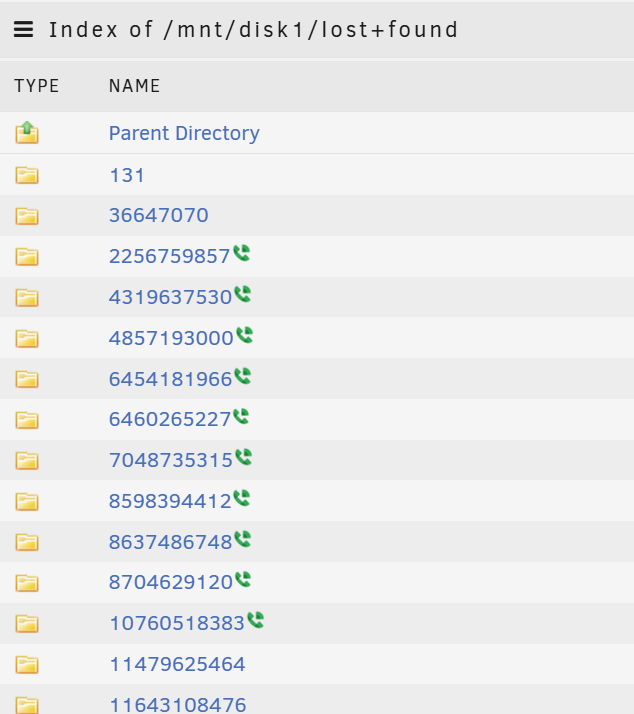
When I start the array and click to browse the disk from the dashboard this is what I see I would not have expected to see this on the emulated disk based on running the commands to "repair" the actual disk and the creation of the lost+found during that process. But I can see it does indeed say its emulated. This just confuses me a little bit. I assume I can mount sdf manually into another mount point so that I can see it. Thoughts?

-
Thank you for your quick response!
-
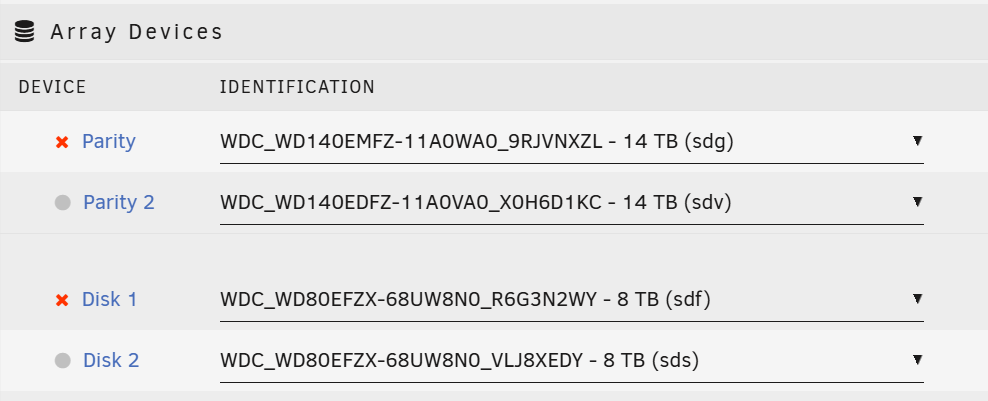
Now the problem I feel is that now under disk 1 it shows the proper disk where as before it did not. If I start the array it will start to rebuild over the disk and I will lose my chance to see if there is valid data on the disk that is not in the array. And yes I had one of the parity drives fail also.
-
Now what do I do? Thanks! Phase 1 - find and verify superblock... Phase 2 - using internal log - zero log... - scan filesystem freespace and inode maps... sb_fdblocks 1106282385, counted 1119907037 - found root inode chunk Phase 3 - for each AG... - scan and clear agi unlinked lists... - process known inodes and perform inode discovery... - agno = 0 bad CRC for inode 128 bad CRC for inode 128, will rewrite correcting nextents for inode 128, was 1124073472 - counted 0 cleared root inode 128 - agno = 1 - agno = 2 - agno = 3 - agno = 4 - agno = 5 - agno = 6 - agno = 7 - process newly discovered inodes... Phase 4 - check for duplicate blocks... - setting up duplicate extent list... - check for inodes claiming duplicate blocks... - agno = 0 - agno = 2 - agno = 4 - agno = 6 - agno = 5 - agno = 1 - agno = 3 - agno = 7 Phase 5 - rebuild AG headers and trees... - reset superblock... Phase 6 - check inode connectivity... reinitializing root directory - resetting contents of realtime bitmap and summary inodes - traversing filesystem ... - traversal finished ... - moving disconnected inodes to lost+found ... disconnected dir inode 131, moving to lost+found disconnected dir inode 36647070, moving to lost+found disconnected dir inode 2256759857, moving to lost+found disconnected dir inode 4319637530, moving to lost+found disconnected dir inode 4857193000, moving to lost+found disconnected dir inode 6454181966, moving to lost+found disconnected dir inode 6460265227, moving to lost+found disconnected dir inode 7048735315, moving to lost+found disconnected dir inode 8598394412, moving to lost+found disconnected dir inode 8637486748, moving to lost+found disconnected dir inode 8704629120, moving to lost+found disconnected dir inode 10760518383, moving to lost+found disconnected dir inode 11479625464, moving to lost+found disconnected dir inode 11643108476, moving to lost+found Phase 7 - verify and correct link counts... resetting inode 1260330676 nlinks from 2 to 16 done
-
Diagnostics attached unraid-diagnostics-20250520-0415.zip
-
I had a disk that was marked offline while I was trying to get the system running with 3 new hbas. I have since migrated to a single hba and I brought the array back on with no issues but now I still have the one disk failed. I would just replace the disk and let it rebuild but I do not have faith in my parity drive because there was a parity check running when there was an issue with one of the hbas in the system. Anyone think its possible to repair the disk and get it back into the array? Thanks! This is the xfs_repair_status: Phase 1 - find and verify superblock... Phase 2 - using internal log - zero log... - scan filesystem freespace and inode maps... sb_fdblocks 1106282385, counted 1119907037 - found root inode chunk Phase 3 - for each AG... - scan (but don't clear) agi unlinked lists... - process known inodes and perform inode discovery... - agno = 0 bad CRC for inode 128 bad CRC for inode 128, would rewrite bad nextents 1124073472 for inode 128, would reset to 0 would clear root inode 128 - agno = 1 - agno = 2 - agno = 3 - agno = 4 - agno = 5 - agno = 6 - agno = 7 - process newly discovered inodes... Phase 4 - check for duplicate blocks... - setting up duplicate extent list... - check for inodes claiming duplicate blocks... - agno = 0 - agno = 2 - agno = 7 - agno = 3 - agno = 5 - agno = 1 - agno = 6 bad CRC for inode 128, would rewrite - agno = 4 bad nextents 1124073472 for inode 128, would reset to 0 would clear root inode 128 No modify flag set, skipping phase 5 Phase 6 - check inode connectivity... would reinitialize root directory - traversing filesystem ... Metadata corruption detected at 0x46f860, inode 0x80 dinode couldn't map inode 128, err = 117 - traversal finished ... - moving disconnected inodes to lost+found ... disconnected dir inode 131, would move to lost+found disconnected dir inode 36647070, would move to lost+found disconnected dir inode 2256759857, would move to lost+found disconnected dir inode 4319637530, would move to lost+found disconnected dir inode 4857193000, would move to lost+found disconnected dir inode 6454181966, would move to lost+found disconnected dir inode 6460265227, would move to lost+found disconnected dir inode 7048735315, would move to lost+found disconnected dir inode 8598394412, would move to lost+found disconnected dir inode 8637486748, would move to lost+found disconnected dir inode 8704629120, would move to lost+found disconnected dir inode 10760518383, would move to lost+found disconnected dir inode 11479625464, would move to lost+found disconnected dir inode 11643108476, would move to lost+found Phase 7 - verify link counts... Metadata corruption detected at 0x46f860, inode 0x80 dinode couldn't map inode 128, err = 117, can't compare link counts No modify flag set, skipping filesystem flush and exiting.
-
Sounds like a decent recommendation. Not having any luck finding anything that isn't coming from China. Is that worth the risk? I mean with regards to getting a counterfeit product.
-
I am looking at the LSI 9750-24i4e also. Were you able to use it without issues with Unraid?
-
Many years ago I picked up the old supermicro 24 bay chassis with opteron and server mobo and that worked fine for many years but I got the itch to upgrade it. So I put one of my old desktops into the case and bought new 9207-8i storage adapters here: https://www.ebay.com/itm/194910024856 My mobo had like 4 pcie slots that operated at fast enough speeds that I thought I would be fine. It was older i7-4771 that I was using. But I had trouble with it recognizing and running the 3 cards. I ended up frying that board but I purchased another 1150 board off ebay with enough slots because I wanted to use the same 4771 with the 32gb of ram I have. But alas it also is throwing errors "MPT BIOS Fault 01b" at boot some of the times but other times no errors. I thought maybe it was because I hadnt tighted down the cards in the case because I was just testing it and that the cards maybe needed a good ground to the case from being tightened down. When booting the system all the drives showed up so I thought I would be fine. I booted into unraid and everything came up and seemed fine. I decided to run a parity check last night and upon checking it today found about 1/3 of my drives as redballed. My thinking is that this mobo also doesnt want to run these 3 cards together. Does anyone have a recommendation for a mobo/cpu combo to run the three pcie x8 cards at speed that they know is able to run these types of cards? It would be very much appreciated! I dont want to break the bank but I do want to get this back online.
-
Thoughts? Here are the results: ########### reiserfsck --check started at Sun Oct 29 10:03:53 2023 ########### Replaying journal: Done. Reiserfs journal '/dev/sdf1' in blocks [18..8211]: 0 transactions replayed Checking internal tree.. finished Comparing bitmaps..finished Checking Semantic tree: finished No corruptions found There are on the filesystem: Leaves 1361 Internal nodes 10 Directories 44 Other files 52 Data block pointers 1371189 (0 of them are zero) Safe links 0 ########### reiserfsck finished at Sun Oct 29 10:10:14 2023 ###########
-
Thank you for your previous response. My bad on not responding. I must have missed the notification and this fell off my radar. I am running reiserfsck right now to see if it finds anything. I am reviving this thread and will update once I get a response back from the command.
-
Closed this issue. Seems I posted about this already a year and a half ago and just notice the comments
-
I have a directory on a disk I am trying to get converted from reiserfs to xfs and just tring to make sure i moved everything off. but I have one directory I cannot access. If I try to cd access the directory via smb I get permission denied and if I try to ls to it or run du -h on the parent drive I get the "Exec format error". Anything I can do here or provide to you to help me figure this one out? Thanks! root@UNRAID:/mnt/disk1# du -h 0 ./tftp 0 ./.apps du: cannot read directory './Videos': Exec format error 0 ./Videos 0 ./Movies-PG13 0 ./TV Shows 0 ./appdata 0 ./Audiobooks 0 .

