Jeffrey Meng
Members
-
Joined
-
Last visited
-
A few minutes ago, at 4:08 or so local time, I was working on my laptop and the wifi suddenly dropped. I tested the router's connection using the router speed test, and it reported that everything going into the router seemed to be fine. I tried the wifi on my phone and that too had dropped. I restarted the router, which still didn't fix anything. I then unplugged the ethernet cable connecting my NAS running Unraid to my router, and the wifi instantly came back. It sounds weird, but this has happened to me numerous times already, always very sporadically, and I now strongly suspect Unraid is somehow messing something up (perhaps with DNS?) on my network. I've collected the diagnostics from right after I disconnected and reconnected my NAS's ethernet connection. It seems like this has been happening to a few other people too, as reported here, but that thread mostly seems to have died. jtower-diagnostics-20230730-1609.zip
-
Do you think that whatever prevented NFS from starting is the cause of the connection drops? I don't have an easy way of testing this since the connection drops happen randomly and very infrequently, and I don't think it's feasible for me to run it in safe mode indefinitely. I installed llfuse (through the nerdtools plugin) because it was a dependency for borgbackup, which I installed since I use it for some of my backups.
-
This just happened to me. It's been happening on and off for a while now, but it got particularly bad today and happened twice in 30 minutes (the most recent time was about 15 minutes ago). I initially didn't think it was the unraid server, since this issue is so ephemeral, but now I'm fairly confident that it is due to the circumstances under which it happens as well as reading about this happening to other people in this thread. I collected my diagnostics after it happened today: diagnostics.zip
-
I got this setup on my local network, but when I try to access my server remotely via wireguard, I can't see .local domains, and so I can't access the time machine share (but I can connect to normal unraid shares via my ip). Does anybody know how to set this up so it can be accessed remotely with wireguard? I'm guessing I need to route it to use my ip and some port but I'm not sure where to set that up.
-
I just fixed the issue; I had set up port forwarding on my router, but I have this xfinity modem and it turns out I need to set up port forwarding on that device too, and after that everything is working.
-
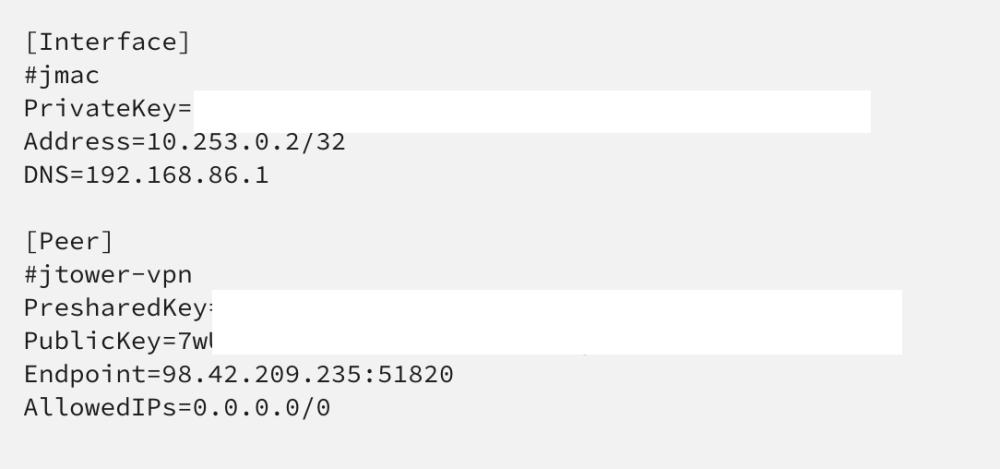
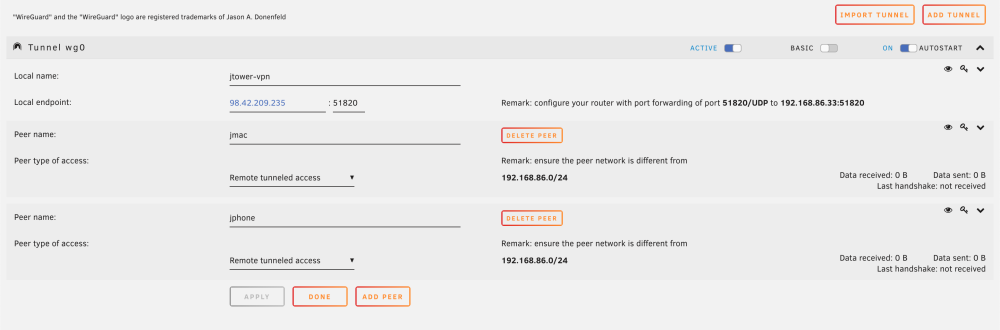
I first got unraid for a NAS a few months ago. I tried to setup unraid but it wasn't working, and I didn't really have time to do anything about it until now. I just reinstalled unraid from scratch and tried setting up unraid again, but I still can't even get a handshake to go through. My wireguard client shows that data is being sent when I'm connected to my mobile hotspot, but the server doesn't show any data being recieved or even a handshake having ever been established. I set up port forwarding of port 51820 through my nest wifi mesh router. I originally set it up with dynamic DNS on cloudflare, but I switched to just using the external IP address of my home network since I figured the dynamic DNS might be an issue, but this still hasn't fixed anything. I've been stuck on this issue for many hours. Please help! jtower-diagnostics-20230330-0201.zip