





TheExoticBeard
Members
-
Joined
-
Last visited
-
Found the issue. Apparently, one of the VMs that uses the GPU autostarted with boot, and that caused the GPU to disappear completly because of the bypass
-
Thanks, I replied there.
-
UPDATE : FOUND THE ISSUE Apparently, one of the VMs that uses the GPU autostarted with boot, and that caused the GPU to disappear completly because of the bypass .. I think the Nvidia plugin should always shows the card so we don't panic like that LOL. /////////////// Alright, I think I might have a diffrent issue here I was on 7.2.4, both cards worked fine and I don't remember what the driver was Then upgraded to 7.2.5 and both GPUs can be seen by the Nvidia driver, but got these errors "NVIDIA-SMI has failed because it couldn't communicate with the NVIDIA driver. Make sure that the latest NVIDIA driver is installed and running." and this is in the logs "kernel: nvidia-nvlink: Unregistered Nvlink Core, major device number 240" Both cards are shown in the NVIDIA driver page but they aren't working .. the driver page recommended downgrading from v595.71.05 to v580.159.03, which fixed my P400, but GTX 970 disappeared completely. I also can't go below v580.159.03. Is this an issue with my Unraid, or shall I say goodbye to my GTX 970? Because quick searching says that kernel updates with 7.2.5 caused this new behaviour, but I'm not sure about that. warmind-diagnostics-20260505-1949.zip NVIDIA Plugin is updated to the latest BTW
-
Alright, I was on 7.2.4, both cards worked fine and I don't remember what the driver was Then upgraded to 7.2.5 and both GPUs can be seen by the Nvidia driver, but got these errors "NVIDIA-SMI has failed because it couldn't communicate with the NVIDIA driver. Make sure that the latest NVIDIA driver is installed and running." and this is in the logs "kernel: nvidia-nvlink: Unregistered Nvlink Core, major device number 240" Both cards are shown in the NVIDIA driver page but they aren't working .. the driver page recommended downgrading from v595.71.05 to v580.159.03, which fixed my P400, but GTX 970 disappeared completely. I also can't go below v580.159.03. Is this an issue with my Unraid, or shall I say goodbye to my GTX 970? Because quick searching says that kernel updates with 7.2.5 caused this new behaviour, but I'm not sure about that. Attached warmind-diagnostics-20260505-1949.zip file
-
I'm looking for a way to share a certain container without changing the network
-
My Unraid connect works perfectly, and I can access my server dashboard with it remotely without issues Also, I can access my SSH with my domain via Cloudflare perfectly with no issues, also my NGINX stuff works perfectly, so my modem/router / ISP are all good But when my public IP changes, my FQDN WAN doesn't change to the new WAN IP unless I restart the server. Keep in mind, when I execute ( curl https://wanip.unraid.net/ ) via Unraid command line,I get the correct IP Attached the diagnostics warmind-diagnostics-20250410-0723.zip
-
Updated : I've fixed it .. by following this solution in this thread it seems that I lost the partitions and this retrieved them back ! Thanks to @JorgeB !!!!
-
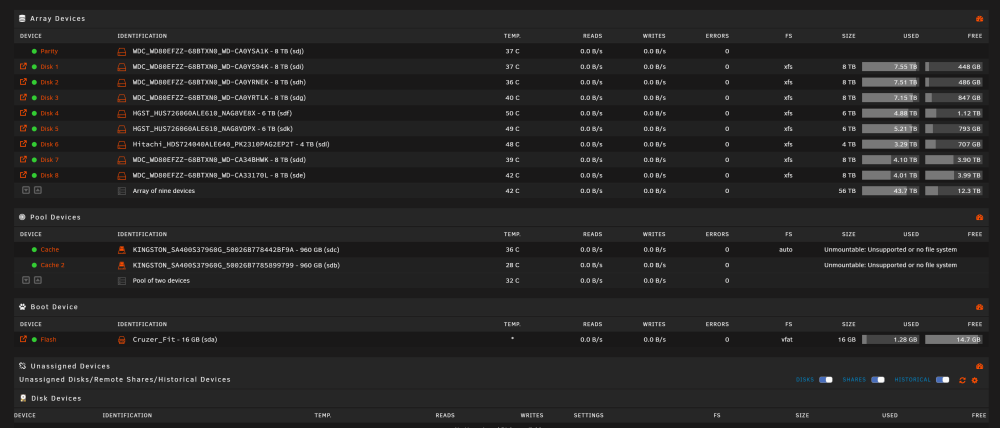
I have two 960GB SSDs assigned as one Cache Pool - BTRFS - Single Mode I wanted to remove one to be a separate Cache pool so I've stopped the array and unassigned the drive then started the array so the rebalance operation happens .. but instead I got unmountable: unsupported or no file system message on the remaining drive .. stopped the array again and put the drive back and now both giving the same message Tired these solutions and checks and nothing worked : remove them all then add them reboot btrfs check --force -s 1 /dev/sdc using SB copy 1, bytenr 67108864 Opening filesystem to check... No valid Btrfs found on /dev/sdc ERROR: cannot open file system btrfs check /dev/sdc Opening filesystem to check... No valid Btrfs found on /dev/sdc ERROR: cannot open file system btrfs rescue super-recover -v /dev/sdc No valid Btrfs found on /dev/sdc Usage or syntax errors mount -o rescue=all,ro /dev/sdc /temp mount: /temp: wrong fs type, bad option, bad superblock on /dev/sdc, missing codepage or helper program, or other error. dmesg(1) may have more information after failed mount system call. mount -o degraded,rescue=all,ro /dev/sdc /temp mount: /temp: wrong fs type, bad option, bad superblock on /dev/sdc, missing codepage or helper program, or other error. btrfs restore -v /dev/sdc /mnt/disk2/restore No valid Btrfs found on /dev/sdc Could not open root, trying backup super No valid Btrfs found on /dev/sdc Could not open root, trying backup super No valid Btrfs found on /dev/sdc Could not open root, trying backup super I've tried all the commands above also with the second drive (sdb) fdisk -l /dev/sdc \Disk /dev/sdc: 894.25 GiB, 960197124096 bytes, 1875385008 sectors Disk model: KINGSTON SA400S3 Units: sectors of 1 * 512 = 512 bytes Sector size (logical/physical): 512 bytes / 512 bytes I/O size (minimum/optimal): 512 bytes / 512 bytes fdisk -l /dev/sdb Disk /dev/sdb: 894.25 GiB, 960197124096 bytes, 1875385008 sectors Disk model: KINGSTON SA400S3 Units: sectors of 1 * 512 = 512 bytes Sector size (logical/physical): 512 bytes / 512 bytes I/O size (minimum/optimal): 512 bytes / 512 bytes Screenshoot & diagnostics attached. Note : don't worry about the second drive SATA CRC error count that's because of a faultily SATA cable and now fixed. also the second drive is 24hrs old BTW. so it's new and working before removing it. warmind-diagnostics-20240320-0553.zip
-
The Codec solution worked !!! Thanks for the suggestion !!! will update my original post for those who will face the same issue.
-
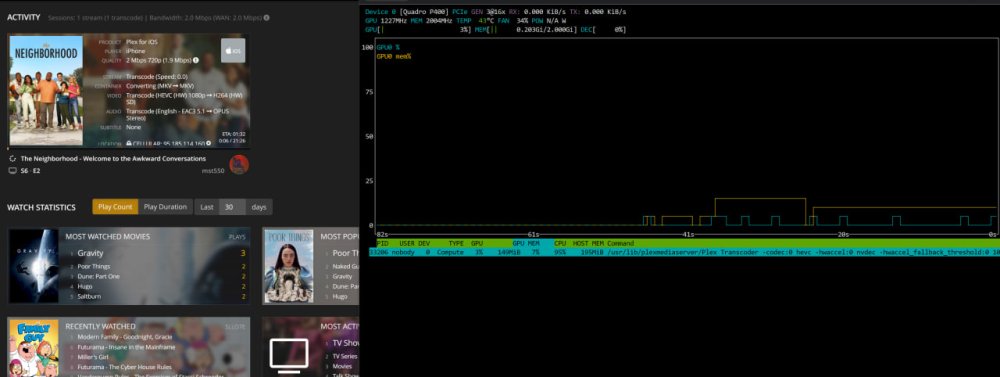
Update : I think the GPU and the NVIDIA Driver aren't the issue .. because I tried to have a direct stream for Video but transcoded audio and same issue happened that means it's a CPU Transcoding issue because as far as I remember GPU can't do audio so only CPU transcode .. so I did turn off GPU transocoding and CPU only transcoding didn't work now I'm downgrading the container to see if it's a plex update issue .. so far I have reached caontainer version 1.32.8.7639-fb6452ebf-ls202 ( 4.116.1 inside plex server ) and still facing the same issue /////////////////// Update : Solution ( Shut down Plex then delete Codecs Folder from Plex then turn the container back on. )
-
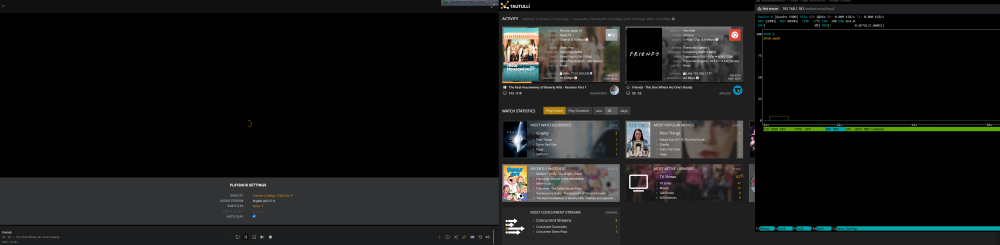
Update : So Plex is actually see GPU and can activate the transcoding process but GPU usage at 0-3% and nothing will stream this issue occurs only by using all clients + optimization except Plex HTPC on WINDOWS it works fine even from 4K to 720p !!!! here is an attachment of ios asking for transcoded session ... stays stuck like this. second one ( Friends ) nothing shows in the NVIDIA-SMI (NVTOP) ///////// Update : Solution ( Shut down Plex then delete Codecs Folder from Plex then turn the container back on. )
-
Hi, Plex is not transcoding anymore .. same as the guy above I'm using latest Linuxserver container .. latest nvidia driver .. every used to work fine .. didn't change anything since a year except updating both also I can see the GPU in the Plex Console via "env" command tried to downgrade the GPU didn't work tried -gpus=all didn't work tried -gpus device=GPU-XXXXXXXXXXXXXXXXXXXXXXXXXX didn't work it seems latest plex update issue ? not sure Update : Solution ( Shut down Plex then delete Codecs Folder from Plex then turn the container back on. )
-
Anyone knows how to enable mutli-thread downloading ? also if it's possible to enable multi file download in the same time ?
-
I've fixed it !!!! Apparently everything I did is correct but I've forgot a missing step in my network setup. Three weeks ago I turned off DMZ for my router in my ISP modem and switched to open the important ports only that my server needs in the modem for the router and in the router for the server. I've forgot that so I forgot to open the port 8211 in my modem. now it's working with my domain too 😄 thanks for the amazing support you did in the past hours Also I would like to add that I've found a good way to test if the port open or not without the game. on the remote client computer run this command ( replace XXX.XXXX.XXX with your public IP ) netcat -u XXX.XXXX.XXX 8211 make sure the container is running then hit enter multiple times after this command and you will see the container responding with gibberish text. that means it's reachable.
-
the container is updating the IP correctly. shows fine in the log. also the ini gets the updated ip too. and we tried to restart my modem 3 times and his also to get new public IPs and we tried all the 3 and still getting the same results and also yes just tried my public domain and we got the same message.



