





nitrosont
Members
-
Joined
-
Last visited
-
Yes, definitely! I think with these hints even I myself might be able to set it up! Thank you very much!
-
Hello D4v3, I had a look in your "BackupScripts" as well. The following questions popped up: 1. The script doesn't run as a docker-container itself, right? It fires up a shell script/some shell scripts and those create containers as needed?! 2. In the file BackupScripts/Config/ResticConfig/restic-repo.password.txt is states Does this mean the password to encrypt/decrypt my restic repository? 3. I only need to edit BackupScripts/Jobs/BaseJob.sh All the other files should be left untouched? 4. With UnRaid, you would suggest to clone the git-files to a folder i.e. appdata => BackupScripts ? 5. Minor one: when the script is running and the containers are up: Do I see them under UnRaid in the GUI? Thanks in advance for any reply!
-
Honestly: I don’t know! I haven’t tried this myself. I just stumbled across it some days ago. But it was here in the forum! Maybe you could ask there!?
-
Maybe this ("BackupScripts with Restic and Rclone" on GitHub) helps?
-
Ok, thanks for the idea. The container started and the logs didn't show any error - so it ssems the argument went in smoothly. BUT: the logs stated, that all transfer-jobs had finished [info] rclone sync finished [info] rclone post check finished [info] rclone finished, sleeping 1h before re-running... But that's definetly not the case! So I guess the argument go miss-interpreted?! Also: It seems the web-UI wasn't reachable.
-
A follow-up-question regarding the bwlimit-option: In the rclone-documentation it stated, that it's possible to use time-tables: i.e. --bwlimit "08:00,512k 12:00,10M 13:00,512k 18:00,30M 23:00,off" When I try to do that, --bwlimit "07:00,500K:100M 23:00,off:100M" it gives me the following error: Error: invalid argument "\"07:00,500K:100M" for "--bwlimit" flag: invalid time specification (hh:mm): "\"07:00" I'm assuming, I need to write it in a other way? In brackets maybe?
-
Thank you very much for this great idea! With the "RCLONE_USER_FLAGS" it worked like a charm!
-
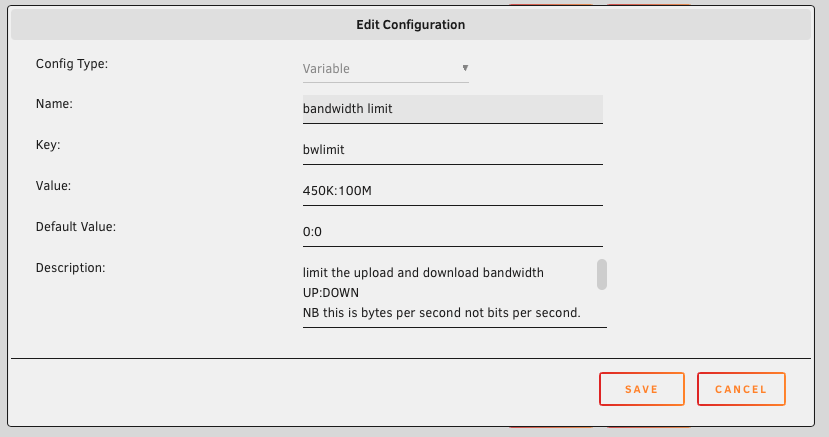
Thank you binhex for this amazing container. For me this will solve I assume many wishes regarding my cloud backup! One question while I'm playing with my setup: In the GUI you can set bandwith limits. However I tried to define this in the docker environment, but this didn't work. How can I set the limits static / before starting the container? This didn't work unfortunately:
-
Thank you for your reply! I also set it up like that - now array and cache are using the same key. One could say, the key(file) is system-wide.
-
How about encrypting the array and the cache? As I understood it, the array places its key under /root/keyfile Is the location and name of a keyfile for a cache different? How do I need to proceed when I want to encrypt my cache as well? Or can I only (do I need to) encrypt the cache with the same keyfile as the array?
-
Yeah, same here. I'm running an i3 12100 (Alder Lake) and I'm wondering if it's possible at all to select a corresponding platform?!
-
There is a tutorial here: But I haven't tried it...


