





storagehound
Members
-
Joined
-
Last visited
Everything posted by storagehound
-
Hi. I'll be going to a Ugreen NAS NASync DXP8800 Plus. I would only be bringing over the data, some Docker's and the old uNRAID license. I won't be bringing over the hard drives. Thank you
-
Hi, All. I MUST be searching improperly. 🤦♂️ I am looking for directions on how to Transfer from an old uNraid server to a new one. Has anyone done this recently and can share some best practices (or a written guide). Or maybe some gotchas? I really want to configure this new system with current best practices. Maybe the awesome SpaceInvaderone's guide is all I really need: https://www.youtube.com/watch?v=ZAPgY4N9txE . It's 3 years old so I thought I'd double check. As the new server won't have uNraid on it I'd need to bring the old license over to the new system. I want to design my new sever along the lines of the Trassh Guides and Ibracorp recommendations: https://trash-guides.info/Hardlinks/How-to-setup-for/Unraid/. My original was designed years ago before I knew these other options. I would want to copy over my old Dockers like DelugeVPN and Plex. But if I could only migrate Plex and did the rest from scratch I'd be fine. I assume I can use the Trial license for initial setup on the new server and copying over the data. This is the first time I've tried to move from old hardware to new so I'm both excited and a bit nervous. Again, I must be searching with the wrong criteria. I can't imagine this hasn't been well documented. Thank you 🤝
-
UPDATE 04/02: I ran the server in safe mode for about 3 days. Then I decided to start the array. My dockers have been running over 2 days without the system shutting down. The Plugin service is not running at all. So far I have not seen all cpus go red for seconds to minutes. Using Glance... I still see some utilization that goes in the high 90% to well over 100% utilization....but it tends to settle down quickly. I noticed some errors doing a short smart test on my parity drive and one other. From what I'm reading they are minor...but I am still going to look into replacing the drives. Later this week I will try turning plugins back on and see if it will trigger the unclean shutdown.
-
Thank you for the reply, mgutt. I did not replace the cables yet. The temperatures look good. I put the server in safe mode before bed. It's been up for over 8 hours now. I plan to leave it in Safe Mode a couple of days to see if it stays up. Is "top" "htop?"
-
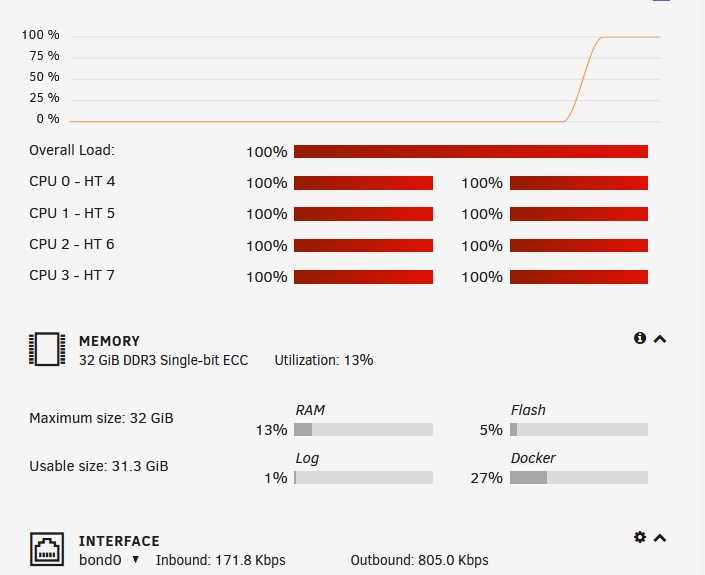
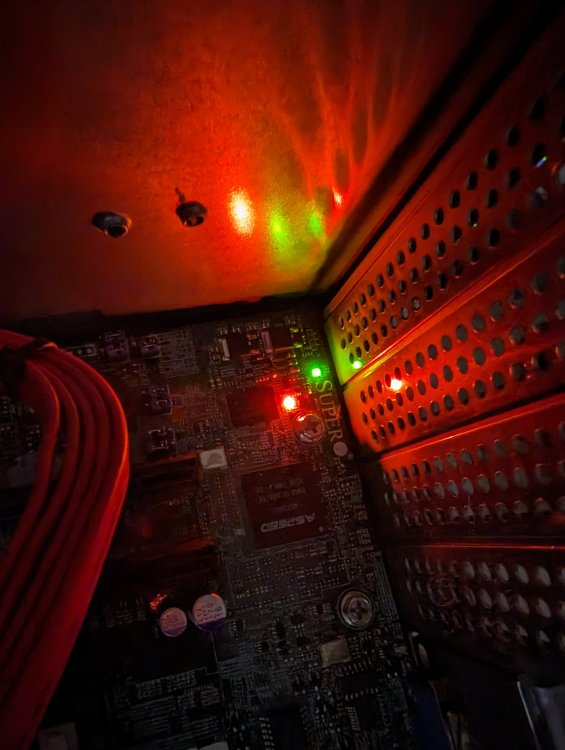
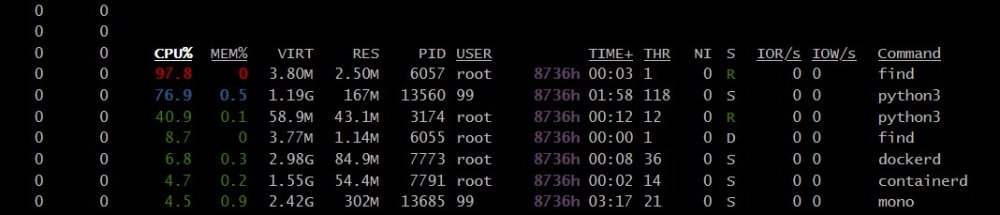
Hello, unRAIDers Not sure if I am posting in the right place. I could use your help with what I should do next. Diagnostics are attached. Here's what I did so far. SPEC: unRAID version 6.11.5 server. Hardware specs: Model: AVS-10/4-X-6 M/B: Supermicro - X10SL7-F CPU: Intel® Xeon® CPU E3-1230 v3 @ 3.30GHz The Server just powered off on it's own Friday. After several tries I got it to reboot. I saw each CPU sit on red almost the entire time I was in it. It stayed up for a maybe an hour and then immediately shut down again and refused to come back up. I saw the LE6 light was red on the mother board... which indicated the Power Supply need to be replaced (according to the motherboard manual https://www.supermicro.com/en/products/motherboard/X10SL7-F). So Sunday I got a Seasonic 750 PSU to replace my Seasonic 650. (why not upgrade?). I replaced it and the server started. I noticed the crazy utilization again. Not sure that this wasn't contributing to the issue I began doing some things on the unRAID forum. I installed "Glance" from the app store and saw CPU utilization in the red going from the 99% and higher. shfs, Find, OpenVPN and a few Docker's were popping up. But "shfs" was the worst/consistent offender. I followed some a good idea from a thread of @mgutt and checked my Docker paths. I updated anything I missed from "mnt/user/appdata to "mnt/cache/appdata." I also saw other suggestions and revisited the settings in the Tips & Tweaks plugins. I also updated some settings in Dynamix Cache Directories. I turned off Plex's post credit scanning. Now every CPU was not red the majority of the time. There were still spikes... and times they would go orange...but not the consistent red 90+ to 100% utilization across every core. "find" will spike in Glance more than "shfs" but not as often or as long as before. I turned the shut the system down gracefully a few times and it came back up easily (unlke with the 650 PSU) I thought I was good...but then the system powered off again. I am at a loss. It did come back up again. Things were red with the initial boot but eventually settled down. It was up for over 2 hours. I still didn't rust it. I wanted to eliminate other things before I considered replacing the motherboard. I checked for swollen capacitors (?). I double checked the cables. unRAIDs tools didn't indicate any hardware issues. OS logs seem reasonable to me. I Docker's/plugins were up to date. *Pause* Then it shut down again. 😵 I also noticed that if I bring it down gracefully the red light is still there. I turn the server on the red light (LE6) goes green. I'm a bit discouraged because I thought I figured everything out. Attached are my diagnostics (again, just to eliminate an OS component to this). Thank you! 🤞 ...... tower1-diagnostics-20230326-2114.zip

-
Hi, @Lolight. Thanks for the reply. I did. I'm waiting on an e-mail reply assuming they are still active. However, I am still interested in other recommendations from our unRAID community.
-
Hello, People I am at the point where I may be forced to replace my server. I would appreciate some advice on trusted sources for getting a pre-built server. My current ... whic is failing... was purchased through unRAID (then Lime Tech) years ago when they had Greenleaf building systems for them. My hope is to just transfer over the license and drives over to a new system with minimal fuss. Maybe even get something robust for current VM and trans-coding needs. Thank you
-
Thank you, @binhex I had only used VPN_OUTPUT_PORTS to get Overseerr to see Plex. I don't have Plex running through DelugeVPN (I think that is not recommended). I don't like it's usage either...but I'm so appreciative you implemented it it. I was only looking a custom networks and other things in SpaceinvaderOne and Ibracorp videos because I am looking at expanding the functionality of my uNraid in the near future (Reverse Proxy's and etc) as so many of you have. Thanks again...
-
Really cool of you to not only reply but to tag Binhex.
-
DelugeVPN and a Custom Network Hi, Gurus My setup. I have DelugeVPN setup with several containers connected to it by adding "--net=container:binhex-delugevpn" to extra parameters. I setup ADDITIONAL_PORTS for the containers. To allow the containers that needed to communicate with each other I added those container port numbers to VPN_OUTPUT_PORTS for DelugeVPN. If I create a custom network and add DelugeVPN and those others containers to it, will I still need to use the VPN_OUTPUT_PORTS for those containers? In an Ibracorp video it sounds like they are saying I will no longer need to specify ports for containers to communicate each other (just the container name). I'm thinking I'm misunderstanding him. Thanks
-
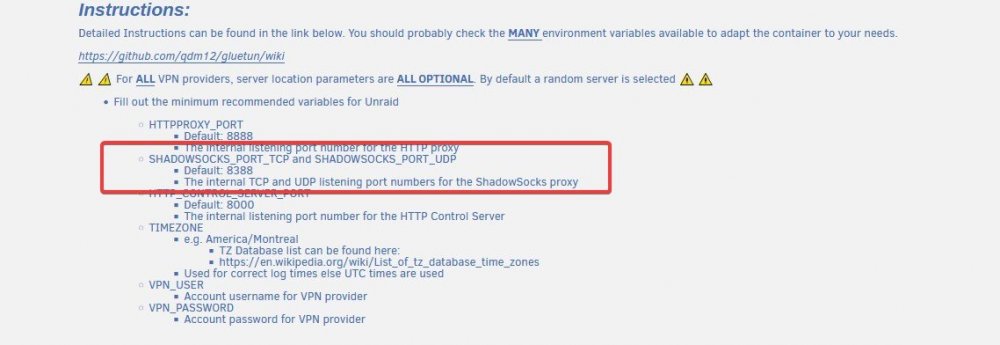
This had gotten me too. The template does not default to the actual numbers that the developer has at the top of this template. Just scroll up and you'll see. I'll include a screenshot. The Template should probably be updated to avoid that confusion. The last I did a complete delete and rebuild it still defaulted to 8888.
-
I thought I would be to route DelugeVPN (what I currently use) or the standard Binhex Deluge through GluetunVPN (availabe in our app store) much like I currently connect other dockers to DelugeVPN for that functionality. I'll review.
-
Hi, Everyone I'm evaluating a dedicated VPN docker. if I should decide to go that route is it wiser to disable the VPN features on the Binhex DelugeVPN or should I switch over version of regular Deluge (sans VPN)? Thank you
-
Thanks. I'll try to remember this when there are updates or if I ever need to recreate the docker.
-
Hello. I noticed something curious. I have shutdown and restarted my unraid server twice and GlutenVPN starts up automatically. I have to manually stop it. This is strange because I don't have it set to :AUTOSTART" None of my other apps that have this feature disabled are automatically starting on reboot. I don't know why that is happening. It's not happening with any other Docker.

-
Good to know, biggiesize You've been a big help. I did catch the time error and corrected it. The Container connection directions look like what I've ready from Binhex so I am feeling good about getting that working. Again... Thank you.
-
Here is a modified version of my log if you'd like to see it. I can already tell that I might want to at least get the VPN to use a set of regions for servers for efficiency. I'm reading through this and looking things up for a little better understanding. Thank you! 2021/08/11 20:50:11 INFO storage: creating /gluetun/servers.json with 11007 hardcoded servers 2021/08/11 20:50:11 INFO routing: default route found: interface eth0, gateway 172.xx.xx.1 2021/08/11 20:50:11 INFO routing: local ethernet link found: gretap0 2021/08/11 20:50:11 INFO routing: local ethernet link found: erspan0 2021/08/11 20:50:11 INFO routing: local ethernet link found: eth0 2021/08/11 20:50:11 INFO routing: local ipnet found: xxx.x.xx.xxx/16 2021/08/11 20:50:11 INFO routing: default route found: interface eth0, gateway 172.xx.xx.1 2021/08/11 20:50:11 INFO routing: adding route for 0.0.0.0/0 2021/08/11 20:50:11 INFO firewall: firewall disabled, only updating allowed subnets internal list 2021/08/11 20:50:11 INFO routing: default route found: interface eth0, gateway 172.xxx.xx.1 2021/08/11 20:50:11 INFO routing: adding route for 192.xxx.x.0/24 2021/08/11 20:50:11 INFO openvpn configurator: checking for device /dev/net/tun 2021/08/11 20:50:11 WARN TUN device is not available: open /dev/net/tun: no such file or directory 2021/08/11 20:50:11 INFO openvpn configurator: creating /dev/net/tun 2021/08/11 20:50:11 INFO firewall: enabling... 2021/08/11 20:50:11 INFO firewall: enabled successfully 2021/08/11 20:50:11 INFO dns over tls: using plaintext DNS at address 1.1.1.1 2021/08/11 20:50:11 INFO http server: listening on :8000 2021/08/11 20:50:11 INFO healthcheck: listening on 127.0.0.1:9999 2021/08/11 20:50:11 INFO firewall: setting VPN connection through firewall... 2021/08/11 20:50:11 INFO openvpn configurator: starting OpenVPN 2.5 2021/08/11 20:50:11 INFO openvpn: 2021-08-11 20:50:11 DEPRECATED OPTION: ncp-disable. Disabling cipher negotiation is a deprecated debug feature that will be removed in OpenVPN 2.6 2021/08/11 20:50:11 INFO openvpn: OpenVPN 2.5.2 x86_64-alpine-linux-musl [SSL (OpenSSL)] [LZO] [LZ4] [EPOLL] [MH/PKTINFO] [AEAD] built on May 4 2021 2021/08/11 20:50:11 INFO openvpn: library versions: OpenSSL 1.1.1k 25 Mar 2021, LZO 2.10 2021/08/11 20:50:11 INFO openvpn: TCP/UDP: Preserving recently used remote address: [AF_INET]109xxx.xxx.xx:443 2021/08/11 20:50:11 INFO openvpn: UDP link local: (not bound) 2021/08/11 20:50:11 INFO openvpn: UDP link remote: [AF_INET]109xxx.xxx.xx:443 2021/08/11 20:50:12 WARN openvpn: 'link-mtu' is used inconsistently, local='link-mtu 1601', remote='link-mtu 1549' 2021/08/11 20:50:12 WARN openvpn: 'auth' is used inconsistently, local='auth SHA512', remote='auth [null-digest]' 2021/08/11 20:50:12 INFO openvpn: [ams-229.windscribe.com] Peer Connection Initiated with [AF_INET]109xxx.xxx.xx:443 2021/08/11 20:50:13 INFO openvpn: TUN/TAP device tun0 opened 2021/08/11 20:50:13 INFO openvpn: /sbin/ip link set dev tun0 up mtu 1500 2021/08/11 20:50:13 INFO openvpn: /sbin/ip link set dev tun0 up 2021/08/11 20:50:13 INFO openvpn: /sbin/ip addr add dev tun0 10.xxx.xxx.xx/23 2021/08/11 20:50:13 INFO openvpn: Initialization Sequence Completed 2021/08/11 20:50:13 INFO VPN routing IP address: 109xxx.xxx.xx 2021/08/11 20:50:13 INFO dns over tls: downloading DNS over TLS cryptographic files 2021/08/11 20:50:13 INFO healthcheck: healthy! 2021/08/11 20:50:15 INFO dns over tls: downloading hostnames and IP block lists 2021/08/11 20:50:17 INFO dns over tls: init module 0: validator 2021/08/11 20:50:17 INFO dns over tls: init module 1: iterator 2021/08/11 20:50:18 INFO dns over tls: start of service (unbound 1.13.1). 2021/08/11 20:50:18 INFO dns over tls: generate keytag query _ta-4a5c-4f66. NULL IN 2021/08/11 20:50:19 INFO dns over tls: ready 2021/08/11 20:50:19 INFO You are running on the bleeding edge of latest! 2021/08/11 20:50:21 INFO ip getter: Public IP address is 109.xxx.xxx.xx (Netherlands, North Holland, Amsterdam) 2021/08/11 20:53:59 INFO http server: 404 GET wrote 41B to 192.xxx.x.xxx:50323 in 31.62µs 2021/08/11 20:53:59 INFO http server: 404 GET /favicon.ico wrote 41B to 192.xxx.x.xxx:50323 in 19.55µs 2021/08/11 20:56:32 INFO http server: 404 GET wrote 41B to 192.xxx.x.xxx:50390 in 41.461µs
-
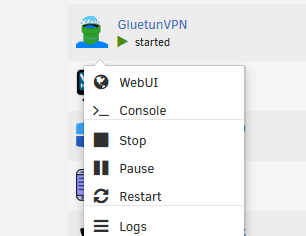
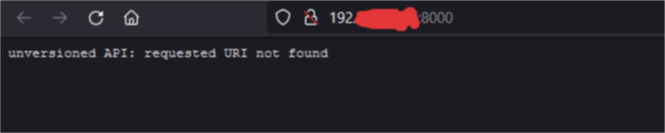
Got it! I uninstall the Docker and made sure there were not remnants. When I reinstalled it noticed an additional field and some of the ports changed. When I first ran it failed again. Then I noticed the Template defaults to a different port than what you recommend at the top of the Template. I changed the 8888 to 8388 as the template directions state. So it's running now. I see no errors in the log! 😁 👍 However, when I try to call up the web page for the VPN I get an error see blelow. Do I need to be concerned about that? Otherwise no log errors. I'll wait until tomorrow to begin testing the disabling the VPN portion of DelugeVPN and using your product. 🙂 When I click on the "webUI" link.... Error I see when I try to open the page.

-
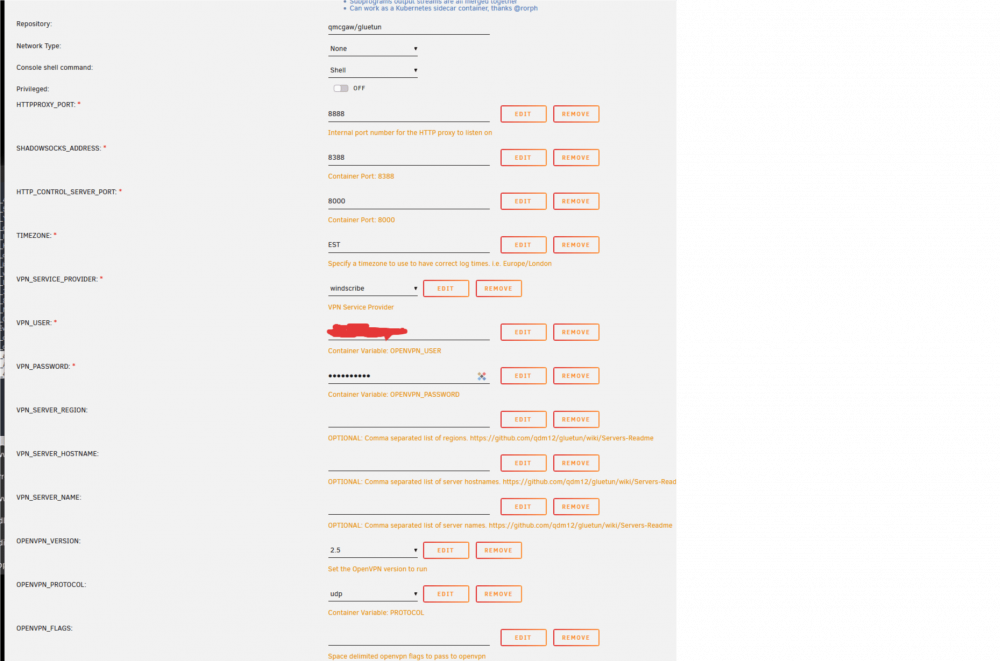
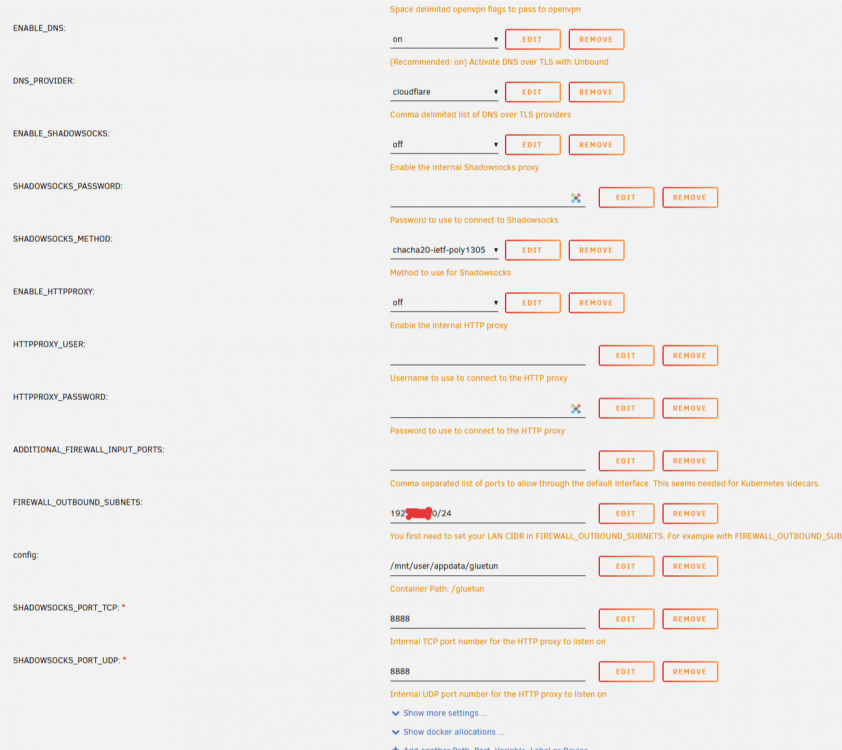
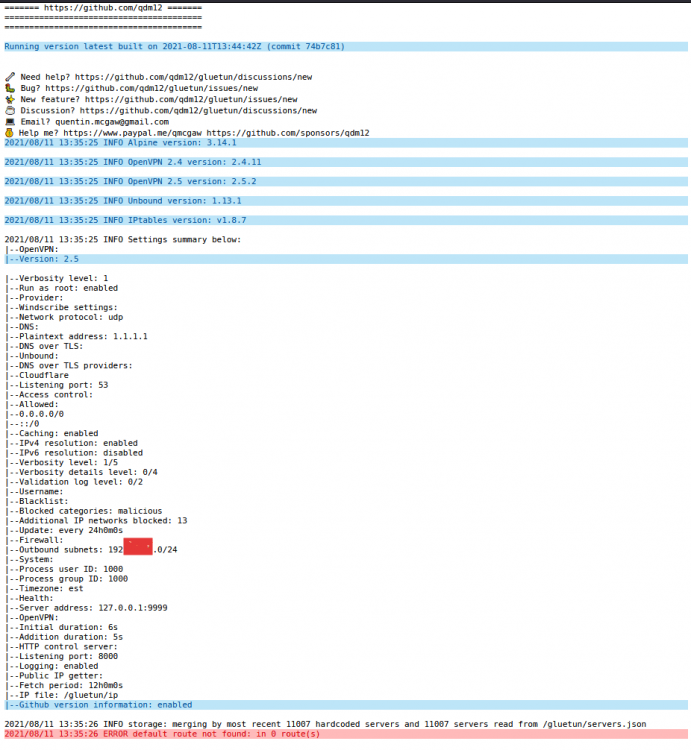
Here you go. I thought it was pretty straight forward. But I notice I have that error in the bottom of the log (last image) and it shuts down. I'm missing something obvious, aren't I? Thank you
-
I'm struggling with getting this to work. But it's honestly been a horrendous few weeks. I'll take a break and come back and try again. I did notice there is updated documentation so I am sure it will all make sense once my brain clears.
-
Very good to read. I am not as savvy as some uNraid users so I tend to be a bit cautious in adopting things that are security related.
-
Ooooooh. 😲 A docker that recognizes specific VPN's like Windscribe? I'm going to have to check this out and see if I gain anything from using that functionality compared DelugeVPN (I tend to lean heavily/happily binhex). Thank you.
-
Thanks for the fix. I'm up and running. I was thinking last week how cool if it got an upgrade like Radarr and Bazarr. And I'm already playing around with some of the updates. I'm going back to re-read the doc to see if I missed any.
-
Personally, I didn't think it was snarky. I thought it was a good question.
-
Looking at my logs I am seeing this as well. 2021-02-26 18:45:14,261 DEBG 'watchdog-script' stdout output: [info] Attempting to start Privoxy... 2021-02-26 18:45:15,272 DEBG 'watchdog-script' stdout output: [info] Privoxy process started [info] Waiting for Privoxy process to start listening on port 8118... 2021-02-26 18:45:15,278 DEBG 'watchdog-script' stdout output: [info] Privoxy process listening on port 8118 2021-02-26 18:45:45,335 DEBG 'watchdog-script' stdout output: [info] Privoxy not running





