





portboy
Members
-
Joined
-
Last visited
Everything posted by portboy
-
Still stable ... I made some restarts --- stable ... is the CPU core limiting the solution ... 🙏 I will report
-
@bmartino1, thanks. Yes, I've searched (a lot ..) and spend much time And yes, I made a posting in openhab forum ... becaus in the first meaning, it sounds like a problem within openhab ... But one thin irritates me, when I start UNRAID in SafeMode, the container is stable ... And in the past, so before my hardware upgrade, the same container was stable for month ... My current attempt is to limit the CPU number to 4 cores. Until now the container is stable (fingercross) ...
-
Hi ... I'm desperate. Since upgrading my hardware, I've encountered a persistent issue with one of my Docker containers. Sometimes the container crashes directly after start, sometimes after hours ... I can't identify any function in Openhab that causes the container to crash. The Openhab container keeps crashing with the following error: Docker Log: # A fatal error has been detected by the Java Runtime Environment: # # SIGSEGV (0xb) at pc=0x000014ad623f1b25, pid=198, tid=1495 # # JRE version: OpenJDK Runtime Environment (17.0.12+7) (build 17.0.12+7-Debian-2deb11u1) # Java VM: OpenJDK 64-Bit Server VM (17.0.12+7-Debian-2deb11u1, mixed mode, tiered, compressed oops, compressed class ptrs, g1 gc, linux-amd64) # Problematic frame: # V [libjvm.so+0x7f1b25] PhaseChaitin::interfere_with_live(unsigned int, IndexSet*) [clone .part.0]+0xd5 Openhab Log: --------------- S U M M A R Y ------------ Command Line: -XX:-UsePerfData -Dopenhab.home=/openhab -Dopenhab.conf=/openhab/conf -Dopenhab.runtime=/openhab/runtime -Dopenhab.userdata=/openhab/userdata -Dopenhab.logdir=/openhab/userdata/logs -Dfelix.cm.dir=/openhab/userdata/config -Djava.library.path=/openhab/userdata/tmp/lib -Djdk.util.zip.disableZip64ExtraFieldValidation=true -Djetty.host=0.0.0.0 -Djetty.http.compliance=RFC2616 -Dorg.apache.cxf.osgi.http.transport.disable=true -Dorg.ops4j.pax.web.listening.addresses=0.0.0.0 -Dorg.osgi.service.http.port=8080 -Dorg.osgi.service.http.port.secure=8443 -Djava.awt.headless=true -Dfile.encoding=UTF-8 --add-reads=java.xml=java.logging --add-exports=java.base/org.apache.karaf.specs.locator=java.xml,ALL-UNNAMED --patch-module=java.base=/openhab/runtime/lib/endorsed/org.apache.karaf.specs.locator-4.4.6.jar --patch-module=java.xml=/openhab/runtime/lib/endorsed/org.apache.karaf.specs.java.xml-4.4.6.jar --add-opens=java.base/java.security=ALL-UNNAMED --add-opens=java.base/java.net=ALL-UNNAMED --add-opens=java.base/java.lang=ALL-UNNAMED --add-opens=java.base/java.util=ALL-UNNAMED --add-opens=java.naming/javax.naming.spi=ALL-UNNAMED --add-opens=java.rmi/sun.rmi.transport.tcp=ALL-UNNAMED --add-opens=java.base/java.io=ALL-UNNAMED --add-opens=java.base/java.lang.reflect=ALL-UNNAMED --add-opens=java.base/java.text=ALL-UNNAMED --add-opens=java.base/java.time=ALL-UNNAMED --add-opens=java.desktop/java.awt.font=ALL-UNNAMED --add-exports=java.base/sun.net.www.protocol.file=ALL-UNNAMED --add-exports=java.base/sun.net.www.protocol.ftp=ALL-UNNAMED --add-exports=java.base/sun.net.www.protocol.http=ALL-UNNAMED --add-exports=java.base/sun.net.www.protocol.https=ALL-UNNAMED --add-exports=java.base/sun.net.www.protocol.jar=ALL-UNNAMED --add-exports=java.base/sun.net.www.content.text=ALL-UNNAMED --add-exports=jdk.xml.dom/org.w3c.dom.html=ALL-UNNAMED --add-exports=jdk.naming.rmi/com.sun.jndi.url.rmi=ALL-UNNAMED --add-exports=java.rmi/sun.rmi.registry=ALL-UNNAMED --add-exports=java.security.sasl/com.sun.security.sasl=ALL-UNNAMED --add-exports=java.naming/com.sun.jndi.ldap=ALL-UNNAMED -Dkaraf.instances=/openhab/userdata/tmp/instances -Dkaraf.home=/openhab/runtime -Dkaraf.base=/openhab/userdata -Dkaraf.data=/openhab/userdata -Dkaraf.etc=/openhab/userdata/etc -Dkaraf.log=/openhab/userdata/logs -Dkaraf.restart.jvm.supported=true -Djava.io.tmpdir=/openhab/userdata/tmp -Djava.util.logging.config.file=/openhab/userdata/etc/java.util.logging.properties -Dkaraf.startLocalConsole=true -Dkaraf.startRemoteShell=true org.apache.karaf.main.Main Host: 13th Gen Intel(R) Core(TM) i9-13900K, 32 cores, 31G, Debian GNU/Linux 11 (bullseye) Time: Mon Jan 20 18:46:32 2025 CET elapsed time: 30.368046 seconds (0d 0h 0m 30s) --------------- T H R E A D --------------- Current thread (0x000014aab4022560): JavaThread "C2 CompilerThread6" daemon [_thread_in_native, id=1495, stack(0x000014a915294000,0x000014a915394000)] Current CompileTask: C2: 30368 27781 4 com.influxdb.query.internal.FluxCsvParser::toValue (533 bytes) Stack: [0x000014a915294000,0x000014a915394000], sp=0x000014a91538f450, free space=1005k Native frames: (J=compiled Java code, j=interpreted, Vv=VM code, C=native code) V [libjvm.so+0x7f1b25] PhaseChaitin::interfere_with_live(unsigned int, IndexSet*) [clone .part.0]+0xd5 siginfo: si_signo: 11 (SIGSEGV), si_code: 1 (SEGV_MAPERR), si_addr: 0x000014b8bdccdc14 Registers: RAX=0x000014aad06d0500, RBX=0x00000000000008ff, RCX=0x000000001538f390, RDX=0x0000000000000000 RSP=0x000014a91538f450, RBP=0x000014a91538f388, RSI=0x000014b8bdccdb80, RDI=0x0000000000000000 R8 =0x000000001538f390, R9 =0x000014a91538f770, R10=0x0000000000000001, R11=0x000014aad072ec58 R12=0x0000000000059f60, R13=0x000014a91538f460, R14=0x000014aad072ec58, R15=0x000014a91538fa90 RIP=0x000014ad623f1b25, EFLAGS=0x0000000000010206, CSGSFS=0x002b000000000033, ERR=0x0000000000000004 TRAPNO=0x000000000000000e Register to memory mapping: RAX=0x000014aad06d0500 points into unknown readable memory: 0x0000000000000000 | 00 00 00 00 00 00 00 00 RBX=0x00000000000008ff is an unknown value RCX=0x000000001538f390 is an unknown value RDX=0x0 is NULL Here’s what I’ve tried so far to resolve the issue: Removed all plugins. Reinstalled Docker (deleted the IMAGE disk). Tested various versions of the Docker container for OpenHab. Ran the Docker container from scratch, without any prior configuration. Verified and reset permissions on the appdata directory. Interestingly, all other containers are functioning flawlessly. Before the hardware upgrade, Docker was rock-solid and never crashed. To keep things running smoothly at home, I’ve temporarily shifted the identical container configuration to a Raspberry Pi (absolutely stable). Since it ran absolutely stable before the hardware swap and also runs perfectly on my Raspberry Pi with the identical configuration, I would assume that the issue lies with my UNRAID installation. But what else can I do? I'm truly at my wit’s end. One more notable point: When I start UNRAID in safe mode, the container operates without any issues. heim-serv-diagnostics-20250120-1904.zip hs_err_pid198.log
-
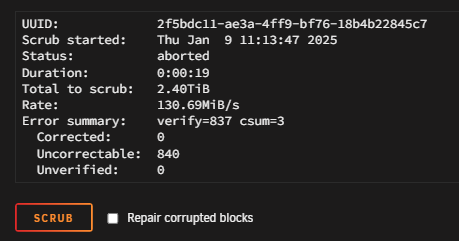
When I halt the array and remove the drive, then format it and reassign it to the same slot, it feels like I'm installing a new drive. I assumed UNRAID would recreate the missing directories. That's how it worked flawlessly during the last drive swap. Why isn't it working this time? Is it because I reinserted the same drive but empty? Apologies if I sound clueless... but I just don't get UNRAID's logic here. 🤷♂️the shares came back ... but without datas to recover ... it's all emptyI made the backup, so no worry ... but how can this be done .... how can the array forget all shares ... I thoght the Unraid System is ... ok not a real raid system .. but it's likely in that direction ... but now it's not more than a single Harddrive ....So I made id ... format the disc and restart the array ... wtf ... all shares which are stored on this disc were gone 😮☠️ So no restore availible ... how can this done .... I started a parity check (with unchecked "write corrections to parity")I feel like we're not on the same page. Or maybe I've been misunderstanding the concept of UNRAID for years. Here's what happened: The log showed BTRFS errors for my Disk5. I stopped the whole UNRAUD machine. I then added a new HDD. After starting UNRAID, I stopped the array. Next, I formatted the new HDD via the GUI and placed it as a replacement for the faulty HDD in the Disk5 slot. When formatting and inserting it into the array, I was warned that all existing data on the HDD would be erased. After starting the array, UNRAID began rebuilding the data on Disk5. This has always been my understanding of UNRAID. I can simply swap out defective HDDs, and the data is restored via the parity disk. Could it be that I've misunderstood "rebuild"? By "rebuild", do you mean the installation of the HDD? My English isn't very strong. If that's the case, then I installed the HDD first and formatted it through the UNRAID interface. Yes, the new HDD was also a used one, but it had been running error-free until now. So, I'm still puzzled as to why I would have the same BTRFS errors on both disks...I hit the "Format" button before the rebuild. Otherwise I was not able to bind the New HDD and start the rebuild.What I have done ... 1. HDD with the errors was removed 2. new HDD was connected to another SATA slot with a new cable. 3. new HDD was formatted with BTRFS. 4. new HDD was integrated in the array. 5. data was restored via the Array. 6. BTRFS error occurs again 7. I'm lost ...I had already done that. I replaced the faulty disk with another one. I formatted this disk and had the data written back via the array. Nevertheless, the errors reappear and the new drive behaves identically to the old drive. I still have the old disk and keep it as a backup. Do you mean I should remove the new disk, format it and mount it again?The scrub scan fails I attached the diagnostics. heim-serv-diagnostics-20250109-1338.zipHi, I have the following Prob: I got the following messages in my Syslog: Jan 9 11:11:40 Heim-Serv kernel: BTRFS critical (device md5p1): corrupt leaf: root=18446744073709551610 block=153714688 slot=0, unexpected item end, have 961822619 expect 16283 Jan 9 11:11:40 Heim-Serv kernel: BTRFS error (device md5p1): read time tree block corruption detected on logical 153714688 mirror 1 Jan 9 11:11:40 Heim-Serv kernel: BTRFS critical (device md5p1): corrupt leaf: root=18446744073709551610 block=153714688 slot=0, unexpected item end, have 961822619 expect 16283 Jan 9 11:11:40 Heim-Serv kernel: BTRFS error (device md5p1): read time tree block corruption detected on logical 153714688 mirror 2 Jan 9 11:11:40 Heim-Serv kernel: BTRFS critical (device md5p1): corrupt leaf: root=18446744073709551610 block=153714688 slot=0, unexpected item end, have 961822619 expect 16283 Jan 9 11:11:40 Heim-Serv kernel: BTRFS error (device md5p1): read time tree block corruption detected on logical 153714688 mirror 1 Jan 9 11:11:40 Heim-Serv kernel: BTRFS critical (device md5p1): corrupt leaf: root=18446744073709551610 block=153714688 slot=0, unexpected item end, have 961822619 expect 16283 Jan 9 11:11:40 Heim-Serv kernel: BTRFS error (device md5p1): read time tree block corruption detected on logical 153714688 mirror 2 Jan 9 11:11:40 Heim-Serv kernel: BTRFS critical (device md5p1): corrupt leaf: root=18446744073709551610 block=153714688 slot=0, unexpected item end, have 961822619 expect 16283 Jan 9 11:11:40 Heim-Serv kernel: BTRFS error (device md5p1): read time tree block corruption detected on logical 153714688 mirror 1 After this I changed the HDD to a new one (and new sata cable) ... made a rebuild with the array ... But after this I still get these errors and additionally, I'm unable to delete datas from this HDD. I won't believe, that both HDDs will have the same errors .... The btrfs scrub was not successful .. What could I do to fix this? Best portboy
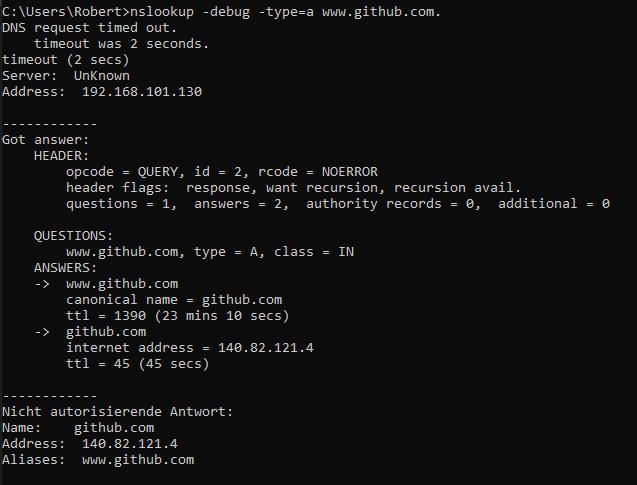
 So please solve the issue with the RAG API 😘Genau was ich suche 👍 Ich melde mich. Welche Zeit passt dir am besten?Mein Server ist mittlerweile über 8 Jahre alt und ich plane die Anschaffung neuer Hardware. Ich kann UNRAID zwar gut konfigurieren und einsetzen, aber mit Hardware kenne ich mich gar nicht aus 😣 Ich suche eine kommerzielle Kaufberatung, welche mir die richtige Hardware für meine Ansprüche zusammenstellt. Klar gibt es hier viele Konfigurationen, aber selbst die kann ich nicht bewerten. Deswegen die Frage nach einem kommerziellen Anbieter 😇 Und ich hoffe nun kein Shitstrom zu erhalten .... 🙏No Log in Adguard Home I setup the container with his own ip. I started with the default config. I activate "Protokolle" in settings. I tested the running Server with nslookup (nslookup -debug -type=a www.github.com) I tested some ad sites like msn.com and got no ads. So Adguard is working. but ... The statistics are completely empty ... nothing .. nada Where is the issue for this portboy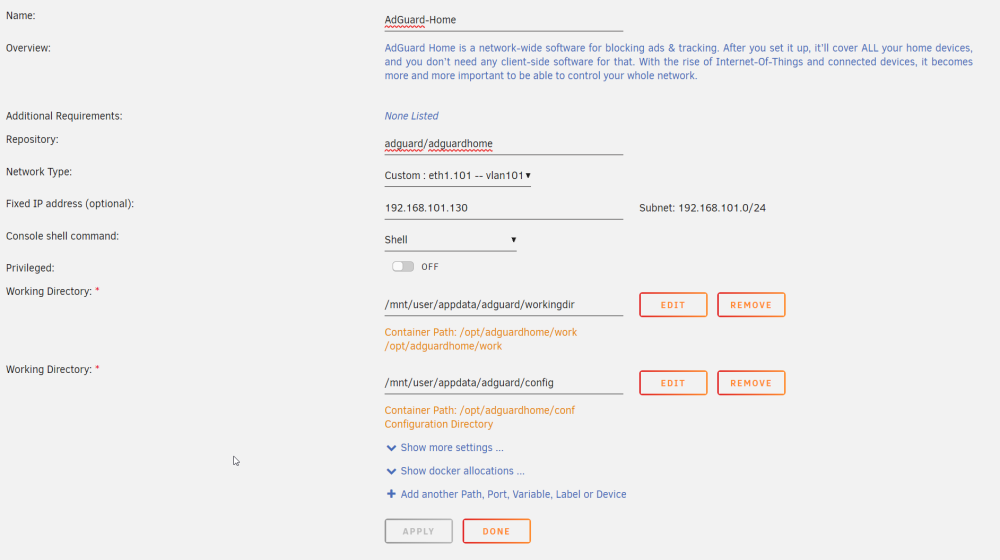
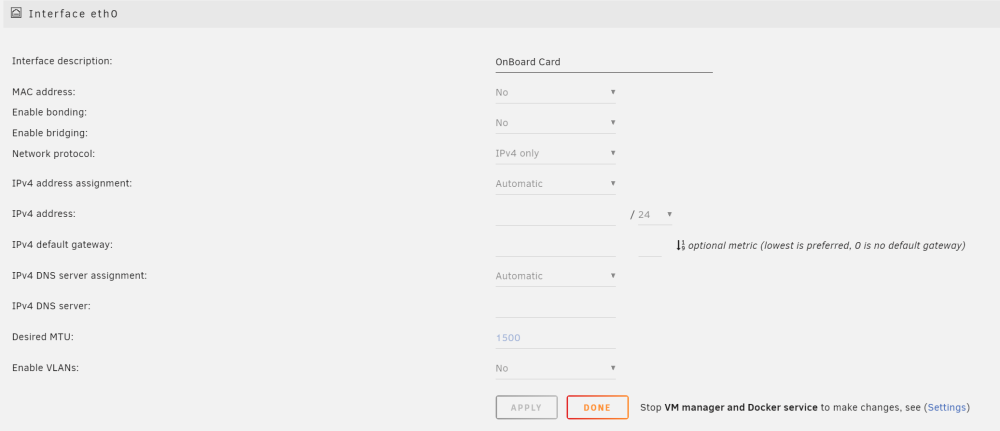
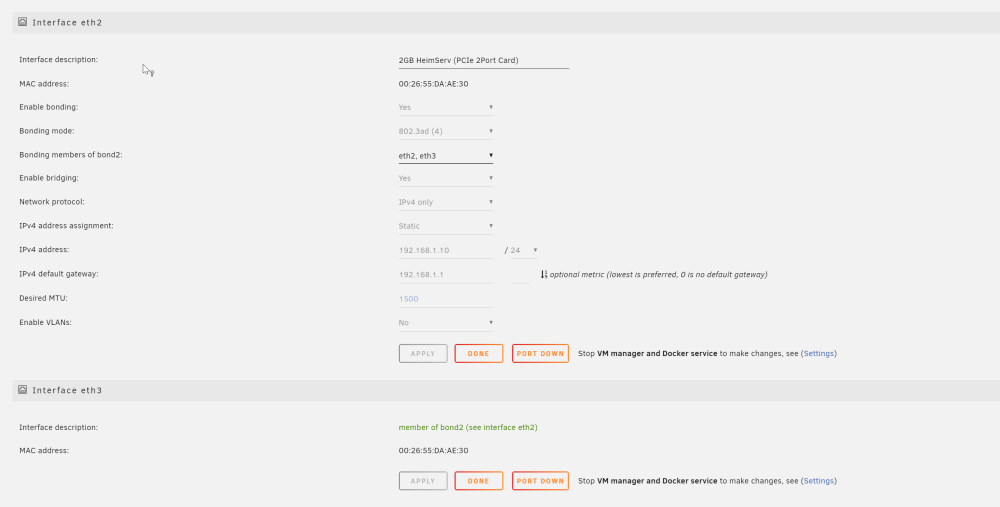
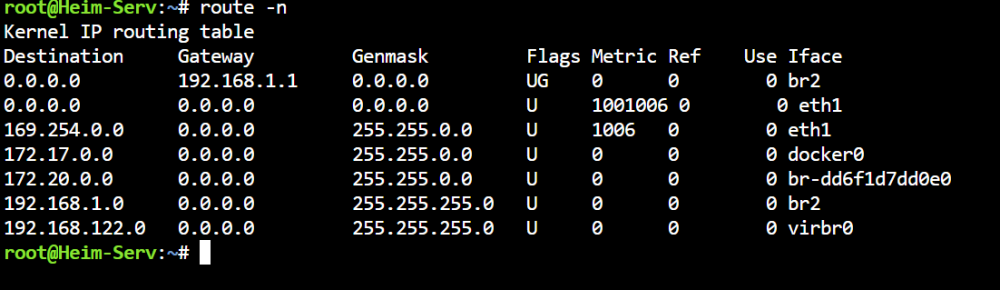
 So I found time to solve my problem 😁 And the problem was not the route. The problem was the DNS. Passing through the card which was assigned to eth0 was the fail. So I just set the pass-through card to eth3 and the other card to eth0. Now it works fine. I love to solve problems by myself 😅I have aggregate two network ports with mode 802.3ad. But after this, I have no access to the internet from the server. The internal network still works. I think, there is an issue with the routing table. My Server has 4 Network Cards. 1. (eth0) - pass-through to my VM 2. (eth1) - own VLAN for some Docker Container 3. + 4. (eth2 + eth3) - Main Cards for the Server I attached the config 1. and 2. have access to the internet. 3. and 4. have no access to the internet. Th internal Network works fine. My Table Where is the break?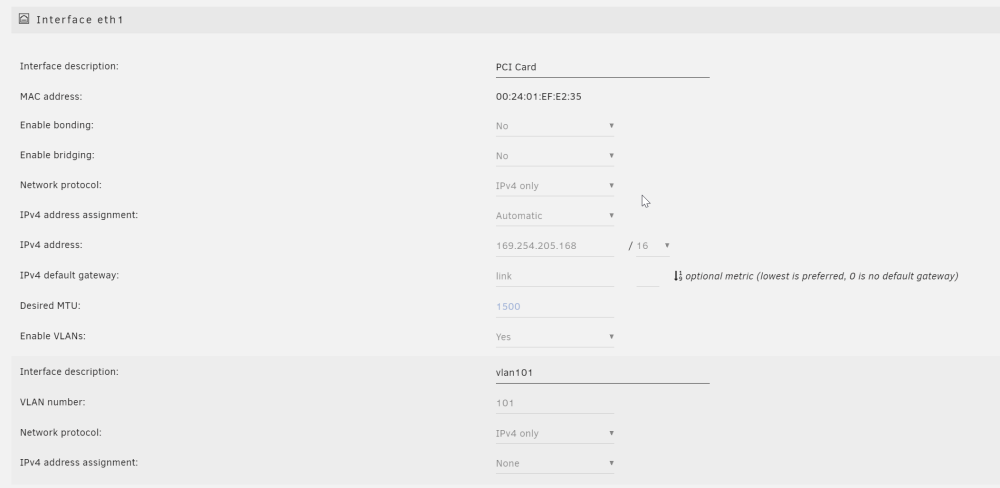
 I changed the slot and this works! Thanks!My VM and passthrough works fine. So no issues in this. But.. I installed a new network card. And this card is in the same IOMMU group like my graphic card. But I don't need the network card within my VM 🤪 it looks like this: How can I unbind only the network card from this group? So I can use the card for the Host and not the VM? I can only (un)select all. The graphic must be in a/this group. Otherwise my VM won't start.
 Thanks for this. It's more a workaround, but it works 👍 I think its a bug that only this kind of mcvlan-setup works with stacks/compose and the preserve option.I’ve set up several containers to use a mcvlan nework. Now I have the issue, that all containers which are setup with portainer stacks can't find the network after a reboot (network xxx not found). It doesn’t matter if I setup the mcvlan only within portainer or with the UNRAID gui for network and docker. The only different is, that the mcvlan which was setup within portainer is gone after restart. Only the config for the mcvlan is still present. The mcvlan whitch was setup only with the UNRAID gui comes back after a restart (but with a new networkID) If I setup the containers not with portainer stacks or the compose plugin, just with the UNRAID gui for new Containers, the containers can automaticly restart after a reboot - so they find the network. But this is for containers with a lot of variables a pain. The docker settings option “PRESERVE USER DEFINED NETWORKS” is always on. Is this a bug or a misunderstanding feature ?I was on vacation, so thats why my answer needs time. I found the reason. The root couse was sitting in front of the computer. I made I mistake in the docker conf. So my containers are all running correctly.




