





MellowB
Members
-
Joined
-
Last visited
-
Does anyone know if it's possible to add more resolutions to the desktop/simulated HDMI output? Currently we got a lot of 16:9, 16:10, 4:3 resolutions etc. but I would require like one or two 21:9 resolutions but don't know how to add them if at all possible. Edit: Nvm, this did the trick: xrandr --newmode "2560x1080" 185.58 2560 2624 2688 2784 1080 1083 1093 1111 -hsync -vsync xrandr --addmode HDMI-0 "2560x1080" xrandr --output HDMI-0 --mode "2560x1080"
-
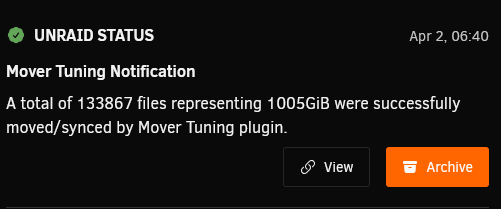
But the notification explicitly states that *Mover Tuning plugin* ran and did its thing... which it obviously shouldnt if I disable it.
-
Good question! As I had not tried to disable the mover tuning before, I can not say.
-
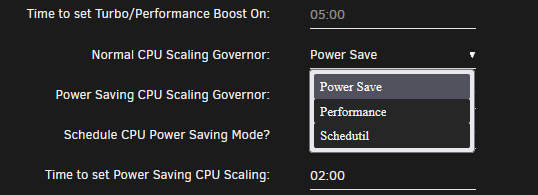
Still having issues with the available/displayed scaling governors that I can select with Tips and Tweaks. I'm on AMD 9000 Series platform and have the following governors available (using AMD Pstate / amd_pstate=passive set) in the commandline: While Tips and Tweaks only displays the following: I have set ondemand and conservative by editing the config file of Tips and Tweaks and that actually works just fine, the set governors get applied at the selected timeframe but its a bit cumbersome as it isnt reflected in the GUI and if you want to change anything a reboot is required.

-
It would seem that the "Disable Mover running on a schedule" setting is not working as expected. At least I have it set to "Yes" and mover still runs on the previously set schedule... this is with the currently latest version.

-
Hm, then nothing really changed with the update and I wonder why I got the error again... Either way, the other part was a missunderstanding on how this works on my part and I tried to use the path to the amdgpu.ids file in the container itself... makes more sense now and after updating the path again it works now, thanks!
-
Updated plex today and got the dreaded error again: 2025-01-22 17:44:49,081 DEBG 'plexmediaserver' stderr output: /home/runner/actions-runner/_work/plex-conan/plex-conan/.conan/data/libdrm/2.4.120-0/plex/main/build/73ee780ba6ea3ef381da6e7f229c475bfaf477ca/meson-install/share/libdrm/amdgpu.ids: No such file or directory Path in the container path is already updated to /home/runner/actions-runner/_work/plex-conan/plex-conan/.conan/data/libdrm/2.4.120-0/sixones/update-expat/build/73ee780ba6ea3ef381da6e7f229c475bfaf477ca/meson-install/share/libdrm/ but it still throws the error up there. Any insight/help?
-
Upgraded from 7.0.0-beta4 without issues. Had some problems with RC1/2 so I went back to beta4 but I think that was mainly hardware/memory overclock instabilities and issues with powertop --auto-tune and ASPM problems on AM5/Ryzen 9000 issues (USB hubs, NVME SSD's, SATA ports and Realtek LAN disappearing, probably not waking up again from sleep). Had some changes/using other things to optimize power consumption now and tested that for some days on beta4 so lets see if this is also stable on the final release.
-
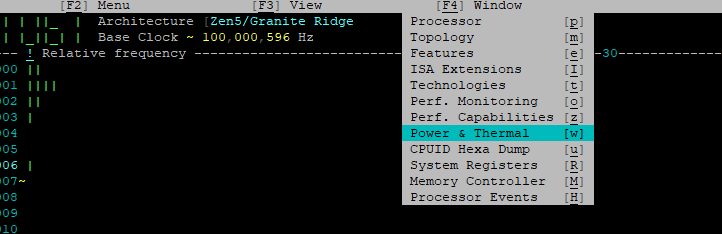
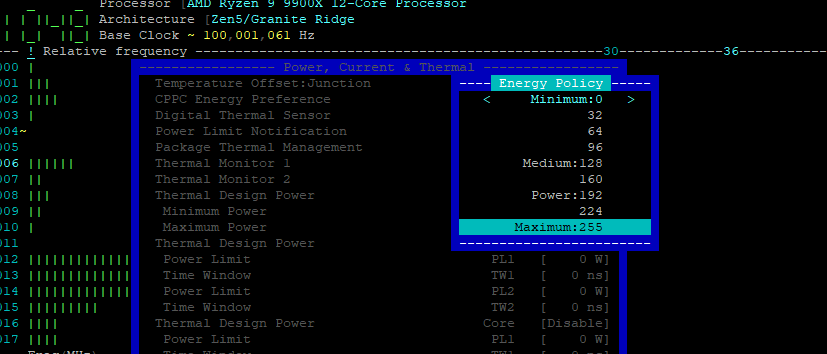
Wenn möglich würde ich an deiner stelle mal testweise CoreFreq aus dem Community App Center Installieren und den Starten/Autostart an machen. In der commandline dann mal nach gestartetem corefreq-cli SHIFT+W drücken, da bekommst du dann den stromverbrauch angezeigt. Bei mir mit Ryzen 9 9900x sieht das zB. so aus: Das ist nicht wirklich idle da Windows VM aktiv usw. aber so um die 60W wäre alleine der CPU Verbrauch. Dann mit den Pfeiltasten in folgendes menü navigieren: und dort die CPPC Energy Preference umstellen, am besten auf "Maximum" vielleicht aber auch einfach etwas experimentieren, geschwindigkeitsunterschiede merke ich jedenfalls keine aber einen großen Verbrauchsrückgang. Sieht dann z.B. mit maximum so aus: Im IDLE spart mir die kleine einstellung also mindestens 30w.


-
Just noticed today that my log is filling up with a TPM related error being produced ever 10 seconds. Had not had this issue with beta1 or 2 or any of the previous versions running on the same system. Error started after this and is repeating every 10 seconds as mentioned: Oct 9 16:35:16 Tower kernel: tpm tpm0: tpm_transmit: tpm_recv: error -5 Oct 9 16:35:17 Tower kernel: tpm tpm0: TPM_LOC_STATE_x.Relinquish timed out Oct 9 16:35:17 Tower kernel: tpm tpm0: tpm_relinquish_locality: : error -62 Oct 9 16:35:18 Tower kernel: mei_me 0000:00:16.0: unexpected reset: dev_state = ENABLED fw status = 90132054 34844040 00000020 00000004 00000000 00000000 Oct 9 16:35:27 Tower kernel: tpm tpm0: TPM_LOC_STATE_x.requestAccess timed out Oct 9 16:35:37 Tower kernel: tpm tpm0: TPM_LOC_STATE_x.requestAccess timed out Oct 9 16:35:48 Tower kernel: tpm tpm0: TPM_LOC_STATE_x.requestAccess timed out Oct 9 16:35:49 Tower kernel: mei_me 0000:00:16.0: timer: init clients timeout hbm_state = 1. Oct 9 16:35:49 Tower kernel: mei_me 0000:00:16.0: unexpected reset: dev_state = INIT_CLIENTS fw status = 90132054 34844040 00000020 00000004 00000000 00000000 Oct 9 16:35:58 Tower kernel: tpm tpm0: TPM_LOC_STATE_x.requestAccess timed out Oct 9 16:36:08 Tower kernel: tpm tpm0: TPM_LOC_STATE_x.requestAccess timed out Oct 9 16:36:18 Tower kernel: tpm tpm0: TPM_LOC_STATE_x.requestAccess timed out Oct 9 16:36:19 Tower kernel: mei_me 0000:00:16.0: timer: init clients timeout hbm_state = 1. Oct 9 16:36:19 Tower kernel: mei_me 0000:00:16.0: unexpected reset: dev_state = INIT_CLIENTS fw status = 90132054 34844040 00000020 00000004 00000000 00000000 Oct 9 16:36:28 Tower kernel: tpm tpm0: TPM_LOC_STATE_x.requestAccess timed out Oct 9 16:36:39 Tower kernel: tpm tpm0: TPM_LOC_STATE_x.requestAccess timed out Oct 9 16:36:49 Tower kernel: tpm tpm0: TPM_LOC_STATE_x.requestAccess timed out Oct 9 16:36:50 Tower kernel: mei_me 0000:00:16.0: timer: init clients timeout hbm_state = 1. Oct 9 16:36:50 Tower kernel: mei_me 0000:00:16.0: unexpected reset: dev_state = INIT_CLIENTS fw status = 90132054 34844040 00000020 00000004 00000000 00000000 Oct 9 16:36:50 Tower kernel: mei_me 0000:00:16.0: reset: reached maximal consecutive resets: disabling the device Oct 9 16:36:59 Tower kernel: tpm tpm0: TPM_LOC_STATE_x.requestAccess timed out Oct 9 16:37:09 Tower kernel: tpm tpm0: TPM_LOC_STATE_x.requestAccess timed out Oct 9 16:37:20 Tower kernel: tpm tpm0: TPM_LOC_STATE_x.requestAccess timed out Oct 9 16:37:30 Tower kernel: tpm tpm0: TPM_LOC_STATE_x.requestAccess timed out Not sure WHY it started happening, at that time the system was not exactly doing much. Also I did not really find any problems because of the error, everything seems to function as normal, it's just filling up the log... tower-diagnostics-20241009-2220.zip
-
Powertop ist bei mir zwar am laufen aber da ich die meiste zeit eine Windows 11 VM am laufen hab ist mein Input da leider ziemlich irrelevant. Momentan in normaler Benutzung ist der Stromverbrauch zumindest nich höher soweit ich das beurteilen kann, ich schau mal morgen früh wie der stromverbrauch so im Idle ist, momentan mit Performance Mode an ist das alles grad sinnfrei haha. @Topic: Leider ein Problem mit meiner PCIe USB Karte (mit ASMedia Technology Inc. ASM2142/ASM3142 USB 3.1 Host Controller) festgestellt welches ich mit 6.12.8 nicht hatte, nach kurzer Zeit fängt die Tastatur die daran angeschlossen ist ständig zu dis- und re-connecten, alle anderen USB Geräte an der Karte (USB-Soundkarte und ein Bluetooth Stick) auch aber nicht so extrem. Hab die Tastatur mit Dongle für Wireless-Maus dran jetzt direkt am rechner angeschlossen und andersweitig durchgereicht, Ideal ist das aber nicht. Frag mich was da jetzt mit 7.0 das Problem ist...
-
Da es mich verwundert das es im Announcements Bereich noch keine Topic zum Update gibt dachte ich mir ich mach hier im Deutschen bereich mal einfach eine auf um sich vielleicht unter den Deutschen Nutzern die bereits Upgedated haben etwas auszutauschen. Update lief bei mir mit 2 Servern ohne größere Probleme bis darauf dass das Fenster mit den Update-Informationen/Progress usw. komplett leer blieb bis auf die "Punkte" am unteren Ende die anzeigen das Irgendwas passiert. Zum glück hab ich im hintergrund die Notifications gesehen bzgl. das jetzt noch Plugins usw. Upgedated werden und dann letztendlich dass das Update abgeschlossen sei. Seite neu Laden und Reboot und fertig. Auf meinem Haupt-Server musste ich die Windows 11 Template neu erstellen da nach änderungen daran kein Start mehr möglich war, aufgrund der vielen manuellen änderungen an der XML aber auch kein wunder - die neu erstellte (und auch die Unveränderte) liefen einwandfrei. VM läuft mit den alten Einstellungen gut, konnte aber auf Q35 8.2 Update und ein paar andere sachen. Kann mir an der stelle vielleicht jemand verraten ob der Kernel Treiber für die Realtek Netzwerkkarten aktualisiert wurde? Ich benutze immer noch "RTL8125(B) PCI Drivers" von Jinlife aus den Community Applications library... der im System Integrierte von Version 6.12.5+ hatte bei mir doch arge probleme gemacht und die 2.5gbit speeds nie erreicht etc.
-
Find the Version that you want to use and download it in the github archive, edit the <!ENTITY version> in the plg with the one you want to use, upload the archive of the version you want to use at the checksum calculator page and use the MD5 checksum in the <!ENTITY md5> fild of the plg. Thats all I did and it worked. Obviously also edit the minimum allowed version of Unraid in the plg file down to 6.11.5.
-
Have a look at my post in the bug report section, I managed to resolve my own issue. It was a problem with my graphics card that was set as default output in BIOS but then bound via VFIO on boot for VM use. So it COULD be of your VFIO bindings on boot too.
-
MellowB changed their profile photo
-
Sure! I went to https://github.com/Squidly271/community.applications/tree/master/archive and downloaded the release I wanted to Install using my edited plg file. Upload that file to https://emn178.github.io/online-tools/md5_checksum.html and you get a MD5 checksum that you can enter in the plg file field <!ENTITY md5> Also <!ENTITY version> needs to be edited corrospondingly.



