





svennibenni
Members
-
Joined
-
Last visited
-
after adding the second line I do have a third line in my config - will this be a problem or should I just delete the third line ? kernel /bzimage append initrd=/bzroot pcie_aspm=off append pcie_acs_override=downstream initrd=/bzroot
-
everything worked out just fine - totally hassle free Thanks for your kind help this far I still have a problem with the array : in "fix common problems" I always get /var/log is getting full (currently 100 % used) Can I delete any app to avoid this behaviour ? I enclosed the diagnostics file mediengrab-diagnostics-20230829-1818.zip
-
thanks so far - parity disk is almost done Now the second part is exchanging one 4TB data disk to a new 8TB disk Also just shutting down the system and swap disks and everything will work out fine by itself again ? Or do I have to do anythin? Of course, I made a backup in case something goes wrong
-
thanks for your reply So I dont have to do anything - after starting the array it will build up the new 8 parity drive by itself ?
-
Hi in order to get more space on my array of 8 drives a 4TB I assume I have to replace the parity disk first. Please advice how to do so - I dont want to loose any data I already bought two new 8TB disks - one for the parity and one for the array itself. Thanks in advance Sven
-
Problem still exists - just days after reboot folder is at 100% full again. It seems I cannot run diagnostics when there is no error ...
-
I have this awful error message : /var/log is getting full (currently 100 % used) My Server has 48 GB Ram Can you help ? mediengrab-diagnostics-20230201-1824.zip
-
thanks for coming back to me and my problem I had absolutely no vm or docker - nothing installed so far But problem has been solved by me, as I formatted the USB drive and started all over again. Now it is up and running fine no diagnostic file needed any longer 🙂
-
First answer came very quickly .... but why there was never an answer to my following questions ? So I had to begin from scratch again. Quite dissapointing
-
in safe mode I can see all the disks, all the data and start the array. If I start in normal mode I can not PLEASE advise OR would it be easier to solve this issue if I just start all over again from scratch ?
-
I try reboot in safe mode - hopefully something like XP safe mode for troubleshooting
-
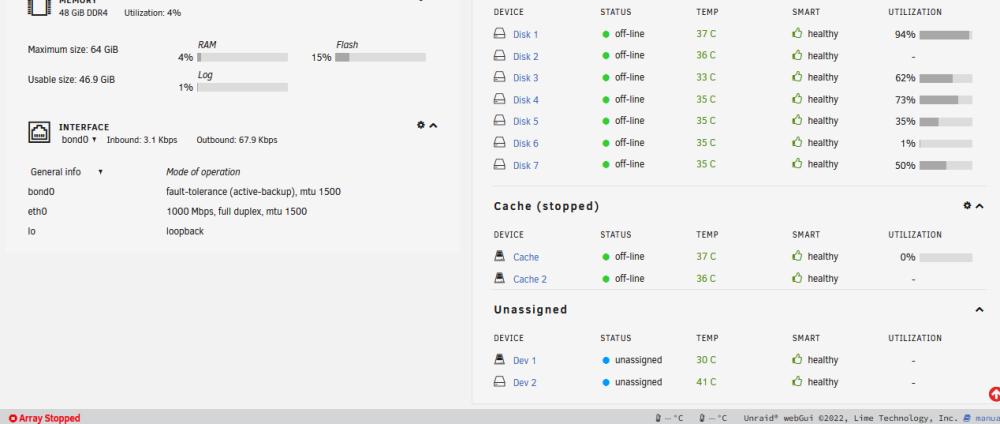
but I cannot add a cache drive, no disk 2 ...
-
strangely .. I can access the shares from a remote computer
-
I could see my data on the other disks again for a short time in midnight commander - but no disk 2 (the new one) I rebootet the system and now I can see nothing again - I could start the array but when I click on shares it tells me that I have to start the array to see the shares ...
-
aaah I had to check this box "I want to do this" It is rebooting
