





shry8
Members
-
Joined
-
Last visited
Everything posted by shry8
-
ok got it, I will install those from Previous apps as new installs, thank you!
-
They seem to be working, but indeed I need to start the settings from scratch. By any chance these are not included in the backups created by Unraid connect?
-
thanks for your help and your patience! Here is the diagnostic after turning the Docker on: server-diagnostics-20240109-1324.zip
-
First one returns: total 44G drwxr-xr-x 1 root root 20 Dec 18 17:27 ./ drwxrwxrwx 1 nobody users 12 Dec 18 17:27 ../ -rw-r--r-- 1 nobody users 50G Jan 7 20:54 docker.img Second: total 8.0K drwxrwxrwx 1 nobody users 64 Jan 7 18:43 ./ drwxrwxrwx 1 nobody users 116 Jan 7 22:04 ../ -rwxrw-rw- 1 patrick users 6.1K Jan 3 22:13 .DS_Store* drwxr-xr-x 1 nobody users 80 Jan 7 18:48 Duplicacy/ drwxr-xr-x 1 root root 0 Jan 7 18:43 Komga/ drwxr-xr-x 1 root root 34 Jan 7 19:50 navidrome/ The 3 apps are the apps I opened to test before realizing the cache was busted
-
Do you mean just click on Main-> Move? I did it: server-diagnostics-20240108-1924.zip
-
ah I followed a wrong post online, ok I did it, there seem to be no error on the cache drive anymore: server-diagnostics-20240107-2205.zip
-
That's what I did, I stopped the array, then formated it. I just tried it again and I get the "Unmountable: Unsupported or no file system " error again once I start back the array
-
oh right sorry! It wasn't displaying that message right after the formatting and I only tried to open dockers -- since I could open them I assumed the problem had been fixed. ok I have disabled docker!
-
here they are, thank you! server-diagnostics-20240107-1855.zip
-
It seems to have worked, thank you!
-
sorry @JorgeB, do you have an idea of what I could try to do to put my cache in read/write? thanks!
-
ahh ok I was in basic view, ok done!
-
So I have disabled Docker, went into Main-> Move. But could you help me to do the following? change Docker from macvlan to ipvlan change my cache to read/write thanks!
-
oh that's really handy! So I did that but unfortunately none of my dockers works anymore, for ex: Komga won't start, the logs say I am trying to write on a read-only db Navidrome won't start either: Photoprism has an "unable to establish a connection to the server" error if I try to reach the GUI server-diagnostics-20240104-1325.zip Let me know if I can still ask questions here, or if each issues should be dealt with separately!
-
thanks, looks fixed! Last question, since all my Dockers have disappeared, can I just restore them using the flash backups? Or is it going to mess with the fixes we just did?
-
thanks! I tried that and I do not have the alerts anymore. Though now when I went to the Docker screen I got an alert message "Docker Service failed to start." Here is the new diagnosis file: server-diagnostics-20240104-1054.zip Thanks for your help, I am not technical enough for these issues unfortunately 😅
-
ah sorry, here it is: server-diagnostics-20240104-0913.zip
-
Hello, The other day I restarted my server because it was behaving strangely and since then all my docker apps have disappeared ("No Docker containers installed" under Docker tab). I had a look at the appdata folder and it looks empty. I tried running the Fix common problems plugin and I get these strange warnings: Share appdata references non existent pool cache Share downloads references non existent pool cache Share isos references non existent pool cache Share media references non existent pool cache Share system references non existent pool cache I double checked and I do have a Pool named cache, and each share is pointing to it so I think I should be all good there. Could you help me find out what happened there and how to solve this? thanks!
-
It worked, thanks!
-
Hi! I have moved to another country, and after scratching my head a bit I have managed to almost put back everything in my server in order. The last piece I'm missing is that I cannot access it using tower.local anymore, I can only use the IP. I am guessing there's something to configure somewhere, maybe in the routing table at the bottom of the network settings? Could someone help me figure this out? thank you!
-
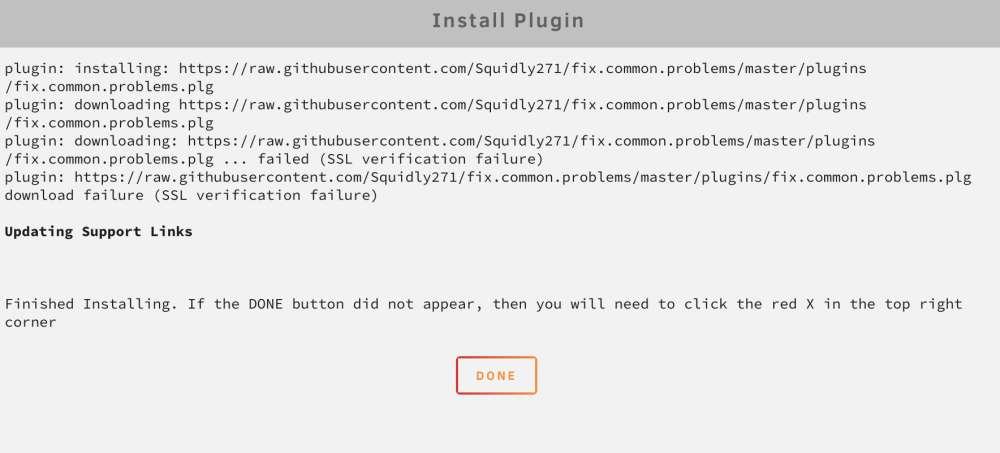
OK so I found the way I think, I have imported my Wireguard config into Settings-> Network -> VPN manager, and I'm using `VPN tunneled access for system". However I'm still getting the same error when trying to install "Fix common issues" 🤔
-
Hi! I just installed my first Unraid NAS but I'm running in an issue when trying to install apps. I always get a `failed (SSL verification failure)`: I managed to install the Community Applications plugin by following the steps described there but it is going to be tedious if I have to do this every time 😄 I live in China where Github is blocked, and I noticed that it was trying to retrieve the apps from there so perhaps that would be the cause? Would there be a way to just redirect all the traffic from the server through a VPN or something? Or perhaps it's something else, I'm not sure. Does anyone have an idea to help me? thanks!
-
I see, it makes sense, thanks for explaining!
-
ah, ok I see what they meant. I had checked the availability before posting the list here and both motherboard and processor would cost me about 75 USD, I think that's a fair price
-
I'm trying to not spend too much but still have a compact build that fits my needs. These looked like a good compromise to me, and I guess it's a bit hard to get n00b friendly documentation online on things that just got released.
