





Joeh
Members
-
Joined
-
Last visited
Everything posted by Joeh
-
I've gone to do my upgrade. 7.2.6 -> 7.3.0 On system reboot im greeted withn a "failed to allocate initramfs memory" on each unraid option Anyone got any suggestions?
-
-
I've followed this method to install sedutil but when i got to use it i get a command not found. Not massively familair with linux and not sure whats wrong.Hi all, I've just acquired a new drive and just hoping to get some further info from people. Sas Drive (Hooked up through my HBA) but unmountable. Looked at the logs and noted Read Capacity (16) failed. but the Sense Key was coming back as: 0x2 with ASC=0x4 ASCQ=0x1 From checking this up it looks like Not Ready - Becoming Ready. I'm new to dealing with Sas Drives and had 1 success and one unlucky failure. This seems promising but can anyone with more knowledge shed some light.. How long should this take to become ready and does anything else need to be done on my part? I've attached a picture of the drive log as well as Diag if it helps. soja-diagnostics-20250129-2121.zip
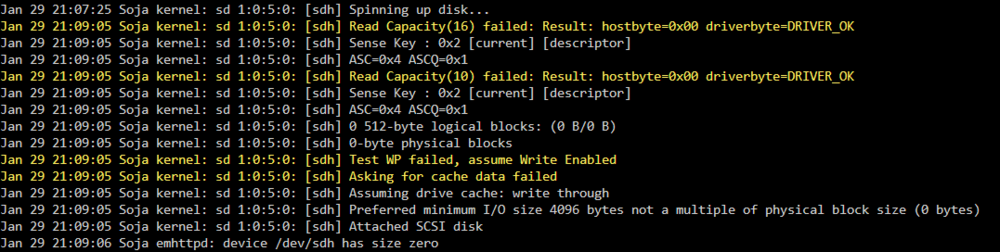 Since updating my system crashed so i've had to hard reset which is now causing my system to parity check and my docker system is failing to start.. but its working cause i can access Plex. But my manually activated services i can't see or touch.Thanks for this. A wealth of information here. However i'm now left with a bigger question. Thanks to to Wody's reply i looked at the ASC and ASCQ lines.. However the ASCQ indicates that the drive is ready and needs to be spun up. However when i spin up the drive it fails to read capacity. "Nov 30 11:56:31 Soja kernel: sd 44:0:0:0: [sdf] Spinning up disk... Nov 30 11:58:12 Soja kernel: ..................................................................................................not responding... Nov 30 11:58:12 Soja kernel: sd 44:0:0:0: [sdf] Read Capacity(16) failed: Result: hostbyte=0x00 driverbyte=DRIVER_OK Nov 30 11:58:12 Soja kernel: sd 44:0:0:0: [sdf] Sense Key : 0x2 [current] [descriptor] Nov 30 11:58:12 Soja kernel: sd 44:0:0:0: [sdf] ASC=0x4 ASCQ=0x2 Nov 30 11:58:12 Soja kernel: sd 44:0:0:0: [sdf] Read Capacity(10) failed: Result: hostbyte=0x00 driverbyte=DRIVER_OK Nov 30 11:58:12 Soja kernel: sd 44:0:0:0: [sdf] Sense Key : 0x2 [current] [descriptor] Nov 30 11:58:12 Soja kernel: sd 44:0:0:0: [sdf] ASC=0x4 ASCQ=0x2" ANy idea?I've got the same issue as yourself at this point. I've got a drive showing the same start info. How did you get it to spin up? *Edit - My start info isn't exactly the same.. its ASC=0x4 ASCQ=0x2, which from my understanding means the drives needs to be spun up.So dead drive then?soja-diagnostics-20241130-0956.zip Here you go. Hope this helps.Hi Guys. I've got an issue were i've purchased a HGST sas drive (preowned) and its showing up as all 0's on the unassigned devices. I've checked my HBA (LSISAS9300) and its flashed to firmware 16 I'm not sure what to do. I've seen some people say to sg_format as it might be byte size.. but that comes up with "format unit command: device not ready, type sense key" any help would be greatful *Edit - This is my first and only SAS drive in the system. everything else is sata via mobo or sata card
 I just ordered this case and was about to make this request. You, good sir, are a true heroDon't know if anyone else is experiencing this but im finding that the latest version of Kavita (0.6.0.0) is causing my server to spike to 80% cpu usage by just the container being active. I don't know why this is happening but it is consistently happening and i can stop the container and see my cpu usage drop straight away.No idea.. Like i said.. It works inside of 6.10.3 but not 6.11 which tells me its something to do with a change in this update. Its not a huge issue for myself as im getting a PCIE 10gbe card soon but other people might find this issue and unless someone reports this.. It won't be fixed.MSI MAG b460 TomahawkThen only reference to this i can find in syslog is this: Sep 26 12:30:57 Tower kernel: pci 0000:03:00.0: [10ec:8125] type 00 class 0x020000 Sep 26 12:30:57 Tower kernel: pci 0000:03:00.0: reg 0x10: [io 0x3000-0x30ff] Sep 26 12:30:57 Tower kernel: pci 0000:03:00.0: reg 0x18: [mem 0xa1200000-0xa120ffff 64bit] Sep 26 12:30:57 Tower kernel: pci 0000:03:00.0: reg 0x20: [mem 0xa1210000-0xa1213fff 64bit] Sep 26 12:30:57 Tower kernel: pci 0000:03:00.0: supports D1 D2 Sep 26 12:30:57 Tower kernel: pci 0000:03:00.0: PME# supported from D0 D1 D2 D3hot D3cold I've attached the syslog as well incase i missed something syslog.txtBefore you go ahead an type below... the fix regarding blacklisting r8169 Doesn't not work for this. Please read issue below as this seems to go Deeper. So I've upgraded from 6.10.3 to 6.11 I have 2 Ethernet ports on my Motherboard (Both built in.. not addition pcie slot) I have a Intel I219-V 1gb connection which is working fine (Have been using as my general access connection) I also have a Realtek RTL8125 connection (Which i've used as my direct connection for uploads) Since upgrade to 6.11 That connection is not visible on my Main page or in my Network Settings. I've checked my Hardware Profiles and can see it present but unlike when i was on 6.11 It has no driver allocation. I've attached my Diag file for this here as well. In the File you can see 00:1f.6 (Intel connection) has a Devicename and Kernal Drivers assigned.. But my 03:00.0 (Realtek Connection) is lacking those 2 fields. This is not a hardware issue as i can downgrade to 6.10.3 and this realtek connection will appear in unraid and be usable. I can only guess this is an OS issue. Does anyone have Any idea's or is this gonna be a Wait for a Patch or Version upgrade for this to be fixed?? lspci.txtI gave that a shot and it made no difference. It doesn't appear in my network settings as a usable port. Equally the unraid is not assigning any drivers to the device so i can't blacklist the wrong ones if there isn't one assigned.Equally the way unraid reports this shows a difference: 00:1f.6 Ethernet controller [0200]: Intel Corporation Ethernet Connection (11) I219-V [8086:0d4d] DeviceName: Onboard - Ethernet Subsystem: Micro-Star International Co., Ltd. [MSI] Ethernet Connection (11) I219-V [1462:7c81] Kernel driver in use: e1000e Kernel modules: e1000e I've highlighted a line in the working ethernet port here that is missing from the none working port 03:00.0 Ethernet controller [0200]: Realtek Semiconductor Co., Ltd. RTL8125 2.5GbE Controller [10ec:8125] (rev 04) Subsystem: Micro-Star International Co., Ltd. [MSI] RTL8125 2.5GbE Controller [1462:7c81] Kernel modules: r8169 Infact the Kernel module is referencing the wrong varible i believe (r8169) and it doesn't state a Kernel Driver in use.. So its very much unraidNo Hardware problem.. I can downgrade to 6.10.3 and it works fine.. Upgrade to 6.11 and its broken. Its a software element 100% as this is normally my direct connection used to transfer files to my array so im very aware of its status.Here you go. The none working Ethernet device is 2nd from bottom in the list. The working port is about 3/4 devices above. lspci.txtWhat Diag file would you require for this? and i can attach.Well my Secondry ethernet port on my Motherboard has disappeared with this update. My realtek rtl8125 2.5gb socket doesn't show in usage or in network settings. The Hardware profile section finds it but looks like Unraid is unable to assign any drivers or configuration to it. Don't know if this was made aware during RC versions so figured i'd message here.


