





Mainfrezzer
Members
-
Joined
-
Last visited
Everything posted by Mainfrezzer
-
could be zfs compression, could be vdisks for vms. Bit hard to guess.
-
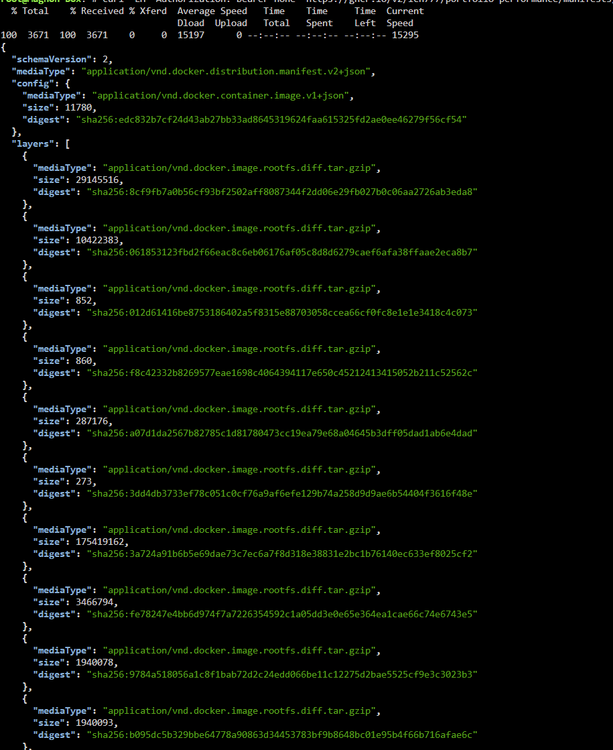
what do you get as output when you run curl -LH "Authorization: Bearer none" https://ghcr.io/v2/ich777/portfolio-performance/manifests/latest | jq . in the unraid terminal? If it looks like this you have to sign out of ghcr.io with docker logout ghcr.io The docker token isnt setup to have the read:packages scope, by the looks of it If it doesnt look like it on the screenshot, something else is going on
-
When you head into the vpn manager, do a dummy change on the wireguard interface for it (put a 1 in the local name and remove it again) so that the apply button for that interface gets enabled, hit it and it will create the wg1 docker interface again
-
if anything its a docker change. I pretty positive docker changed how the networking behaves but i cannot tell definitively. (i might be crazy and recall that it abused the host but ehhh not important) Docker on v6 is ancient with 24.0.9. on v7 runs 27.0.3. So that a lot of versions to crawl through for changes. But you should really sort out the dns^^ Edit: Yes, it was changed as it was a CVE fix
-
This is getting really strange. At this point it might be easier to recreate the docker image If you stop docker and start it again. Grab the output from the syslog after rc.docker: Docker daemon... Started. rc.docker: Starting network... and if there is a message with "is already using parent interface br0" again take the name, thats displayed, in the syslog message. As it was "network di-b3c2cf3baf6e" before and then type "docker network rm b3c2cf3baf6e" obviously, you need to change it for whatever its gonna display in the syslog.
-
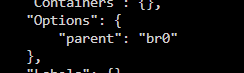
you have to go through them 1 by 1 with "docker network inspect NAME" and then see whos parent is br0
-
Well, then i would suggest finding out why your dns server is not responding to your docker containers. The issue clearly lies with it. the alternative i mentioned above changing the go file to echo nameserver 192.168.200.1 >/etc/resolv.conf echo nameserver 8.8.8.8 >>/etc/resolv.conf echo 192.168.200.10 NAS >>/etc/hosts would allow all docker container to fall back to use 8.8.8.8 and you dont have to include the --dns one.
-
You should really include what someone has to be afraid of, "this thing" could be anything.
-
Yeah thats docker doing its thing. Try with a different container where you can test dig. That you can pin 192.168.200.1 is already a good sign. The question is why the dns request fails
-
oh thats good. now, with a multi nic setup, im not sure how docker and the vm behaves. But to check that, can you actually ping 192.168.200.1 from the affected container? If you can ping it, check if it actually answers to dns requests. on any alpine distro it would be "apk add bind-tools" to get "dig @192.168.200.1 google.com" running. On a debian container it should be "apt-get install dnsutils" (you might have to restart the container with the --dns flag as the image might not come with dig installed)
-
Ja die Fritzbox und fe80 Adressen (Local Link) vertragen sich nicht. Muss die ULA (fd00) sein. Aber ich glaub Unraid lief ja selbst nur über IPV4, dann wird der LXC Container keine bekommen. Da hilft dann tatsächlich nur den ipv6 auf ne Bogusadresse (fe80::5054:ff:fe65:9c3f) zu setzen oder einfach mit ::1 abzuspeisen.
-
Thats great, good to hear. What i got from the docs is that unbound itself is managing they keyfile as long as unbound is up and updates it correctly (from what ive seen it creates new subkeys) and the anchor is only used when unbound wasnt running. So setting the anchor at startup was the most logical way. I will add it to the readme at some point, i did assume that someone who wants to enable dnssec knows about the setting in the unbound config. The semantic difference between the config "yes" and DNSSEC_ENABLE is mostly for the unraid-template sake. I added the dnssec as an advanced option to it which is not shown unless you expand the options. I find a "yes" as setting is a more clear way for it to communicate what that one specific setting does, as where 0 and 1 would suffice to get the point accross to you and me, it might not to someone else. (i would otherwise just use 0 and 1 respectively accross all and will be, with the exception for the "provide config" one, that ill keep at yes^^)
-
I cannot answer you that with full certainty as im not running any of the arrs. But i highly suspect that they use 1 of the vpn containers and just network attach all the others to that vpn container. As it would be the easiest way to manage everything together Now if they use multiple different vpn connections, that does get a bit more complicated.
-
now that is very strange. but i might have found your issue. Feb 27 01:39:37 mHDPC root: Error response from daemon: network di-b3c2cf3baf6e is already using parent interface br0 So one of your custom networks highjacks br0 Edit: To make absolutely sure, i recreated the circumstance and yes. That is your issue I created a bogus network via docker network create -d ipvlan --subnet=10.0.1.0/24 --gateway=10.0.1.1 -o parent=br0 test and the result is the missing br0 interface upon docker start Feb 28 19:51:47 Tower rc.docker: Starting network... Feb 28 19:51:47 Tower root: Error response from daemon: network di-661d5701ce59 is already using parent interface br0
-
Wait a second You need to enable bridging in the network settings. Your docker container cant communicate with your domain controller vm Of course they cannot communicate with the dns server on 192.168.200.1 🙃 Edit: So either, you change to br0 and keep everything as it is OR you fix your go file script to echo nameserver 192.168.200.1 >/etc/resolv.conf echo nameserver 8.8.8.8 >>/etc/resolv.conf echo 192.168.200.10 NAS >>/etc/hosts
-
You dont have to, what i mean is all docker container can communicate with all other containers that are exposed over an unraid bridge via 172.17.0.1 So for example, you have some http server running on a bridge that maps port 80 to 8080 on unraid. A second container, thats running on a different bridge should simply be able to access the http server via 172.17.0.1:8080. But if you run something like binhex vpn containers for the connection, that wouldnt work.
-
Mhmmm. When docker is running, you could try to remove the existing br0 (there must be one cause docker creates one upon start) docker network rm br0 then stop the docker service and then start it again
-
They should be still able to communicate over the dockerhost. I.e whatever you need to access should be available at 172.17.0.1:PORT, if they all run on a bridge
-
-
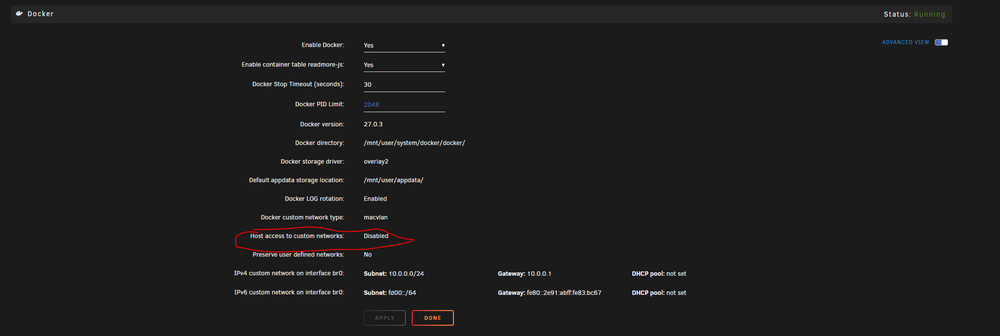
Click in the GUI on Settings then Docker Stop the Docker Service and enable Advance view in the top right There is no documentation about the wireguard issue, apart from a thread by me to work around it. What it boils down to is that unraid uses br0 for interfaces, which will no longer work if host access is activated because it should use shim-br0
-
Thats a secruity feature by docker. You can enable host access to custom networks in the docker settings to work around it. (could have issues with wireguard, if you use that)
-
From where are you trying to access is? From Unraid or from another Pc? What container is it? If its any of Binhex vpn containers, that will not work on br0
-
https://docs.unraid.net/unraid-os/release-notes/7.0.0/#new-windows-changes-may-result-in-loss-of-access-to-public-shares
-
What does the domain controller say then? Because docker copies the host resolv.conf to the container upon start and thats the only nameserver they use for it. Im gonna assume the containers can reach it.
-
Does the dns server 192.168.200.1 actually work? if not, then i would stop overwriting your nameservers with it^^




