





TOMillr-old
Members
-
Joined
-
Last visited
Everything posted by TOMillr-old
-
Just came across this announcement, that XFS in the upcoming Linux 7.0 kernel is going to get an autonomous self-healing capability. Is this something Unraid users will benefit from as well?
-
Can User Shares span multiple pools or unassigned devices as well? Or are they limited to the classic Array setup?
-
Release notes for 7.2 says that it's now possible to create "an array or single device pool" with ext4 formatted drives: I'm curious about the "single device pool" wording. Does this mean, I can't create a pool consisting of multiple ext4 drives? Is there a way to combine multiple ext4 drives to a storage volume similar to a Logical Volume Management (LVM) solution?

-
I'm well aware that trim is not supported for SSDs in an Unraid Array setup. However, I've found conflicting information for setups in which the array is used without a parity drive. Does trim work in such a use case? My understanding is, that trim is not supported, because a trim job might change some bits on the data drive and this in turn would mess with the parity information. But what if I just want to combine a bunch SSDs with different sizes/file systems into a combined storage spaces and don't need the parity functionality?
-
Ich möchte gerne dieses alte Thema noch mal hervorholen, da ich ebenfalls Probleme habe, meine IPTV Playlist von Zattoo mit Telerising in Plex einzubinden. Möchte Plex ebenfalls nur zum Aufzeichnen, also nicht für Live-TV nutzen. Gibt es Ende 2025 da endlich eine brauchbare Lösung? Oder ist es immer noch einfacher, die Aufnahmen über einen anderen Service zu machen und dann Plex nur zur Wiedergabe der Aufzeichnungen zu verwenden? Irgendwelche Empfehlungen abseits von TVHeadend, um die Aufzeichnungen zu machen? Konnte bei meiner Recherche so neuere Tools wie NextPVR, Vini Play, Dispatcharr oder m3u editor finden.
-
So I'd basically have to use my three SSDs as unassigned devices and use the snapRAID plugin to write the parity information to the HDD, when I want to use the snapRAID plugin in Unraid? And unassigned devices also need the dedicated plugin, right? Can I still use one of the unassigned SSDs as a storage for the Docker app data? Or does Unraid require an array or pool for that to work?
-
Seeing as there seems to be an increasing number of SSD-only NAS devices coming to market, can we expect to see TRIM-support for use with an Unraid array anytime soon? Is it technically even possible to achieve? Otherwise I'd have to look into using something like SnapRAID to get some level of parity for my SSD-only setup.
-
Besides the integrated bitrod protection, the main reason for looking into this setup was that I'm mostly using SSDs and TRIM is not working inside an Unraid array. Or has this limitation been addressed lately and I've just missed that?
-
I'm looking into moving my small media server from OVM to Unraid. Is it feasible to run Unraid just with a snapRAID setup? My current OMV setup looks like this. SSD1 (ext4): Docker appdata SSD2 (ext4): data drive 1 SSD3 (ext4): data drive 2 HDD1 (ext4): parity drive I guess all drives, except SSD1 with the system and appdata, just need to be mounted as unassigned devices. Do I have to start with a clean parity drive or can I work of the existing parity file on HDD1?
-
Is there a way to disable wake-on-lan for my two networks adapters enp1s0 and enp2s0 together with running the --auto-tune command? Currently, I run --auto-tune on startup but have to manually go in and disable WOL to get the highest energy savings.
-
Ich möchte mir gerne einen stromsparenden und leisen Plex Server aufbauen. Als Speicherträger werde ich daher die folgende Kombination aus SSDs und 2,5" HDDs verwenden. Als zusätzliches Backup würde ich eine externe USB-Festplatte sowie einen Cloud-Anbieter nutzen. 500GB WD Red Sata SSD 4TB Crucial M.2 SSD 5TB Seagate 2,5" Sata HDD 5TB Seagate 2,5" Sata HDD Die HDDs wären jeweils als Cold-Storage und Paritydrive gedacht. Auf den SSDs würde ich gerne aktuelle und häufig benutze Dateien sowie Docker App-Daten ablegen. Welches Setup (Unraid Array, Pool, Cash, Filesystem) sollte ich in Unraid einsetzen, wenn ich die HDDs die meiste Zeit im Spin-Down haben, gleichzeitig aber durch Parity gegen einen Ausfall gesichert sein möchte? Cache 500GB WD Red Sata SSD Daten 4TB Crucial M.2 SSD 5TB Seagate 2,5" Sata HDD Parity für Daten 5TB Seagate 2,5" Sata HDD Ist es weiterhin nicht empfohlen, wegen der fehlenden Trim-Funktion, SSDs nicht in einem Unraid Array zu benutzen? Wie könnte ich sonst für die beiden SSDs und die 5TB HDD Parity einrichten? Die bit rot- und Hash-Funktionen von BRFS und ZFS funktionieren in einem Unraid-Array ja nicht. Gibt es sonst eine Möglichkeit, eine self-healing Funktion für die Datenspeicher zu bekommen?
-
Hat vielleicht jemand in der Zwischenzeit TLP im Dauerbetrieb einen Vergleich mit powertop unterzogen? Lässt sich mit TLP mehr Einsparungen hervorholen als mit dem typischen powertop --auto-tune?
-
I still haven't found a way to match the low power consumption seen in OMV, Debian or TrueNAS Scale with version 7.1 of Unraid. I'm using the exact same bios settings, all devices have ASPM enabled, scaling_governor and energy_performance_preference are also the same. Yet Unraid never goes below c8 while it remains on c10. Are there maybe any processes Unraid is running in idle that might explain the additional power draw?
-
As my post above indicate, I'm also struggling to optimize power consumption in Unraid. I'd be curious to see how your setup fares during idle in a vanilla Debian or Ubuntu Server install.
-
Tried the final version of 7.1 and power consumption during idle is still way worse compared to OMV, Debian or even TrueNAS scale. In OMV, even with some containers like Plex running, power consumption is still 22% lower than a clean install of Unraid 7.1 with nothing running at all. ☹️ What's idle Unraid doing to justify the additional power need?
-
Anyone got any ideas how to fix this?
-
That's why I'm asking. Is there some crucial differences between the different get_iplayer containers I should be aware of? Can I use the binhex version with a DNS proxy inside the container and put the dns information in the compose file?
-
Sorry, this might be a stupid question. As I understand your distribution, the script runs a build of get_iplayer on top of an Arch Linux base. What's the benefit of that as a Unraid user compared to other containers?
-
Did you manage to fix this? I'm having those loopback calls show up in my console as well.
-
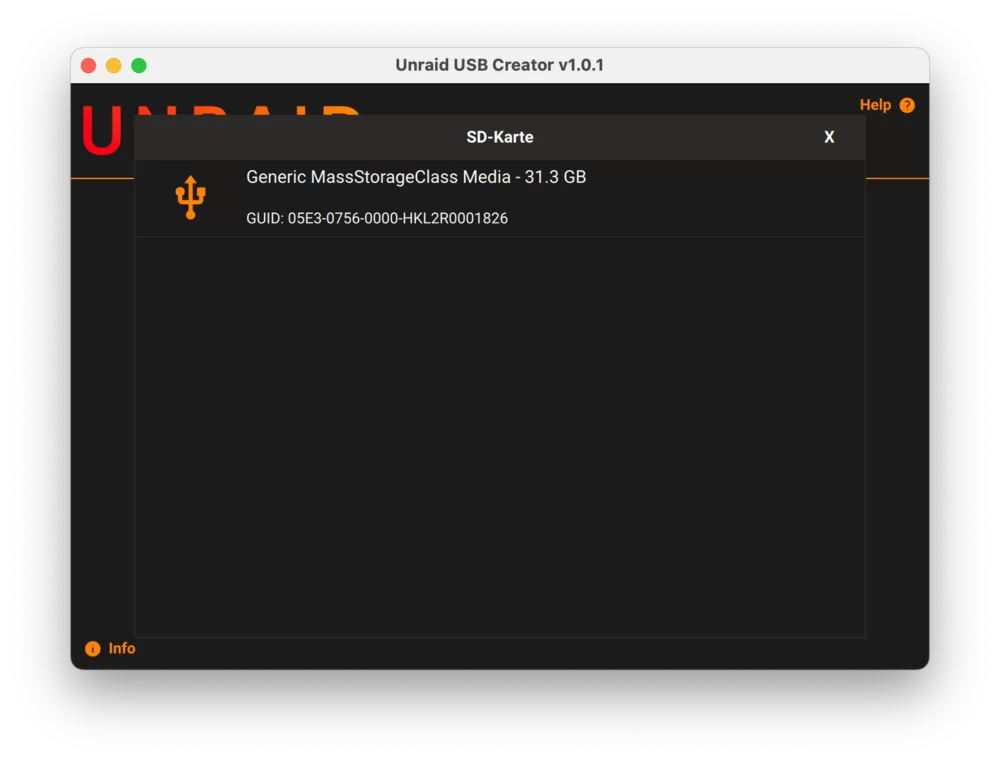
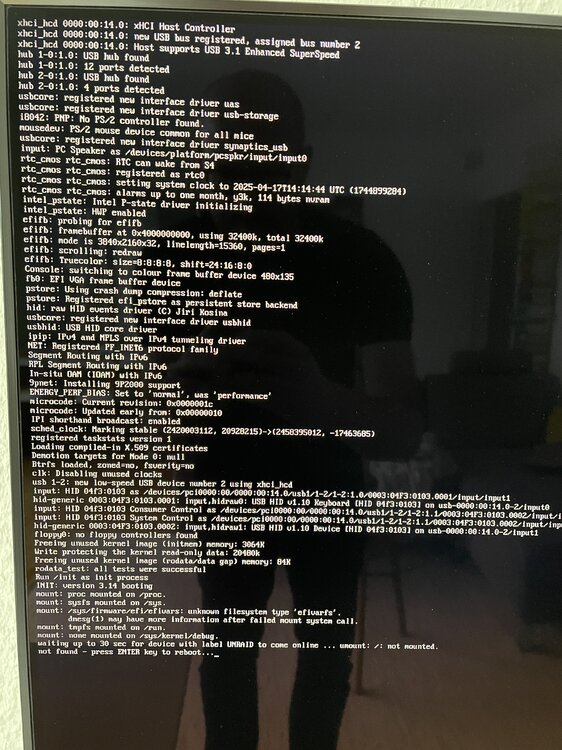
Ich habe einfach mal eine eMMC-Speicherkarte bei Hardkernel bestellt. Wie man im Unraid USB Creator schön sieht, hat die Speicherkarte eine eigene GUID: Ich kann auch später das Unraid Image im Odroid H4+ von der Karte booten. Danach erwartet Unraid jedoch, dass das Bootimage in einem USB-Port befindet und bricht den Bootvorgang ab: Technisch wäre es also kein Problem, neben einem USB-Stick Unraid auch von einer eMMC-Speicherkarte laufen zu lassen. Unraid hat daran aber offenbar einfach kein Interesse...
-
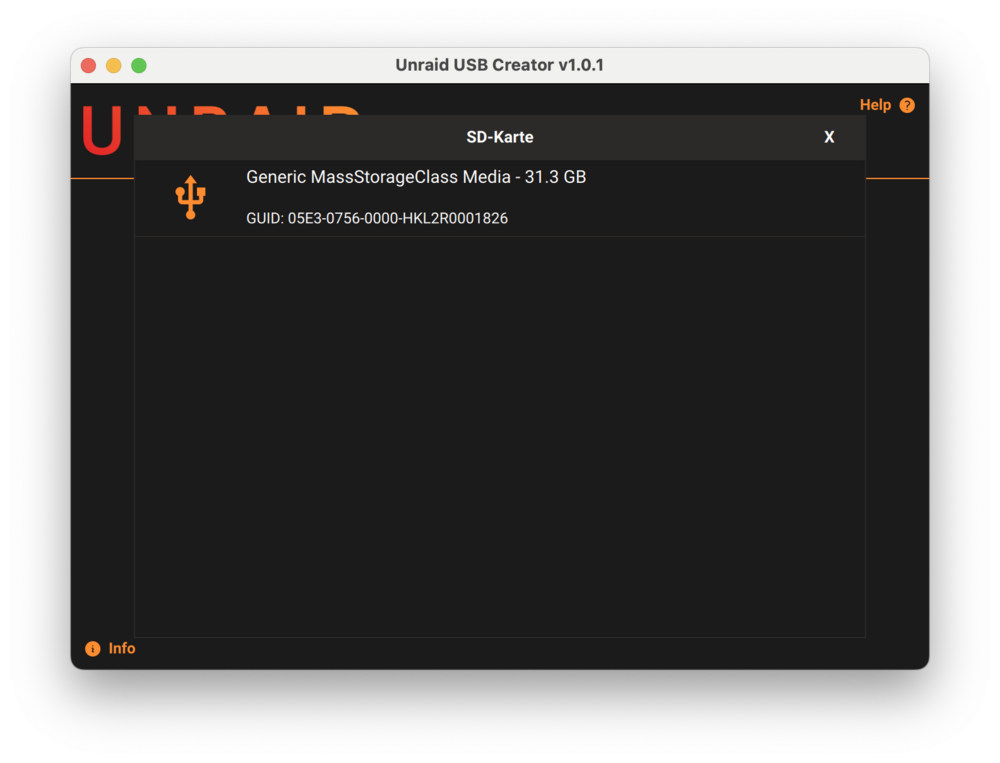
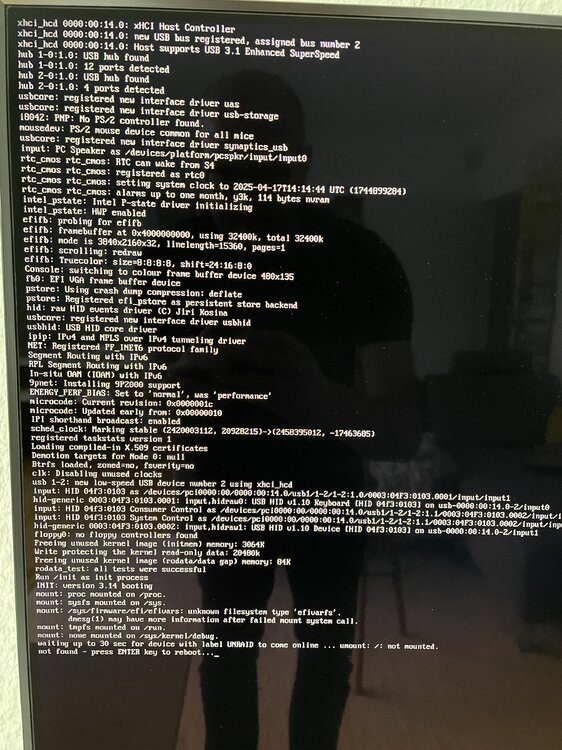
I'd love to boot Unraid from my currently unused eMMC module in an Odroid H4+ single board computer. Since eMMC modules have a unique GUID, you can create an Unraid boot medium on it, just like on any other USB stick: I'm also able to boot of the eMMC module, load the Unraid boot loader and start the initial setup process. Unfortunately, the setup is currently only looking for USB ports and fails to mount the "UNRAID device" it is looking for. Please add the option to look for an eMMC storage controller as well.
-
Just upgrade my test system to the final release of TrueNAS Scale 25.04. Idle power consumption of an empty system is still 26% lower compared to the latest Unraid build. 👎 Any chance to get Unraid down to that level as well? The hardware is clearly capable of reaching c10.
-
Anyone? I can't believe that a clean and idle installation of Unraid draws 26% more power compared to a beta release of TrueNAS scale or 48% more than a basic Debian server.
-
@mgutt Are my old readings in any way conclusive? Or should I do some more?
-
I've previously already did the following readings: Unraid 7.1 beta 1 lspci -vvPPDq | awk '/ASPM/{print $0}' RS= | grep --color -P '(^[a-z0-9:./]+|:\sASPM (\w+)? ?((En|Dis)abled)?)'; 0000:00:1c.0 PCI bridge: Intel Corporation Alder Lake-N PCI Express Root Port #3 (prog-if 00 [Normal decode]) LnkCtl: ASPM L1 Enabled; RCB 64 bytes, LnkDisable- CommClk+ 0000:00:1c.3 PCI bridge: Intel Corporation Alder Lake-N PCI Express Root Port #4 (prog-if 00 [Normal decode]) LnkCtl: ASPM L1 Enabled; RCB 64 bytes, LnkDisable- CommClk+ 0000:00:1c.6 PCI bridge: Intel Corporation Alder Lake-N PCI Express Root Port #7 (prog-if 00 [Normal decode]) LnkCtl: ASPM L0s L1 Enabled; RCB 64 bytes, LnkDisable- CommClk+ 0000:00:1c.0/01:00.0 Ethernet controller: Intel Corporation Ethernet Controller I226-V (rev 04) LnkCtl: ASPM L1 Enabled; RCB 64 bytes, LnkDisable- CommClk+ 0000:00:1c.3/02:00.0 Ethernet controller: Intel Corporation Ethernet Controller I226-V (rev 04) LnkCtl: ASPM L1 Enabled; RCB 64 bytes, LnkDisable- CommClk+ 0000:00:1c.6/03:00.0 SATA controller: ASMedia Technology Inc. ASM1064 Serial ATA Controller (rev 02) (prog-if 01 [AHCI 1.0]) LnkCtl: ASPM L0s L1 Enabled; RCB 64 bytes, LnkDisable- CommClk+ Ubuntu Desktop 22.04. lspci -vvPPDq | awk '/ASPM/{print $0}' RS= | grep --color -P '(^[a-z0-9:./]+|:\sASPM (\w+)? ?((En|Dis)abled)?)'; 0000:00:1c.0 PCI bridge: Intel Corporation Alder Lake-N PCI Express Root Port #3 (prog-if 00 [Normal decode]) LnkCtl: ASPM L1 Enabled; RCB 64 bytes, Disabled- CommClk+ 0000:00:1c.3 PCI bridge: Intel Corporation Alder Lake-N PCI Express Root Port #4 (prog-if 00 [Normal decode]) LnkCtl: ASPM L1 Enabled; RCB 64 bytes, Disabled- CommClk+ 0000:00:1c.6 PCI bridge: Intel Corporation Alder Lake-N PCI Express Root Port #7 (prog-if 00 [Normal decode]) LnkCtl: ASPM L0s L1 Enabled; RCB 64 bytes, Disabled- CommClk+ 0000:00:1c.0/01:00.0 Ethernet controller: Intel Corporation Ethernet Controller I226-V (rev 04) LnkCtl: ASPM L1 Enabled; RCB 64 bytes, Disabled- CommClk+ 0000:00:1c.3/02:00.0 Ethernet controller: Intel Corporation Ethernet Controller I226-V (rev 04) LnkCtl: ASPM L1 Enabled; RCB 64 bytes, Disabled- CommClk+ 0000:00:1c.6/03:00.0 SATA controller: ASMedia Technology Inc. ASM1064 Serial ATA Controller (rev 02) (prog-if 01 [AHCI 1.0]) LnkCtl: ASPM L0s L1 Enabled; RCB 64 bytes, Disabled- CommClk+ Debian 12 lspci -vvPPDq | awk '/ASPM/{print $0}' RS= | grep --color -P '(^[a-z0-9:./]+|:\sASPM (\w+)? ?((En|Dis)abled)?)'; 0000:00:1c.0 PCI bridge: Intel Corporation Alder Lake-N PCI Express Root Port (prog-if 00 [Normal decode]) LnkCtl: ASPM L1 Enabled; RCB 64 bytes, Disabled- CommClk+ 0000:00:1c.3 PCI bridge: Intel Corporation Alder Lake-N PCI Express Root Port #4 (prog-if 00 [Normal decode]) LnkCtl: ASPM L1 Enabled; RCB 64 bytes, Disabled- CommClk+ 0000:00:1c.6 PCI bridge: Intel Corporation Alder Lake-N PCI Express Root Port (prog-if 00 [Normal decode]) LnkCtl: ASPM L0s L1 Enabled; RCB 64 bytes, Disabled- CommClk+ 0000:00:1c.0/01:00.0 Ethernet controller: Intel Corporation Ethernet Controller I226-V (rev 04) LnkCtl: ASPM L1 Enabled; RCB 64 bytes, Disabled- CommClk+ 0000:00:1c.3/02:00.0 Ethernet controller: Intel Corporation Ethernet Controller I226-V (rev 04) LnkCtl: ASPM L1 Enabled; RCB 64 bytes, Disabled- CommClk+ 0000:00:1c.6/03:00.0 SATA controller: ASMedia Technology Inc. ASM1064 Serial ATA Controller (rev 02) (prog-if 01 [AHCI 1.0]) LnkCtl: ASPM L0s L1 Enabled; RCB 64 bytes, Disabled- CommClk+ TrueNAS Scale 25.04 rc1 lspci -vvPPDq | awk '/ASPM/{print $0}' RS= | grep --color -P '(^[a-z0-9:./]+|:\sASPM (\w+)? ?((En|Dis)abled)?)'; 0000:00:1c.0 PCI bridge: Intel Corporation Alder Lake-N PCI Express Root Port (prog-if 00 [Normal decode]) LnkCtl: ASPM L1 Enabled; RCB 64 bytes, Disabled- CommClk+ 0000:00:1c.3 PCI bridge: Intel Corporation Alder Lake-N PCI Express Root Port #4 (prog-if 00 [Normal decode]) LnkCtl: ASPM L1 Enabled; RCB 64 bytes, Disabled- CommClk+ 0000:00:1c.6 PCI bridge: Intel Corporation Alder Lake-N PCI Express Root Port (prog-if 00 [Normal decode]) LnkCtl: ASPM L0s L1 Enabled; RCB 64 bytes, Disabled- CommClk+ 0000:00:1c.0/01:00.0 Ethernet controller: Intel Corporation Ethernet Controller I226-V (rev 04) LnkCtl: ASPM L1 Enabled; RCB 64 bytes, Disabled- CommClk+ 0000:00:1c.3/02:00.0 Ethernet controller: Intel Corporation Ethernet Controller I226-V (rev 04) LnkCtl: ASPM L1 Enabled; RCB 64 bytes, Disabled- CommClk+ 0000:00:1c.6/03:00.0 SATA controller: ASMedia Technology Inc. ASM1064 Serial ATA Controller (rev 02) (prog-if 01 [AHCI 1.0]) LnkCtl: ASPM L0s L1 Enabled; RCB 64 bytes, Disabled- CommClk+




