





NexusEFR
Members
-
Joined
-
Last visited
Everything posted by NexusEFR
-
Well, I don't think anyone is attending this project, it hasn't answered any user for a long time.
-
Hello @Eurotimmy, can lend me a hand with the proxy manager? I have attached the Odoo forum where these issues appear, in case someone else is experiencing a similar problem with storage loss when restarting the server. Is it an approved solution to include that value in the variables within Odoo? Thanks in advance. https://www.odoo.com/es_ES/forum/ayuda-1/updated-how-do-i-prevent-website-common-asset-files-from-constantly-not-being-found-ioerror-errno-2-no-such-file-or-directory-92982
-
Hello @Eurotimmy , great contribution with your manual for Odoo. I am having problems with stability and data persistence that are being uploaded to Odoo, such as profile images or icons of applications that are being installed. I don't know if anyone else is experiencing this issue or if there is a parameter that solves this: FileNotFoundError: [Errno 2] No such file or directory: '/var/lib/odoo/filestore/Odoo/a9/a9f6... Additionally, I believe I should configure the NPM as you mentioned. I already have the Proxy mode = true activated, but I don't know which parameters are unique to my configuration in all these lines that need to be added : proxy_set_header X-Forwarded-Host $http_host; proxy_set_header X-Forwarded-For $proxy_add_x_forwarded_for; proxy_set_header X-Forwarded-Proto $scheme; proxy_set_header X-Real-IP $remote_addr; proxy_redirect off; proxy_pass $forward_scheme://$server:$port; I understand that each line should have unique values from my server, but I don't understand which part should be kept and which should be replaced. Could you give me some hints, please?
-
Hello @Eurotimmy , great contribution with your manual for Odoo. I am having problems with stability and data persistence that are being uploaded to Odoo, such as profile images or icons of applications that are being installed. I don't know if anyone else is experiencing this issue or if there is a parameter that solves this: FileNotFoundError: [Errno 2] No such file or directory: '/var/lib/odoo/filestore/Odoo/a9/a9f6... Additionally, I believe I should configure the NPM as you mentioned. I already have the Proxy mode = true activated, but I don't know which parameters are unique to my configuration in all these lines that need to be added : proxy_set_header X-Forwarded-Host $http_host; proxy_set_header X-Forwarded-For $proxy_add_x_forwarded_for; proxy_set_header X-Forwarded-Proto $scheme; proxy_set_header X-Real-IP $remote_addr; proxy_redirect off; proxy_pass $forward_scheme://$server:$port; I understand that each line should have unique values from my server, but I don't understand which part should be kept and which should be replaced. Could you give me some hints, please?
-
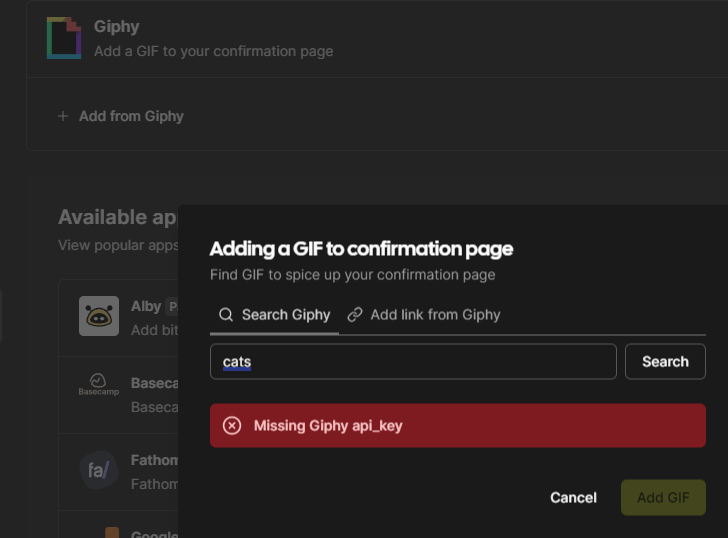
The problem of putting in production the api of giphy is that they ask for a video where the environment is shown in production where it is displayed by sending a gif, I do not think that admits a capture of the screen where the api in cal. com... but something will try. Regarding openssl keys, you mean to put the same in all these variables (adding new variables to the template unraid logically) as the variables used by CALENDSO_ENCRYPTION_KEY and NEXTAUTH_SECRET ?
-
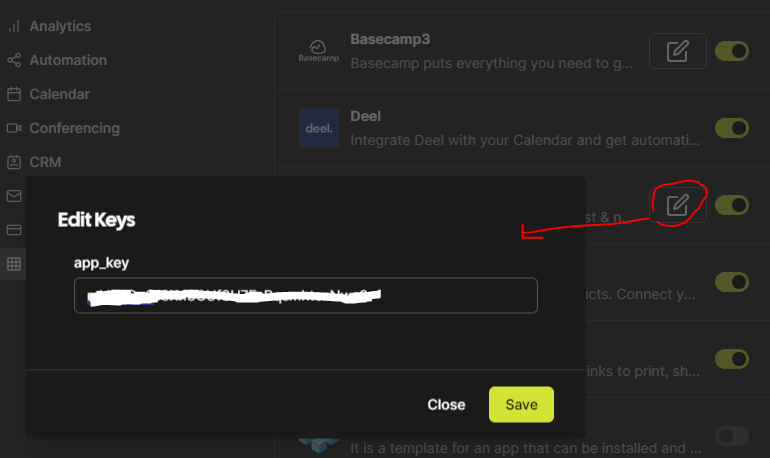
Thanks, yes, the case is that the IDS, the Google API Keys if they work and I can connect Google calendars. But the Giphy API does not work, I thought it was precisely the docker in v3.7.11 and that with the new tag would be resolved. The Giphy API is in normal mode, not in production mode because I understand that it is not necessary, besides complicated to send the requirements that they ask. On the other hand, I still have some notices of NextJS, I hit you, you have any similar? @calcom/web:start: [next-auth][error][JWT_SESSION_ERROR] @calcom/web:start: https://next-auth.js.org/errors#jwt_session_error "exp" claim timestamp check failed { @calcom/web:start: message: '"exp" claim timestamp check failed', @calcom/web:start: stack: 'JWTExpired: "exp" claim timestamp check failed\n' + @calcom/web:start: ' at exports.default (/calcom/node_modules/jose/dist/node/cjs/lib/jwt_claims_set.js:79:19)\n' + @calcom/web:start: ' at jwtDecrypt (/calcom/node_modules/jose/dist/node/cjs/jwt/decrypt.js:9:53)\n' + @calcom/web:start: ' at async Object.decode (/calcom/node_modules/next-auth/jwt/index.js:64:7)\n' + @calcom/web:start: ' at async Object.session (/calcom/node_modules/next-auth/core/routes/session.js:43:28)\n' + @calcom/web:start: ' at async AuthHandler (/calcom/node_modules/next-auth/core/index.js:165:27)\n' + @calcom/web:start: ' at async NextAuthApiHandler (/calcom/node_modules/next-auth/next/index.js:22:19)\n' + @calcom/web:start: ' at async NextAuth._args$ (/calcom/node_modules/next-auth/next/index.js:106:14)', @calcom/web:start: name: 'JWTExpired' @calcom/web:start: } These two are also usually out in the log console. @calcom/web:start: Warning: data for page "/auth/login" is 140 kB which exceeds the threshold of 128 kB, this amount of data can reduce performance. @calcom/web:start: See more info here: https://nextjs.org/docs/messages/large-page-data @calcom/web:start: 12:49:09:827 WARNRateLimit Disabled due to not finding UPSTASH env variables @calcom/web:start: [PERF]: getByViewer(1) took 57.60049295425415ms @calcom/web:start: [PERF]: getByViewer(1) took 4.371723890304565ms @calcom/web:start: [PERF]: getByViewer(1) took 7.092308044433594ms @calcom/web:start: [PERF]: getByViewer(1) took 5.01249098777771ms @calcom/web:start: [PERF]: getByViewer(1) took 4.469022035598755ms @calcom/web:start: [PERF]: getByViewer(1) took 9.372783184051514ms @calcom/web:start: @calcom/web:start: ⚠ metadata.metadataBase is not set for resolving social open graph or twitter images, using "http://localhost:3000". See https://nextjs.org/docs/app/api-reference/functions/generate-metadata#metadatabase @calcom/web:start: `themeBasis` is required for booking page theme support. Not providing it will cause theme flicker. @calcom/web:start: react-i18next:: You will need to pass in an i18next instance by using initReactI18next
-
Wow great! Works! Adding the environment variable does not give a login error on the page and works without giving prism or DB errors. Only notices of duplicate values continue to appear in the common.json as mentioned by mariushosting on GitHub. Thank you for reporting this problem also in unraid, without your help I would not have been able to continue updating the platform. Best regards
-
Okay, I'll put some more APIs, but I tried to put the Ghipy and it didn't work well, I said I couldn't find it and that's why I thought it was only for paid cal.com licenses (the api was put inside the cal.com web console, not in docker variables, and that's what I did also with Google's, many of them can be entered into the web console itself). I have the reverse proxy with NPM (Nginx proxy manager) and it works well in bridge mode with many more dockers that I have running (freescout, pingvin-share, projectsend, s-pdf,etc.) but I didn't know what was better to cal.com a custom dedicated network (local network ip range). And I've tried setting up cal.com with custom networking, but the login error still continues. Thanks again.
-
Thank you so much for sharing your template, by the way, amazing you have also set up all the API variables for payment gateways (stripe, etc.) for Cal.com and video conferencing systems. So do you have an enterprise-licensed version of cal.com? Because the APIs only work in the paid version, or at least that's what they say, although you can also put the API keys on the web platform, right? Another thing, you have the network in direct custom mode, not in bridge right? I have it in bridge mode, it could affect this maybe. I don't understand why it doesn't work for me, but I appreciate your effort and support.
-
I'm running the same PostgreSQL engine as you, version 15.6 I don't think the problem should be there, since in previous versions of docker everything goes well, until v3.7.11😩 Edit: These are the current errors when trying to log in with the login @calcom/web:start: [next-auth][error][CLIENT_FETCH_ERROR] @calcom/web:start: https://next-auth.js.org/errors#client_fetch_error Unexpected token < in JSON at position 0 { @calcom/web:start: error: { @calcom/web:start: message: 'Unexpected token < in JSON at position 0', @calcom/web:start: stack: 'SyntaxError: Unexpected token < in JSON at position 0\n' + @calcom/web:start: ' at JSON.parse (<anonymous>)\n' + @calcom/web:start: ' at parseJSONFromBytes (node:internal/deps/undici/undici:4747:19)\n' + @calcom/web:start: ' at successSteps (node:internal/deps/undici/undici:4718:27)\n' + @calcom/web:start: ' at fullyReadBody (node:internal/deps/undici/undici:1433:9)\n' + @calcom/web:start: ' at process.processTicksAndRejections (node:internal/process/task_queues:95:5)\n' + @calcom/web:start: ' at async specConsumeBody (node:internal/deps/undici/undici:4727:7)', @calcom/web:start: name: 'SyntaxError' @calcom/web:start: }, @calcom/web:start: url: 'https://my.domain.com/auth/login/csrf', @calcom/web:start: message: 'Unexpected token < in JSON at position 0' @calcom/web:start: }
-
Yes, I was also trying to use the :latest because I want a new feature of the new versions (the recipient of the meeting invitation has a text box to put a link to their own video conferencing system on the booking page of the sent or shared appointment) but the login module breaks. Could you put your template as you have it with the hidden fields of your sensitive data? I've tried everything, with many variables including... Do you have a reverse proxy on your unraid? Nginx proxy manager maybe and from what version of the unraid CA store? I'm planning to switch to the official jc21 repository instead of jlesage because it doesn't update and they say it's less secure. Edit: I also put my template better in case it looks something strange, the node and yarn fields were imported when using the CA store conversion, since the ibracorp template disappeared (which also failed me with the latest versions) but the important thing is put (including ALLOWED HOSTNAMES and RESERVE SUBDOMAINS) docker run -d --name='CAL.COM' --net='bridge' -e TZ="Europe/Paris" -e HOST_OS="Unraid" -e HOST_HOSTNAME="UnRaid" -e HOST_CONTAINERNAME="CAL.COM" -e 'NODE_VERSION'='18.19.0' -e 'YARN_VERSION'='1.22.19' -e 'NEXT_PUBLIC_WEBAPP_URL'='https://my.domain.com' -e 'NODE_ENV'='production' -e 'Community_Applications_Conversion'='true' -e 'CALCOM_TELEMETRY_DISABLED'='1' -e 'NEXTAUTH_SECRET'='xxxxxxxxxxxxxvaFGGjSpTJjQK0SrHMbIqoE9ItrKpv9Y=' -e 'CALENDSO_ENCRYPTION_KEY'='l7DbGjqJJGJmcC5862LYxxxxxxxxxxxxxx' -e 'EMAIL_FROM'='[email protected]' -e 'EMAIL_SERVER_HOST'='vps.daomain.com' -e 'EMAIL_SERVER_PORT'='465' -e 'EMAIL_SERVER_USER'='[email protected]' -e 'EMAIL_SERVER_PASSWORD'='password' -e 'DATABASE_URL'='postgresql://admcalcom:[email protected]:5432/calcomdb' -e 'ALLOWED_HOSTNAMES'='"localhost:3000","localhost:3003","10.255.176.218:3003","172.17.0.4:3000","10.255.176.123:5432","172.17.0.4:5432","my.domain.com","domain.com"' -e 'NEXTAUTH_URL'='https://my.domain.com/auth/login' -e 'RESERVED_SUBDOMAINS:'='"app","auth","docs","design","console","go","status","api","saml","www","matrix","developer","cal","my","team","support","security","blog","learn","admin","subdomain","domain","login"' -l net.unraid.docker.managed=dockerman -l net.unraid.docker.webui='http://10.255.176.123:3003' -l net.unraid.docker.icon='https://i.imgur.com/mwmNzNQ.png' -p '3003:3000/tcp' -v '/mnt/user/appdata/calcom/':'/cal':'rw' 'calcom/cal.com:latest'
-
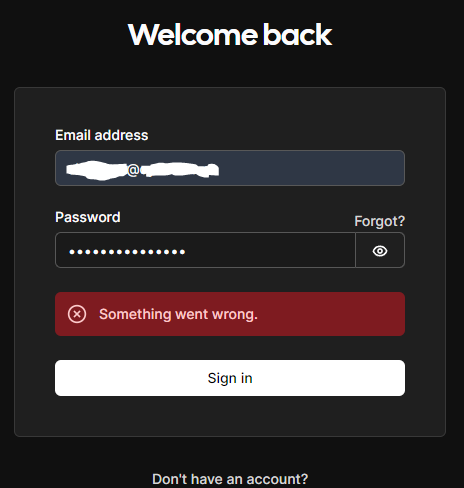
Well, I'm still figuring things out. The thing is, the GitHub changelog is not the same as the dockerhub changelog and the tags prove it. https://hub.docker.com/r/calcom/cal.com/tags If you try to pull down the images between V3.7.11 and v3.7.14 they don't exist, because the available images are these and the ones that can be downloaded as upgradable. So this tells me that version V3.7.15 already breaks the docker login of the cal.com app, because in version v3.7.11 everything works. Someone has tried with the latest version to perform the installation, so calcom/cal.com:latest
-
By the way, this returns the console with the npx prisma generate command. npx prisma generate Prisma schema loaded from packages/prisma/schema.prisma Error: Generator "ts-node --transpile-only ./enum-generator" failed: node:internal/modules/cjs/loader:1137 throw err; ^ Error: Cannot find module './enum-generator' Require stack: - /calcom/imaginaryUncacheableRequireResolveScript at Module._resolveFilename (node:internal/modules/cjs/loader:1134:15) at Function.resolve (node:internal/modules/helpers:188:19) at requireResolveNonCached (/calcom/node_modules/ts-node/dist/bin.js:549:16) at getProjectSearchDir (/calcom/node_modules/ts-node/dist/bin.js:519:40) at phase3 (/calcom/node_modules/ts-node/dist/bin.js:267:27) at bootstrap (/calcom/node_modules/ts-node/dist/bin.js:47:30) at main (/calcom/node_modules/ts-node/dist/bin.js:33:12) at Object.<anonymous> (/calcom/node_modules/ts-node/dist/bin.js:579:5) at Module._compile (node:internal/modules/cjs/loader:1356:14) at Module._extensions..js (node:internal/modules/cjs/loader:1414:10) { code: 'MODULE_NOT_FOUND', requireStack: [ '/calcom/imaginaryUncacheableRequireResolveScript' ] } Node.js v18.19.0 Could you please tell me what release you have installed or when you have installed it because the pace of releases since February 7th when you published your message, has been frenetic. https://github.com/calcom/cal.com/compare/v3.7.10...v3.8.0 Thank you, greetings and have a good weekend.
-
Should I try to insert that table with pgadmin into the cal.com database? I don't know how to do anything with pgadmin, but I will search if it is possible because that's what the cal.com help says to avoid the error. Anyway, I managed to get it up and running until I reached the platform with the created admin and another user, but I did it using version v3.7.11, because using the later versions breaks the system and either doesn't allow login or doesn't load the login screen. What I don't understand is why this happens with the docker in unraid, since they have released so many versions until today, reaching v3.8.0, because those who use docker on Linux or manually, it does work for them. Some variable or parameter fails, or something inside the docker is not set correctly. If anyone has experience with the latest versions that work for them, please shed some light on the subject.
-
Thanks avinyc! Well, after managing to start it, I'm also getting the Prisma error, but with what I mentioned in the previous post. I'll see if I can continue, the truth is that this docker on unraid is costing a lot to keep it without errors just to start it. And that cost me much more to create pretix from scratch. Greetings and thanks again!
-
Okay, it seems that I have managed to bring it up, and when trying to set the first user as an administrator, on the assistant's web interface, it does not proceed to step 2 and starts returning errors in the console like these: @calcom/web:start: 15:56:11:916 ERROR[redactError] Error: {"name":"PrismaClientKnownRequestError","code":"P2021","clientVersion":"5.4.2","meta":{"table":"public.UserPassword"}} @calcom/web:start: PrismaClientKnownRequestError: @calcom/web:start: Invalid `prisma.user.create()` invocation: @calcom/web:start: @calcom/web:start: @calcom/web:start: The table `public.UserPassword` does not exist in the current database. @calcom/web:start: at Cn.handleRequestError (/calcom/node_modules/@prisma/client/runtime/library.js:123:6817) @calcom/web:start: at Cn.handleAndLogRequestError (/calcom/node_modules/@prisma/client/runtime/library.js:123:6206) @calcom/web:start: at Cn.request (/calcom/node_modules/@prisma/client/runtime/library.js:123:5926) @calcom/web:start: at async l (/calcom/node_modules/@prisma/client/runtime/library.js:128:9968) @calcom/web:start: at async handler (/calcom/apps/web/.next/server/pages/api/auth/setup.js:1:1616) @calcom/web:start: at async /calcom/apps/web/.next/server/chunks/70349.js:1:974 @calcom/web:start: at async /calcom/apps/web/.next/server/pages/api/auth/setup.js:1:3920 { @calcom/web:start: code: 'P2021', @calcom/web:start: clientVersion: '5.4.2', @calcom/web:start: meta: { table: 'public.UserPassword' } @calcom/web:start: } And checking the cal.com documentation on Docker installation mentions this error in Prisma that can occur, and it matches the error in my console logs, but I don't know how to modify that parameter or how to reach it in Docker. Does anyone know how to include that space in the user, in an empty JSON object? https://cal.com/docs/introduction/quick-start/self-hosting/docker#troubleshooting
-
Hello everyone, I have been using this template for several months now and recently there have been many updates from both cal.com and postgres. I don't know why, but it started to fail and didn't show the reservations when I logged in. I had to downgrade to version v.3.7.11 to make it work again. And then I tried newer versions until I couldn't even log in, so my docker became useless. Interestingly, I noticed that the template also disappeared from the CA of unraid (the one mentioned by ibracorp) and now I'm trying to do it manually but I can't seem to get past connection and prisma errors... @calcom/web:start: The provided database string is invalid. Error parsing connection string: invalid port number in database URL. Please refer to the documentation in https://www.prisma.io/docs/reference/database-reference/connection-urls for constructing a correct connection string. In some cases, certain characters must be escaped. Please check the string for any illegal characters. @calcom/web:start: at Cn.handleRequestError (/calcom/node_modules/@prisma/client/runtime/library.js:123:7090) @calcom/web:start: at Cn.handleAndLogRequestError (/calcom/node_modules/@prisma/client/runtime/library.js:123:6206) @calcom/web:start: at Cn.request (/calcom/node_modules/@prisma/client/runtime/library.js:123:5926) @calcom/web:start: at async l (/calcom/node_modules/@prisma/client/runtime/library.js:128:9968) @calcom/web:start: at async getServerSideProps (/calcom/apps/web/.next/server/pages/auth/login.js:1:10204) { @calcom/web:start: clientVersion: '5.4.2', @calcom/web:start: errorCode: undefined @calcom/web:start: } @calcom/web:start: react-i18next:: You will need to pass in an i18next instance by using initReactI18next @calcom/web:start: 13:35:14:306 ERROR[redactError] Error: {"name":"PrismaClientInitializationError","clientVersion":"5.4.2"} @calcom/web:start: PrismaClientInitializationError: @calcom/web:start: Invalid `prisma.user.count()` invocation: I had a $ in the password of the PostgreSQL DB and I changed it in case the illegal character was causing issues, but it still gives an error even though I recreated the DB again (same name and user, I admit it). I'm desperate because it's an incredible application for managing my environment and it's broken in production. Any similar experiences? Is it a problem with postgres? the latest dockers? Do you know if there are solutions for the converted templates to work? Or is it a matter of deleting the entire DB (which I did) and the DB user (which I didn't) and starting from this point? Thanks for the help, greetings!
-
Same here, this template doesn't work on unraid CA, has anyone managed to make onlyoffice community server work on unraid? I'm sure there are missing parameters, but there are also no installation instructions, only on the official docker. Also, the template seems to be very basic in terms of variables. Thanks if anyone knows anything. Greetings.
-
Thank you very much Mainfrezzer!! Yesterday I managed to perform your steps and although it cost me a little (I'm still learning linux-docker) your solution worked perfectly! For now I have been able to change in upload.pug and download.pug the text of "PsiTransfer" for another, and although I can not find the file that contains the text of "Password for uploading" (I protected it with this function) it is already good progress. And if I can change the logo of the cloud everything would be perfect. I just hope that updating the docker in Unraid doesn't bring everything back to how it was before. I thank you for your dedication to answer me step by step, again. Best regards
-
Buff nobody can help me? ;-(
-
Hello, I find the psitransfer tool interesting, but I need help for customization, since in unraid I do not see how to edit the configuration in the folders mentioned in the psitransfer thread https://github.com/psi-4ward/psitransfer/blob/master/docs/layout-customization.md https://github.com/psi-4ward/psitransfer/issues/162 I only find read-only files with VI editor in terminal mode from unraid, nor do I see folders in the psitransfer installation under unraid, there is nothing in appdata in cache either. I just want to change the name of "PsiTransfer" in the html of the web server for a different one, nothing else, neither icons nor logos. Thank you very much for the help, greetings to all!
-
Hello, I find the psitransfer tool interesting, but I need help for customization, since in unraid I do not see how to edit the configuration in the folders mentioned in the psitransfer thread https://github.com/psi-4ward/psitransfer/blob/master/docs/layout-customization.md I only find read-only files with VI editor in terminal mode from unraid, nor do I see folders in the psitransfer installation under unraid, there is nothing in appdata in cache either. I just want to change the name of "PsiTransfer" in the html of the web server for a different one, nothing else, neither icons nor logos. Thank you very much for the help, greetings to all!
