DjangoDurano
Members
-
Joined
-
Last visited
-
It's correct that installing things on unraid is not the best way. But installing packages from official isn't the best way in that case, that leads definitely trouble with some modules that are built in python. Nerdtools by the way uses this "officials builds" and I used there python 3.9 packages. Normal things are working but for my python sleep script it got me errors, that come from not compatible packages from building vs. unraid. I think it will be better if you clarify this in your post, that installing from official source isn't recommended. Even with your build process that you are posting. If you look at your unraid server at /var/lib/pkgtools/packages there should be all packages that are installed on unraid. If you look for maybe glibc and then search here (use the complete name that are listed in unraid) then you got the version that are installed within unraid. I think the best way is, too look whats packages is installed within unraid, and then installing this packages into your slackware-lxc and then build python. This should give us an fully working/compatible version of python for unraid. Otherwise maybe some things are builded within python, with newer packages and this give us unexpected errors.
-
Hello, I will show here my python sleep script for unraid. It can replace the original sleep plugin complete and it runs for weeks at my unraid server with 6.12.6 without any problems. For these people that have also problems with the original plugin maybe this is an alternative. It has almost all features that the original plugin have, and more. The only thing that I don't implemented is the commands after sleep option. The only disadvantage is that there is not fancy gui to set your settings, you must set your settings in a config file. I also can't test if the script is correct running after sleep, my mainboard don't support s3 correct. It don't wake up after s3. I only use shutdown. Sleep is also implemented, maybe someone can test it. Going to sleep is working. Script can be found here. Following instruction there to install it, or for further information.
-
Oh. Didn't see the search field. Thanks for notice me. Is there a problem, if I add your python packages as dependency to my python sleep script at github? https://github.com/DjangoDurano/Unraid_Python_Sleep_Script
-
Thanks for your help. I google for a long time but it's really hard to find older slackware packages. Older "stable" versions are can be found for example glibc 2.33 but other versions not. I know https://slackware.uk/slackware/ but there are also only newer versions. The only thing is, that there are slackBuild scripts, maybe it is possible to build a previous version with that scripts.
-
Hello. I like your python builds for unraid, and I founded it at the right time. So I had a question, is it possible that you provide your build packages? As you mentioned it is necessary to have the correct packages to build, even not after build it will not run. I tried to build some own python package, but the main problem for me is, to find older slackware packages, like openssl 3.1 or glibc 2.37 and so on. If you know where I can find this older packages it's also fine. Best regards
-
Hello, had a question about logging user logins at syslog. If there is a login from webgui then there is the following message: Nov 11 17:34:05 Server webGUI: Successful login user root from IP This message is not the problem, it's clear that a Login come from webGUI from a specific IP. My question is about the user logout from webGUI. The message are: Nov 11 17:38:39 Server ool www[20674]: Successful logout user root from IP What "ool" stands for? "www" stands for logout from webGUI? "[20674]" whats this number? It's not the same number always. My goal is to log user login from webgui into my own python script. I tried to use the following command for this: ps -o command,tty This gives me the following output: COMMAND TT Xvnc -nolisten tcp -noliste pts/0 bash --login pts/0 ps -o command,tty pts/0 The "bash --login" signals that there is a login from webgui. The problem is if I use this command into my python script, with subprocess or psutil this only works if I start the script in the terminal and don't logout. After I logout and login again, the command output don't work after all. Output is complete different, I think if the script runs in background that don't work. At this point I am thinking about, watching at syslog and get info about login/logout from webgui from there. Maybe there is another method to get user login/logout from webgui safe? Best regards
-
Also ich habe jetzt nocht etwas getestet. Das mit dem Musik abspielen liegt wohl mit dem VLC Player zusammen. Wenn ich Musik abspiele und zeitgleich etwas kopiere dann hängt es dort. Wenn ich einen anderen Player nehme habe ich das Problem nicht. Soweit ich das nachlesen konnte hat VLC wohl da schon seit geraumer Zeit Probleme damit, das es nicht richtig buffert. Zum Thema Testsenzario. Wie ich oben ja schon geschrieben hab hab ich ein Share in der smb-custom.conf angelegt, und ein Share in meinem Array für meine Musik. Das Share für die Musik ist nur 1 Disk also nicht gesplittet auf mehrere. Mein komplettes Array ist ohne Cache. Kopieren von/zu dem Share aus der custom.conf und zeitgleich Musik über VLC hören führt bei mir dazu, das dann eben die Musik ständig stoppt, und auch die Übertragungsrate zeitweise total einbricht.
-
Das Ruckeln habe ich bei jeder Verbindung. Ich hatte am Anfang die Verbindung 10G Client und 2,5 G am Server → Ruckeln 1G vom Client zu 2,5G am Server weiß ich nicht mehr genau ob ich das schonmal hatte glaube aber ganz am Anfang, denke aber auch nicht das sich hier was ändert. Am Laptop mal getestet mit 1G Buchse zu 2,5G am Server → Ruckeln 10G am Client zu 10G Client wobei die beiden direkt miteinander verbunden waren, also kein Switch oder ähnliches dazwischen → Ruckeln Meine 10G Karte im Server geht nach dem Sleep eh immer in den Inactive Mode, da bin ich auch noch nicht so schlauch drauß geworden, weshalb ich die ganze Zeit über eigentlich dort auch gar kein Kabel angeschlossen hatte, Karte war einfach nur im Server verbaut. Was mir aufgefallen ist, das bei einer Datenübertragung egal von welchem Share, manchmal kurz die Datenrate einbricht und dann wieder steigt. Es scheint mir so als würde bei einer Datenübertragung die komplette Prio nur auf diese eine Übertragung gehen und dann ist Schluss. Bei der 1G Buchse könnte ich das noch verstehen, da ich hier bis zu 110 mb/s teilweiese schaffe, was ja ziemlich nah am max ist. Bei der 10G komme ich aber nur auf 500 irgendwas, da sollte ja auf jeden Fall noch Luft sein. Switch kann ich ausschließen, da ich ja auch Direktverbindung getestet hab ohne Switch dazwischen.
-
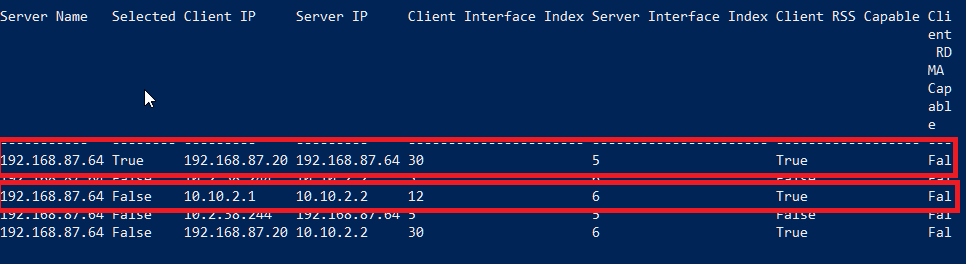
Nein. Am Server ist die interne Karte vom Mainboard eth0. Die 10G Karte ist eth1. Die 1G bzw. 2,5G Buchse kann wahrscheinlich kein RSS, ist zumindest denkbar. Das mit 1G alleine müsste ich nochmals testen, allerdings denke ich nicht das es sich hier viel tut, da ich am Anfang das glaube ich am Anfang so hatte wenn ich mich recht entsinne. Muss ich die Tage mal testen.
-
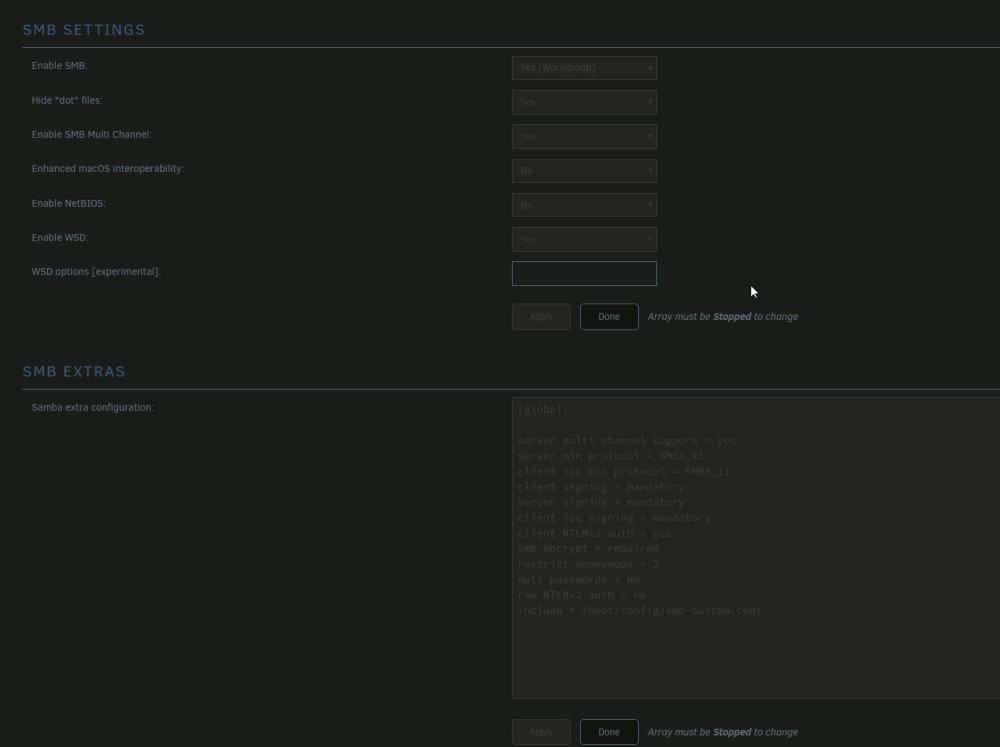
[global] interfaces = "192.168.87.64;capability=RSS,speed=1000000000" "10.10.2.2;capability=RSS,speed=10000000000" include = /boot/config/smb-custom.conf Hab ich so schon aktiv. Die Reihenfolge dürfte ja keine Rolle spielen.
-
Ich hab in der smb-custom.conf einmal ein Share zum Testen: path = /mnt/cache_array comment = browseable = no Force User = nobody valid users = user write list = user vfs objects = Und nochmal eins das auf eine unassign Disk verweist ist dann mit path = /mnt/disks/name comment = browseable = no Force User = nobody valid users = user write list = user vfs objects =
-
@mgutt Also bei mir sieht das Ganze so aus: tcp 0 0 10.10.2.2:445 10.10.2.1:64883 ESTABLISHED 25879/smbd tcp 234 0 10.10.2.2:445 10.10.2.1:64879 ESTABLISHED 28424/smbd tcp 0 0 10.10.2.2:445 10.10.2.1:64869 ESTABLISHED 25879/smbd tcp 117 0 10.10.2.2:445 10.10.2.1:64880 ESTABLISHED 28424/smbd tcp 0 0 10.10.2.2:445 10.10.2.1:64884 ESTABLISHED 25879/smbd tcp 0 0 10.10.2.2:445 10.10.2.1:64885 ESTABLISHED 25879/smbd tcp 0 0 192.168.87.64:445 192.168.87.20:64876 ESTABLISHED 28424/smbd tcp 234 0 10.10.2.2:445 10.10.2.1:64881 ESTABLISHED 28424/smbd tcp 117 0 10.10.2.2:445 10.10.2.1:64882 ESTABLISHED 28424/smbd Bei der 10 GB Karten (10.10.2.2) scheint das mit dem Multichannel zu funktionieren, bei der normalen 1GB Verbindung (192.168.87.64) scheinbar nicht. Befehl hab ich während Transfer ausgeführt, 1mal während Transfer über die 1GB Verbindung, 1mal über die 10GB. Sah jedes mal gleich aus. Das Problem besteht nicht wenn ich Musik über die 1GB Verbindung höre, und zeitgleich über die 10 GB was übertrage. AMD Ryzen 5 PRO 4650G Bin mir nicht ganz sicher ob ich dich richtig verstehe aber, ich habe ja meine normalen User-Shares, davon der Großteil auf meinem Array, unter anderem auch das Musik Share, dann hab ich dort noch ein Share, welches nur auf eine SSD in meinem Pool zugreift und auf Prefer steht ohne eine Disk aus dem Array hinterlegt zu haben. Disk Shares meinst du wahrscheinlich die Shares, die man selbst anlegt unter smb-extra bzw. smb-custom.conf? Wenn ja dann hab ich dort auch ein Share anglegt, mit den Werten von hier. Bei allen drei Seznarien besteht jedoch das selbe Problem.
-
Schmeiß ich gerne alles raus. Allerdings bringt mir das leider nichts, da ich die Einstellungen erst gemacht habe nachdem das Problem schon bestand. Wenn du mit prüfen meinst, das was dort im Thread geschrieben steht, dann ist beides bei mir aktiv.
-
Hallo, ich habe folgendes Problem. Wenn ich Daten über das Netzwerk per SMB von/zu Unraid übertrage, und gleichzeitig z.B. Musik höre von einem Share hängt sich die komplette Verbindung auf. Die Übertragungsgeschwindigkeit bricht komplett ein und die Musik wird nicht abgespielt bzw. buffert die ganze Zeit. Ich hab das Problem auch z.B. wenn ich auf ein Share zugreife und kurz was dort suchen will, dann hängt es auch kurz. Die Übertragungsgeschwindigkeit ist eigentlich soweit in Ordnung. Bei der 1 GB zu 2,5 GB Karte hab ich so um die 115 mb/s. Bei einer Direktverbindung zwischen zwei 10 GB Karten komm ich auf um die 500 mb/s. Ich habe folgendes getestet: 1. Direktverbindung zwischen Pc und Unraid Server über jeweils eine 10 GB Karte → höhere Übertragungsgeschwindigkeit, Problem bleibt aber 2. Hatte mich hier auch schon zum Thema SMB hier durchgelesen und die Einstellungen übernommen → auch kein Effekt 3. Es ist egal ob ich von einem Share kopiere das auf mein Array zugreift, ein Share was auf eine Unassign HDD zugreift oder ein Share welches auf einen Pool zugreift, überall das selbe Spiel. Bevor ich zu Unraid gewechselt bin hatte ich immer einen Windows PC dort hab ich dann die Festplatten freigegeben und von meinem anderen PC darauf zugegriffen. Dort hatte ich nie Probleme das ich nicht Musik oder andere Dinge tun konnte, während ich etwas kopiert habe. Es hat evtl. mal paar Sekunden länger gedauert aber das wars auch schon, eher ist hier dann die Übertragungsgeschwindigkeit etwas runter gegangen. Hoffe mir kann jemand helfen und es gibt eine Lösung dafür. Gruß server-x-diagnostics-20221014-1510.zip