





Vazelinko
Members
-
Joined
-
Last visited
-
It actually is a JSON, just needs to be decoded. Copy the text it gives you and run it through a decoder (like this one https://it-tools.tech/url-encoder), remove the text at the beginning before the first curly bracket ("data:text/plain;charset=utf-8,") and then save it as a .json. There's really no need to use an LLM for that.
-
To answer my own question, lspci.
-
Okay. Shame, but it is what it is.
-
Any way to check that info?
-
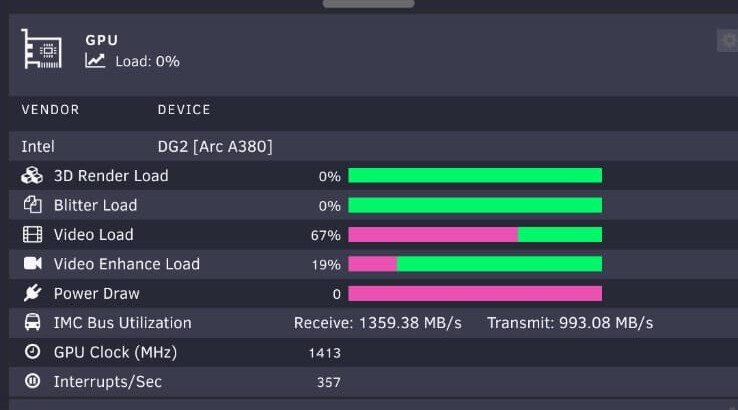
A380: Worked fine before the upgrade to the new MBO + CPU. Here's an older screenshot I took from the previous setup with the same card:

-
This is what it shows It worked before switching MBO. Not sure why it hasn't since. Edit: correction. MBO + CPU. Went from i7-6700 to i7-12700.

-
I still can't get IMC Bus Utilization to show anything for my A380, it's stuck on N/A. I tried multiple combinations of timers to no avail.
-
@thany@aleberro I'm not sure if you managed to get it to work, but I had the same issue with another container, so thought I'd test it out. It's directory permission issue. I chmod 777 the whole focalboard directory, which allowed the container to create a database. I don't know why this happens, though. After creating the db, I reverted to 755 and it still seems to work (but didn't test extensively).
-
@DerEchte @mp3 not sure if you managed to fix it, but this is what I did. I had the same issue right out of the box, so I tinkered a bit with plikd.cfg. I created a database with mariadb, then edited the Driver value under MetadataBackendConfig section in plikd.cfg from sqlite3 to mysql. I also changed ConnectionString value, according to this here, from /data/plik.db to user:pass@tcp(db_IP:port)/dbname?charset=utf8mb4&parseTime=True&loc=Local. So now it looks like this: [MetadataBackendConfig] Driver = "mysql" ConnectionString = "plik_user:plik_password@tcp(serverIP:3306)/plik_db_name?charset=utf8mb4&parseTime=True&loc=Local" With real values, instead of placeholder ones, of course. However, I stumbled upon another issue once I got Plik up and running. Whenever I tried to upload a file, I got "error 500: unable to save file : unable to create upload directory". I went to check permissions of ./plik/data, and it turns out even though I followed instructions on creating the dir before installing the Plik image, /data didn't have the right permissions. I changed it to 777 and that fixed the issue. In hindsight, incorrect /data permissions were probably what blocked Plik from creating its database, hence the "failed to initialize database" error.

