darranwest
Members
-
Joined
-
Last visited
-
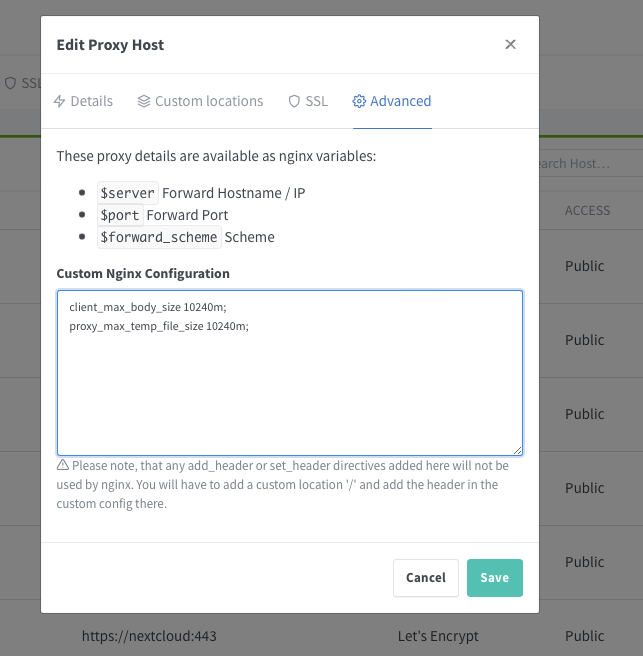
I think I have been having the same issue as you with large files not uploading. In my Nextcloud appdata folder I have a file called php-local.ini located in this directory, /mnt/user/appdata/nextcloud/php. I edited the php-local.ini file and added the following lines. memory_limit = 8G upload_max_filesize = 16G This would allow the large file I wanted to add to start the upload process, however, it failed with a 413 error. This was due to a web server error. This got me looking through the appdata folder again and I eventually ended up in the Nextcloud nginx, specifically in this folder /mnt/user/appdata/nextcloud/nginx/site-confs. Looking in the file called default.conf I had to edit one line to look like this client_max_body_size 10240M; This increased the max file size the web server would accept to 10GB (10240MB). After another restart of the Nextcloud docker the file started to upload again, but this time there was a timeout error. I went back into /mnt/user/appdata/nextcloud/php so that I could edit php-local.ini again. I increased the input time to 600s (10 minutes) and the execution time to 3600s (1 hour). The contents of this file now looked as follows date.timezone = Europe/London # this is my timezone, I am not sure if I added this are it was done on during docker creation memory_limit = 8G post_max_size = 16G upload_max_filesize = 16G max_execution_time = 3600 max_input_time = 600 After another restart of the Nextcloud docker the 4GB file I wanted to add to Nextcloud synced without issue. In summary my changes were as follows 1) Edit this file, /mnt/user/appdata/nextcloud/php/php-local.ini 2) Edit what was there and add additional lines so that it looked like this date.timezone = Europe/London memory_limit = 8G post_max_size = 16G upload_max_filesize = 16G max_execution_time = 3600 max_input_time = 600 3) Edit this file /mnt/user/appdata/nextcloud/nginx/site-confs/default.conf 4) Find client_max_body_size and edit the value as below client_max_body_size 10240M; Locally on my network I use Network Proxy Manager to handle SSL certificates. In the advanced section for my Nextcloud SSL I added the following lines client_max_body_size 10240m; proxy_max_temp_file_size 10240m; I am not sure if they were needed but at some point during my testing I added them. This was before I had changed the client_max_body_size in default.conf, so I am not sure if they made any difference. I just thought it best to include this information as it could be another point of failure for the upload. I hope this helps you fix the issue you are having.