haeho
Members
-
Joined
-
Last visited
-
这个步骤不对吧?如果创建新配置(”设置 - 新配置“)后,就没办法使用校验盘重建数据了。
-
Through forum search, the CH340/CH341 driver is supported in unRAID 6.7. In unRAID 6.12.4, insert the CH340 to CH9329 cable (for IPKVM to simulate the control of the mouse and keyboard). Although the system can recognize /dev/ttyUSB0 normally, it cannot be used. The manufacturer has released a new version of the driver. Can this driver be updated to the kernel? Or dynamically load the driver as an application plug-in? Driver (updated 2024-10-24): - https://www.wch.cn/downloads/CH341SER_LINUX_ZIP.html
-
I don't know why the error occurs, the exception message thrown is the same as described before. After the NFS server unRAID system is restarted, the NFS client cannot use the NFSv4 + 'noac' parameter to mount the remote path.
-
Ok, I'm not sure if this is an issue with the unRAID 6.12.4 system or the Unassigned Devices plugins. To facilitate troubleshooting, I'm providing the steps to reproduce the issue here. 1. Set the "NFS Version to use when Mounting Remote Shares" option of the NFS client's Unassigned Devices plugin to NFSv4. 2. Assuming the current status of the NFS client's remote path mounting from the NFS server is normal (Note: In case the described mounting issue occurs, it is necessary to first restart the unRAID system on the NFS client). 3. Click the `UMOUNT` button in the Unassigned Devices plugin on the NFS client to unmount. 4. Stop the disk array on the NFS server and restart the server's unRAID system. 5. Wait for the NFS server's unRAID system to fully start up. 6. Click the `MOUNT` button in the Unassigned Devices plugin on the NFS client. 7. At this point, the NFS client is expected to encounter a mounting error.
-
Error when using NFSv4 to mount remote paths with Unassigned Devices plugins. Fixing method: 1. Unassigned Devices plugins "NFS Version to use when Mounting Remote Shares" Seting: Auto 2. Remove the `noac` parameter when mounting a remote path. Is it possible to add custom '--types' mount parameters for the Unassigned Devices plugins? In the current version, I couldn't find any relevant options. If there are any, please let me know. Thank you. Environment Information: unRIAD version: 6.12.4 NFS Server IP Address: 192.168.1.20 NFS Clinet IP Address: 192.168.1.10 Unassigned Devices plugins version: 2023.09.15 Unassigned Devices plugins "NFS Version to use when Mounting Remote Shares" Seting: NFSv4 NFS Server: 1. NFS server 'appdata' shared folder NFS configuration parameters. 192.168.1.10/32(rw,async,no_root_squash,no_subtree_check,fsid=100) 2. Use the 'exportfs -v' command to view detailed information on the NFS server. exportfs -v /mnt/user/appdata 192.168.1.10/32(async,wdelay,hide,no_subtree_check,fsid=100,sec=sys,rw,secure,no_root_squash,no_all_squash) NFS Clinet: 1. The execution log when mounting paths using the 'unassigned.devices' plugin on the client side. Sep 26 22:14:13 unRAID ool www[1691]: /usr/local/emhttp/plugins/unassigned.devices/scripts/rc.settings 'save' Sep 26 22:14:26 unRAID unassigned.devices: Mounting Remote Share '192.168.1.20:/mnt/user/appdata/nextcloud/nextcloud-data'... Sep 26 22:14:26 unRAID unassigned.devices: Mount NFS command: /sbin/mount -t 'nfs4' -o rw,soft,noac,noatime,nodiratime,retrans=4,timeo=300 '192.168.1.20:/mnt/user/appdata/nextcloud/nextcloud-data' '/test' Sep 26 22:14:26 unRAID unassigned.devices: NFS mount failed: 'mount.nfs4: mounting 192.168.1.20:/mnt/user/appdata/nextcloud/nextcloud-data failed, reason given by server: No such file or directory '. Sep 26 22:14:26 unRAID unassigned.devices: Remote Share '192.168.1.20:/mnt/user/appdata/nextcloud/nextcloud-data' failed to mount. 2. Manually execute 'mount' on the client side. root@unRAID:/test# /sbin/mount -vvv -t 'nfs4' -o rw,soft,noac,noatime,nodiratime,retrans=4,timeo=300 '192.168.1.20:/mnt/user/appdata/nextcloud/nextcloud-data' '/test' mount.nfs4: timeout set for Tue Sep 26 22:28:24 2023 mount.nfs4: trying text-based options 'soft,noac,retrans=4,timeo=300,vers=4.2,addr=192.168.1.20,clientaddr=192.168.1.10' mount.nfs4: mount(2): Invalid argument mount.nfs4: trying text-based options 'soft,noac,retrans=4,timeo=300,vers=4,minorversion=1,addr=192.168.1.20,clientaddr=192.168.1.10' mount.nfs4: mount(2): Invalid argument mount.nfs4: trying text-based options 'soft,noac,retrans=4,timeo=300,vers=4,addr=192.168.1.20,clientaddr=192.168.1.10' mount.nfs4: mount(2): No such file or directory mount.nfs4: mounting 192.168.1.20:/mnt/user/appdata/nextcloud/nextcloud-data failed, reason given by server: No such file or directory 3. Remove the `noac` parameter from the mount command and execute it. root@unRAID:/test# /sbin/mount -vvv -t 'nfs4' -o rw,soft,noatime,nodiratime,retrans=4,timeo=300 '192.168.1.20:/mnt/user/appdata/nextcloud/nextcloud-data' '/test' mount.nfs4: timeout set for Tue Sep 26 22:29:42 2023 mount.nfs4: trying text-based options 'soft,retrans=4,timeo=300,vers=4.2,addr=192.168.1.20,clientaddr=192.168.1.10' mount.nfs4: mount(2): Invalid argument mount.nfs4: trying text-based options 'soft,retrans=4,timeo=300,vers=4,minorversion=1,addr=192.168.1.20,clientaddr=192.168.1.10' mount.nfs4: mount(2): Invalid argument mount.nfs4: trying text-based options 'soft,retrans=4,timeo=300,vers=4,addr=192.168.1.20,clientaddr=192.168.1.10' 192.168.1.20:/mnt/user/appdata/nextcloud/nextcloud-data on /test type nfs4 (rw,noatime,nodiratime,soft,retrans=4,timeo=300) 4. Show mount info root@unRAID:/test# df -Th Filesystem Type Size Used Avail Use% Mounted on rootfs rootfs 3.8G 115M 3.7G 3% / tmpfs tmpfs 32M 704K 32M 3% /run /dev/sda1 vfat 16G 457M 15G 3% /boot overlay overlay 3.8G 115M 3.7G 3% /lib overlay overlay 3.8G 115M 3.7G 3% /usr devtmpfs devtmpfs 8.0M 0 8.0M 0% /dev tmpfs tmpfs 3.9G 0 3.9G 0% /dev/shm tmpfs tmpfs 128M 2.7M 126M 3% /var/log tmpfs tmpfs 1.0M 0 1.0M 0% /mnt/disks tmpfs tmpfs 1.0M 0 1.0M 0% /mnt/remotes tmpfs tmpfs 1.0M 0 1.0M 0% /mnt/addons tmpfs tmpfs 1.0M 0 1.0M 0% /mnt/rootshare /dev/md1p1 xfs 239G 18G 221G 8% /mnt/disk1 shfs fuse.shfs 239G 18G 221G 8% /mnt/user0 shfs fuse.shfs 239G 18G 221G 8% /mnt/user /dev/loop2 btrfs 10G 317M 8.8G 4% /var/lib/docker /dev/loop3 btrfs 1.0G 4.6M 904M 1% /etc/libvirt tmpfs tmpfs 781M 0 781M 0% /run/user/0 192.168.1.20:/mnt/user/appdata/nextcloud/nextcloud-data nfs4 239G 60G 180G 25% /test PS:I was able to successfully mount using the same parameters on the CentOS 7.3 system." [root@rbtnode1 ~]# mount -vvv -t 'nfs4' -o rw,soft,noac,noatime,nodiratime,retrans=4,timeo=300 192.168.1.1:/data3/jboss /test mount.nfs4: timeout set for Tue Sep 26 23:17:12 2023 mount.nfs4: trying text-based options 'soft,noac,retrans=4,timeo=300,vers=4.1,addr=192.168.1.1,clientaddr=192.168.1.2' [root@rbtnode1 /]# df -Th tmpfs tmpfs 1.6G 0 1.6G 0% /run/user/0 192.168.1.1:/data3/jboss nfs4 1.0T 96G 928G 10% /test
-
Sorry for the late reply,thanks for your suggestion, I will continue to use rsync for backups. Thanks again.
-
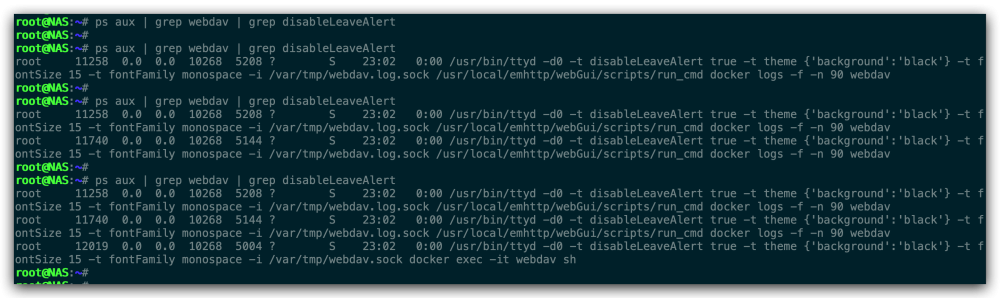
unRAID version: - 6.10.3 Question phenomenon: 1. Start any docker container, for example, the docker name is: webdav. 2. Execute in the unRAID SSH window: ps aux | grep webdav | grep disableLeaveAlert. 3. You may see many processes or none depending on whether you have ever opened the console or log window of the webdav container. 4. Now in the unRAID WebUI interface, open the log window or console window of the webdav container, then close the window. 5. Execute: ps aux | grep webdav | grep disableLeaveAlert. 6. You will see that there are related processes. 7. the number of processes depends on the number of times you have opened the window of the webdav container. Question conclusion: 1. Open the log window or console window of the docker container on the unRAID WebUI interface. After closing the opened window, the related process will not be released. 2. The number of processes depends on the number of windows you have opened in the webdav container. Question image:
-
Yes, there is a risk of data loss if another disk fails during the rebuild. But we have stated in the agreement before that the loss of movie/TV series data can be tolerated. I guess I need to explain why this backup method is considered: 1. Under normal circumstances, I will check the parity of the array on a monthly or regular basis, and the problem of disk loss may still occur during the parity check. 2. Since regular parity checks are taken, compared to parity rebuilds, the pressure on the disk should be equal. 3. If the parity rebuilds fails, the datas shared folder still has two complete data backups (16T backup disk mounted on UD and old_disk4).
-
When unRAID has a parity disk, it can perform parity reconstruction and recovery on the failed data disk in the array. Can this feature be used to periodically back up specific data? Here are some of my thoughts: PS: - My English is not very good, there may be inaccurate expressions in some places, please forgive me. - We will not discuss other backup solutions for the time being, but only discuss the above backup methods. Array situation: - 1 piece of 12T parity disk - 3 piece of 12T data disk - 1 piece of 16T backup disk (unallocated device mount) Disk Data Distribution: - disk1 parity disk - disk2 movie - disk3 TV series - disk4 data Shared folder settings: - Set the shared folder (datas) to only be written to disk4. Agreement: - Assume that the disk4 (old_disk4) has been backed up with the 16T backup disk mounted on Unassigned Devices before executing parity rebuild. - Assuming data loss for movies/TV shows can be tolerated. Backup operations at the end of each month: - Perform a Mover operation to move all cached data into an array. - Stop the array after confirming that the Mover data is normal. - Take out the disk4 (old_disk4) disk and Unassign, then boot in maintenance mode. - Stop array. - Insert the new disk4 (new_disk4) disk to replace the old disk4 (old_disk4), start the array for parity rebuild. Questions and Discussions: - Is it feasible to use the parity rebuild mechanism for backup? - Is there some data error after rebuilding? - Some other issues that may arise... - Advantages and disadvantages compared to other backup methods
-
unRAID 存在校验盘的情况下,可以对阵列中故障的数据盘进行奇偶校验重建恢复,能否利用这个特性对特定数据进行周期性备份?下面是我的一些想法: PS: - 暂不讨论其他备份方案,只是对上述备份方式进行探讨。 阵列情况: - 1 块 12T 校验盘 - 3 块 12T 数据盘 - 1 块 16T 备份盘 (Unassigned Devices 挂载) 磁盘数据分布: - disk1 校验盘 - disk2 电影 - disk3 电视剧 - disk4 数据 共享文件夹设定: - 设置共享文件夹(datas) 只写入 disk4 中 约定: - 假设在执行奇偶校验重建前,已使用 Unassigned Devices 挂载 的 16T 备份盘对 disk4 (old_disk4) 磁盘进行备份 - 假设可以容忍电影 / 电视剧的数据丢失 每月底备份操作: - 执行 Mover 操作将缓存盘的数据全部移动到阵列 - 确认 Mover 的数据正常后停止阵列 - 拔出 disk4 (old_disk4) 磁盘并取消分配,然后以维护模式启动 - 停止阵列 - 插入新的 disk4 (new_disk4) 磁盘替换旧的 disk4 (old_disk4),启动阵列进行奇偶校验重建 疑问及探讨: - 利用奇偶校验重建机制进行备份是否可行? - 重建后是否存在部分数据错误的情况? - 可能会出现的一些其他问题 - 对比其他备份方式的优点与缺点
-
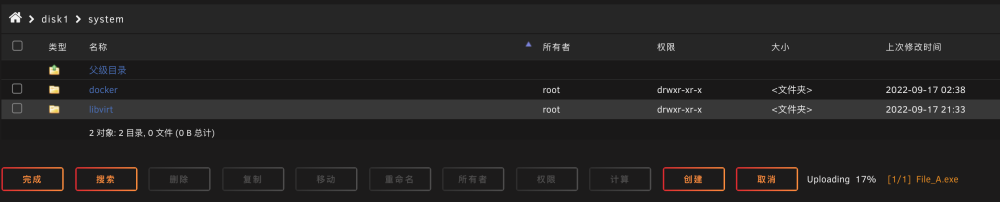
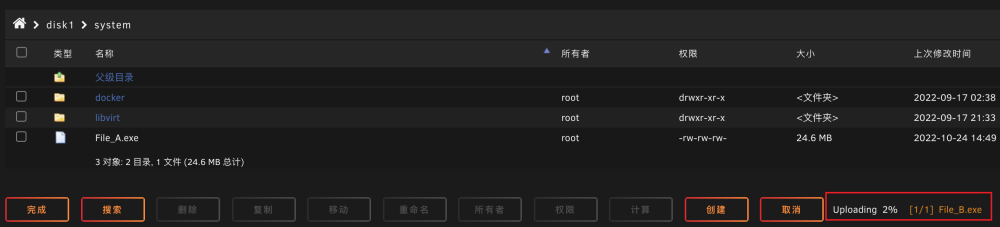
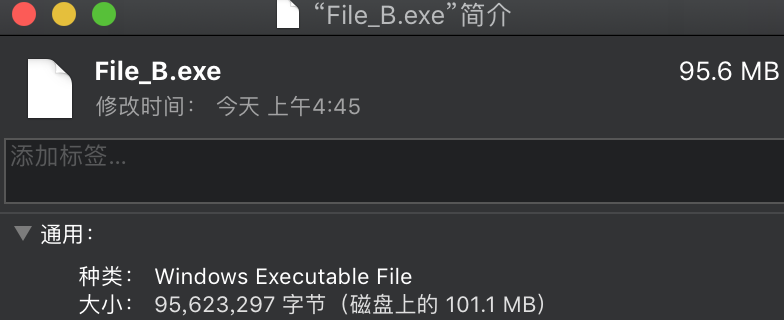
Several problems were found during use: unRAID version: 6.10.3 Dynamix File Manager version: 2022.09.07 1. Multi-process upload is not supported (1). Open two browser windows to upload files respectively, first upload "File_A" in the TAB_A window, then upload "File_B" in the TAB_B window, use "watch ls -hl" in the shell to check the file changes, and find that only "File_B" "Uploading, and "File_A" appears to be interrupted after "File_B" performs the upload operation. 2. In some cases, the uploaded file is corrupted (1). The operation steps are as above. After the "File_B" transfer is complete, the file size is different from the original file. The original file of "File_B" was 95.6MB, but after uploading to unRAID it was 169MB, the file size of "File_B" seems to depend on how much "File_A" has already uploaded.