obnoxious-hacker
Members
-
Joined
-
Last visited
-
yeah no kidding but when you have your trail going how to you upgrade to pay leave the USA in the sever or put your usb in you computer pay and then put it back in the server is it really that hard to figure out for people her maybe this will help better it has a CPU water cooled 10 sticks of ram 8 fans some red most green . hope that helps better. so not you know that what do i do server or computer oh the computer has a asus with RBG 12 fans 16 sticks of ram 1200 power supply in a Thermaltake Tower 900 Black Tempered Glass Fully Modular E-ATX Vertical Super Tower Chassis with 200 terabyte let me know if there is more you need to know thanks
-
yeah no kidding but when you have your trail going how to you upgrade to pay leave the USA in the sever or put your usb in you computer pay and then put it back in the server is it really that hard to figure out for people her maybe this will help better it has a CPU water cooled 10 sticks of ram 8 fans some red most green . hope that helps better. so not you know that what do i do server or computer oh the computer has a asus with RBG 12 fans 16 sticks of ram 1200 power supply in a Thermaltake Tower 900 Black Tempered Glass Fully Modular E-ATX Vertical Super Tower Chassis with 200 terabyte let me know if there is more you need to know thanks
-
it has 6 fans some are green and red its water cooled has a CPU 10 sticks of ram is there anything else you would like to know that will help fix this? far from a troll but its cute. so what is it then? do i put the usb in my computer to update when i pay or do i put it in a server ? if you know what a computer is? just wondering do you know what a server is by chance? If you don't know what your talking about maybe you should just keep your mask on. now I was not that A$$ that started this just this shim thinks shim knows what a troll it but show he don cuz i was asking a real question its shows this person cant be in public and know how to Handel shim self in public i asked something and this keyboard wormeries trying to be tough guy on the other side of the key board if he cant Handel being in public maybe he shouldn't talk in public

-
wow would have been nice for someone to tell me where the usb goes once you pay but guessing you don't like money cuz now I have to pay full price must have given everyone the days off over the black Friday sales wow I'm confused. I have my USB in my server so do I make a new account? do I take the USB out put it in my computer and download unraid again? do I leave it in my server I don't get it.
-
wow would have been nice for someone to tell me where the usb goes once you pay but guessing you don't like money cuz now I have to pay full price must have given everyone the days off over the black Friday sales wow
-
Gooday everyone hope you all had a great weekend have a 51it1 u212 cores 24 Threads and I finally have everything up running and working great so since unraid is on sale I'm going to buy package #3 now what it is I need to know is i Buy it here in the site where do I put my USB card do I leave it in my sever? or do I put it in my PC and let it do its things any help would be great. Also, not sure if this is where I'm to put this or not I have looked around for and answer couldn't seem to find anything so I'm asking if it's not to be here A big sorry for it any help please and have a great evening and God Bless.
-
sorry hope this is what you're looking for thank you again for you time have great rest of your weekend. tower-diagnostics-20221030-1753.zip
-
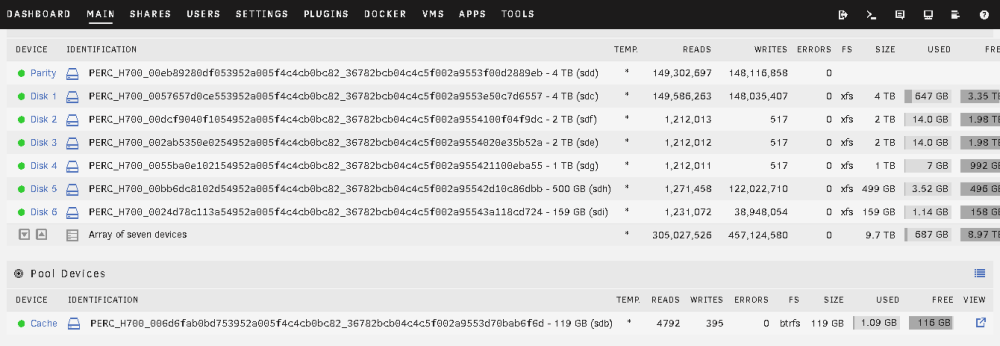
Okay not sure if this was the right fix but this is what I did. I did a New Config and started with one 4 T in the parity 1 spot and one 4T in the array and rain the parity scan and it went through both array and parity went green so great so then I add A 2T into the array ran scan and formatted it and everything went green so then I add one drive at a time and now everything is working great all great parity and ariary so thank you very much for all the info you have gave me and the help you gave me and your time thank you so much and God Bless to you and to the people on the forum that are here helping people like me .
-
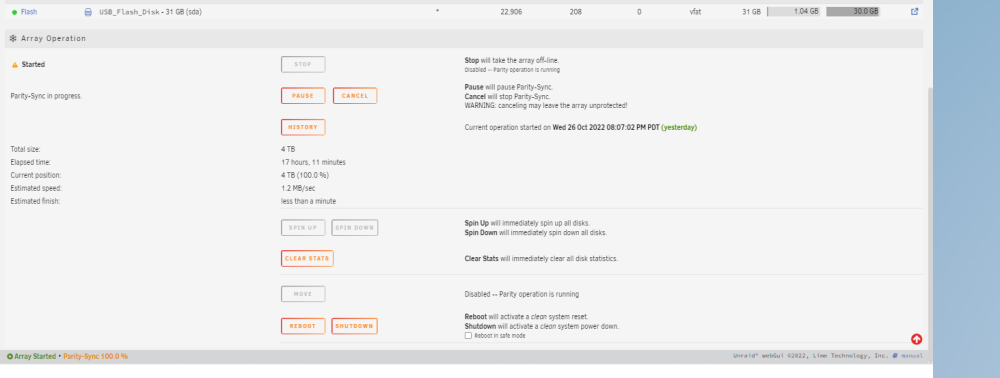
Okay its just finished well it says %100 but is till yellow so ill try not using the raid and see what i get if you leave this open I can put in what i did to get it to finally work once i get it working thank you so much for your time and what you have help me with have a great day and il let you know as soon as I get it working right have a great day
-
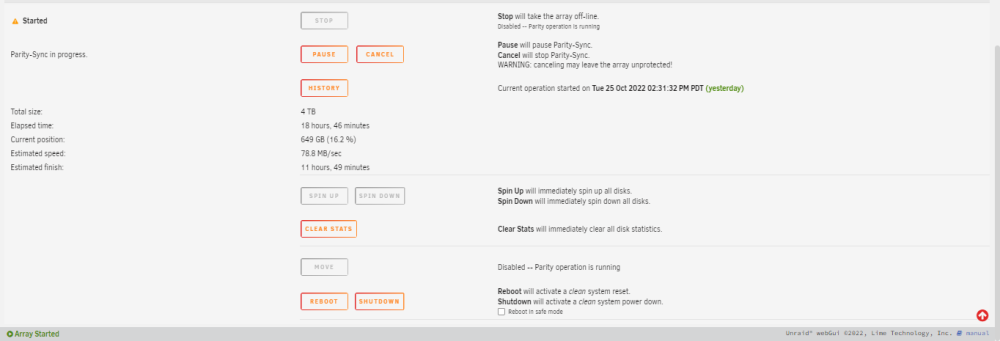
okay I stated it again yesterday at Tue 25 Oct 2022 02:31:32 PM PDT just haven't gone to see what it has done but m going to check it right now. Here is a screen shot just seems slow if it doesn't work again this time I should i take out all may drivers format them all and then stick the back in and start right from the get-go again? what you think? Now your ad said something about the raid card but that it should make a different is there a way to take the cad out and have then just as driver with no raid card? If so, I can try something like that I'm new at the server game i can do the basic things im just not the smartest when it comes to everything thank you again for your time
-
here you go hope this one help thanks again tower-diagnostics-20221025-1728.zip
-
okay ill do that and post it in a bit thanks
-
Hope this is the file you're looking for. Is there anything in this file that people shouldn't, see? or is it okay? thank you for your time my friend tower-diagnostics-20221024-1730.zip
-
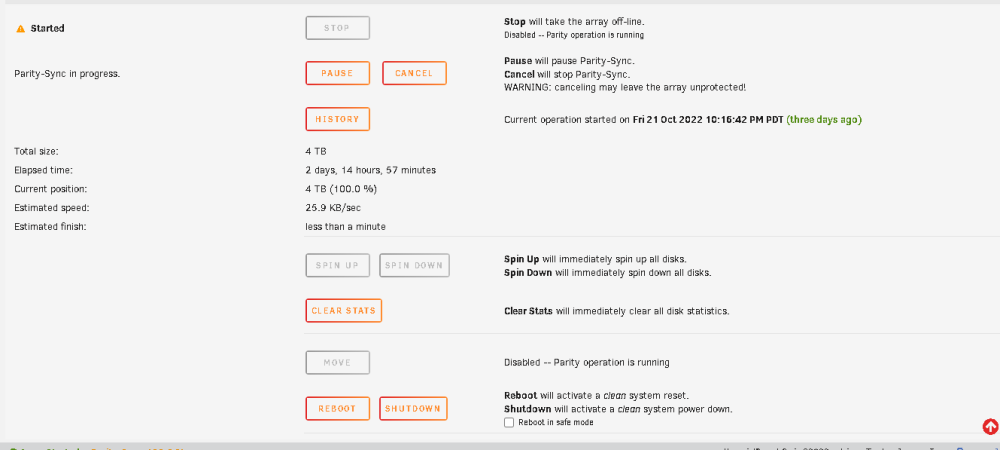
IM on umraid Version: 6.11.1 I'm using a Dell R510 with 2 Intel® Xeon® CPU X5650 @ 2.67GHz with 40 gigs of ram bios is up to date. my problem is I have a 4-terabyte parity drive, and, in my array, I have 4 terabyte 2 terabyte 2 terabyte 1 terabyte 1 terabyte with a total 10 T in my array my parity won't go green it says 100% now for at least 16 days that's the most I have let it get to so I'm looking for help please. Now I was just thinking Cuz my array is 10 T is 4 T parity enough for the 10 T array that just popped in my head if not any help, please I have been working on this for at least 6 months thanks you to everyone's help.