





KD-DSO
Members
-
Joined
-
Last visited
-
Seemed I had a seperate logging issue not helping anything. Deleted all rsyslog.* files in /boot/config/ and the log file at /boot/log/syslog. After reboot I now have logs in /boot, through the GUI and at Splunk. Hopefully that helps in troubleshooting the main issue.
-
I did last week, yes. System crashed again. Same messages on monitor as shown above. Syslog did not update. Want to confirm the syslog should be writing to /boot/logs/syslog when mirror to flash is enabled? I am going to try ingesting it into an external splunk server as well.
-
That's the Syslog I pulled from /boot/logs. Should I be looking elsewhere?
-
Exactly. I do not understand what is happening. The only real indication of panic I get is displayed on my monitor.
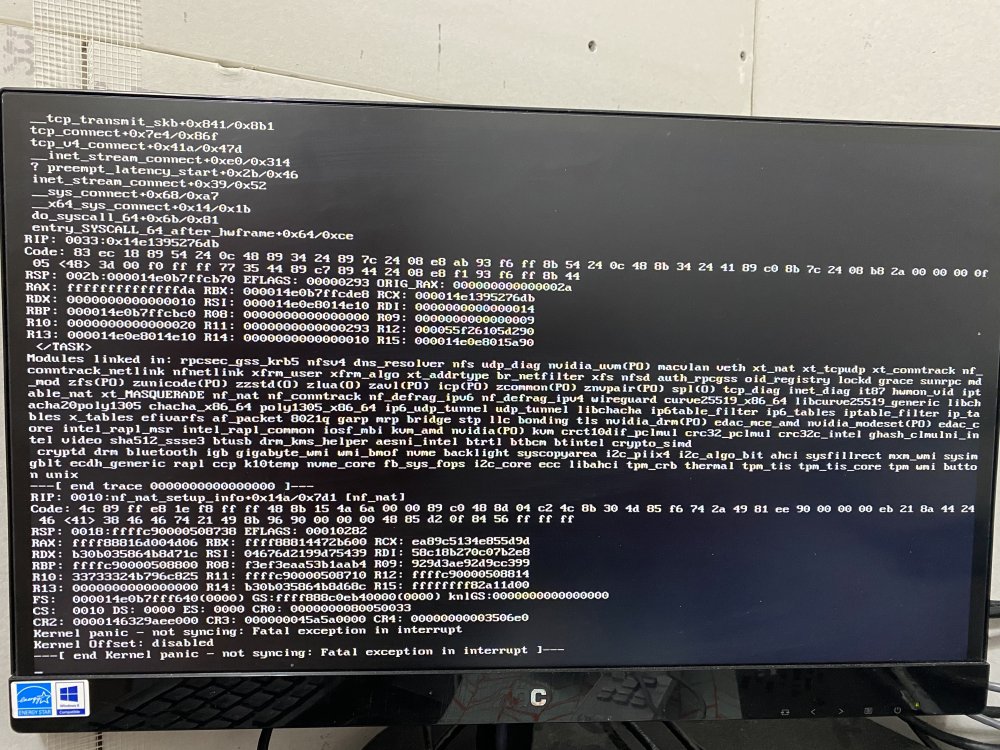
-
Syslog attached. This is from today after another kernel panic. No idea why the timestamp is so far off. syslog
-
I've been dealing with kernel panics and freezes over the last several weeks. Syslogs have not proven helpful. "Fix Common Problems" plugin has not show errors. Everything is updated. Disabling various Docker containers is proving unhelpful. Looking for any suggestions or help.
-
I initially had to mess with C-States to even get it to boot. I can't honestly remember what setting I have it on. Unfortunately I am remote and can't get into the BIOS. That being said, It doesn't explain why I am getting zero logs. I don't recall that ever being the case until these recent crashes started.
-
My UNRAID server has crashed twice in the last week, a reboot brings it back up healthy. No logs are being generated in the GUI or in /var/logs. I am confused, but want a fix. Any suggestions at what I can look at remotely? tower-diagnostics-20230307-1717.zip tower-syslog-20230307-1416.zip
-
Attaching diagnostics tower-diagnostics-20221027-1241.zip
-
KD-DSO joined the community
-
I am building out an unRAID server on an old gaming pc. The system constantly goes offline requiring a hard boot. It goes down anywhere from 5 minutes to 2 hours after boot, occasionally it comes back up after boot. I took the PC in for inspection at a local PC repair shop, where all the hardware tested good. They were unable to reproduce any errors. I have tried multiple power sources in multiple locations, monitored temps (always under 50c), tried multiple USB drives in multiple ports, and adjusted the BIOS settings numerous times. Don't see anything alarming in syslog. This is driving me a little crazy and I would love whatever assistance I could get.
